Jurnal, buku besar, laporan keuangan, tutup buku, bank, pajak, aset tetap, dan valas sesuai SAK Indonesia.
Journals, ledger, financial statements, closing, bank, tax, fixed assets, and foreign currency under Indonesian standards.
17 November 2026 · PT Satu Rupiah Indonesia
1rupiah1Finance · Panduan Pengguna | User Guide
Mengapa 1rupiah
Why 1rupiah
Sistem bisnis lama dibangun untuk kantor yang selalu online, satu bahasa, dan pajak yang dihitung manual. 1rupiah dibangun untuk cara kerja Indonesia hari ini.
Older business systems were built for offices that are always online, in one language, with tax worked out by hand. 1rupiah is built for how Indonesian businesses work today.
AI yang bekerja, bukan sekadar menjawabTanya data dengan kalimat biasa, pembaca faktur pemasok dari foto atau PDF, agen yang menagih dan memesan ulang dalam batas nilai, dan situs 1CMS yang disusun AI. Setiap usulan AI bisa ditinjau dan dibatalkan.
AI that works, not just chatsAsk your data in plain words, read supplier invoices from a photo or PDF, let agents chase payments and reorder within value limits, and draft a 1CMS website with AI. Every AI suggestion can be reviewed and undone.
Pajak Indonesia sudah di dalamPPN 12 persen dengan DPP nilai lain 11/12, ekspor Faktur Pajak ke Coretax, PPh 21 tarif TER, PPh 23 dan 4(2) dengan bukti potong, BPJS, PBJT restoran, dan pesangon PP 35/2021.
Indonesian tax built inVAT at 12 percent on the 11/12 tax base, tax invoice export to Coretax, PPh 21 TER rates, PPh 23 and 4(2) with withholding slips, BPJS, restaurant PBJT, and severance under PP 35/2021.
Tetap jalan saat internet putusKasir dan aplikasi HP terus berjualan dan mencatat saat koneksi hilang, lalu menyinkronkan sekali saat online lagi tanpa transaksi ganda.
Keeps working offlineThe cashier and mobile apps keep selling and recording when the connection drops, then sync once when back online without duplicate transactions.
Keamanan kelas bankPasskey, verifikasi dua langkah, masuk dengan Google (Microsoft bila diaktifkan), persetujuan empat mata untuk uang keluar, rekening pemasok dicek orang kedua, data tiap perusahaan di skema terpisah, dan jejak audit lengkap.
Bank grade securityPasskeys, two step verification, Google sign in (Microsoft when enabled), four eyes approval for money going out, supplier bank accounts checked by a second person, a separate schema per company, and a full audit trail.
Angka yang selalu tepatHarga, PPN, dan pembulatan dihitung oleh Calc Core berbahasa Rust yang sama di server, web, dan desktop. Jurnal selalu seimbang dan periode terkunci tidak bisa diubah diam diam.
Figures that are always rightPrices, VAT, and rounding are computed by the same Rust Calc Core on the server, web, and desktop. Journals always balance and locked periods cannot be changed quietly.
Bayar hanya yang dipakaiMulai dari 1ERP Gratis, lalu tambah aplikasi satu per satu: 1Finance, 1Sales, 1HR, 1Cashier, dan lainnya. Semua terhubung dalam satu data, satu login, di web, desktop, dan HP.
Pay only for what you useStart on 1ERP Free, then add apps one at a time: 1Finance, 1Sales, 1HR, 1Cashier, and more. Everything shares one set of data and one login, on web, desktop, and mobile.
Satu halaman, satu tugasSetiap halaman menjelaskan satu pekerjaan dari awal sampai selesai.
One page, one taskEach page covers one job from start to finish.
Nomor di gambarKotak bernomor 1 menunjukkan tombol atau isian yang dimaksud langkah dengan nomor sama.
Numbers on screenshotsA numbered box 1 marks the button or field the matching step refers to.
Chip tombolSimpan adalah tombol utama, Batal tombol biasa, persis seperti di layar.
Button chipsSave is a main button and Cancel a regular one, exactly as on screen.
Gambar layarGambar diambil dari tampilan bahasa Indonesia. Ganti bahasa kapan saja lewat pilihan bahasa di kanan atas.
ScreenshotsScreenshots use the Indonesian interface. Switch language at any time with the language picker at the top right.
1rupiah1Finance · Panduan Pengguna | User Guide
1Finance · 01
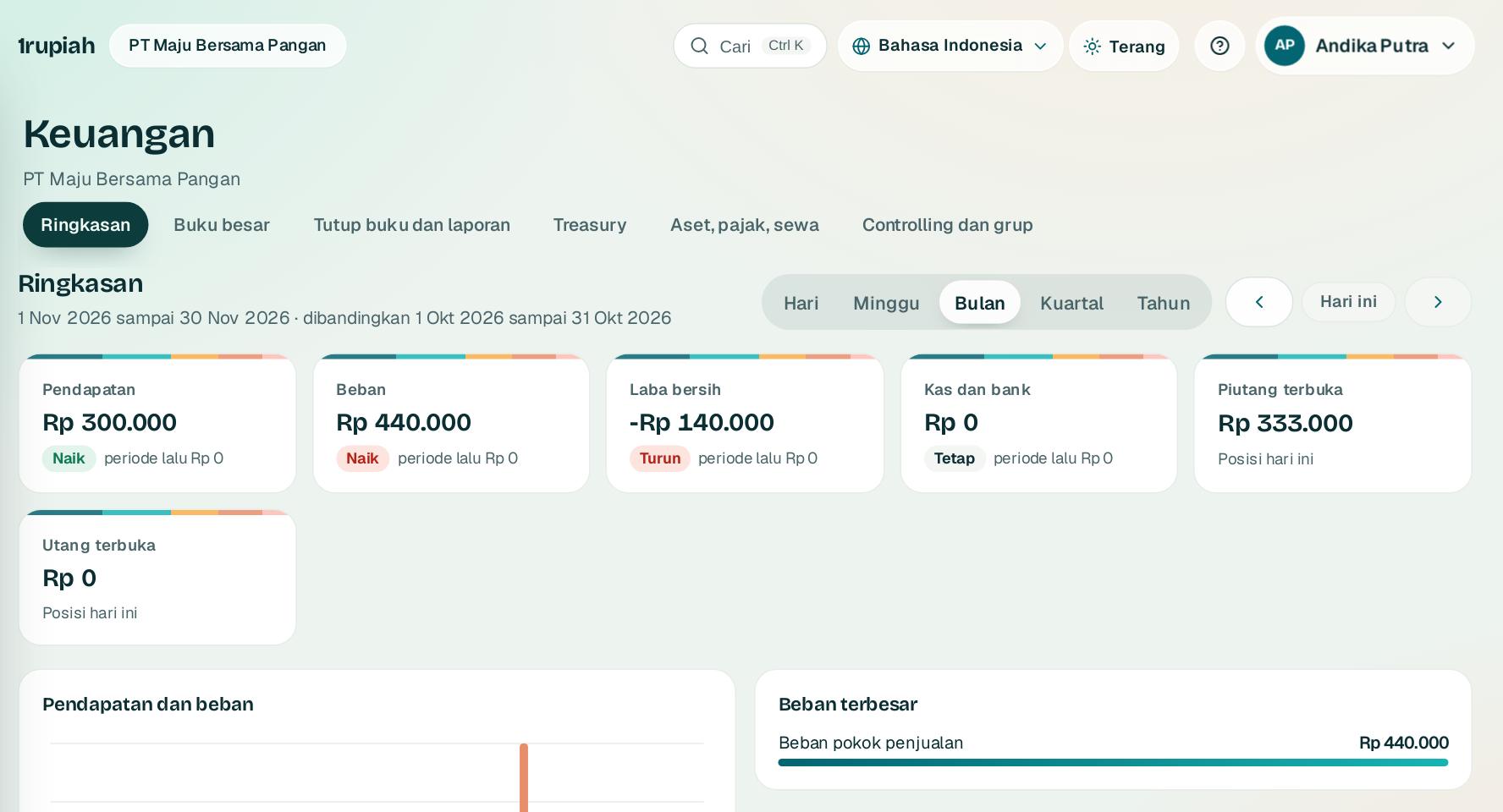
Ringkasan keuangan
Finance overview
Pendapatan, beban, laba, kas, piutang, dan utang dalam satu layar dengan pembanding periode.
Revenue, expenses, profit, cash, receivables, and payables on one screen with period comparison.
12
1
Buka Keuangan dari rel kiri, tab Ringkasan.
Open Finance from the left rail, Summary tab.
2
Pilih rentang Hari, Minggu, Bulan, Kuartal, atau Tahun di 1.
Choose Day, Week, Month, Quarter, or Year at 1.
3
Geser ke periode sebelumnya atau berikutnya dengan panah 2. Persentase di tiap kartu membandingkan periode utuh yang sama.
Move to the previous or next period with the arrows 2. The percentage on each card compares a full period of the same length.
4
Klik kartu untuk membuka daftar dokumen sumber angkanya.
Click a card to open the list of source documents behind the figure.
1rupiah1Finance · Panduan Pengguna | User Guide
1Finance · 02
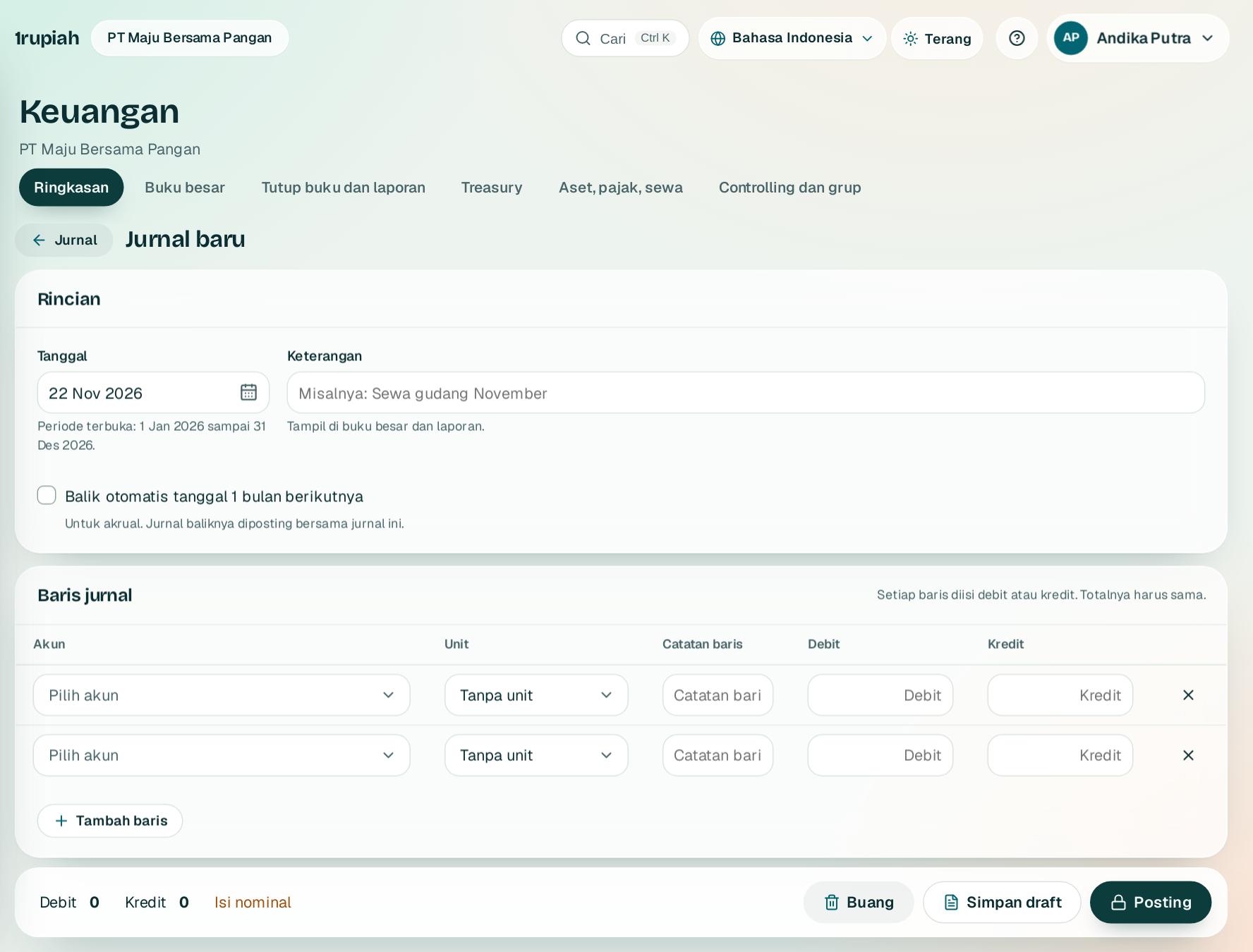
Membuat jurnal umum
Recording a general journal
Catat penyesuaian, akrual, dan koreksi. Jurnal hanya bisa diposting bila seimbang.
Record adjustments, accruals, and corrections. A journal can only be posted when it balances.
1234
1
Buka Keuangan, Jurnal lalu Jurnal baru. Pilih tanggal dan isi keterangan 1.
Open Finance, Journals and choose New journal. Pick the date and write a description 1.
2
Pilih akun di 2 dan isi debit atau kredit. Tambah baris dengan Tambah baris3; baris kosong terakhir terisi sisa selisih saat diklik.
Choose an account at 2 and enter a debit or a credit. Add lines with Add line3; the last empty line fills the remaining difference when clicked.
3
Untuk akrual, centang Balik otomatis tanggal 1 bulan berikutnya.
For accruals, tick Auto reverse on the 1st of next month.
4
Tunggu bilah menunjukkan Seimbang, lalu Posting4. Penyusun tanpa hak setuju mengajukan jurnal ke Inbox penyetuju.
Wait until the bar says Balanced, then Post4. Preparers without approval rights submit the journal to the approver Inbox.
Tips Jurnal yang sudah diposting tidak bisa diubah. Buka jurnalnya dan pilih Buat jurnal balik, lalu catat yang benar.
Tip Posted journals cannot be edited. Open the journal and choose Reverse, then record the correct one.
1rupiah1Finance · Panduan Pengguna | User Guide
1Finance · 03
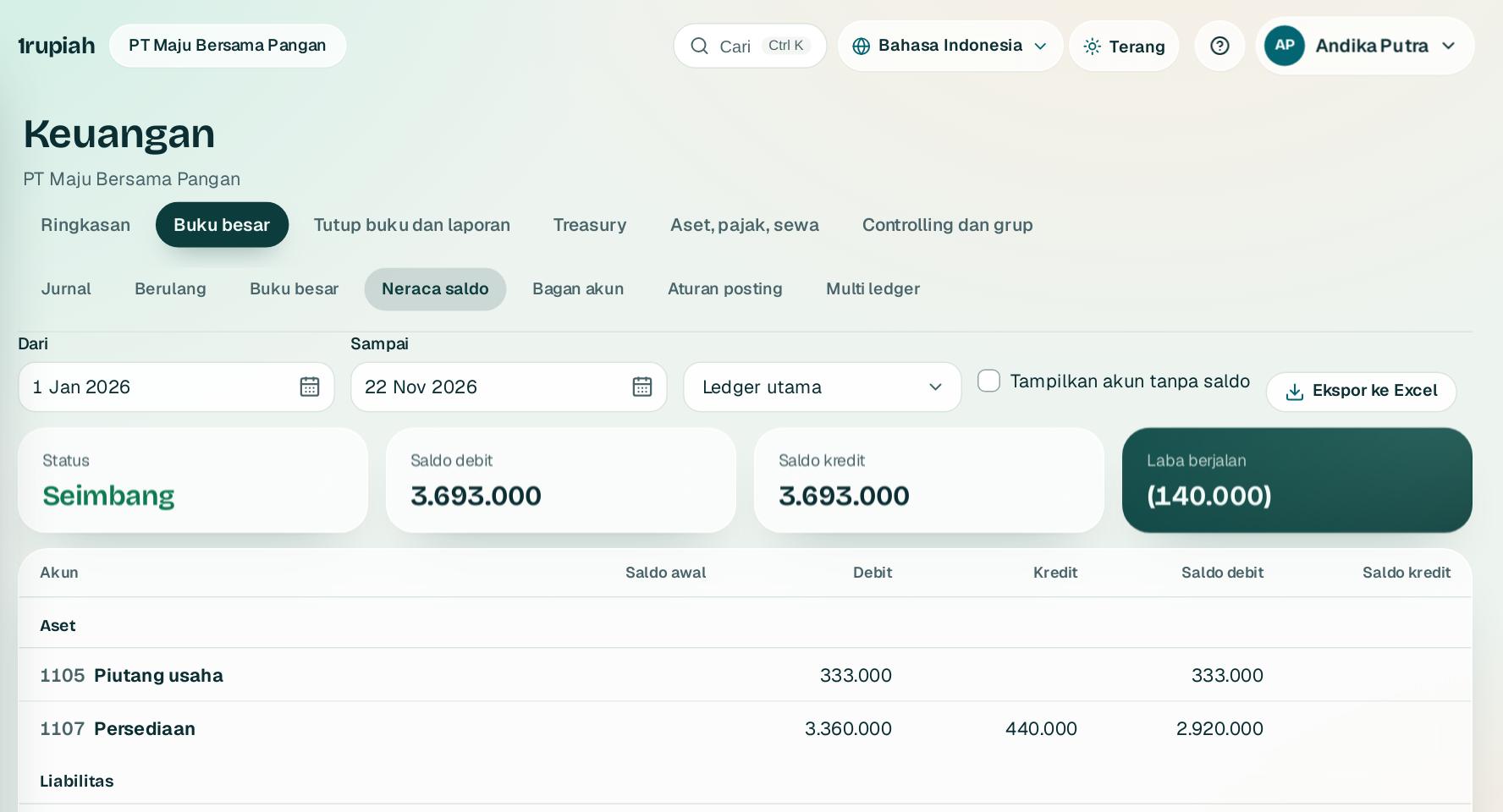
Buku besar dan neraca saldo
General ledger and trial balance
Telusuri setiap posting dan pastikan pembukuan selalu seimbang.
Trace every posting and make sure the books always balance.
12
1
Buka Keuangan, Neraca saldo dan atur rentang tanggal 1.
Open Finance, Trial balance and set the date range 1.
2
Setiap akun menampilkan saldo awal, mutasi debit dan kredit, serta saldo akhir. Totalnya selalu Seimbang.
Each account shows the opening balance, debit and credit movements, and closing balance. The totals always balance.
3
Klik akun untuk membuka buku besarnya dengan saldo berjalan, lalu klik nomor jurnal untuk membuka jurnalnya.
Click an account to open its ledger with a running balance, then click a journal number to open the journal.
4
Klik Ekspor ke Excel2. Angka tetap angka sehingga bisa dijumlah.
Click Export to Excel2. Figures stay numbers so they can still be summed.
1rupiah1Finance · Panduan Pengguna | User Guide
1Finance · 04
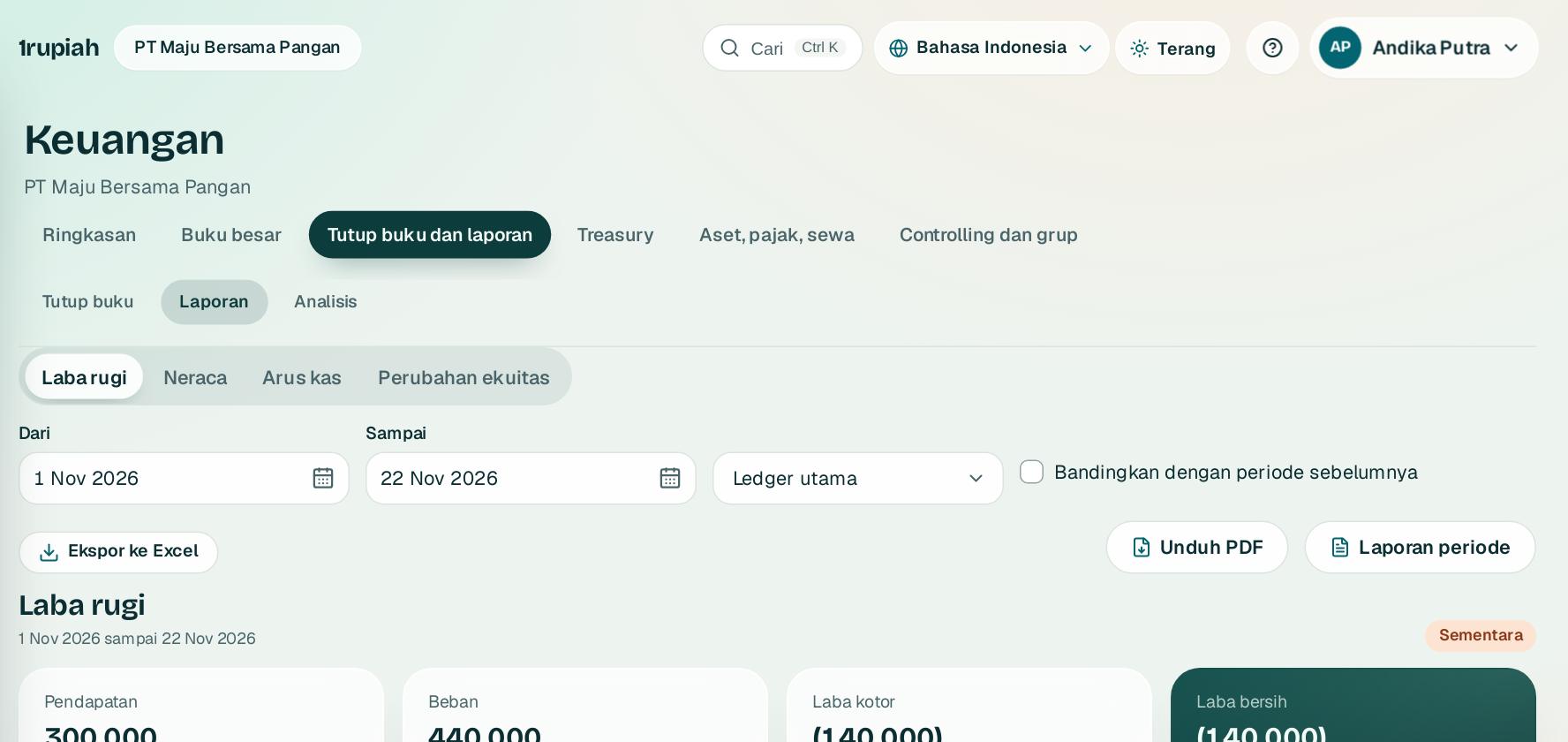
Laporan keuangan
Financial statements
Laba rugi, neraca, arus kas, dan perubahan ekuitas langsung dari buku besar, siap diunduh PDF.
Profit and loss, balance sheet, cash flow, and changes in equity straight from the ledger, ready as PDF.
123
1
Buka Keuangan, Laporan lalu pilih jenis laporan 1 dan rentang tanggal.
Open Finance, Reports, then choose the statement 1 and date range.
2
Centang pembanding 2 untuk melihat periode yang sama tepat sebelumnya.
Tick the comparison 2 to see the same length of time just before.
3
Klik Unduh PDF3 atau Ekspor ke Excel. Laporan Tahunan dan Bulanan lengkap dengan catatan tersedia lewat Laporan periode.
Click Download PDF3 or Export to Excel. The full Annual and Monthly reports with notes are under Period report.
4
Label Sementara berarti masih ada bulan terbuka, Final berarti semua bulan sudah dikunci.
Provisional means a month is still open, Final means every month is locked.
1rupiah1Finance · Panduan Pengguna | User Guide
1Finance · 05
Tutup buku bulanan
Closing a month
Kunci bulan yang sudah selesai supaya laporan tidak berubah lagi.
Lock finished months so reports cannot change afterwards.
1
Buka Keuangan, Tutup buku lalu klik bulan yang ingin ditutup.
Open Finance, Closing and click the month to close.
2
Selesaikan semua item merah: bulan sudah lewat, bulan sebelumnya terkunci, dan tidak ada jurnal yang menunggu persetujuan.
Clear every red item: the month has ended, the previous month is locked, and no journal is waiting for approval.
3
Controller memilih Kunci periode. Posting ke bulan itu langsung ditolak.
A Controller chooses Lock period. Postings to that month are refused from then on.
4
Koreksi bulan terkunci dengan Buka kembali beserta alasannya. Laporan diberi tanda revisi.
Correct a locked month with Reopen and a reason. Reports are marked as revised.
Tips Mengunci bulan terakhir tahun buku memindahkan laba ke saldo laba dan membuka tahun berikutnya.
Tip Locking the last month of the year moves profit to retained earnings and opens the next year.
1rupiah1Finance · Panduan Pengguna | User Guide
1Finance · 06
Rekonsiliasi bank
Bank reconciliation
Cocokkan mutasi rekening dengan buku besar secara otomatis.
Match bank statement lines with the ledger automatically.
123
1
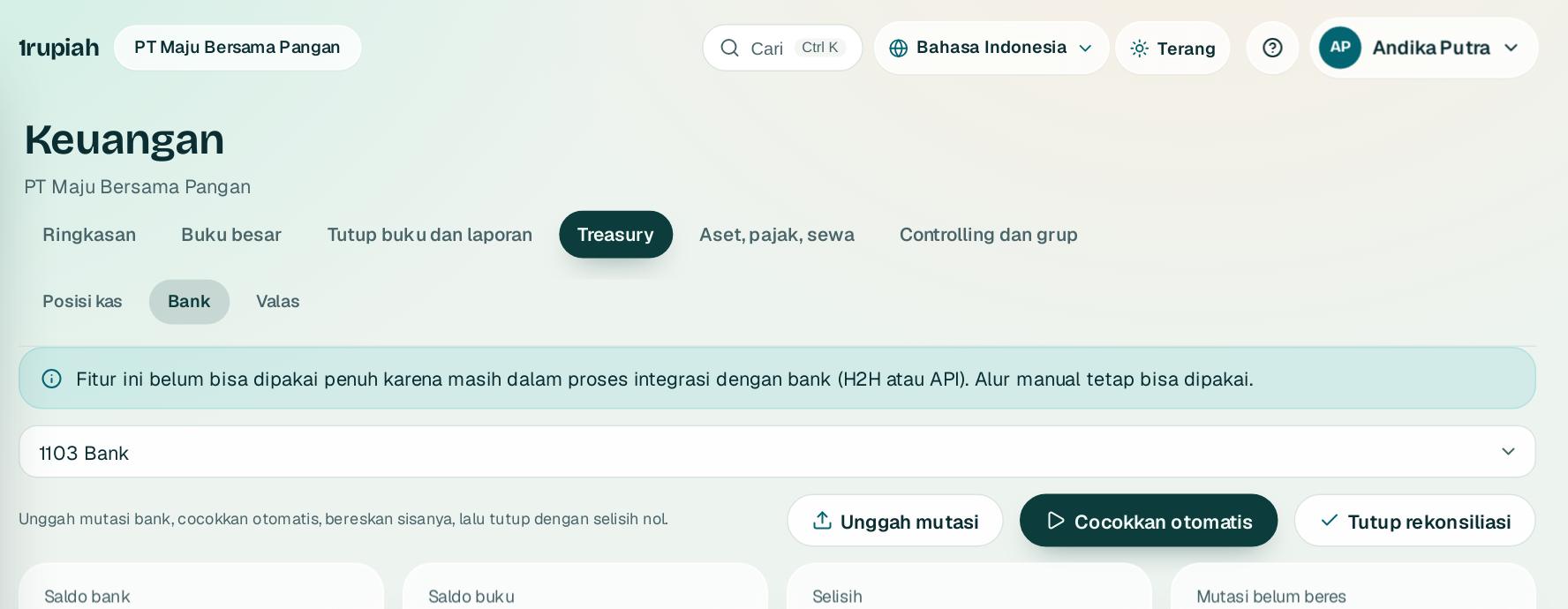
Buka Keuangan, Bank, pilih rekening, lalu unggah file mutasi CSV di 1. Mutasi yang sudah diimpor dilewati.
Open Finance, Bank, pick the account, and upload the CSV statement at 1. Lines already imported are skipped.
2
Klik Cocokkan otomatis2. Nominal sama dalam seminggu langsung cocok; bila ada beberapa, Anda yang memilih.
Click Auto match2. Equal amounts within a week match at once; if there are several, you choose.
3
Biaya bank dan transfer antar rekening sendiri dijurnal dengan satu klik.
Bank fees and transfers between your own accounts are journaled in one click.
4
Klik Tutup rekonsiliasi3 saat selisihnya nol.
Click Close reconciliation3 once the difference is zero.
1rupiah1Finance · Panduan Pengguna | User Guide
1Finance · 07
PPN dan Faktur Pajak untuk Coretax
VAT and tax invoices for Coretax
PPN keluaran dan masukan dicocokkan dengan buku besar, lalu diekspor untuk Coretax.
Output and input VAT are reconciled with the ledger, then exported for Coretax.
12
1
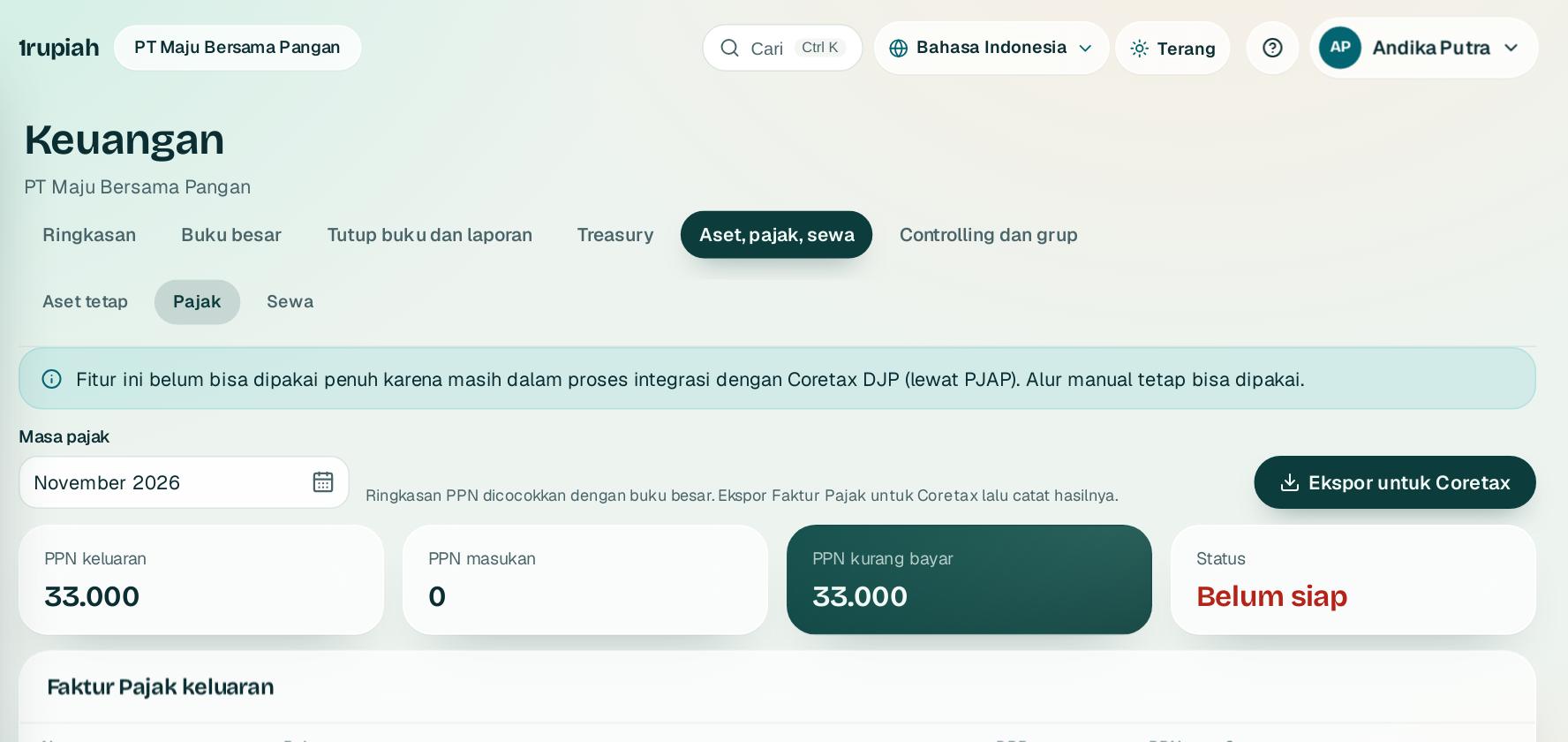
Buka Keuangan, Pajak lalu pilih masa pajak 1.
Open Finance, Tax and choose the tax period 1.
2
Periksa daftar Faktur Pajak keluaran. Barang non mewah memakai PPN 12 persen dari DPP nilai lain 11/12.
Check the list of output tax invoices. Non luxury goods use 12 percent VAT on the 11/12 tax base.
3
Klik Ekspor untuk Coretax2 dan unggah XML ke Coretax. Catat hasilnya: disetujui dengan nomor, atau ditolak dengan alasan.
Click Export for Coretax2 and upload the XML to Coretax. Record the result: approved with its number, or rejected with a reason.
4
Pelacak omzet memberi peringatan saat mendekati Rp500 juta dan Rp4,8 miliar.
The turnover tracker warns you as you approach Rp500 million and Rp4.8 billion.
Tips Pelanggan tanpa NPWP atau NIK tetap bisa difakturkan, tetapi Faktur Pajaknya ditandai belum lengkap.
Tip Customers without an NPWP or NIK can still be invoiced, but their tax invoice is flagged as incomplete.
1rupiah1Finance · Panduan Pengguna | User Guide
1Finance · 08
Aset tetap dan penyusutan
Fixed assets and depreciation
Catat aset, susutkan tiap bulan, revaluasi, dan lepas dengan jurnal otomatis.
Record assets, depreciate monthly, revalue, and dispose with automatic journals.
123
1
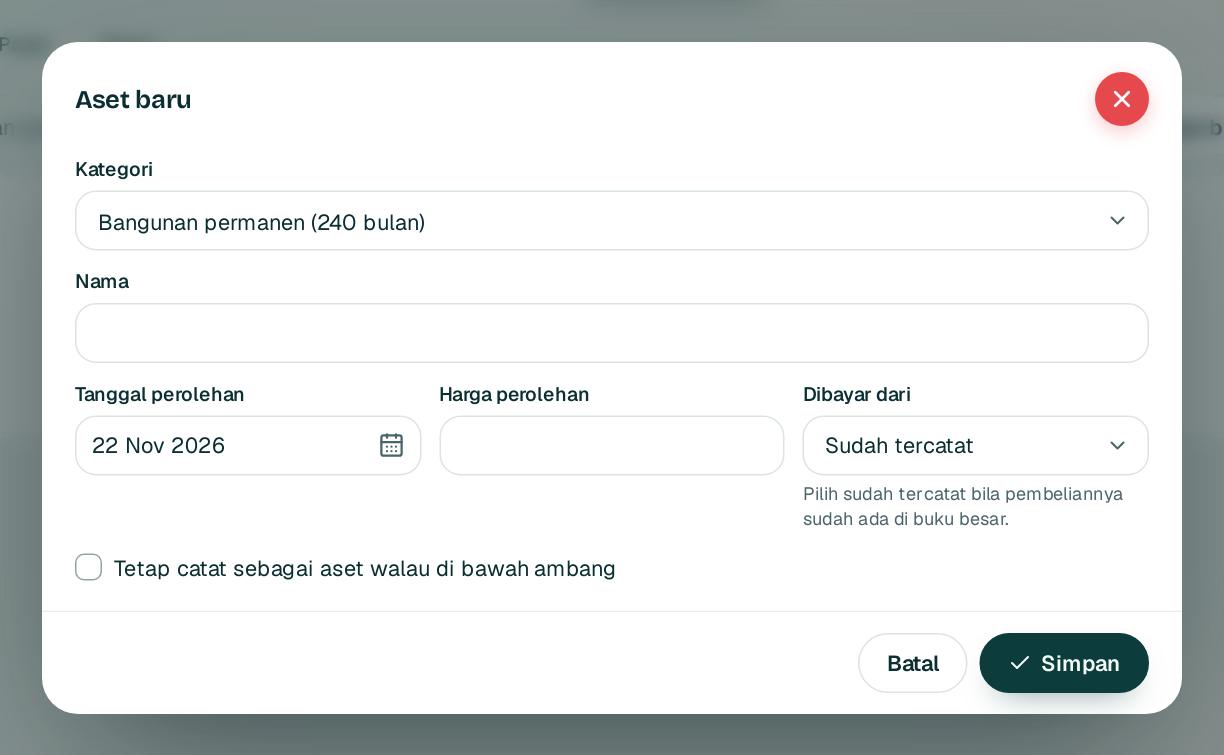
Buka Keuangan, Aset tetap lalu Aset baru.
Open Finance, Fixed assets and choose New asset.
2
Pilih kategori 1. Kategori menentukan umur, metode, kelompok fiskal, dan ambang kapitalisasi.
Choose the category 1. It sets the useful life, method, tax group, and capitalisation threshold.
3
Isi nama, tanggal perolehan, harga perolehan 2, dan sumber pembayarannya, lalu Simpan3.
Fill in the name, acquisition date, cost 2, and how it was paid, then Save3.
4
Setiap bulan klik Susutkan bulan ini. Penyusutan komersial dijurnal, fiskal dicatat untuk koreksi fiskal.
Each month click Depreciate this month. Book depreciation is journaled and tax depreciation is recorded for the tax reconciliation.
1rupiah1Finance · Panduan Pengguna | User Guide
1Finance · 09
Valas dan revaluasi
Foreign currency and revaluation
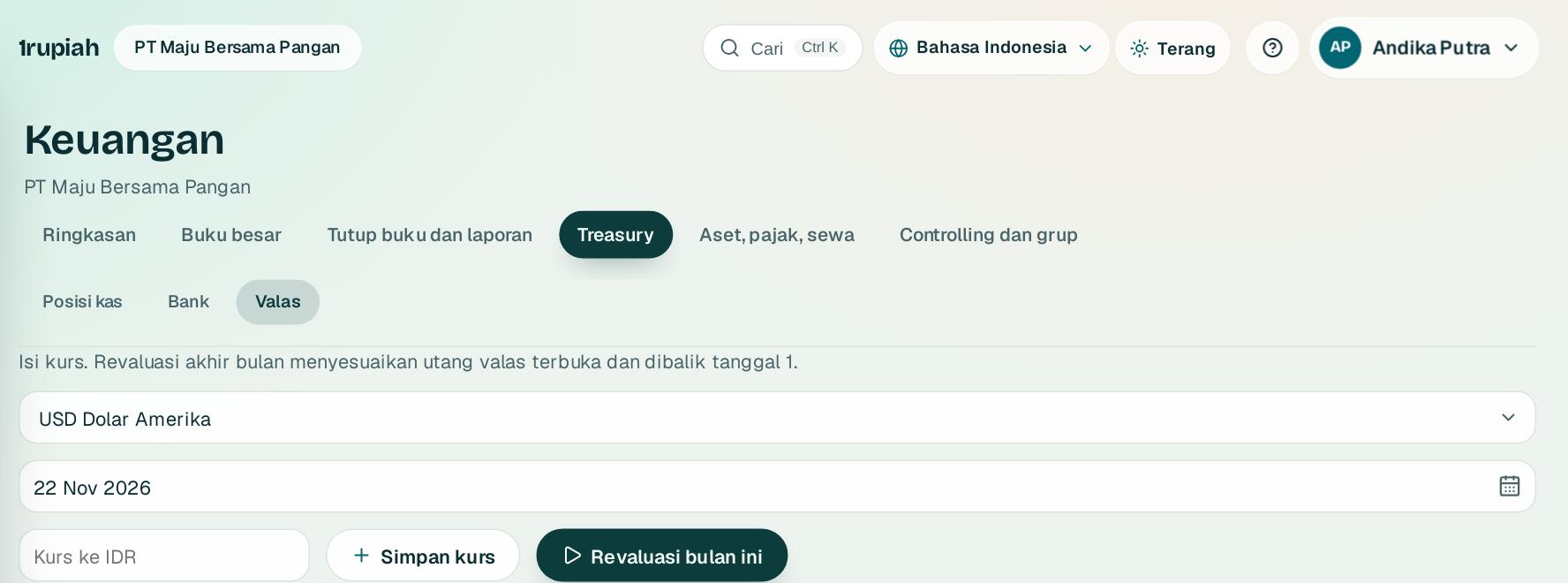
Simpan kurs harian dan revaluasi saldo valas di akhir bulan.
Store daily rates and revalue foreign currency balances at month end.
123
1
Buka Keuangan, Valas lalu pilih mata uang dan tanggal.
Open Finance, Foreign currency, then choose the currency and date.
2
Isi kurs ke rupiah 1. Ketik 16.250,5 dan sistem menyimpannya persis.
Enter the rate to rupiah 1. Type 16,250.5 and it is stored exactly.
3
Klik Simpan kurs2.
Click Save rate2.
4
Di akhir bulan klik Revaluasi bulan ini3. Jurnal selisih kurs dibalik otomatis tanggal 1.
At month end click Revalue this month3. The exchange difference journal reverses automatically on the 1st.
1rupiah1Finance · Panduan Pengguna | User Guide
1Finance · 10
Jurnal berulang dan aturan posting
Recurring journals and posting rules
Otomatiskan jurnal rutin seperti sewa, dan lihat akun yang dipakai setiap transaksi.
Automate routine journals such as rent, and see the accounts every transaction uses.
123
1
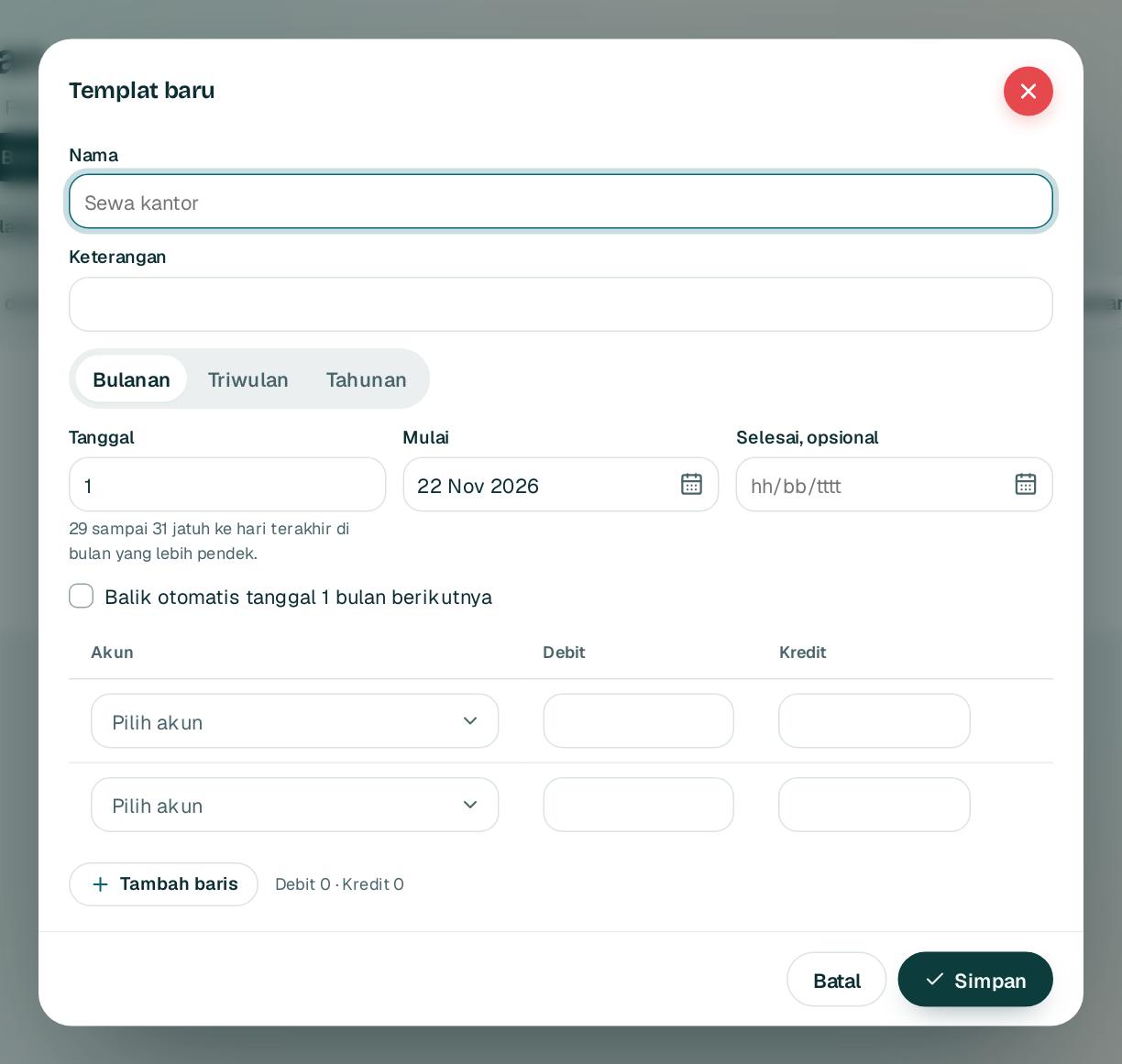
Buka Keuangan, Berulang lalu Templat baru. Beri nama 1.
Open Finance, Recurring and choose New template. Give it a name 1.
2
Pilih frekuensi 2 dan tanggal mulai. Tanggal 31 jatuh ke hari terakhir pada bulan yang lebih pendek.
Choose the frequency 2 and start date. The 31st falls on the last day of shorter months.
3
Isi baris akun lalu Simpan3. Di tiap jatuh tempo, draft muncul di daftar jurnal dan Inbox.
Fill in the account lines, then Save3. On each due date a draft appears in the journal list and Inbox.
4
Tab Aturan posting menampilkan akun debit dan kredit tiap transaksi. Controller bisa menggantinya dengan tanggal berlaku.
The Posting rules tab shows the debit and credit accounts of each transaction. A Controller can change them with an effective date.
1rupiah1Finance · Panduan Pengguna | User Guide
1Finance · 11
Controlling: laba per cost center, profit center, dan segmen
Controlling: profit by cost center, profit center, and segment
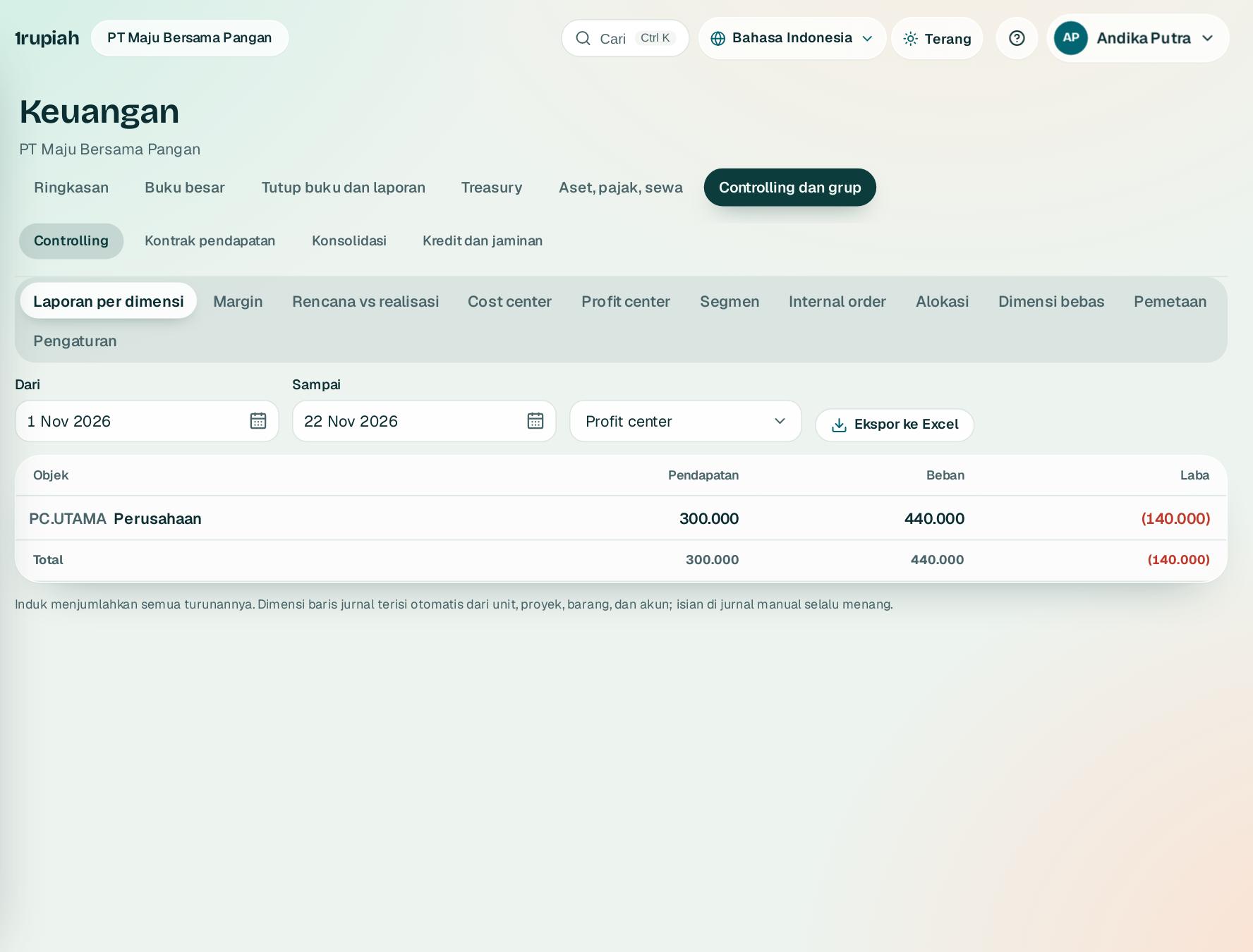
Lihat laba rugi per unit tanggung jawab, lini produk, atau segmen, tanpa jurnal tambahan.
See profit and loss per responsibility unit, product line, or segment, with no extra journals.
123
1
Buka Keuangan, Controlling 1. Setiap baris jurnal dari semua modul sudah membawa cost center, profit center, dan segmen.
Open Finance, Controlling 1. Every journal line from every module already carries a cost center, profit center, and segment.
2
Pilih kelompok laporan 2 dan rentang tanggal. Induk menjumlahkan semua turunannya.
Choose how to group the report 2 and the date range. Parents add up all their children.
3
Buat cost center, profit center, dan segmen di tab masing masing, lalu petakan unit, proyek, barang, dan akun di tab Pemetaan.
Create cost centers, profit centers, and segments in their tabs, then map units, projects, items, and accounts in the Mapping tab.
4
Ekspor ke Excel 3 untuk analisis lanjutan.
Export to Excel 3 for further analysis.
Tips Penjualan dipecah per barang, jadi laporan per segmen langsung menunjukkan pendapatan, HPP, dan laba tiap lini produk.
Tip Sales are split per item, so the segment report shows revenue, cost of goods sold, and profit for each product line.
1rupiah1Finance · Panduan Pengguna | User Guide
1Finance · 12
Close cockpit dan rekonsiliasi akun neraca
Close cockpit and balance sheet reconciliations
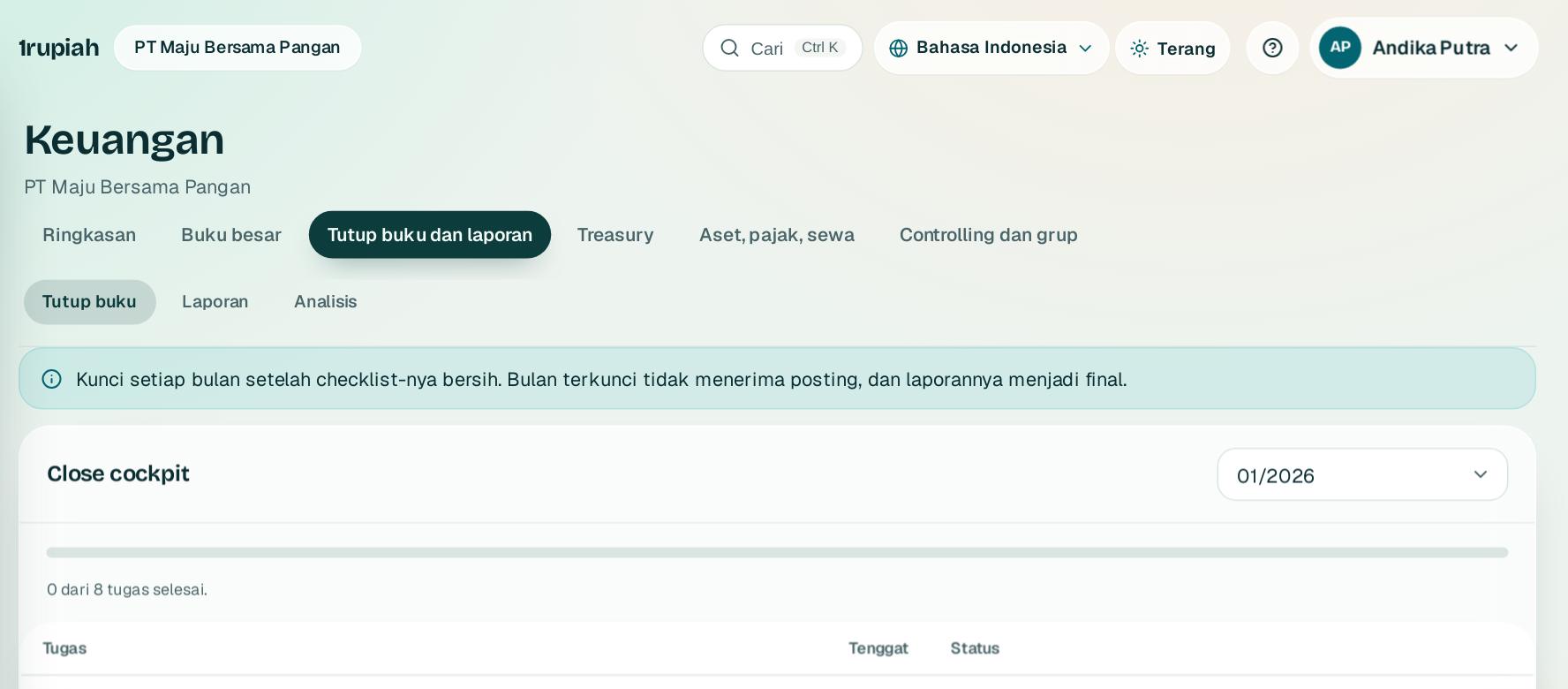
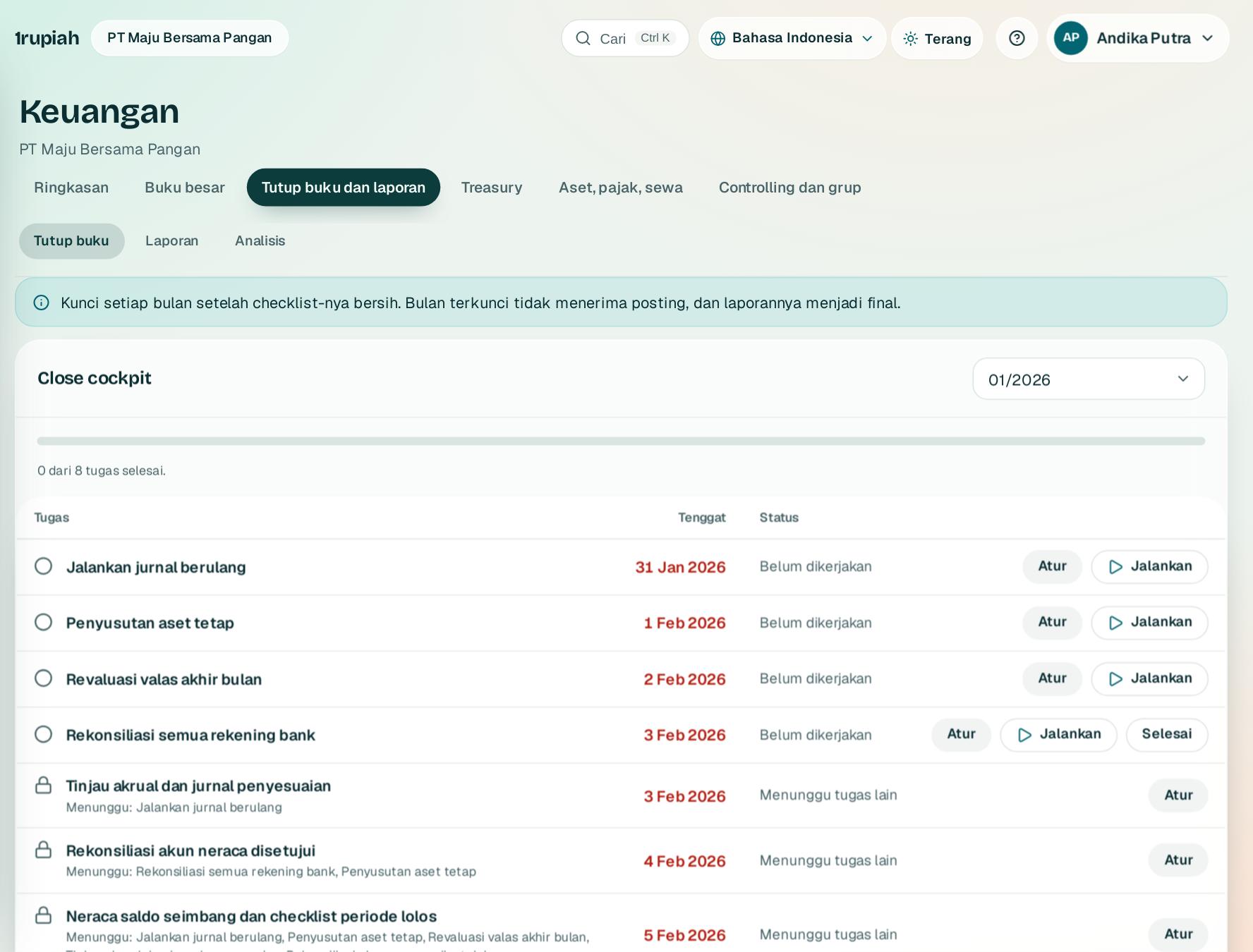
Tutup buku bulanan berurutan dengan tugas, tenggat, dan bukti.
Close each month in order with tasks, due dates, and evidence.
123
1
Buka Keuangan, Tutup buku 1. Setiap bulan punya tugas bawaan dengan tenggat dan ketergantungan.
Open Finance, Close 1. Every month has built in tasks with due dates and dependencies.
2
Klik Jalankan2 untuk tugas otomatis seperti jurnal berulang, penyusutan, dan revaluasi valas. Tugas manual ditandai selesai dengan bukti.
Click Run2 for automatic tasks such as recurring journals, depreciation, and FX revaluation. Manual tasks are marked done with evidence.
3
Siapkan rekonsiliasi setiap akun neraca 3; orang lain yang menyetujui. Selisih wajib dijelaskan.
Prepare a reconciliation for every balance sheet account 3; someone else approves it. Differences need an explanation.
4
Modul seperti penjualan bisa dikunci lebih dulu. Tugas terakhir mengunci periode.
Modules such as sales can be locked first. The last task locks the period.
Tips Agen tutup buku di tab Analisis bisa menjalankan semua tugas otomatis yang siap sekaligus, tanpa mengunci periode.
Tip The close agent in the Analysis tab can run every ready automatic task at once, without locking the period.
1rupiah1Finance · Panduan Pengguna | User Guide
1Finance · 13
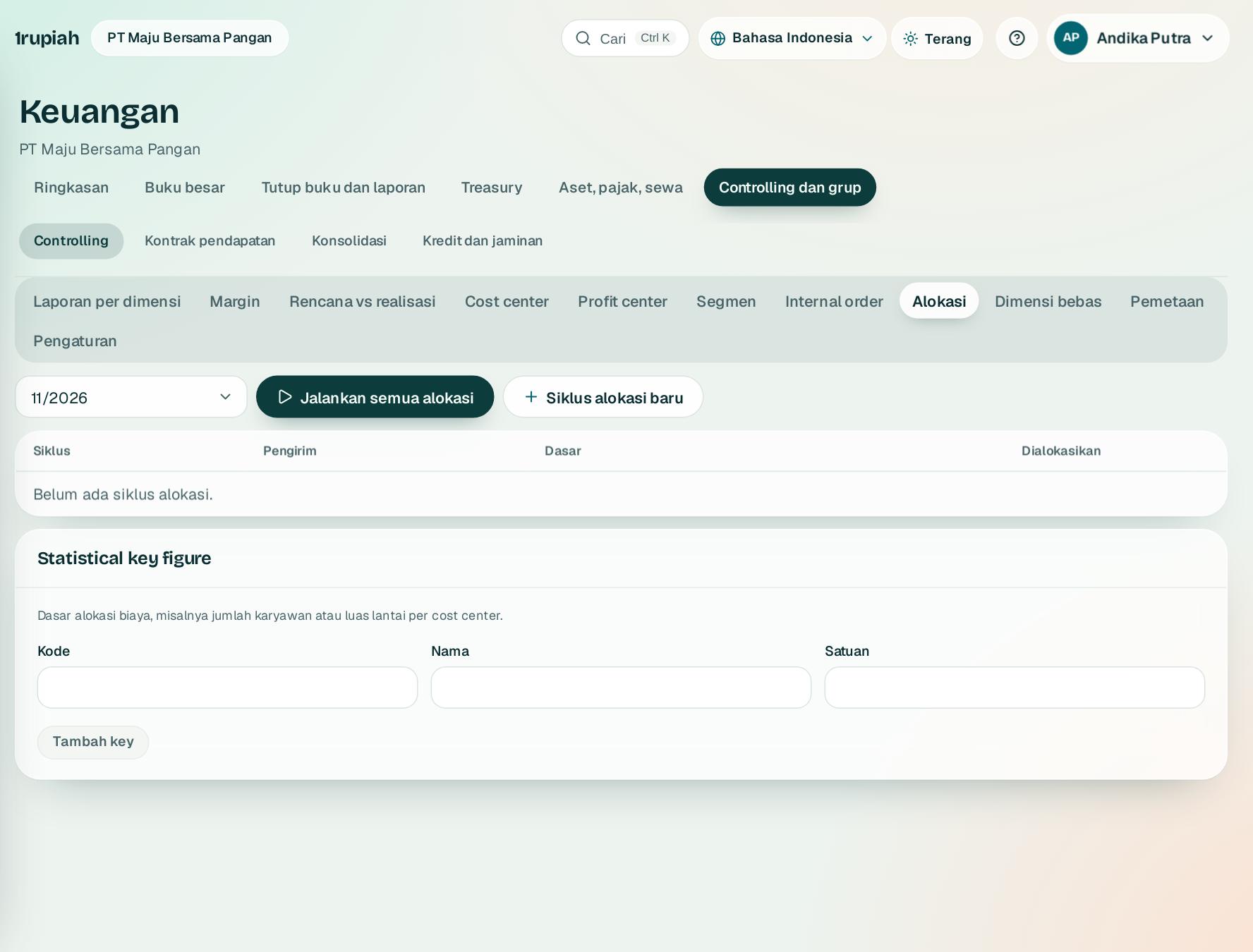
Alokasi biaya antar cost center
Cost allocation between cost centers
Bagi biaya bersama seperti sewa dan listrik ke bagian yang memakainya.
Share common costs such as rent and power across the units that use them.
123
1
Buka Keuangan, Controlling lalu Alokasi. Pilih periode 1.
Open Finance, Controlling, then Allocations. Pick the period 1.
2
Buat Siklus alokasi baru3: cost center pengirim dan persen tiap penerima, total 100.
Create a New allocation cycle3: the sending cost center and a percent per receiver, totalling 100.
3
Klik Jalankan semua alokasi2. Setiap siklus hanya sekali per periode dan bisa dibalik.
Click Run all allocations2. Each cycle runs once per period and can be reversed.
Tips Dasar jumlah karyawan, luas, atau jam mesin bisa dipakai lewat kunci statistik.
Tip Headcount, floor area, or machine hours can be used as statistical keys.
1rupiah1Finance · Panduan Pengguna | User Guide
1Finance · 14
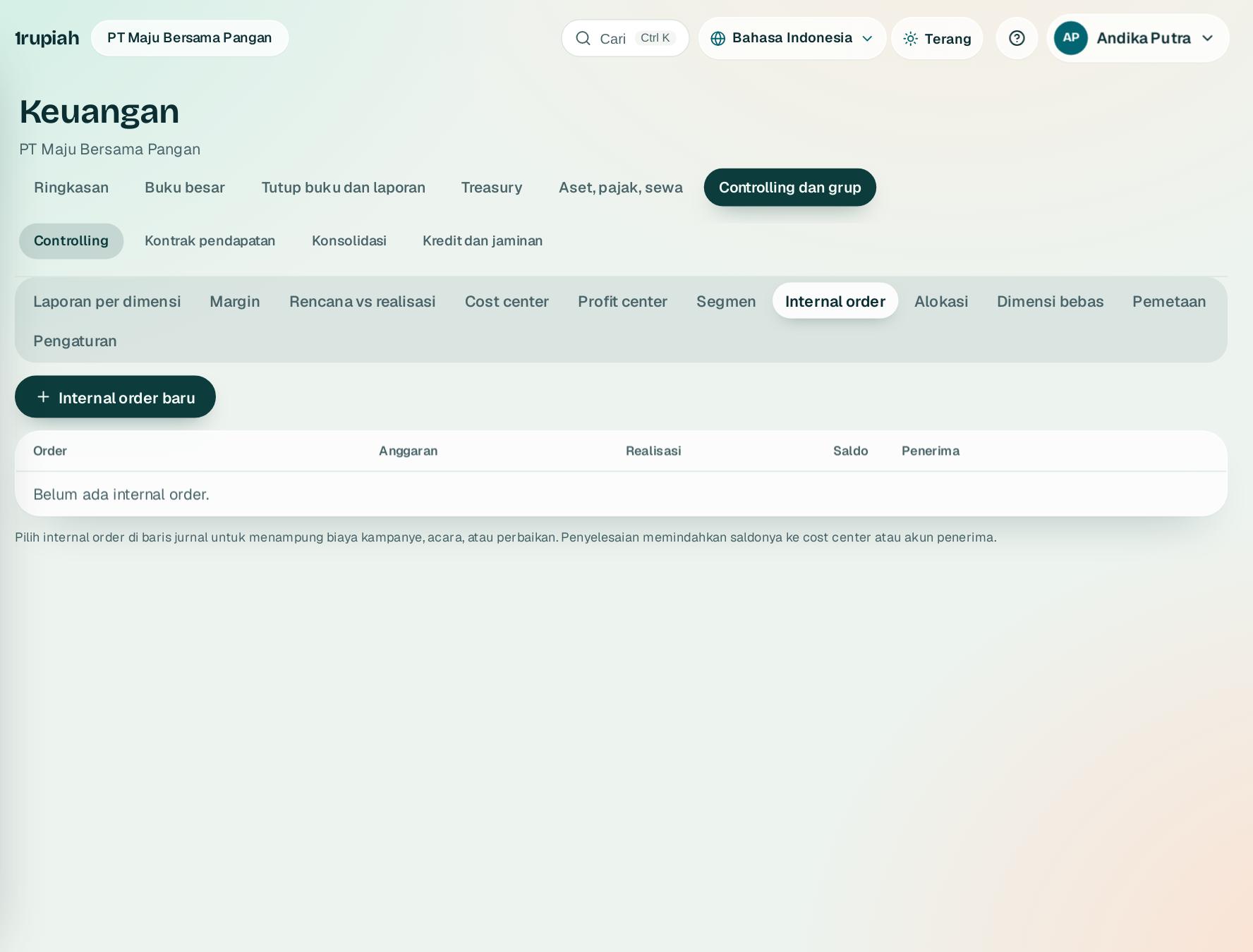
Internal order dan aset dalam penyelesaian
Internal orders and assets under construction
Tampung biaya kampanye, acara, perbaikan, atau pembangunan dengan anggaran.
Collect campaign, event, repair, or construction costs against a budget.
123
1
Buka Controlling, Internal order lalu Internal order baru1. Isi anggaran dan kendalinya.
Open Controlling, Internal orders and choose New internal order1. Set the budget and its control.
2
Pilih internal order di baris jurnal atau dokumen. Saldo 2 bertambah sampai diselesaikan.
Pick the internal order on journal or document lines. The balance 2 grows until it is settled.
3
Order biasa diselesaikan ke cost center penerima 3. Order investasi dikapitalisasi menjadi satu atau beberapa aset tetap beserta komponennya.
Regular orders are settled to the receiving cost center 3. Investment orders are capitalised into one or more fixed assets and their components.
4
Di Aset tetap, Uji penurunan nilai mencatat rugi bila nilai terpulihkan lebih rendah dari nilai buku.
In Fixed assets, Impairment test records a loss when the recoverable amount is below the carrying amount.
1rupiah1Finance · Panduan Pengguna | User Guide
1Finance · 15
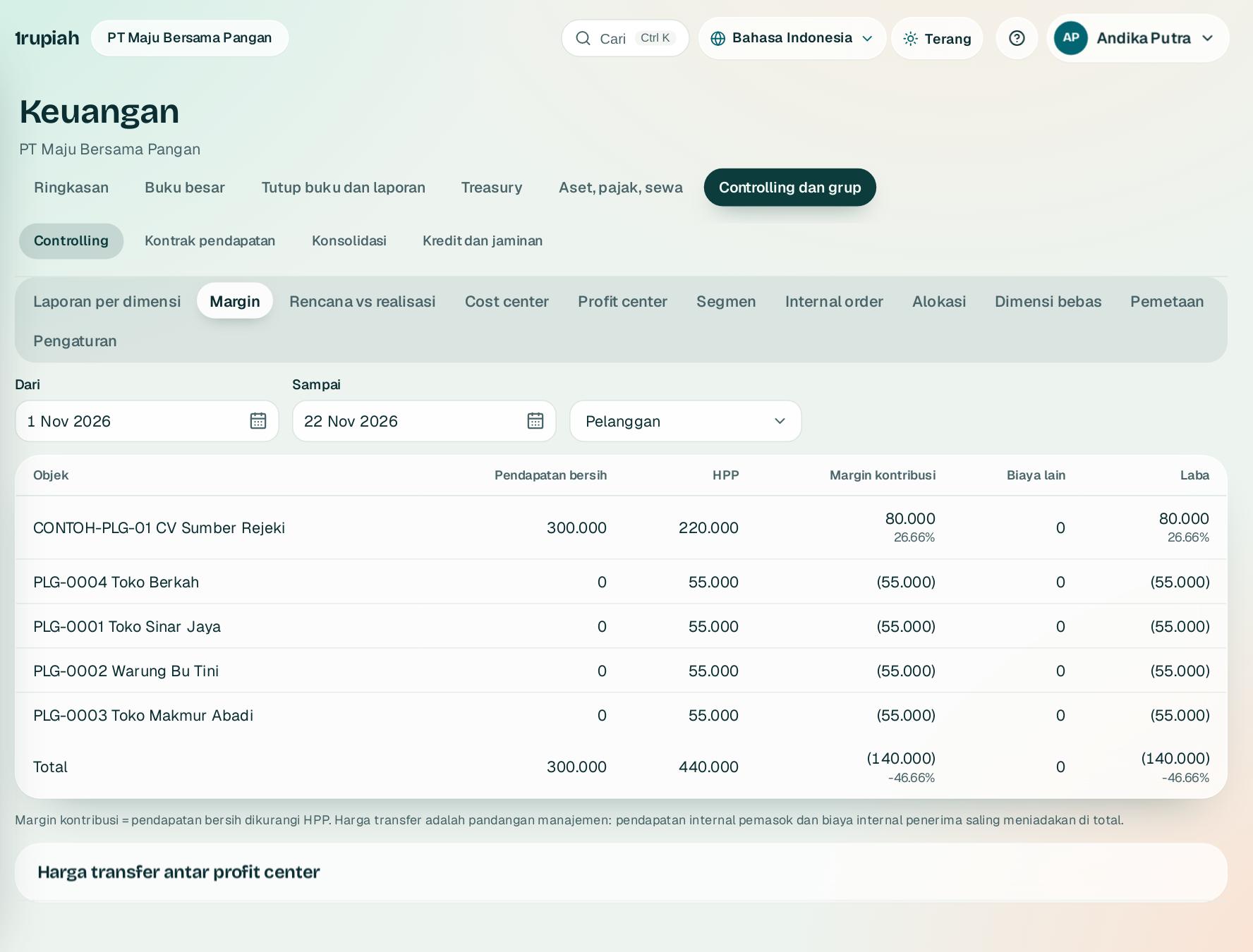
Margin, rencana, dan harga transfer
Margin, plan, and transfer prices
Lihat margin per pelanggan, barang, atau segmen, dan bandingkan biaya dengan rencana.
See margin per customer, item, or segment, and compare costs with the plan.
123
1
Buka Controlling, Margin. Pilih kelompok 1: pelanggan, barang, segmen, profit center, cost center, atau proyek.
Open Controlling, Margin. Pick the grouping 1: customer, item, segment, profit center, cost center, or project.
2
Margin kontribusi 2 adalah pendapatan bersih dikurangi HPP, lengkap dengan persennya. Baris total 3 sama dengan laba rugi.
Contribution margin 2 is net revenue less cost of goods sold, with its percentage. The total row 3 matches the income statement.
3
Per profit center, centang Dengan harga transfer untuk melihat laba internal pemasok dan penerima.
By profit center, tick With transfer prices to see internal profit for suppliers and receivers.
4
Rencana vs realisasi menampilkan sisa anggaran per cost center termasuk komitmen PO.
Plan vs actual shows the remaining budget per cost center including PO commitments.
1rupiah1Finance · Panduan Pengguna | User Guide
1Finance · 16
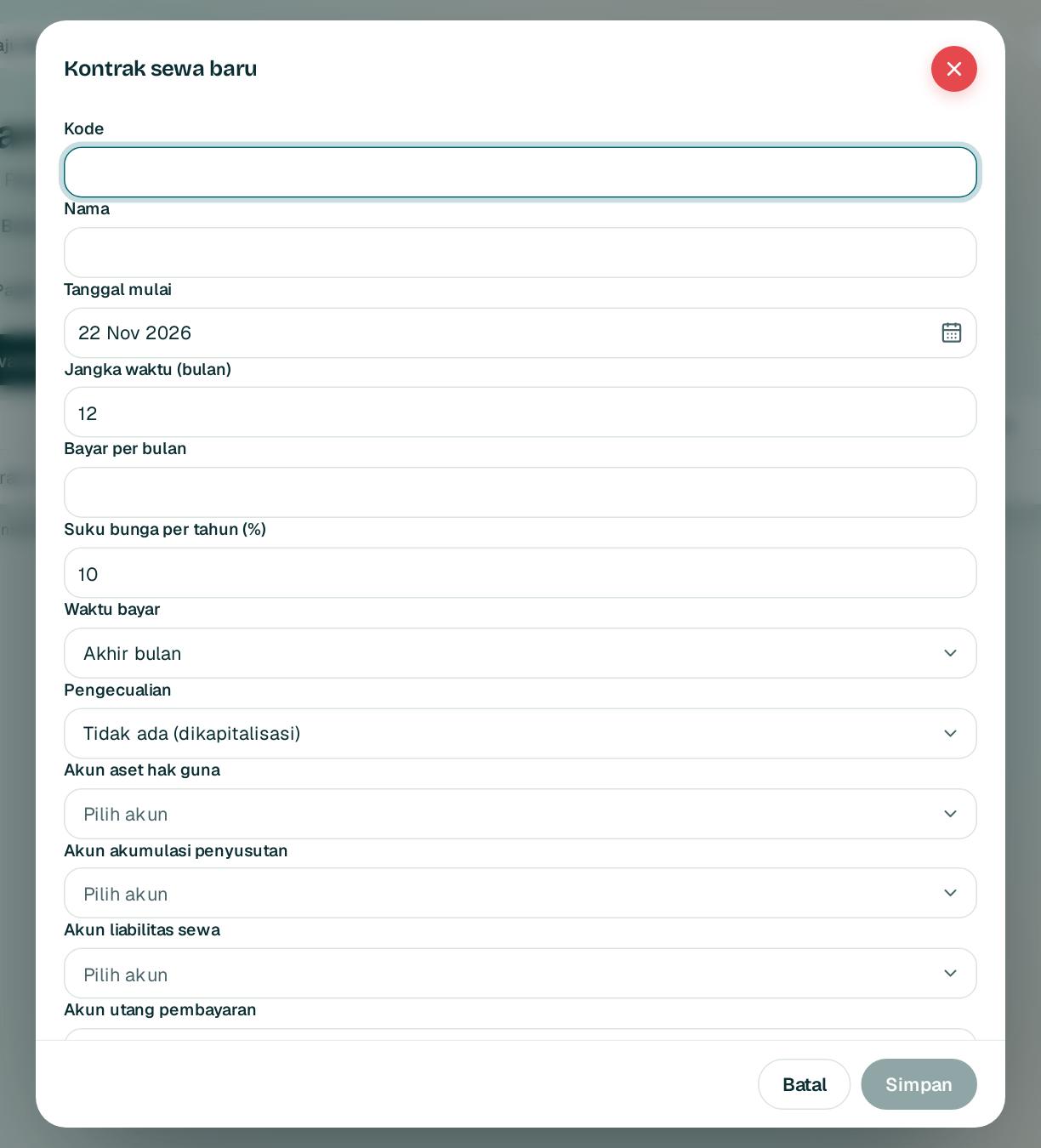
Sewa PSAK 116
Leases under IFRS 16
Catat sewa gedung, kendaraan, atau mesin sebagai aset hak guna dan liabilitas.
Record building, vehicle, or machine leases as right of use assets and liabilities.
123
1
Buka Keuangan, Sewa lalu Kontrak sewa baru. Isi pembayaran per bulan 1, suku bunga 2, jangka waktu, dan akun.
Open Finance, Leases and choose New lease. Fill in the monthly payment 1, rate 2, term, and accounts.
2
Simpan 3 lalu klik Mulai. Liabilitas awal dihitung sebagai nilai kini dan jadwal lengkap dibuat.
Save 3, then click Start. The initial liability is the present value and the full schedule is created.
3
Tiap bulan klik Posting jurnal sewa bulan ini: bunga, pembayaran, dan penyusutan.
Each month click Post this month's lease journals: interest, payment, and depreciation.
4
Modifikasi mengukur ulang liabilitas; penghentian menghapus aset dan liabilitas dengan laba atau rugi.
A modification remeasures the liability; a termination removes the asset and liability with a gain or loss.
Tips Sewa paling lama 12 bulan atau bernilai rendah bisa dikecualikan sehingga langsung menjadi beban.
Tip Leases of 12 months or less, or of low value, can be exempted so they are expensed directly.
1rupiah1Finance · Panduan Pengguna | User Guide
1Finance · 17
Pengakuan pendapatan PSAK 72
Revenue recognition under IFRS 15
Akui pendapatan kontrak saat setiap kewajiban terpenuhi.
Recognise contract revenue as each obligation is satisfied.
123
1
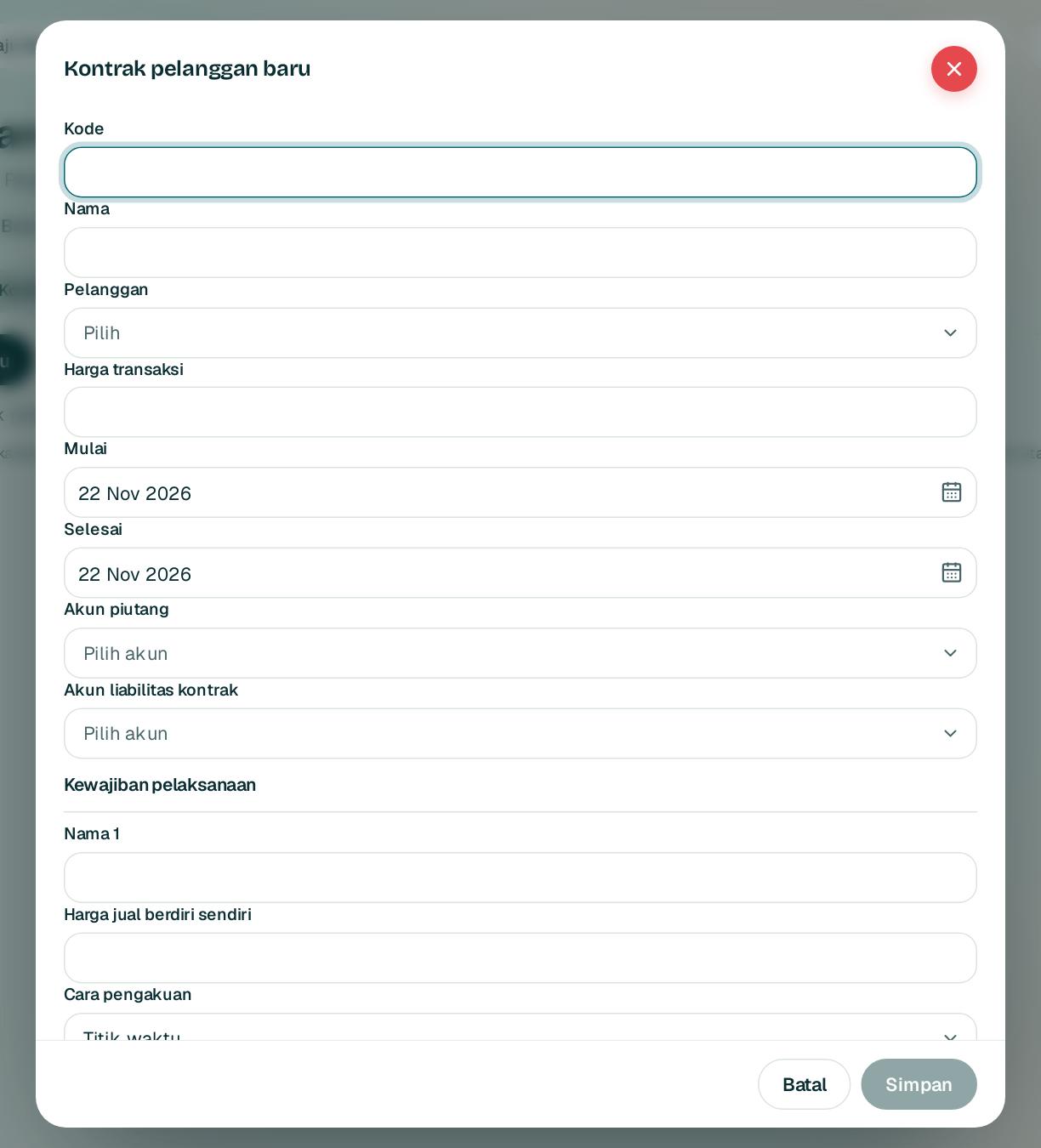
Buka Keuangan, Kontrak pendapatan lalu Kontrak baru. Isi harga transaksi 1.
Open Finance, Revenue contracts and choose New contract. Fill in the transaction price 1.
2
Tambahkan setiap kewajiban pelaksanaan 2 dengan harga jual berdiri sendiri 3 dan cara pengakuannya. Harga transaksi dibagi menurut harga jual itu.
Add every performance obligation 2 with its standalone selling price 3 and recognition method. The transaction price is split by those prices.
3
Aktifkan, lalu tagih. Tagihan masuk ke liabilitas kontrak.
Activate, then bill. Billings go to the contract liability.
4
Klik Terpenuhi untuk kewajiban titik waktu, dan Akui pendapatan bulan ini untuk yang seiring waktu.
Click Satisfied for point in time obligations, and Recognise this month for over time ones.
1rupiah1Finance · Panduan Pengguna | User Guide
1Finance · 18
Konsolidasi grup dan antar perusahaan
Group consolidation and intercompany
Gabungkan semua entitas dengan eliminasi, penjabaran valas, dan kepentingan nonpengendali.
Combine every entity with eliminations, currency translation, and non controlling interest.
123
1
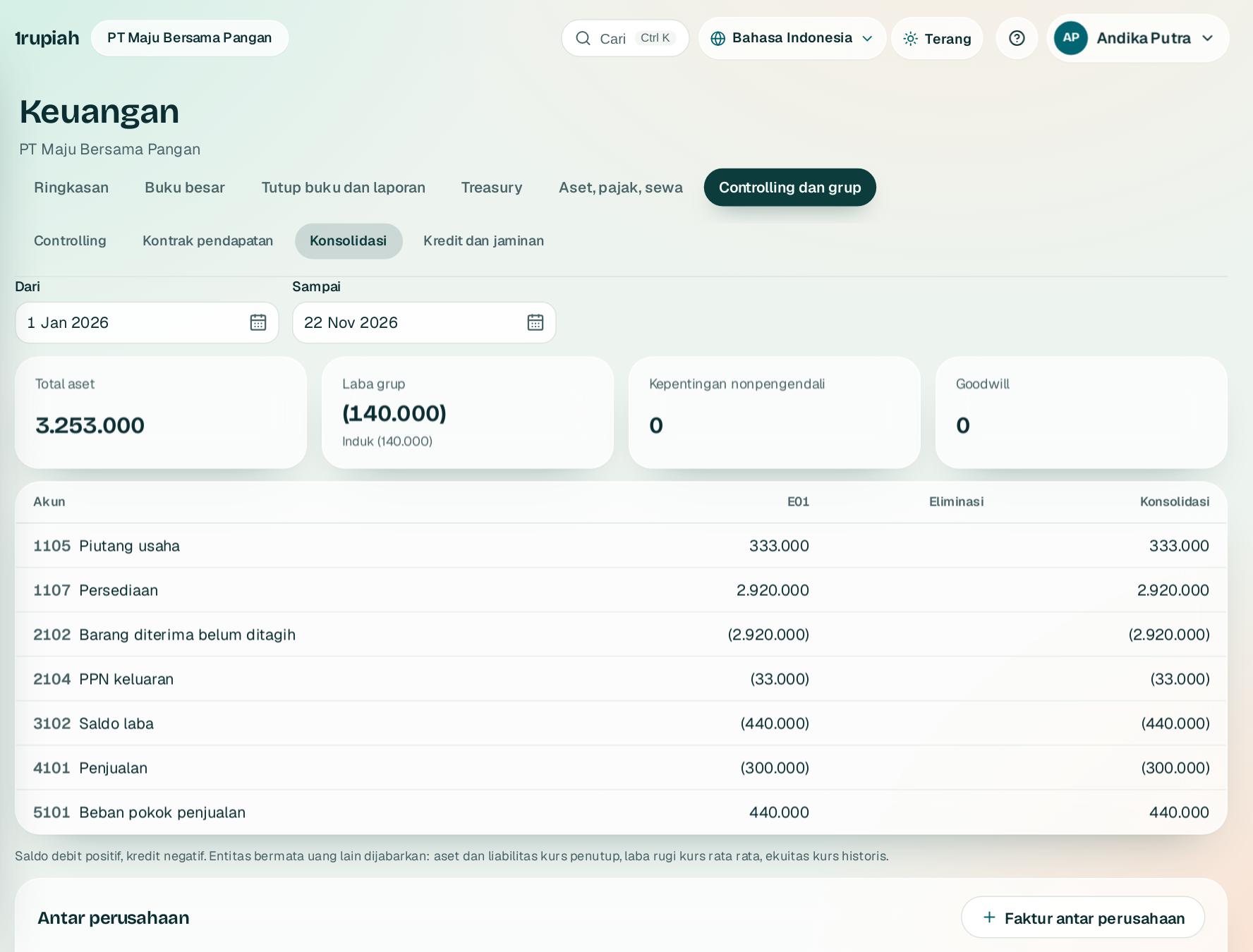
Buka Keuangan, Konsolidasi dan pilih rentang tanggal. Ringkasan 1 menampilkan aset, laba grup, dan kepentingan nonpengendali; goodwill 3 muncul dari eliminasi investasi.
Open Finance, Consolidation and pick the date range. The summary 1 shows assets, group profit, and non controlling interest; goodwill 3 comes from the investment elimination.
2
Kolom eliminasi 2 menghapus saldo dan laba rugi antar perusahaan secara otomatis.
The eliminations column 2 removes intercompany balances and profit automatically.
3
Catat faktur antar perusahaan sekali; jurnal penjual dan pembeli terbentuk bersamaan dan rekonsiliasinya tampil per pasangan.
Record an intercompany invoice once; seller and buyer journals are created together and reconciled per pair.
1rupiah1Finance · Panduan Pengguna | User Guide
1Finance · 19
Kredit, netting, jaminan, dan denda
Credit, netting, deposits, and late charges
Kelola risiko kredit pelanggan dan saling hapus piutang dengan utang.
Manage customer credit risk and offset receivables against payables.
123
1
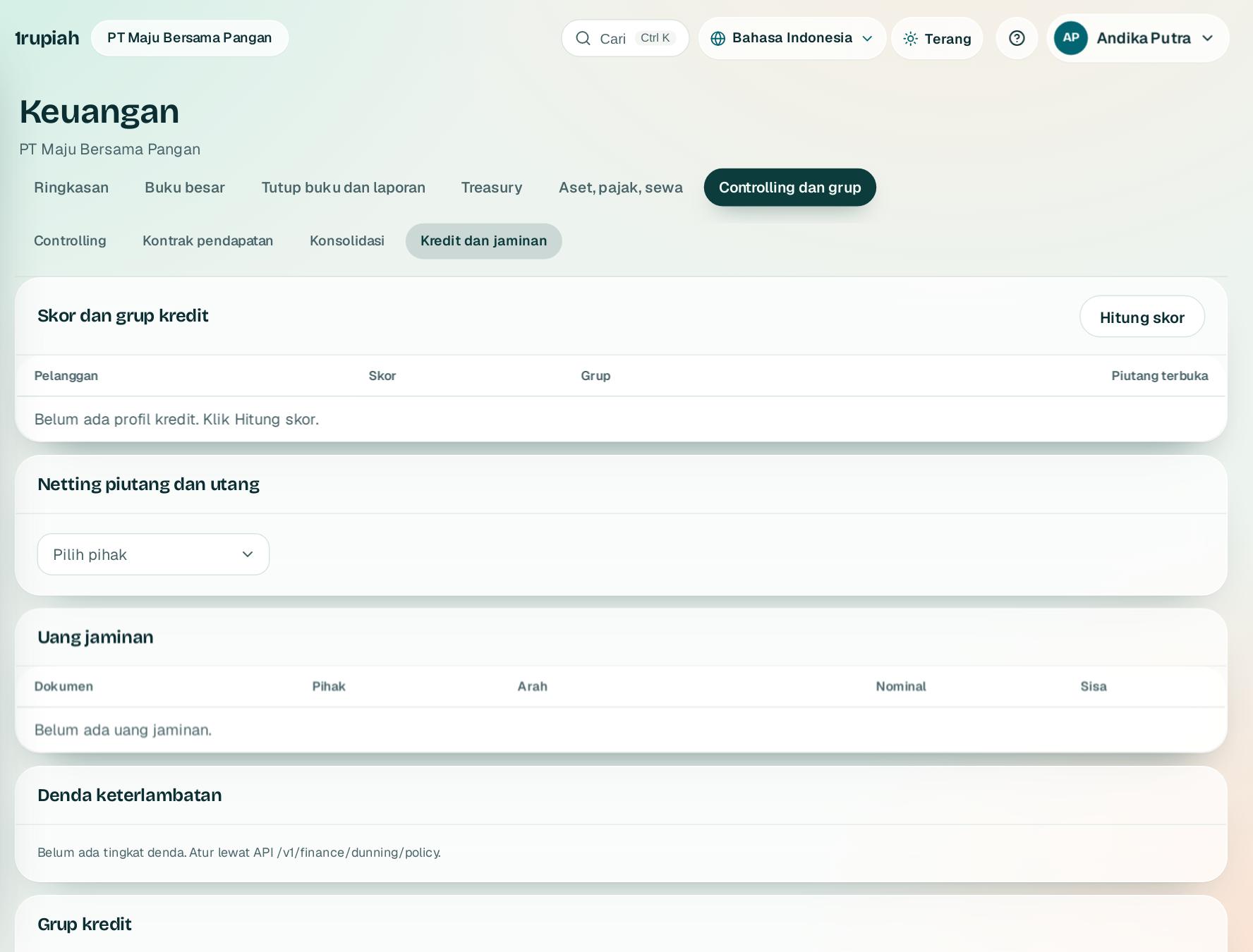
Buka Keuangan, Kredit dan jaminan. Klik Hitung skor1 untuk menilai pelanggan dari perilaku bayarnya.
Open Finance, Credit and deposits. Click Score now1 to rate customers by how they pay.
2
Pilih pihak yang juga pemasok di bagian netting 2, lalu netting piutang dengan utangnya.
Pick a party that is also a supplier in the netting section 2, then net its receivables against payables.
3
Uang jaminan tercatat terpisah dan bisa dikembalikan atau diterapkan ke faktur.
Deposits are recorded separately and can be refunded or applied to invoices.
4
Denda keterlambatan 3 dikenakan bertingkat, sekali per faktur per tingkat, kecuali faktur bersengketa.
Late charges 3 apply in levels, once per invoice per level, except for disputed invoices.
1rupiah1Finance · Panduan Pengguna | User Guide
1Finance · 20
Analisis: kenapa laba berubah
Analysis: why profit changed
Penjelasan laba dalam bahasa biasa, agen tutup buku, dan catatan atas laporan keuangan.
Plain language profit explanations, the close agent, and notes to the financial statements.
12
1
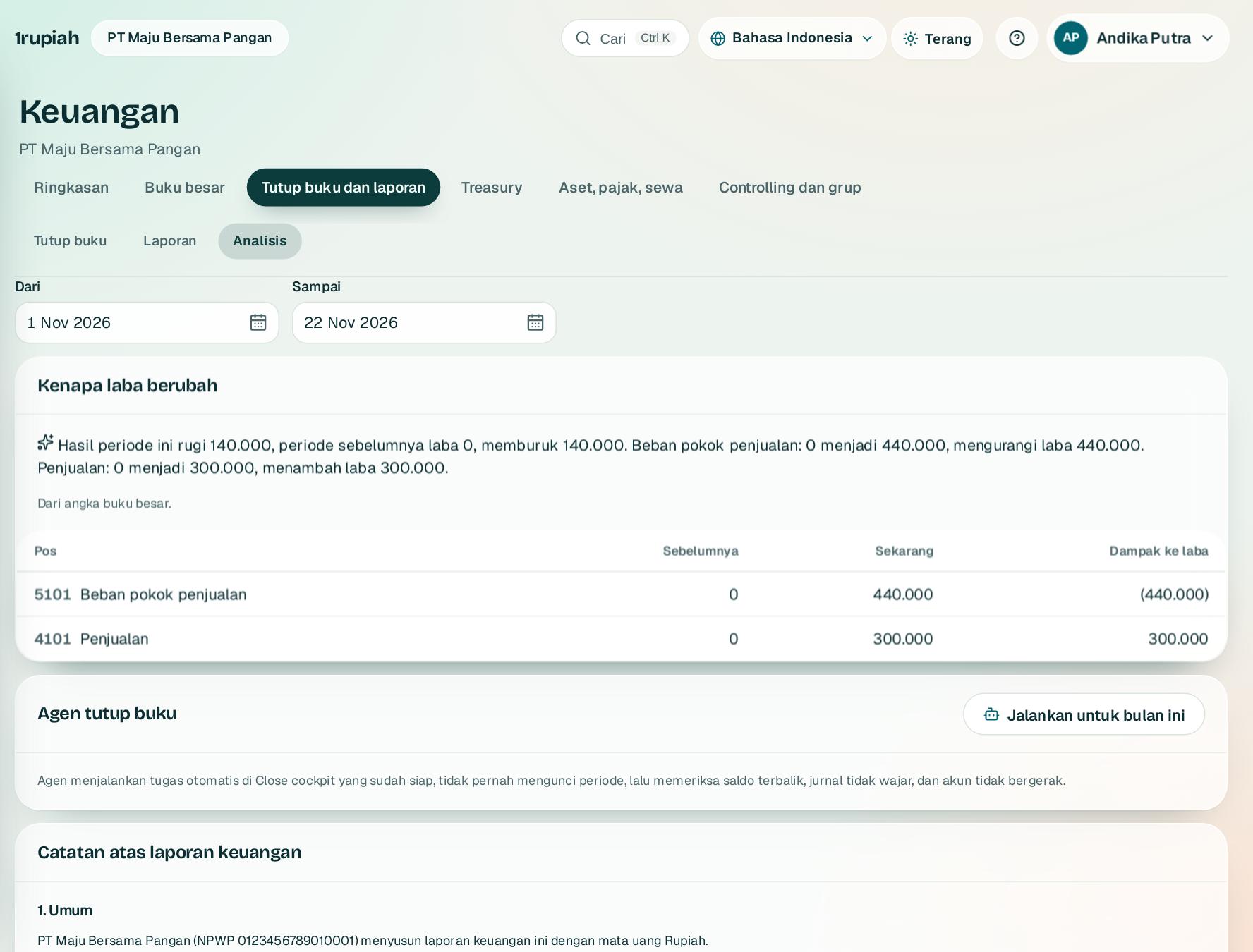
Buka Keuangan, Analisis. Bagian 1 menjelaskan perubahan laba terhadap periode sebelumnya dan pos penggeraknya.
Open Finance, Analysis. Section 1 explains how profit changed against the prior period and which lines drove it.
2
Jalankan untuk bulan ini2 menjalankan agen tutup buku dan menampilkan anomali seperti saldo terbalik.
Run for this month2 runs the close agent and lists anomalies such as reversed balances.
3
Catatan atas laporan keuangan di bawahnya tersusun otomatis dari buku besar dan fitur yang dipakai.
The notes to the financial statements below are built automatically from the ledger and the features in use.
1rupiah1Finance · Panduan Pengguna | User Guide
1Finance · 21
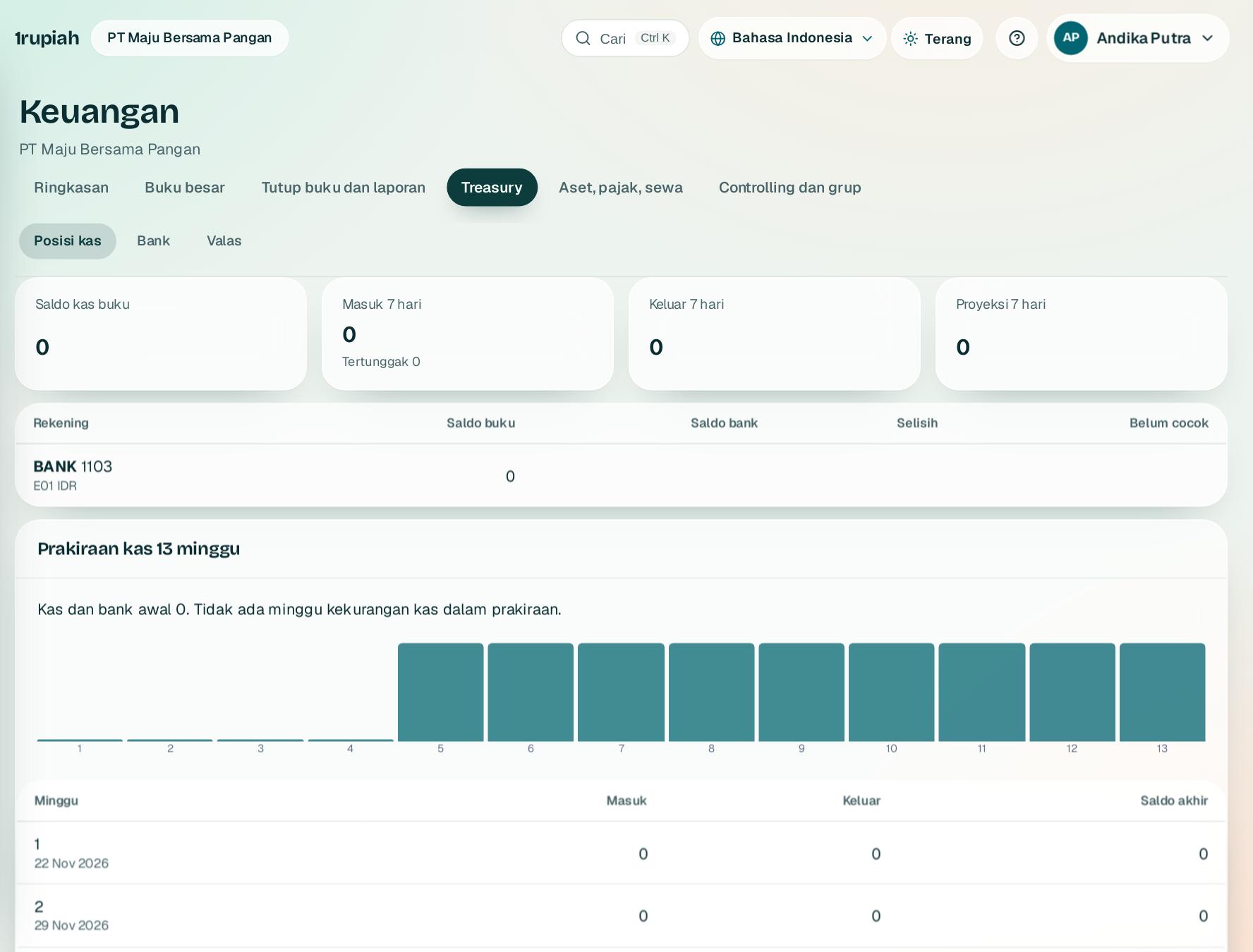
Posisi kas dan rekening bank
Cash position and bank accounts
Saldo semua rekening hari ini, arus 7 hari, dan rekening yang dikelola empat mata.
Today's balance on every account, the next 7 days, and four eyes account management.
123
1
Buka Keuangan, Treasury lalu Posisi kas. Saldo buku semua rekening 1 dan proyeksi 7 hari 2 tampil di atas.
Open Finance, Treasury, then Cash position. The book balance of every account 1 and the 7 day projection 2 are on top.
2
Setiap rekening menunjukkan saldo mutasi bank terakhir 3, selisih dengan buku, dan mutasi yang belum dicocokkan.
Each account shows the last bank statement balance 3, the difference to the books, and unmatched lines.
3
Buka, ubah, atau tutup rekening dan atur penandatangan lewat Ajukan rekening baru di bagian bawah; orang lain yang menyetujui.
Open, change, or close accounts and manage signatories through Request a new account further down; someone else approves.
1rupiah1Finance · Panduan Pengguna | User Guide
1Finance · 22
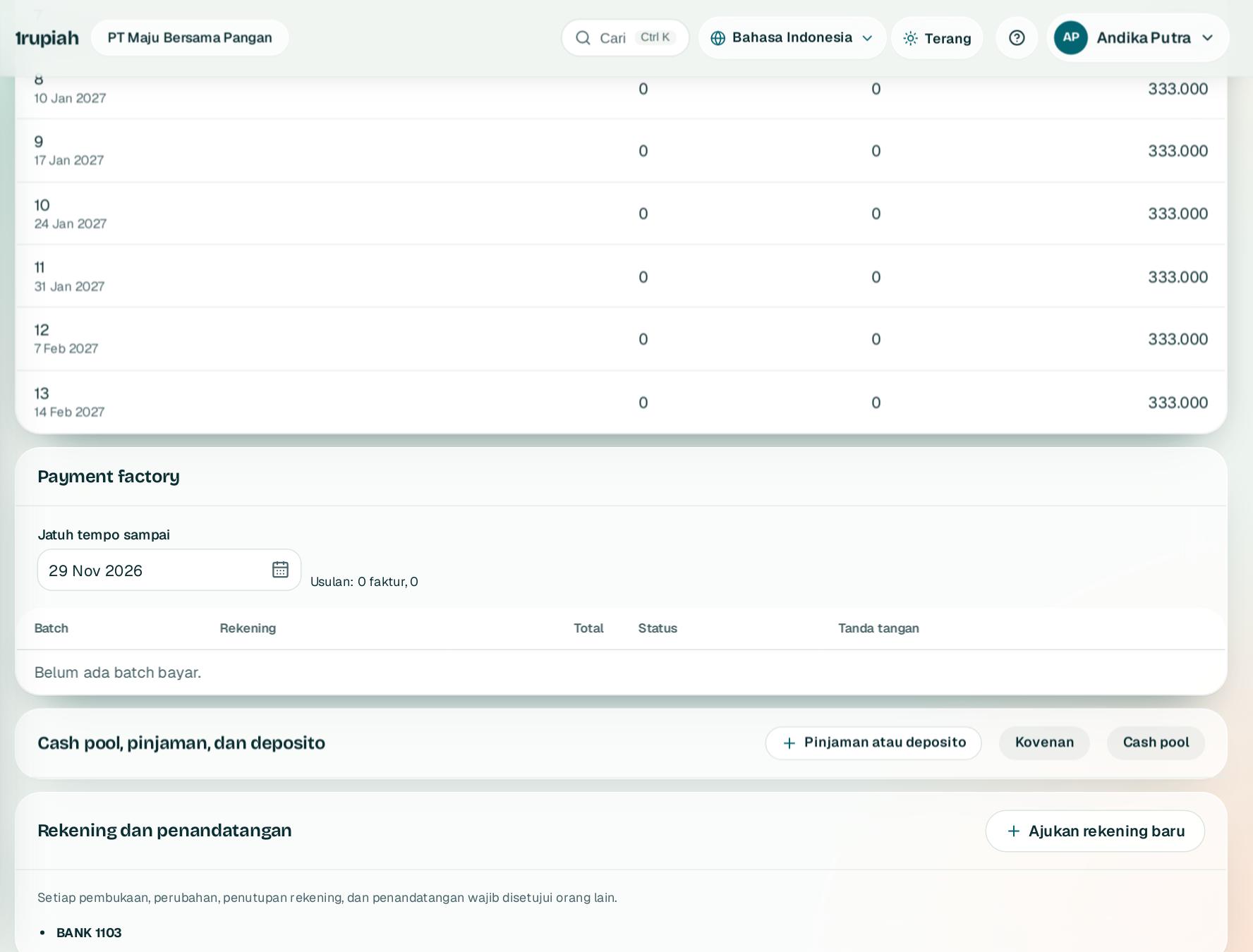
Payment factory
Payment factory
Satu pintu pembayaran pemasok untuk semua entitas dengan tanda tangan dan file bank.
One door for supplier payments across entities, with signatures and bank files.
123
1
Di bagian Payment factory 1 pilih batas jatuh tempo 2. Faktur pemasok yang siap bayar dikumpulkan per entitas.
In Payment factory 1 pick the due date limit 2. Payable supplier invoices are gathered per entity.
2
Usulan 3 menunjukkan jumlah faktur dan nilainya; klik Buat batch bayar untuk mengajukan batch ke persetujuan sesuai nilai.
The proposal 3 shows the invoice count and amount; click Create payment batches to send batches to approval by amount.
3
Penandatangan rekening menandatangani batch, lalu unduh file bank BCA, Mandiri, BRI, atau BNI. H2H masih proses integrasi.
Account signatories sign the batch, then download the BCA, Mandiri, BRI, or BNI bank file. H2H integration is in progress.
1rupiah1Finance · Panduan Pengguna | User Guide
1Finance · 23
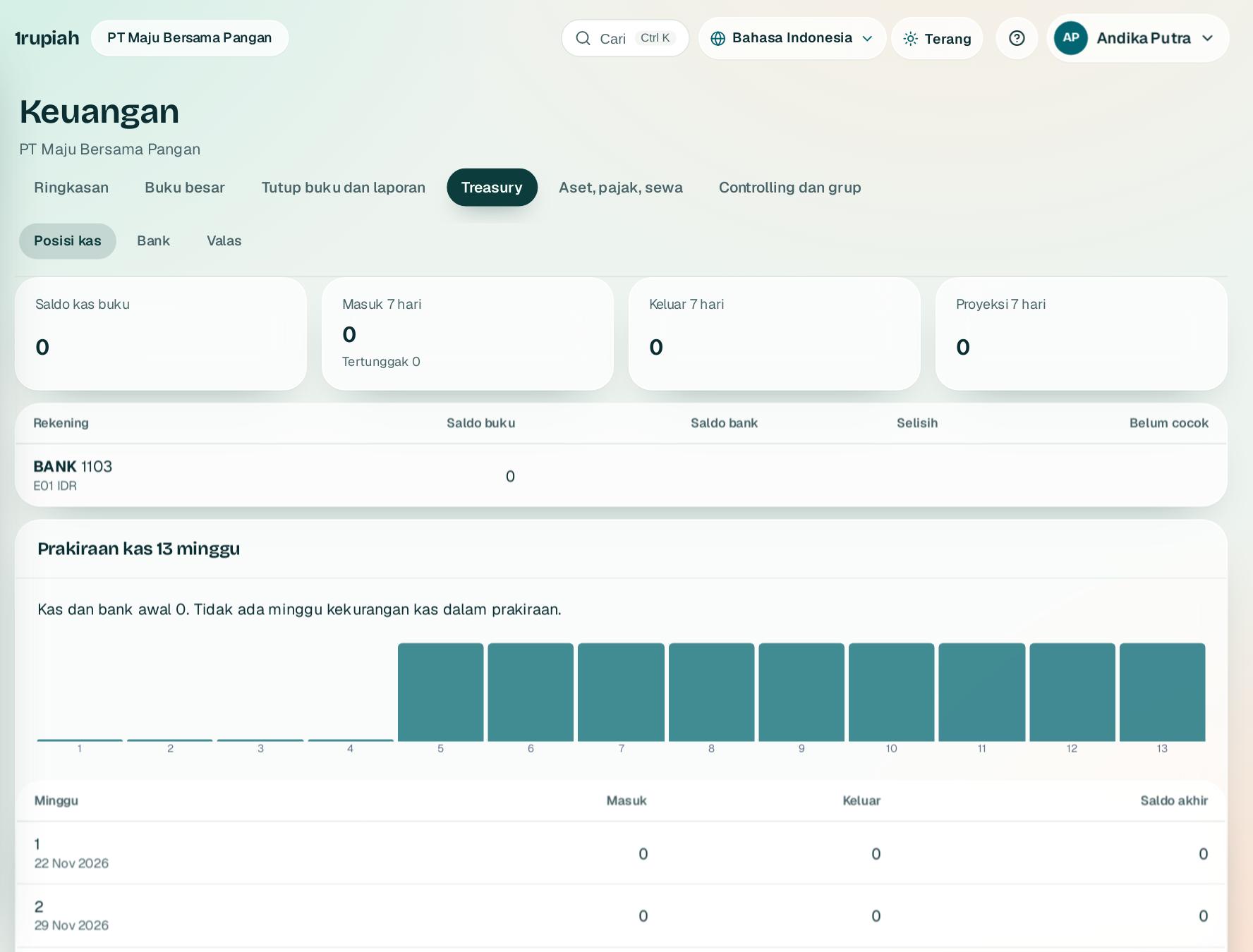
Prakiraan kas dan lindung nilai
Cash forecast and hedging
Kas 13 minggu dari kebiasaan bayar nyata, dan lindung nilai valas.
13 weeks of cash from real payment habits, and FX hedging.
123
1
Ringkasan 1 menjelaskan kapan kas diperkirakan kurang dan apa yang bisa dilakukan.
The summary 1 says when cash may run short and what to do.
2
Batang merah 2 adalah minggu di bawah saldo minimum; tabel 3 merinci masuk dan keluar.
Red bars 2 are weeks below the minimum balance; the table 3 lists in and out.
3
Kontrak forward dan swap dinilai ulang ke kurs pasar; lindung nilai arus kas yang efektif masuk cadangan ekuitas.
Forwards and swaps are revalued to market rates; effective cash flow hedges go to the equity reserve.
1rupiah1Finance · Panduan Pengguna | User Guide
1Finance · 24
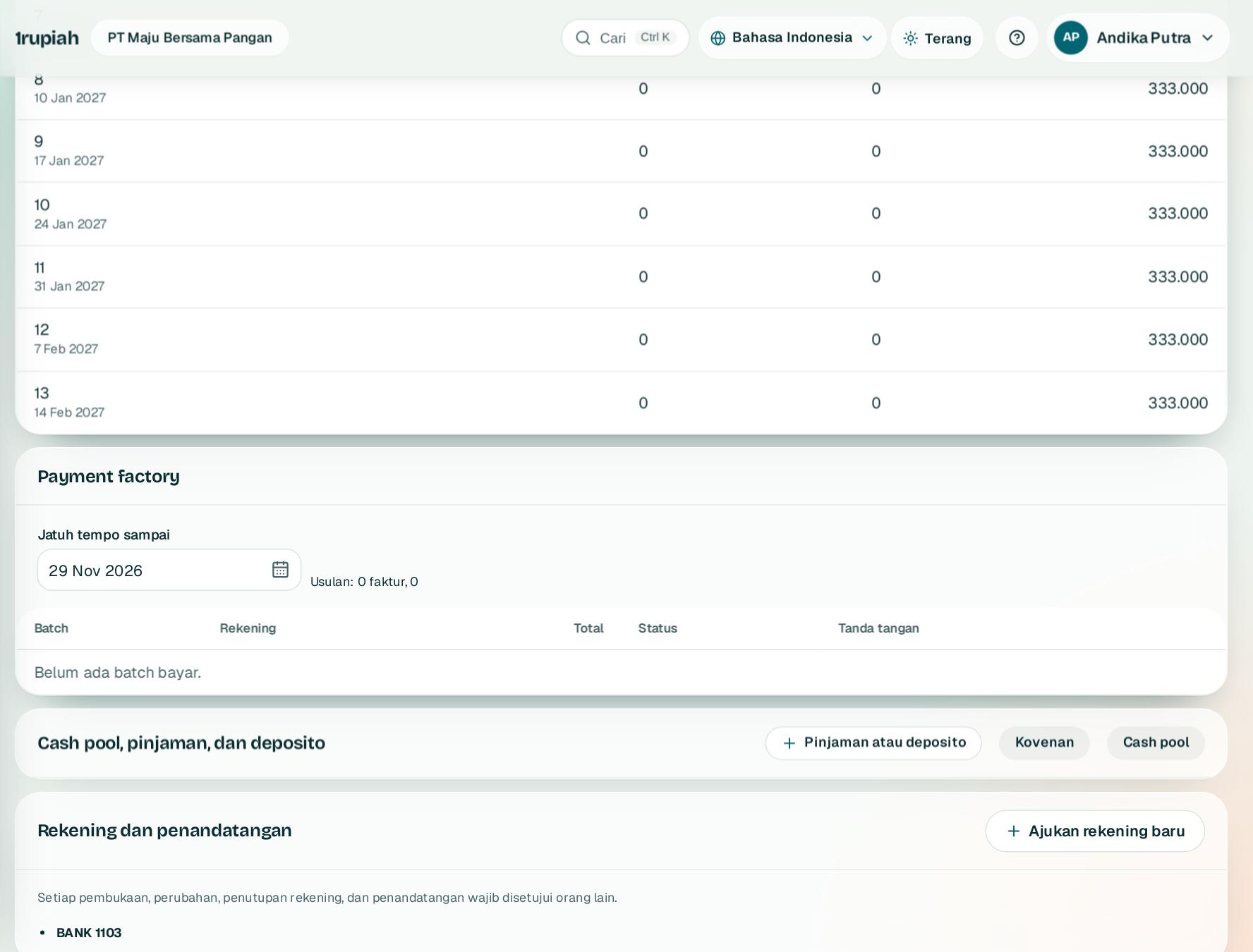
Pinjaman, deposito, dan cash pool
Loans, deposits, and cash pools
Jadwal angsuran otomatis, kovenan, dan sapuan saldo antar entitas.
Automatic instalment schedules, covenants, and balance sweeps between entities.
123
1
Catat pinjaman atau deposito 1: pokok, bunga, jangka, dan cara angsur. Pencairan langsung dijurnal.
Record a loan or deposit 1: principal, rate, term, and repayment. The drawdown is journaled.
2
Tambahkan kovenan 2 seperti kas minimum; statusnya diuji dari buku besar.
Add covenants 2 such as minimum cash; they are tested against the ledger.
3
Cash pool 3 menyapu saldo anak usaha ke rekening induk menjadi piutang dan utang antar perusahaan berbunga.
A cash pool 3 sweeps subsidiary balances to the header account as interest bearing intercompany balances.
1rupiah1Finance · Panduan Pengguna | User Guide
1Finance · 25
Multi ledger: SAK dan IFRS berdampingan
Multi ledger: local GAAP and IFRS side by side
Tambah ledger paralel untuk IFRS atau fiskal tanpa menggandakan pencatatan.
Add a parallel ledger for IFRS or tax without recording twice.
123
1
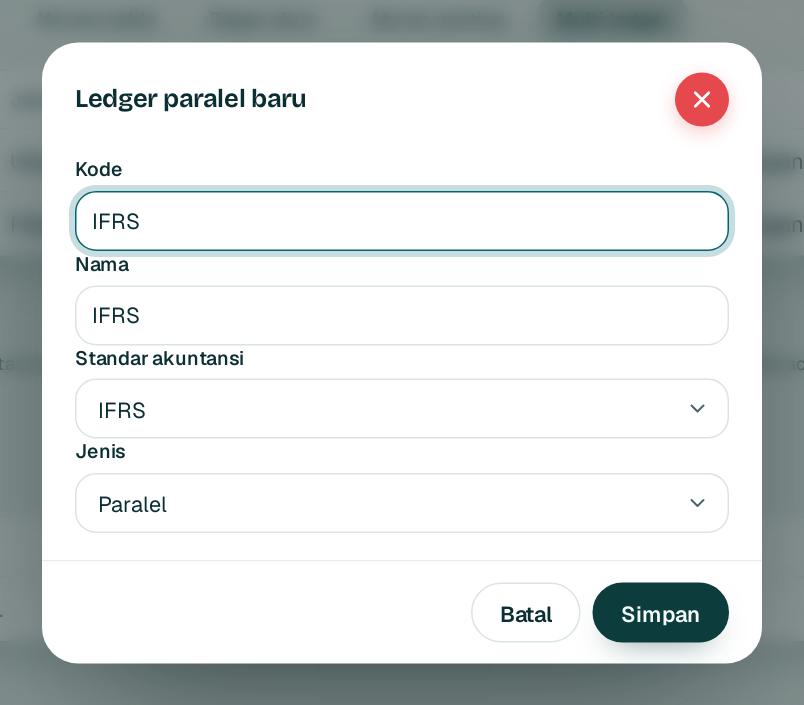
Buka Keuangan, Multi ledger lalu Ledger paralel baru. Isi kode 1 dan pilih standar akuntansi 2, lalu simpan 3.
Open Finance, Multi ledger and choose New parallel ledger. Fill in the code 1, pick the accounting standard 2, then save 3.
2
Ledger paralel memakai semua jurnal ledger utama. Catat hanya perbedaannya lewat Jurnal penyesuaian, misalnya IFRS 16.
A parallel ledger uses every primary ledger journal. Record only the differences with Adjustment journal, for example IFRS 16.
3
Pilih ledger di Neraca saldo dan Laporan untuk melihat angka versi ledger itu.
Pick the ledger in Trial balance and Reports to see that version of the figures.
4
Rekonsiliasi di bawah daftar menampilkan selisih per akun dan dampaknya ke laba.
The reconciliation below the list shows the difference per account and its effect on profit.
1rupiah1Finance · Panduan Pengguna | User Guide
1Finance · 26
Bagan akun
Chart of accounts
Daftar akun buku besar, dikelompokkan sesuai standar SAK.
The general ledger accounts, grouped to SAK standards.
1
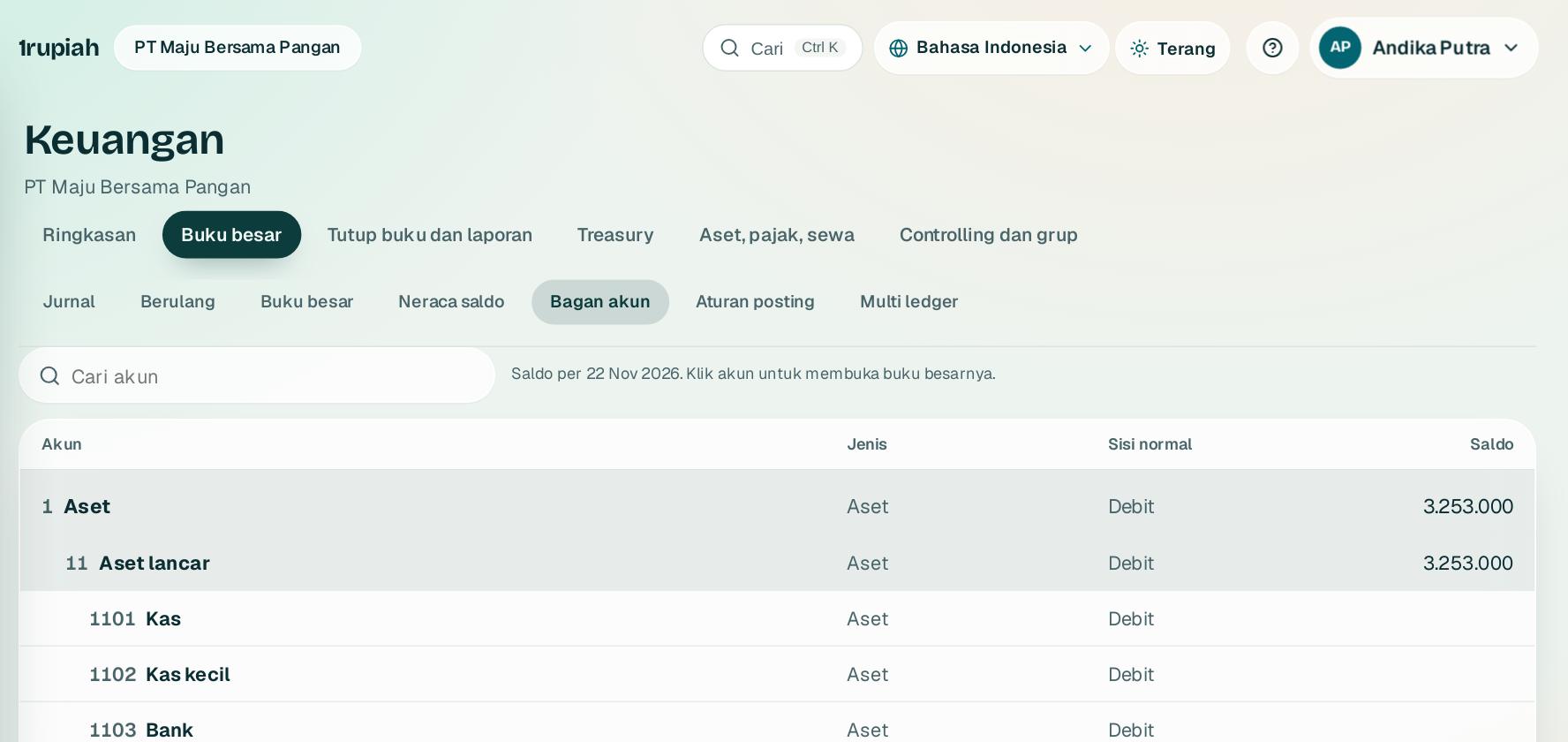
Buka Keuangan, Buku besar, Akun. Bagan akun awal dibuat dari paket industri Anda.
Open Finance, Ledger, Accounts. The starting chart comes from your industry pack.
2
Tambah akun anak di bawah akun induk. Akun yang sudah dipakai tidak bisa dihapus, hanya dinonaktifkan.
Add child accounts under a parent. Accounts already in use cannot be deleted, only deactivated.
1rupiah1Finance · Panduan Pengguna | User Guide
1Finance · 27
Aturan posting
Posting rules
Tentukan akun yang dipakai setiap dokumen saat dijurnal otomatis.
Choose the accounts each document uses when it is journaled automatically.
12
1
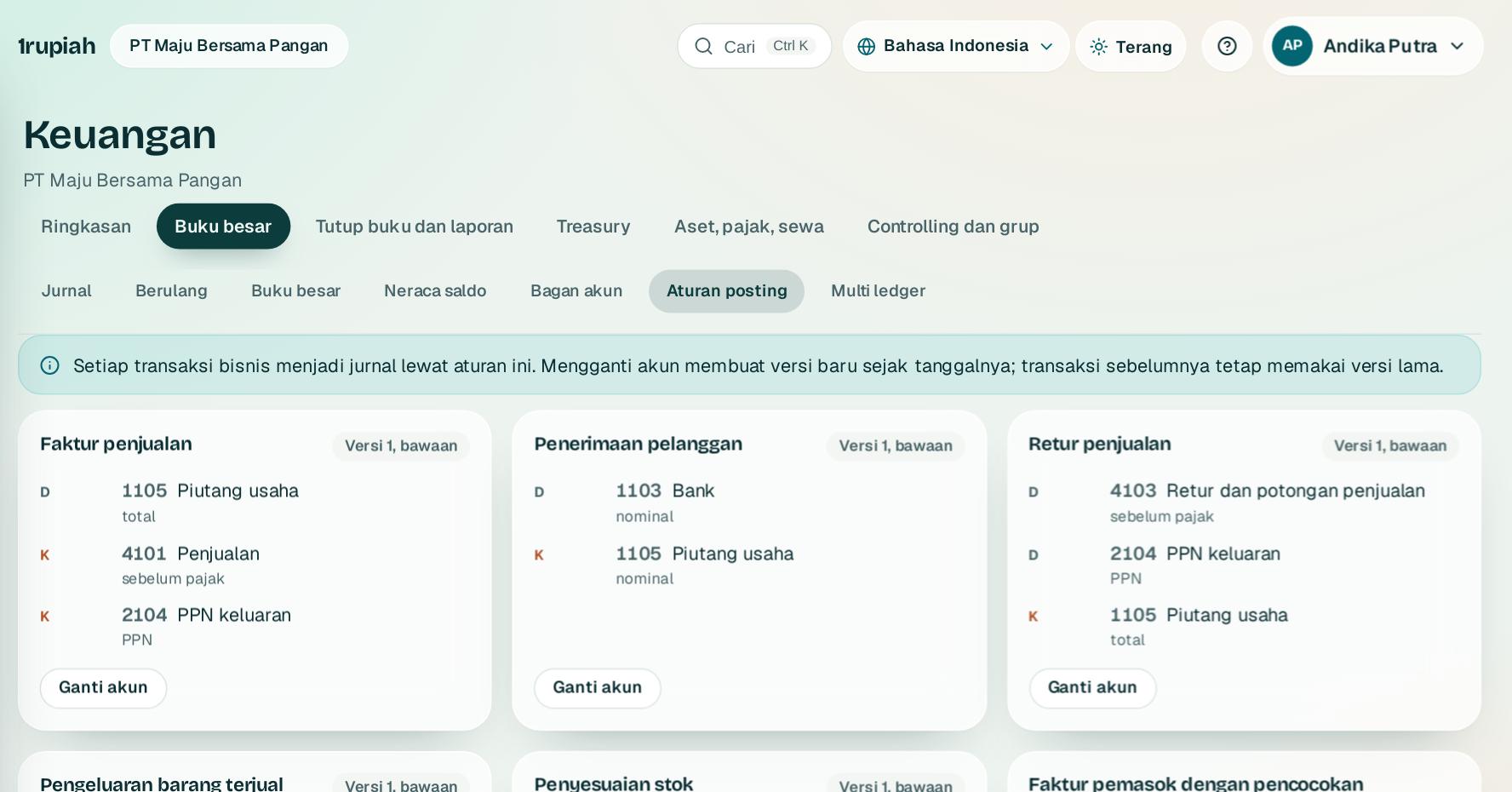
Buka Keuangan, Aturan posting. Setiap jenis dokumen, misalnya Faktur penjualan1, menampilkan akun debit dan kreditnya.
Open Finance, Posting rules. Each document type, for example Sales invoice1, shows its debit and credit accounts.
2
Tekan Ganti akun2 untuk memakai akun lain. Perubahan berlaku untuk dokumen berikutnya dan tercatat di jejak audit.
Press Change account2 to use another account. The change applies to the next documents and is recorded in the audit trail.
1rupiah1Finance · Panduan Pengguna | User Guide
1Finance · 28
Rekonsiliasi fiskal dan SPT tahunan
Fiscal reconciliation and the annual return
Ubah laba komersial menjadi laba fiskal dan siapkan data SPT 1771.
Turn commercial profit into taxable profit and prepare the 1771 return data.
123
1
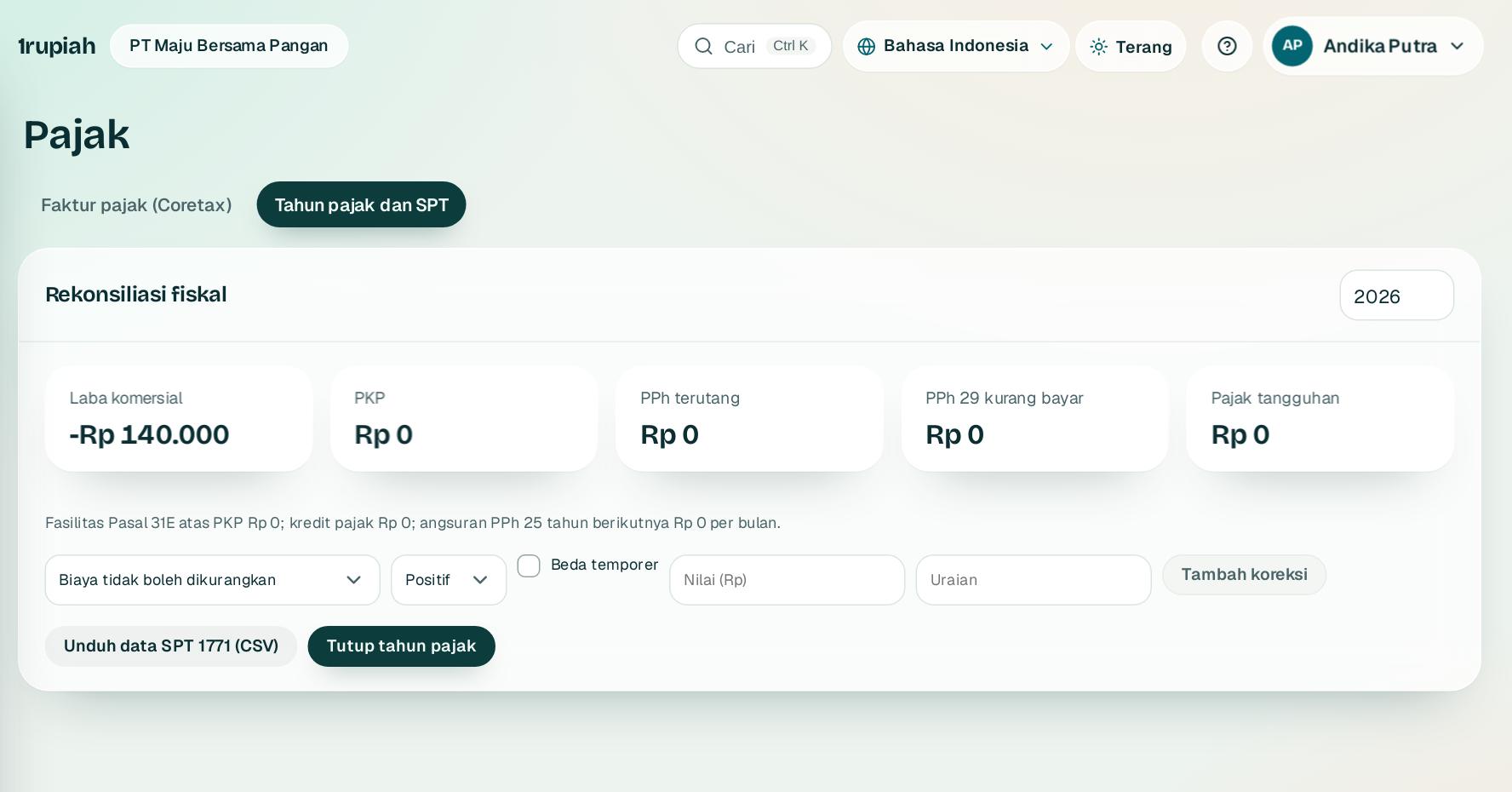
Buka Pajak, Tahunan. Rekonsiliasi fiskal1 dimulai dari laba rugi buku besar.
Open Tax, Annual. Fiscal reconciliation1 starts from the ledger profit and loss.
2
Tambah koreksi positif atau negatif dengan Tambah koreksi2, misalnya beban yang tidak bisa dikurangkan.
Add positive or negative adjustments with Add adjustment2, for example non deductible expenses.
3
Unduh data SPT 1771 (CSV)3 untuk pengisian SPT, lalu Tutup tahun pajak agar angka terkunci.
Download 1771 return data (CSV)3 for filing, then Close tax year to lock the figures.
1rupiah1Finance · Panduan Pengguna | User Guide
1Finance · 29
Anggaran dan cek anggaran
Budgets and budget checks
Batasi belanja per akun dan unit sebelum uangnya keluar.
Limit spending per account and unit before the money goes out.
12
1
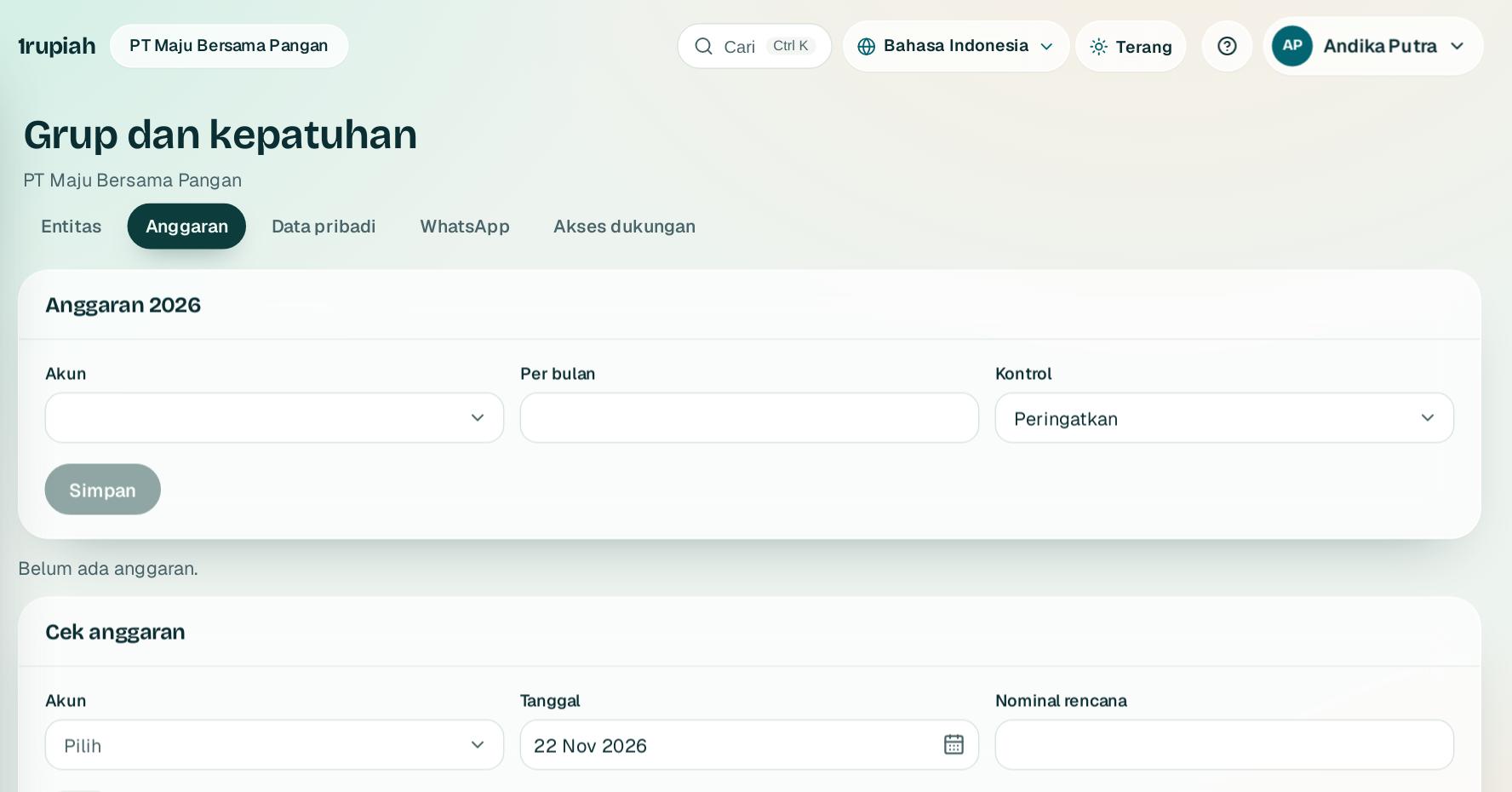
Buka Grup dan kepatuhan, Anggaran. Isi Anggaran 20261 per akun dan unit, lalu pilih tindakan saat terlampaui: peringatkan atau blokir.
Open Group and compliance, Budgets. Fill in the 2026 budget1 per account and unit, then choose what happens when exceeded: warn or block.
2
Cek anggaran2 menunjukkan sisa anggaran sebelum Anda mengajukan pembelian atau biaya.
Budget check2 shows what is left before you submit a purchase or expense.
1rupiah1Finance · Panduan Pengguna | User Guide
1Finance · 30
Kartu korporat dan struk
Corporate cards and receipts
Cocokkan transaksi kartu dengan struk, lalu jurnal otomatis.
Match card transactions with receipts, then journal them automatically.
123
1
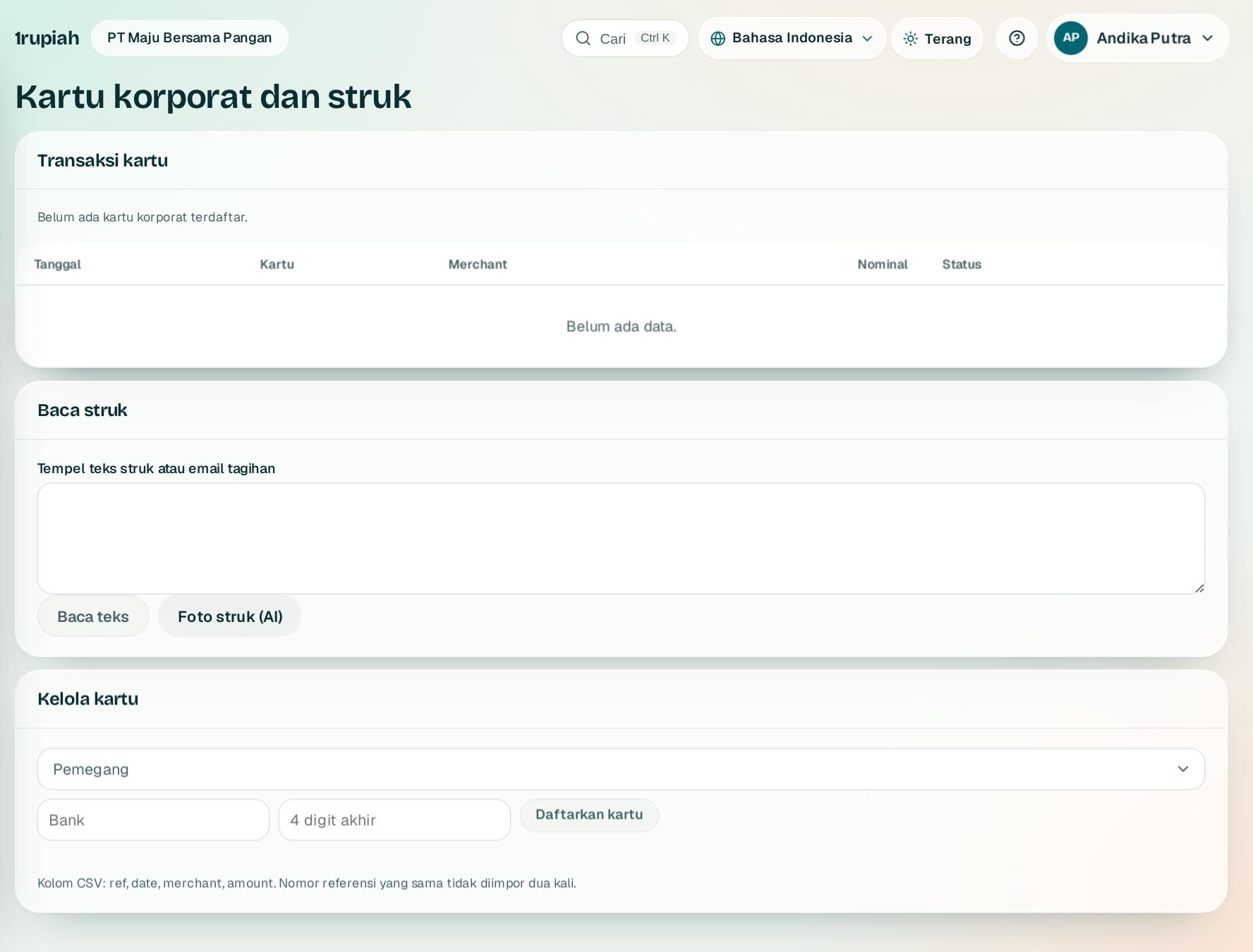
Buka Kartu korporat. Transaksi kartu1 berisi mutasi dari setiap kartu yang terdaftar.
Open Corporate cards. Card transactions1 lists activity from every registered card.
2
Di Baca struk2, tempel teks struk atau unggah fotonya; tanggal, nominal, dan pedagang dibaca otomatis lalu dicocokkan.
In Read receipt2, paste the receipt text or upload a photo; the date, amount, and merchant are read and matched.
3
Kelola kartu3 untuk mendaftarkan kartu dan pemegangnya.
Manage cards3 to register cards and their holders.
1rupiah1Finance · Panduan Pengguna | User Guide
1Finance · 31
Perjalanan dinas
Business travel
Ajukan perjalanan sesuai kebijakan, lalu pertanggungjawabkan biayanya.
Request trips within policy, then settle their costs.
12
1
Buka Perjalanan dinas. Di Perjalanan ajukan tujuan, tanggal, dan perkiraan biaya untuk disetujui.
Open Business travel. Under Trips request the destination, dates, and estimated cost for approval.
2
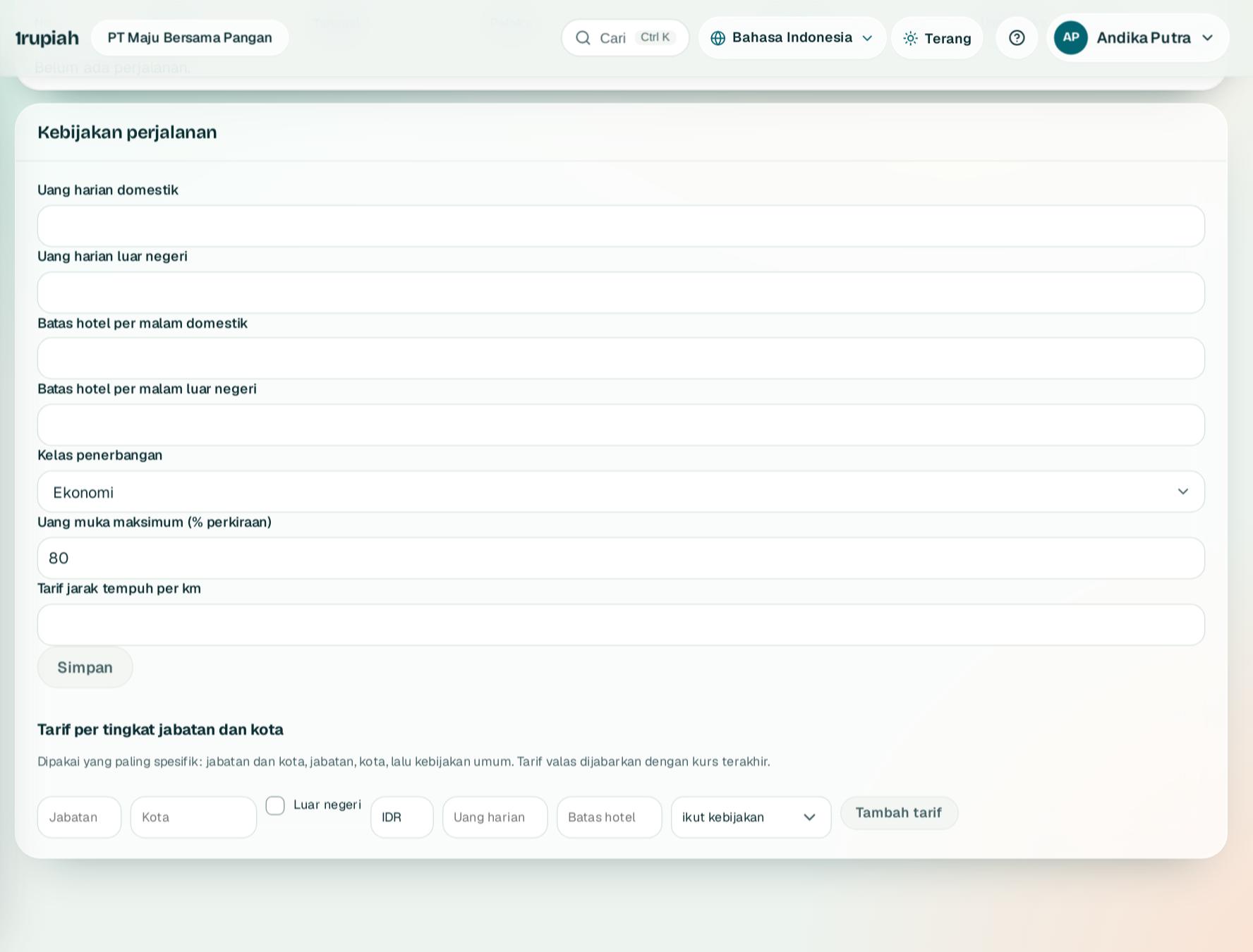
Admin mengatur Kebijakan perjalanan1: kelas penerbangan, lalu tarif harian per tujuan lewat Tambah tarif2.
Admins set the Travel policy1: flight class, then daily rates per destination with Add rate2.
1rupiah
Butuh bantuan?
Tim kami siap 24 jam, Senin sampai Minggu. Buka chat di aplikasi atau situs, atau kirim email.
Need help?
Our team is available 24 hours, Monday to Sunday. Open the chat in the app or on the site, or send an email.