Masuk, menyiapkan perusahaan, mengatur pengguna dan persetujuan, data induk, serta langganan. Dasar untuk semua aplikasi.
Signing in, setting up the company, users and approvals, master data, and your subscription. The foundation for every app.
17 November 2026 · PT Satu Rupiah Indonesia
1rupiah1rupiah · Panduan Pengguna | User Guide
Mengapa 1rupiah
Why 1rupiah
Sistem bisnis lama dibangun untuk kantor yang selalu online, satu bahasa, dan pajak yang dihitung manual. 1rupiah dibangun untuk cara kerja Indonesia hari ini.
Older business systems were built for offices that are always online, in one language, with tax worked out by hand. 1rupiah is built for how Indonesian businesses work today.
AI yang bekerja, bukan sekadar menjawabTanya data dengan kalimat biasa, pembaca faktur pemasok dari foto atau PDF, agen yang menagih dan memesan ulang dalam batas nilai, dan situs 1CMS yang disusun AI. Setiap usulan AI bisa ditinjau dan dibatalkan.
AI that works, not just chatsAsk your data in plain words, read supplier invoices from a photo or PDF, let agents chase payments and reorder within value limits, and draft a 1CMS website with AI. Every AI suggestion can be reviewed and undone.
Pajak Indonesia sudah di dalamPPN 12 persen dengan DPP nilai lain 11/12, ekspor Faktur Pajak ke Coretax, PPh 21 tarif TER, PPh 23 dan 4(2) dengan bukti potong, BPJS, PBJT restoran, dan pesangon PP 35/2021.
Indonesian tax built inVAT at 12 percent on the 11/12 tax base, tax invoice export to Coretax, PPh 21 TER rates, PPh 23 and 4(2) with withholding slips, BPJS, restaurant PBJT, and severance under PP 35/2021.
Tetap jalan saat internet putusKasir dan aplikasi HP terus berjualan dan mencatat saat koneksi hilang, lalu menyinkronkan sekali saat online lagi tanpa transaksi ganda.
Keeps working offlineThe cashier and mobile apps keep selling and recording when the connection drops, then sync once when back online without duplicate transactions.
Keamanan kelas bankPasskey, verifikasi dua langkah, masuk dengan Google (Microsoft bila diaktifkan), persetujuan empat mata untuk uang keluar, rekening pemasok dicek orang kedua, data tiap perusahaan di skema terpisah, dan jejak audit lengkap.
Bank grade securityPasskeys, two step verification, Google sign in (Microsoft when enabled), four eyes approval for money going out, supplier bank accounts checked by a second person, a separate schema per company, and a full audit trail.
Angka yang selalu tepatHarga, PPN, dan pembulatan dihitung oleh Calc Core berbahasa Rust yang sama di server, web, dan desktop. Jurnal selalu seimbang dan periode terkunci tidak bisa diubah diam diam.
Figures that are always rightPrices, VAT, and rounding are computed by the same Rust Calc Core on the server, web, and desktop. Journals always balance and locked periods cannot be changed quietly.
Bayar hanya yang dipakaiMulai dari 1ERP Gratis, lalu tambah aplikasi satu per satu: 1Finance, 1Sales, 1HR, 1Cashier, dan lainnya. Semua terhubung dalam satu data, satu login, di web, desktop, dan HP.
Pay only for what you useStart on 1ERP Free, then add apps one at a time: 1Finance, 1Sales, 1HR, 1Cashier, and more. Everything shares one set of data and one login, on web, desktop, and mobile.
Satu halaman, satu tugasSetiap halaman menjelaskan satu pekerjaan dari awal sampai selesai.
One page, one taskEach page covers one job from start to finish.
Nomor di gambarKotak bernomor 1 menunjukkan tombol atau isian yang dimaksud langkah dengan nomor sama.
Numbers on screenshotsA numbered box 1 marks the button or field the matching step refers to.
Chip tombolSimpan adalah tombol utama, Batal tombol biasa, persis seperti di layar.
Button chipsSave is a main button and Cancel a regular one, exactly as on screen.
Gambar layarGambar diambil dari tampilan bahasa Indonesia. Ganti bahasa kapan saja lewat pilihan bahasa di kanan atas.
ScreenshotsScreenshots use the Indonesian interface. Switch language at any time with the language picker at the top right.
1rupiah1rupiah · Panduan Pengguna | User Guide
1rupiah · 01
Masuk ke 1rupiah
Signing in to 1rupiah
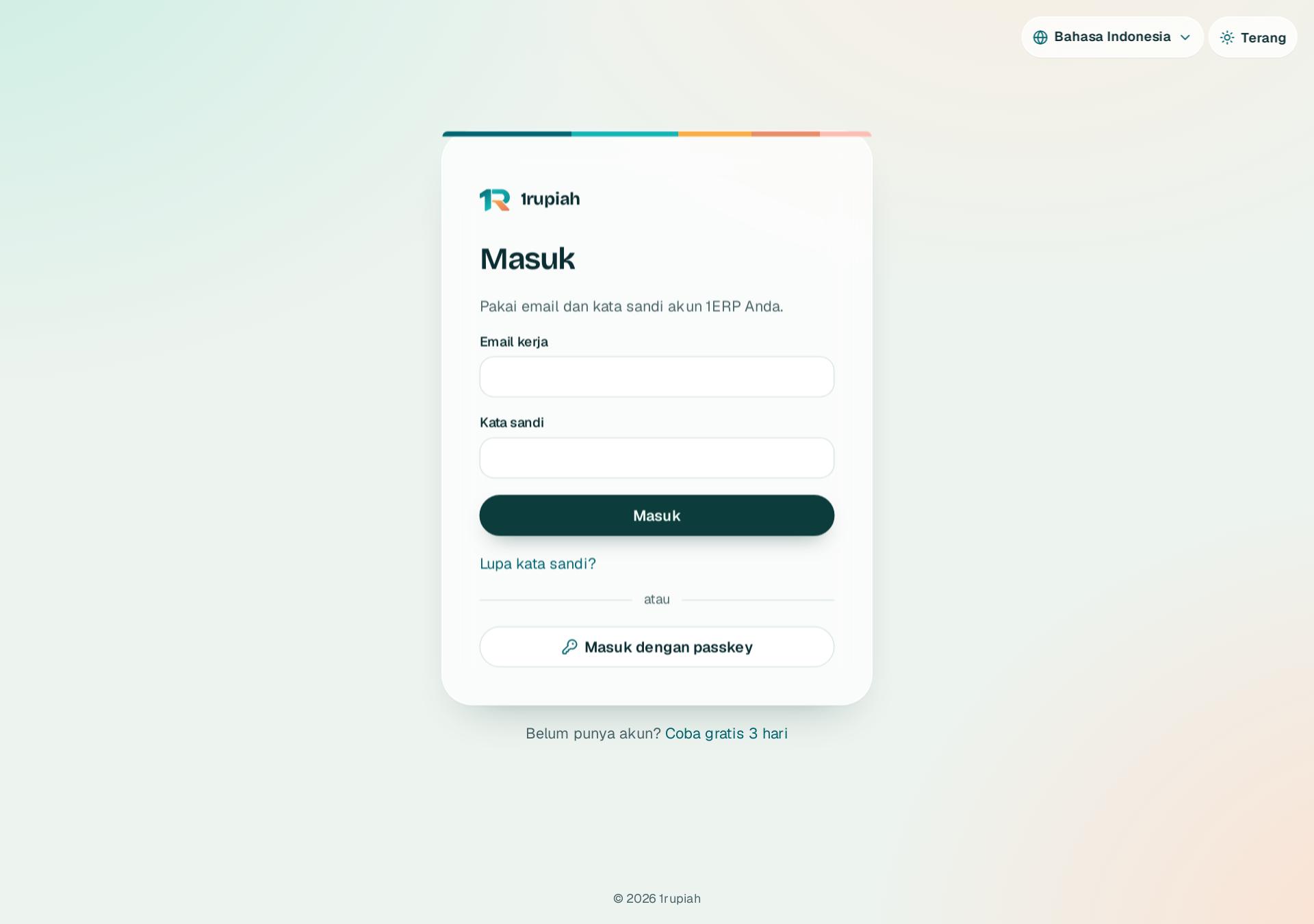
Buka app.1rupiah.biz.id dari browser di komputer atau HP. Satu akun dipakai di web, desktop, dan aplikasi HP.
Open app.1rupiah.biz.id in a browser on a computer or phone. One account works on web, desktop, and the mobile apps.
123
1
Isi email kerja Anda di kotak 1.
Type your work email in box 1.
2
Isi kata sandi di kotak 2, lalu klik Masuk3.
Type your password in box 2, then click Sign in3.
3
Owner dan admin diminta kode 6 angka dari aplikasi authenticator. Saat pertama kali, pindai kode QR lalu simpan 10 kode cadangan.
Owners and admins are asked for a 6 digit code from an authenticator app. The first time, scan the QR code and keep the 10 backup codes.
4
Lupa kata sandi? Klik Lupa kata sandi, isi email, lalu buka tautan di email dalam 60 menit.
Forgot your password? Click Forgot password, enter your email, and open the link in the email within 60 minutes.
Tips Bisa juga Lanjut dengan Google untuk email yang sudah terdaftar. Setelah lima kali salah kata sandi, akun dikunci 15 menit; atur ulang kata sandi membuka kuncinya.
Tip You can also use Continue with Google for an email that is already registered. After five wrong passwords the account locks for 15 minutes; resetting the password unlocks it.
1rupiah1rupiah · Panduan Pengguna | User Guide
1rupiah · 02
Beranda dan langkah mulai pakai
Home and the getting started checklist
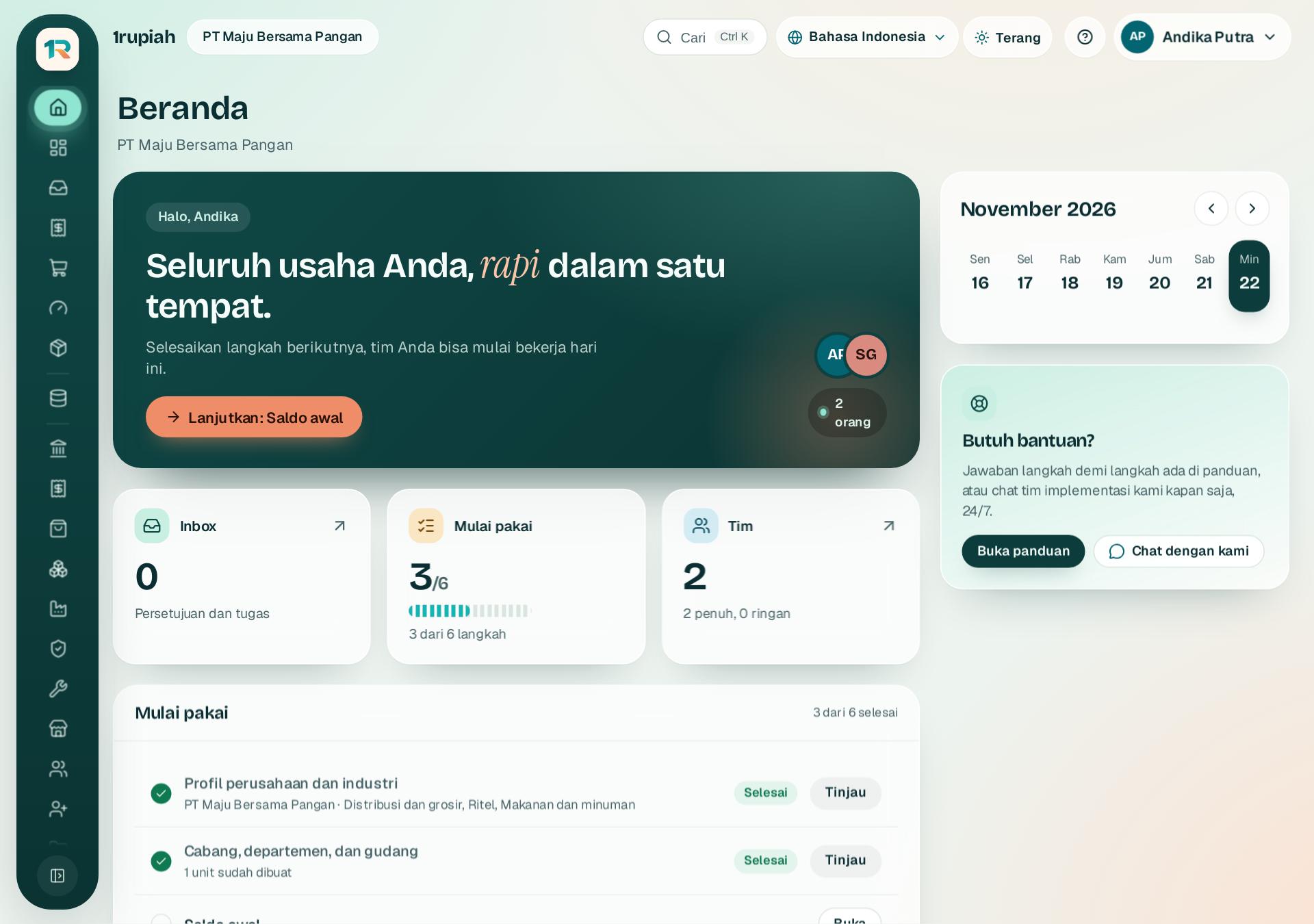
Beranda menyapa Anda dengan langkah berikutnya, angka penting, kalender, dan semua aplikasi yang aktif.
Home greets you with your next step, key figures, the calendar, and every active app.
123
1
Kartu sapaan 1 menampilkan langkah berikutnya. Klik tombol koralnya untuk melanjutkan, misalnya profil perusahaan atau saldo awal.
The welcome card 1 shows your next step. Click its coral button to continue, for example the company profile or opening balances.
2
Daftar Mulai pakai 2 menampilkan ringkasan tiap langkah. Langkah yang selesai tetap bisa dibuka lewat Tinjau.
The Getting started list 2 summarises each step. Finished steps can still be opened with Review.
3
Rel kiri 3 berisi semua aplikasi. Arahkan kursor untuk melihat namanya, atau klik tombol paling bawah untuk melebarkan rel.
The left rail 3 holds every app. Hover to see its name, or click the bottom button to widen the rail.
4
Bahasa, tema terang atau gelap, panduan, dan menu akun selalu ada di kanan atas.
Language, light or dark theme, help, and your account menu are always at the top right.
1rupiah1rupiah · Panduan Pengguna | User Guide
1rupiah · 03
Cari dan pindah cepat dengan Ctrl K
Search and jump with Ctrl K
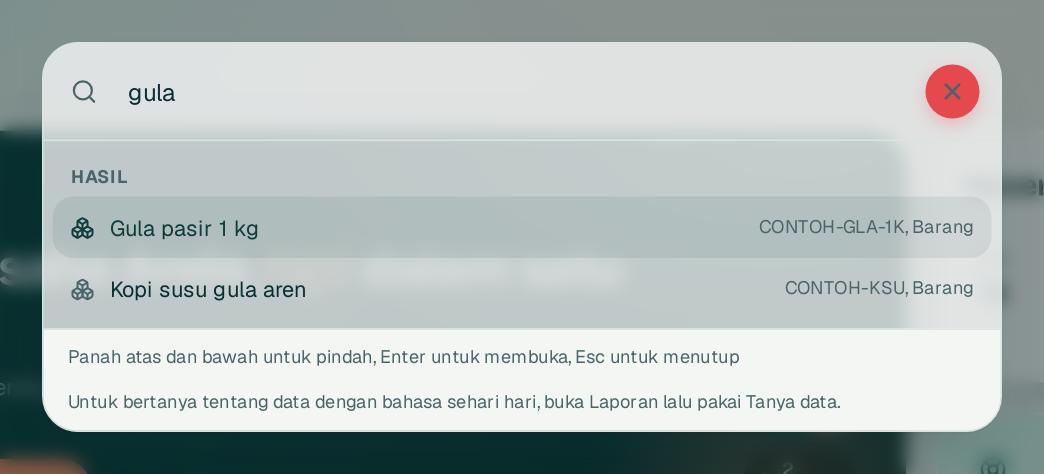
Palet perintah mencari pelanggan, pemasok, barang, dokumen, dan halaman dari mana saja.
The command palette finds customers, suppliers, items, documents, and pages from anywhere.
1
1
Tekan Ctrl dan K bersamaan, atau klik kotak Cari di bilah atas.
Press Ctrl and K together, or click the Search box in the top bar.
2
Ketik nama, kode, NPWP, nomor dokumen, atau barcode di kotak 1. Hasil dikelompokkan: Hasil, Aksi, dan Pergi ke.
Type a name, code, NPWP, document number, or barcode in box 1. Results are grouped into Results, Actions, and Go to.
3
Pilih dengan panah atas dan bawah lalu Enter, atau klik hasilnya. Esc menutup palet.
Pick with the up and down arrows and press Enter, or click a result. Esc closes the palette.
1rupiah1rupiah · Panduan Pengguna | User Guide
1rupiah · 04
Kotak masuk: persetujuan dan tugas
Inbox: approvals and tasks
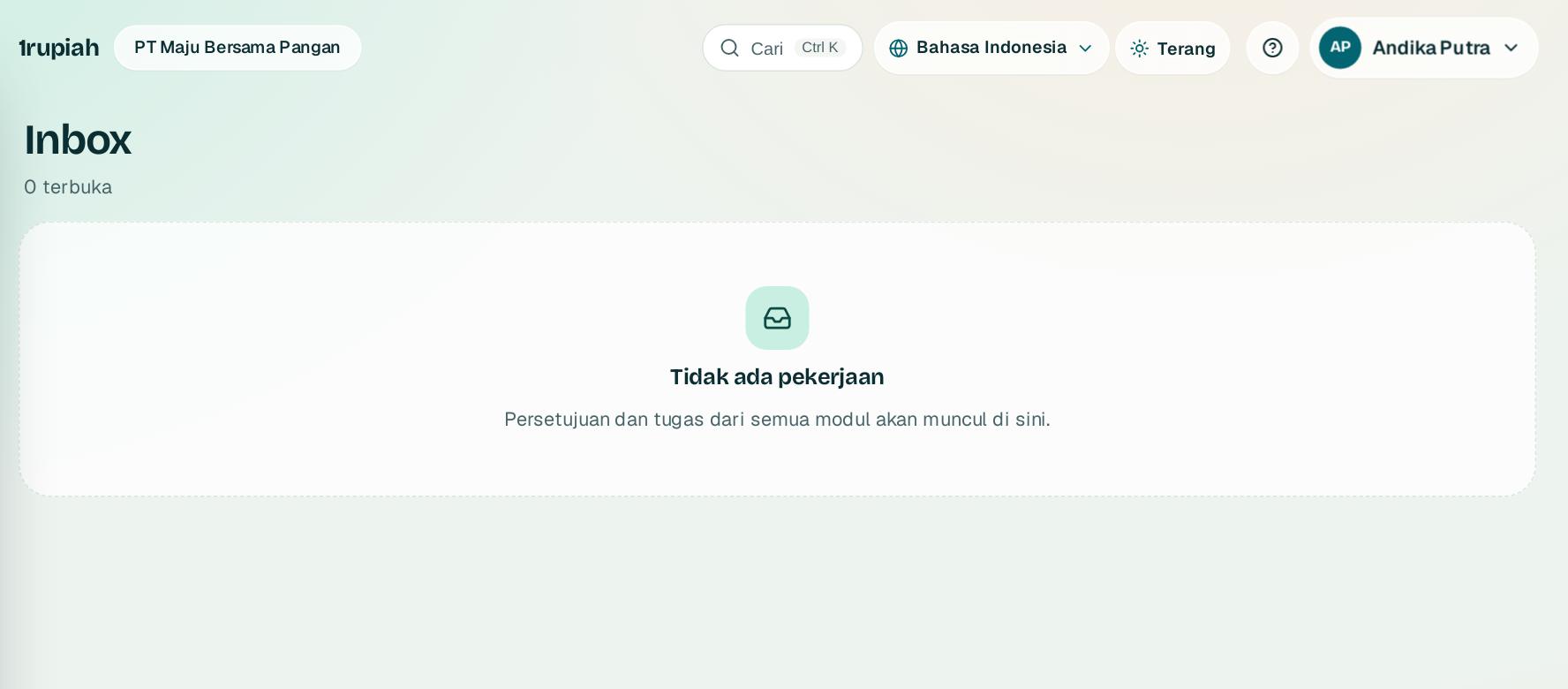
Semua yang menunggu keputusan Anda terkumpul di satu tempat: PO, faktur, klaim, cuti, payroll, dan tugas dari agen.
Everything waiting for your decision lands in one place: purchase orders, invoices, claims, leave, payroll, and agent tasks.
1
Buka Inbox dari rel kiri. Angka di Beranda menunjukkan jumlah yang menunggu.
Open Inbox from the left rail. The number on Home shows how many items are waiting.
2
Buka satu item untuk melihat dokumennya, lalu pilih Setujui, Tolak, atau Minta info. Menolak dan meminta info wajib alasan minimal lima huruf.
Open an item to see its document, then choose Approve, Reject, or Ask for info. Rejecting or asking needs a reason of at least five characters.
3
Banyak item dengan aturan yang sama? Centang semuanya lalu setujui sekaligus.
Several items under the same rule? Tick them all and approve them together.
4
Sedang cuti? Atur pelimpahan di Akun saya, Notifikasi supaya persetujuan tetap berjalan.
Away? Set a delegation in My account, Notifications so approvals keep moving.
1rupiah1rupiah · Panduan Pengguna | User Guide
1rupiah · 05
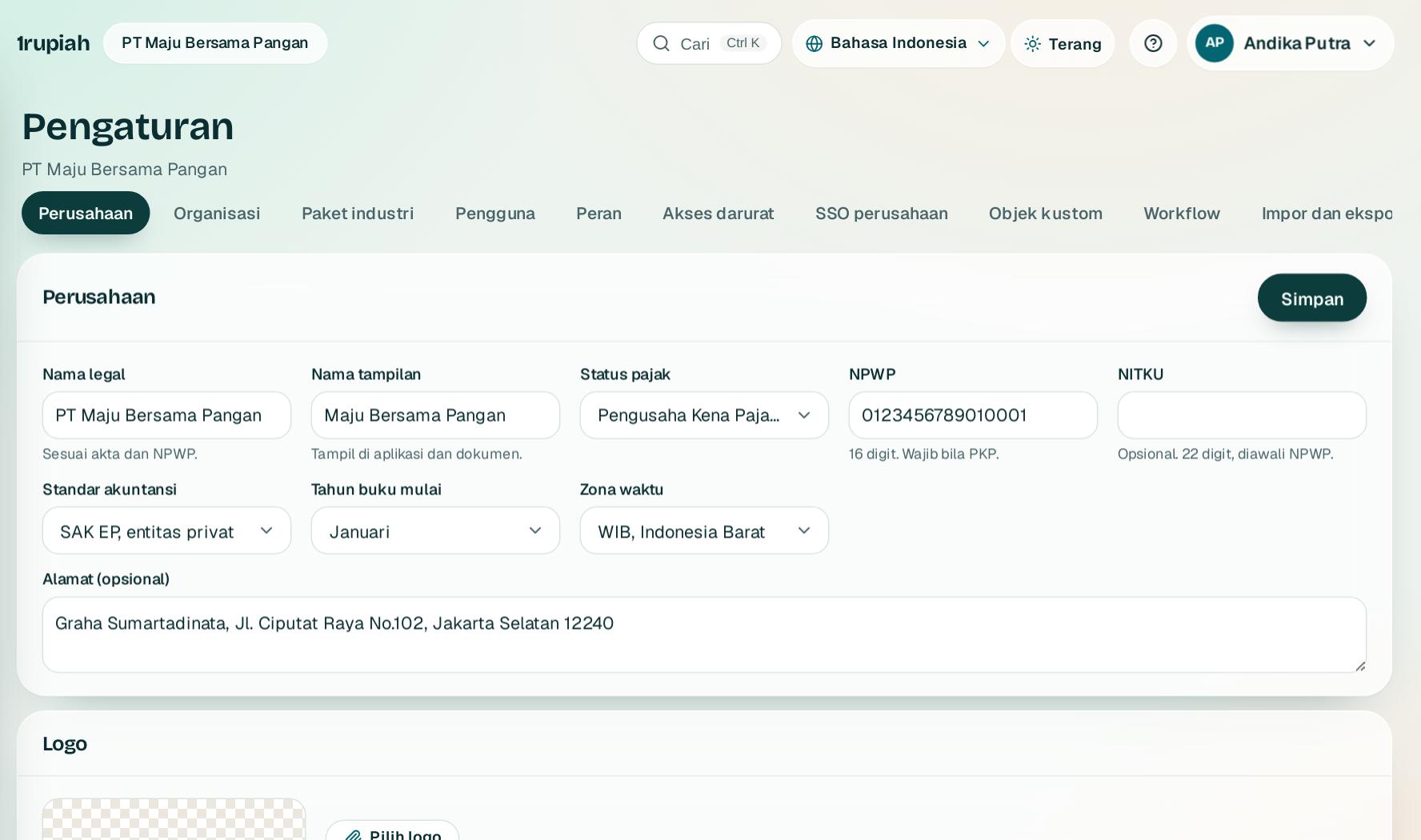
Profil perusahaan dan pajak
Company profile and tax
Data ini tampil di faktur, PO, slip gaji, dan menentukan cara PPN dihitung.
This data appears on invoices, purchase orders, and payslips, and decides how VAT is calculated.
123
1
Buka Pengaturan, tab Perusahaan. Isi nama legal sesuai akta dan nama tampilan.
Open Settings, Company tab. Fill in the legal name from the deed and the display name.
2
Pilih status pajak 1: Bukan PKP, PKP, atau PBJT untuk restoran dan hotel.
Choose the tax status 1: not VAT registered, VAT registered (PKP), or PBJT for restaurants and hotels.
3
PKP wajib mengisi NPWP 16 digit di 2. Isi juga NITKU bila punya cabang.
VAT registered companies must fill in the 16 digit NPWP at 2. Add the NITKU if you have branches.
4
Klik Simpan3. Di halaman yang sama Anda bisa memasang logo, penerima Laporan Bulanan otomatis, dan akses Dasbor Pemilik.
Click Save3. The same page sets the logo, recipients of the automatic Monthly Report, and Owner dashboard access.
Tips Setiap perubahan tercatat di Riwayat perubahan di bagian bawah halaman.
Tip Every change is recorded in the change history at the bottom of the page.
1rupiah1rupiah · Panduan Pengguna | User Guide
1rupiah · 06
Cabang, gudang, dan outlet
Branches, warehouses, and outlets
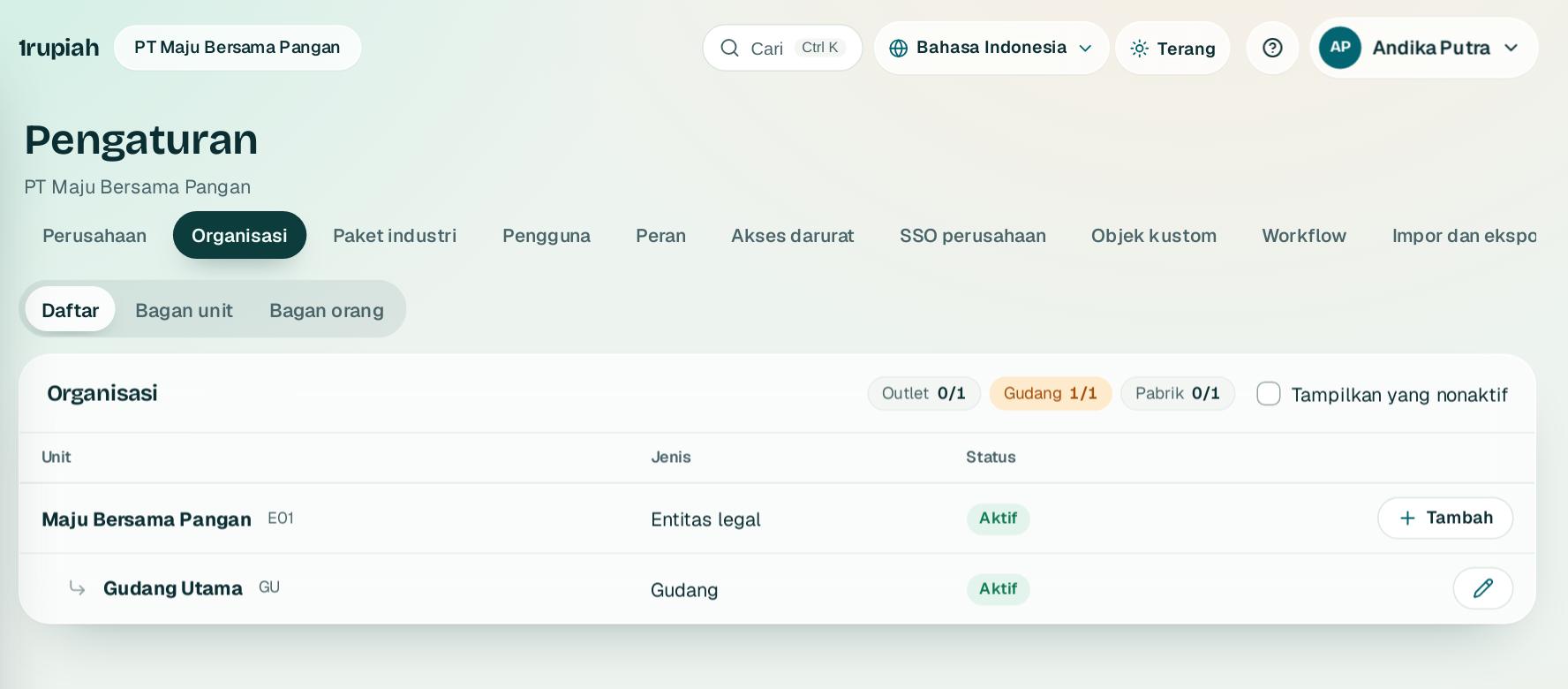
Susun pohon organisasi tempat setiap transaksi tercatat.
Build the organisation tree every transaction belongs to.
12
1
Buka Pengaturan, Organisasi lalu klik Tambah1.
Open Settings, Organization and click Add1.
2
Pilih jenis unit: cabang, departemen, gudang, outlet, atau pabrik, lalu induknya. Kode harus unik.
Choose the unit type: branch, department, warehouse, outlet, or factory, then its parent. Codes must be unique.
3
Lihat strukturnya sebagai bagan dengan Bagan unit2 atau Bagan orang, lalu ekspor ke PNG, SVG, atau PDF.
See the structure as a chart with Unit chart2 or People chart, then export it to PNG, SVG, or PDF.
4
Unit yang tidak dipakai dinonaktifkan, bukan dihapus, supaya riwayatnya tetap ada.
Units no longer used are deactivated, not deleted, so their history stays.
1rupiah1rupiah · Panduan Pengguna | User Guide
1rupiah · 07
Undang pengguna dan atur peran
Invite users and set roles
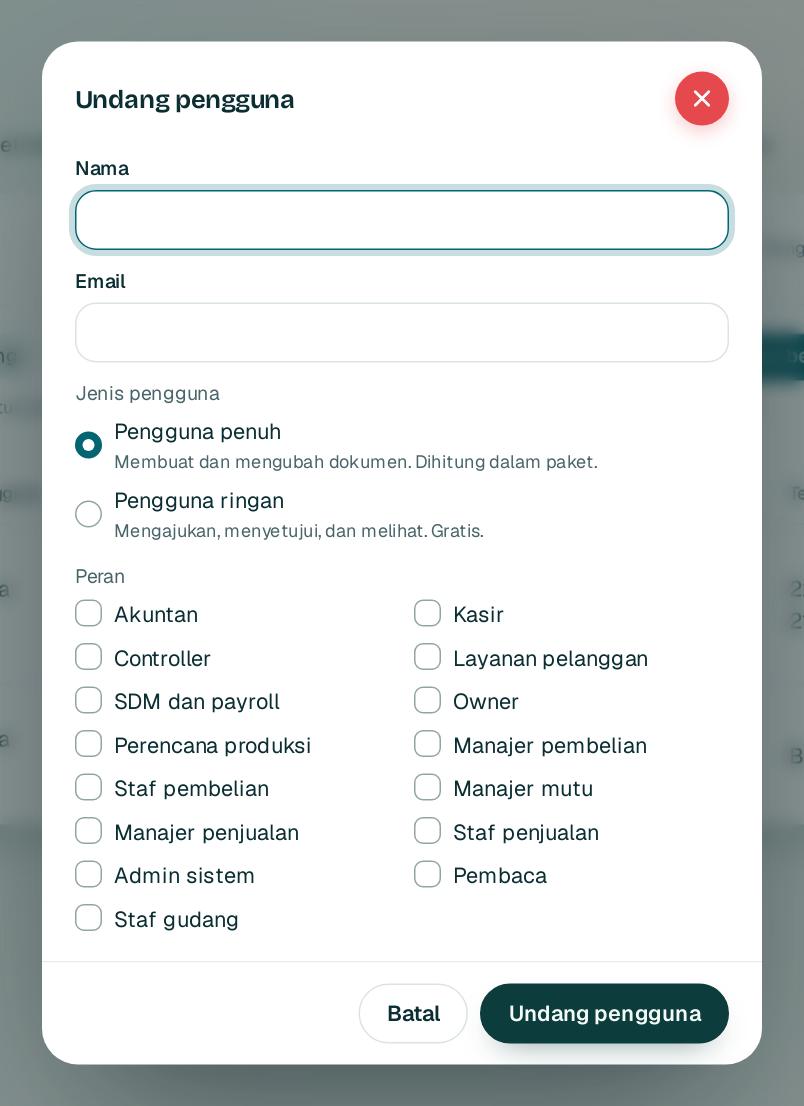
Beri setiap orang akses sesuai pekerjaannya. Pengguna ringan gratis.
Give each person exactly the access their work needs. Light users are free.
123
1
Buka Pengaturan, Pengguna lalu klik Undang pengguna.
Open Settings, Users and click Invite user.
2
Isi nama dan email 1.
Fill in the name and email 1.
3
Pilih jenis pengguna 2: penuh untuk yang membuat dokumen, ringan untuk yang hanya mengajukan, menyetujui, atau melihat.
Pick the user type 2: full for people who create documents, light for people who only request, approve, or view.
4
Centang satu atau lebih peran, lalu klik Undang pengguna3. Undangan berlaku 7 hari.
Tick one or more roles, then click Invite user3. The invitation is valid for 7 days.
Tips Bila satu orang bisa membuat sekaligus menyetujui transaksi yang sama, sistem meminta alasan dan mencatatnya di jejak audit.
Tip If one person could both create and approve the same transaction, the system asks for a reason and records it in the audit trail.
1rupiah1rupiah · Panduan Pengguna | User Guide
1rupiah · 08
Batasi data per cabang, gudang, atau proyek
Limit data by branch, warehouse, or project
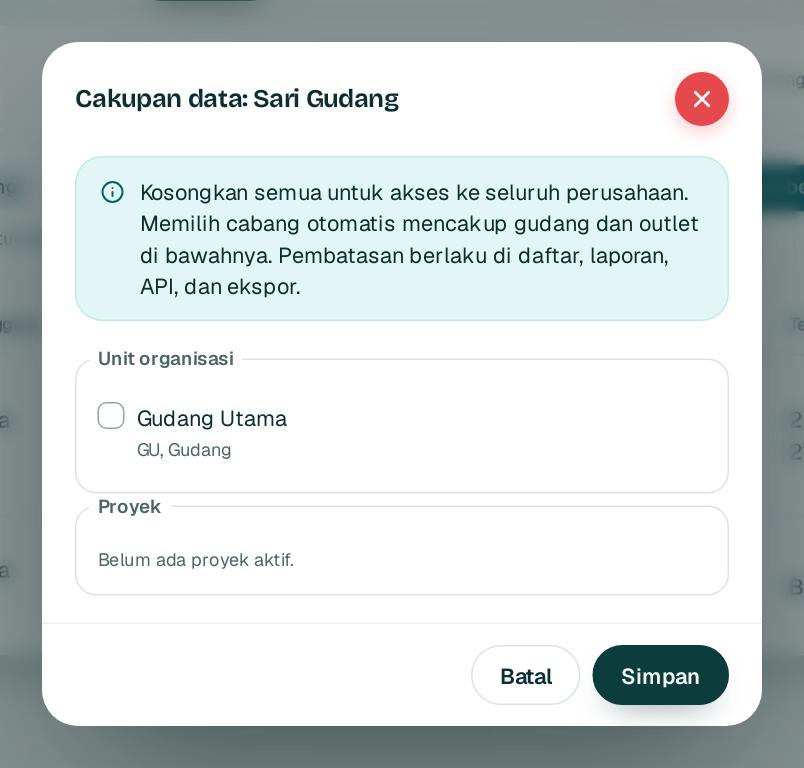
Staf cabang hanya melihat dan mengubah dokumen cabangnya sendiri.
Branch staff only see and change their own branch documents.
123
1
Buka Pengaturan, Pengguna lalu klik Cakupan data di baris orangnya.
Open Settings, Users and click Data scope on that person.
2
Centang cabang, gudang, atau outlet 1. Cabang ikut mencakup gudang dan outlet di bawahnya.
Tick branches, warehouses, or outlets 1. A branch includes the warehouses and outlets below it.
3
Centang proyek bila perlu 2, lalu simpan 3. Kosongkan semua untuk akses seluruh perusahaan.
Tick projects if needed 2, then save 3. Clear everything for access to the whole company.
Tips Pembatasan ditegakkan di basis data, jadi berlaku di daftar, laporan, ekspor, dan API.
Tip The restriction is enforced in the database, so it applies to lists, reports, exports, and the API.
1rupiah1rupiah · Panduan Pengguna | User Guide
1rupiah · 09
Aturan persetujuan
Approval rules
Tentukan siapa yang wajib setuju menurut jenis dokumen, nilai, dan kategori.
Decide who must approve by document type, value, and category.
123
1
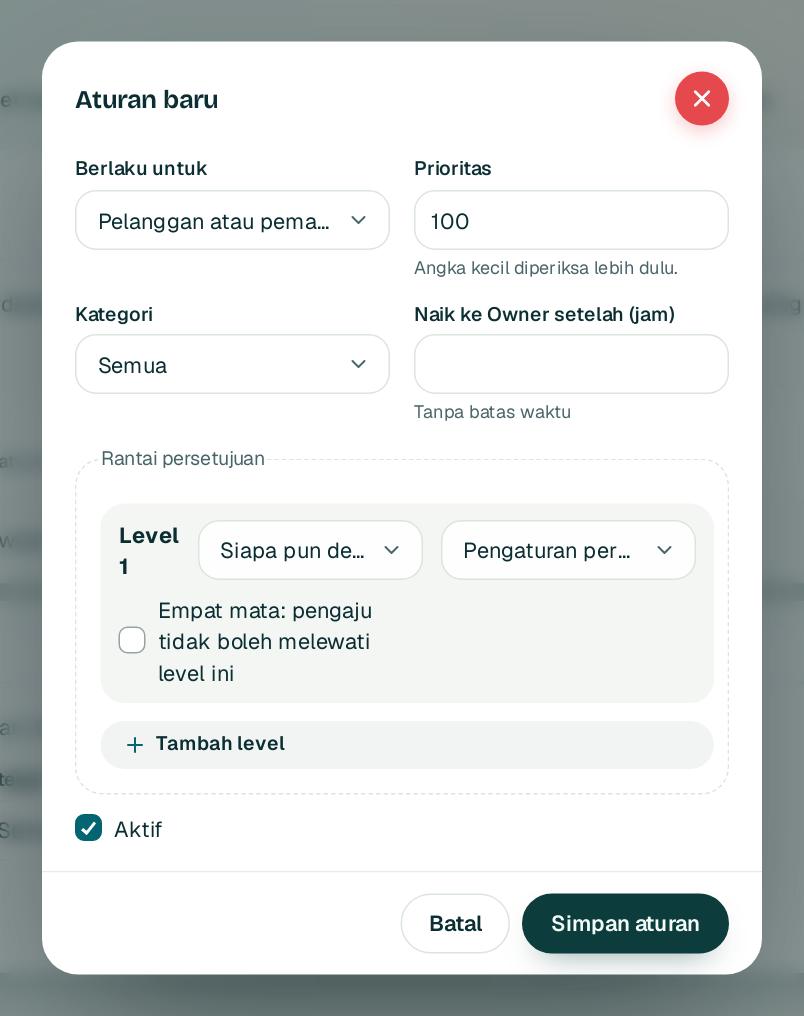
Buka Pengaturan, Persetujuan lalu klik Aturan baru.
Open Settings, Approvals and click New rule.
2
Pilih dokumen di 1, lalu rentang nilai dan kategorinya.
Choose the document at 1, then the value range and category.
3
Susun rantai dengan Tambah level2. Tiap level adalah satu izin atau satu orang.
Build the chain with Add level2. Each level is one permission or one person.
4
Centang empat mata 3 agar pengaju tidak bisa melewati level itu, isi batas jam naik ke Owner, lalu Simpan aturan.
Tick four eyes 3 so the requester cannot skip that level, set the hours before it escalates to Owners, then Save rule.
Tips Pakai Pratinjau rantai untuk melihat siapa yang akan menyetujui suatu nilai sebelum aturan disimpan.
Tip Use the chain preview to see who would approve a given value before you save the rule.
1rupiah1rupiah · Panduan Pengguna | User Guide
1rupiah · 10
Pelanggan, pemasok, dan barang
Customers, suppliers, and items
Satu daftar rapi yang dipakai semua dokumen. Data mirip langsung terdeteksi.
One clean list used by every document. Look alike records are flagged as you type.
123
1
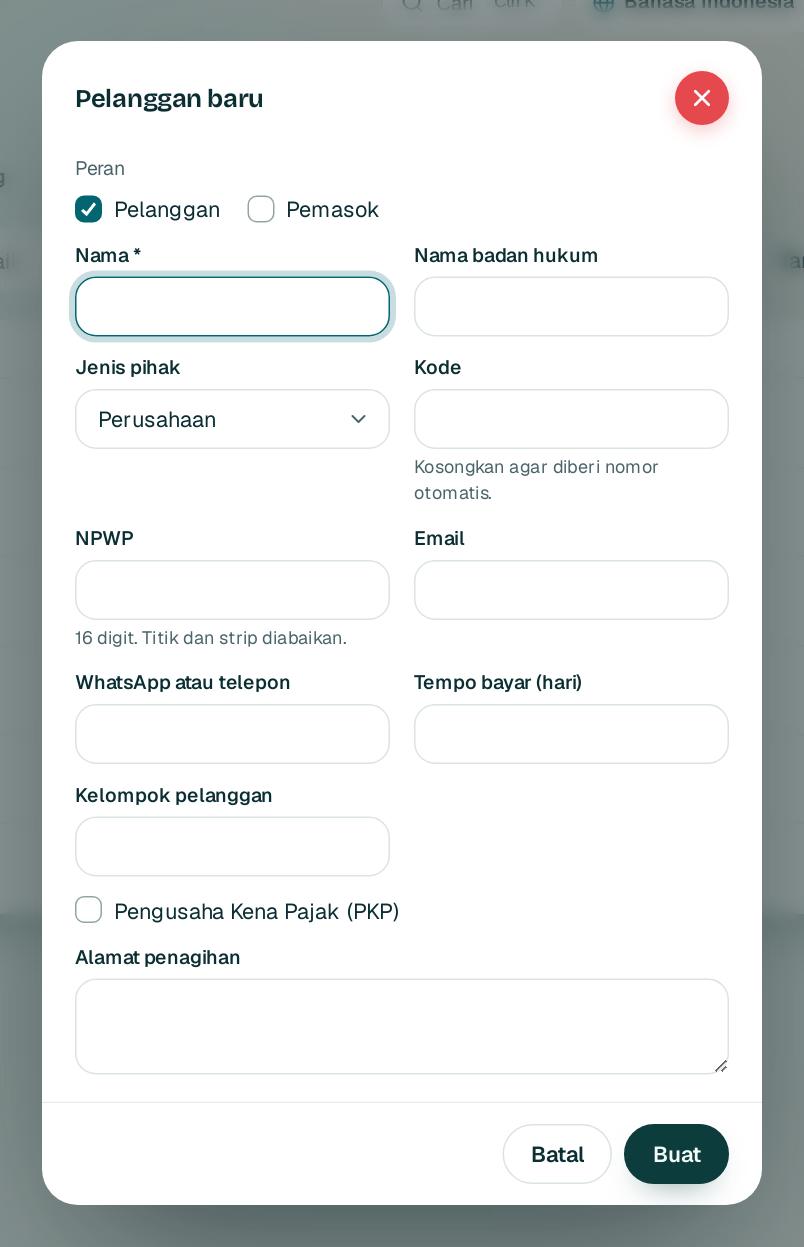
Buka Data induk, pilih tab Pelanggan, Pemasok, atau Barang, lalu klik tombol baru.
Open Master data, choose the Customers, Suppliers, or Items tab, then click the new button.
2
Isi nama 1. Saat mengetik, data yang mirip muncul. Bila sama, buka data itu dan jangan membuat kembar.
Type the name 1. Similar records appear as you type. If one is the same, open it instead of creating a duplicate.
3
Isi NPWP 2 untuk pelanggan PKP supaya Faktur Pajak lengkap, lalu tempo bayar dan alamat penagihan.
Add the NPWP 2 for VAT registered customers so tax invoices are complete, then payment terms and billing address.
4
Klik Buat3. Data baru menunggu persetujuan dan bisa dipantau di tab Permintaan.
Click Create3. New records wait for approval and can be tracked in the Requests tab.
Tips NPWP atau barcode yang sama ditolak. Admin bisa menggabung data ganda selama belum dipakai dokumen.
Tip The same NPWP or barcode is blocked. Admins can merge duplicates as long as they are not used on documents yet.
1rupiah1rupiah · Panduan Pengguna | User Guide
1rupiah · 11
Impor data dari Excel
Import data from Excel
Pindahkan daftar pelanggan, pemasok, dan barang dari Excel atau sistem lama.
Bring customer, supplier, and item lists from Excel or another system.
12
1
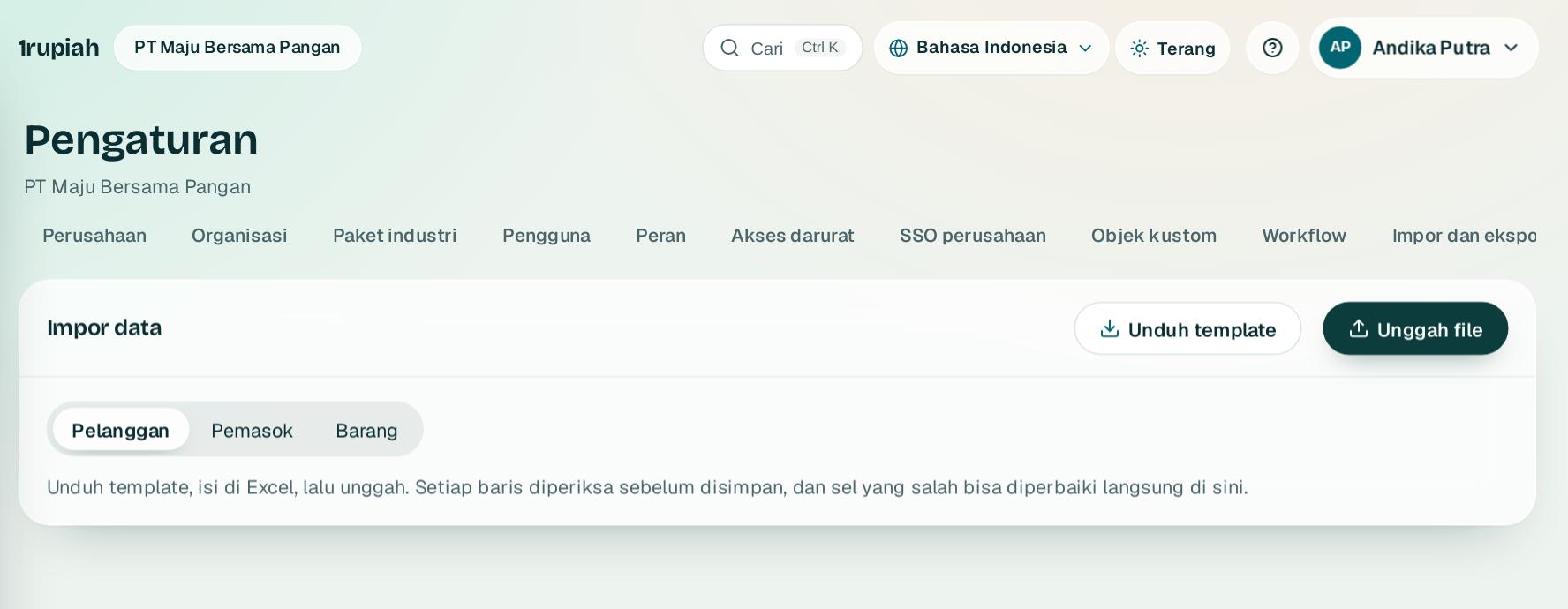
Buka Pengaturan, Impor data dan pilih jenis datanya.
Open Settings, Import data and choose the data type.
2
Klik Unduh template1, lalu isi di Excel.
Click Download template1 and fill it in Excel.
3
Klik Unggah file2 dan pilih file .xlsx atau .csv. File dibaca di browser Anda.
Click Upload file2 and choose the .xlsx or .csv file. It is read in your browser.
4
Perbaiki sel merah langsung di grid, lalu impor baris yang valid. Maksimal 5.000 baris sekali impor.
Fix red cells directly in the grid, then import the valid rows. Up to 5,000 rows per import.
1rupiah1rupiah · Panduan Pengguna | User Guide
1rupiah · 12
Penomoran dokumen
Document numbering
Atur format nomor setiap dokumen sesuai kebiasaan perusahaan Anda.
Set the number format of every document to match your company habits.
1
1
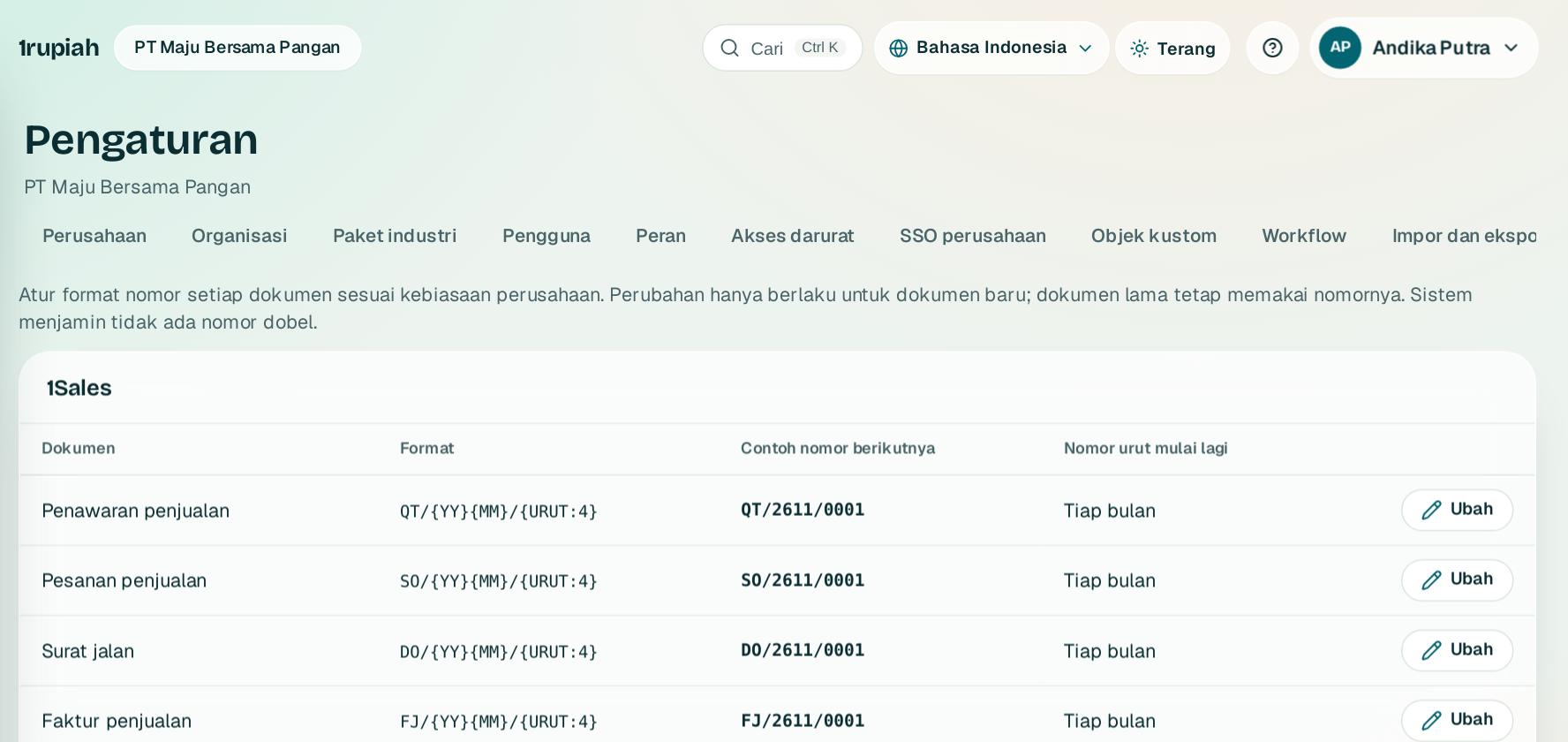
Buka Pengaturan, Penomoran dokumen. Dokumen dikelompokkan per aplikasi.
Open Settings, Document numbering. Documents are grouped by app.
2
Klik Ubah1 pada dokumen yang ingin diatur.
Click Edit1 on the document you want to change.
3
Susun format dengan isian YYYY, YY, MM, BULAN_ROMAWI, DD, URUT:n, dan OUTLET untuk struk kasir. Contoh nomor berikutnya tampil langsung.
Build the format with YYYY, YY, MM, BULAN_ROMAWI, DD, URUT:n, and OUTLET for cashier receipts. A preview of the next number appears straight away.
4
Pilih kapan nomor urut mulai lagi: tidak pernah, tiap tahun, atau tiap bulan.
Choose when the sequence restarts: never, every year, or every month.
Tips Nomor tidak pernah dobel walau dua orang menyimpan bersamaan.
Tip Numbers are never duplicated, even when two people save at the same time.
1rupiah1rupiah · Panduan Pengguna | User Guide
1rupiah · 13
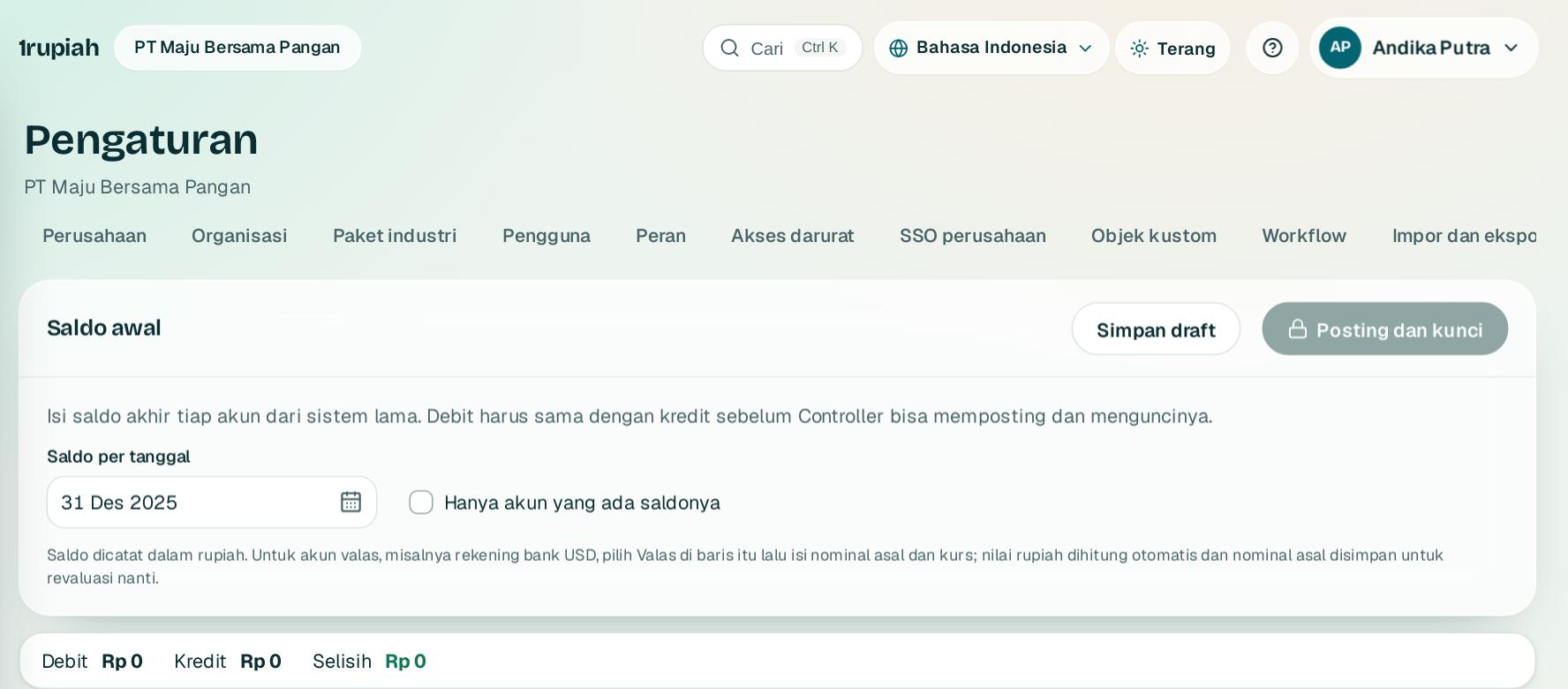
Saldo awal
Opening balances
Mulai pembukuan dengan saldo akhir dari sistem sebelumnya.
Start the books with the closing balances from your previous system.
1
Buka Pengaturan, Saldo awal dan pilih tanggal saldo.
Open Settings, Opening balances and choose the balance date.
2
Isi saldo setiap akun di kolom Debit atau Kredit. Bilah atas menunjukkan total dan selisih saat Anda mengetik.
Enter each account in the Debit or Credit column. The top bar shows the totals and difference as you type.
3
Akun aset dan liabilitas valas punya tombol Valas untuk mengisi nominal dan kurs.
Foreign currency asset and liability accounts have a Foreign currency button for the amount and rate.
4
Klik Simpan draft, lalu Controller memilih Posting dan kunci setelah selisih nol. Sesudah itu koreksi lewat jurnal penyesuaian.
Click Save draft, then a Controller chooses Post and lock once the difference is zero. After that, corrections go through adjusting journals.
1rupiah1rupiah · Panduan Pengguna | User Guide
1rupiah · 14
Integrasi: konektor dan webhook
Integrations: connectors and webhooks
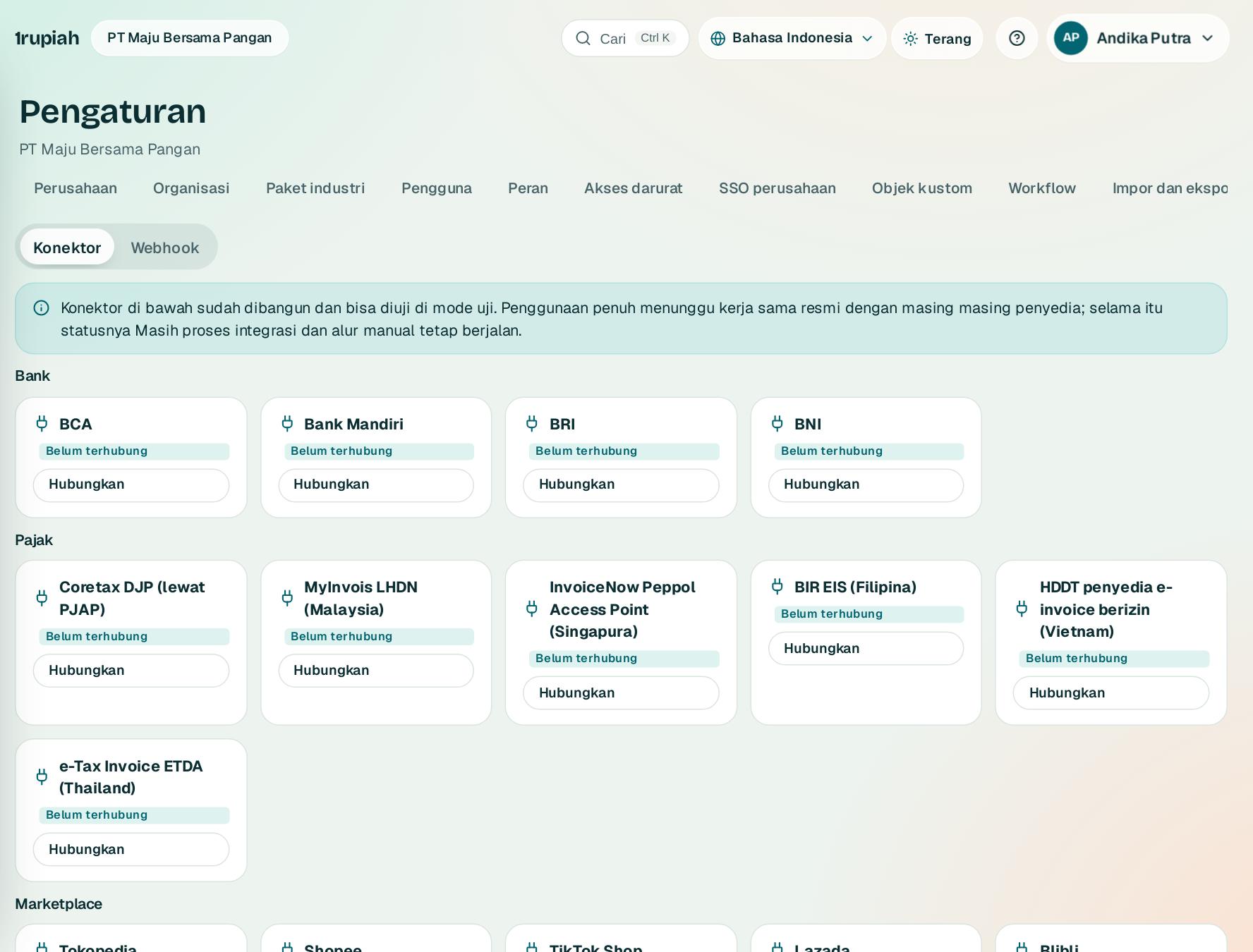
Hubungkan bank, Coretax, marketplace, kurir, dan sistem lain.
Connect banks, Coretax, marketplaces, couriers, and other systems.
123
1
Buka Pengaturan, Integrasi 1. Konektor dikelompokkan per jenis penyedia.
Open Settings, Integrations 1. Connectors are grouped by provider type.
2
Pilih penyedia 2 lalu isi kredensialnya. Kredensial disimpan terenkripsi.
Pick a provider 2 and fill in its credentials. Credentials are stored encrypted.
3
Status Masih proses integrasi berarti kerja sama resmi dengan penyedia sedang berjalan; mode uji dan alur manual tetap bisa dipakai.
The status Integration in progress means the official agreement with the provider is under way; test mode and the manual flow still work.
4
Tab Webhook 3 mengabari sistem lain setiap ada peristiwa bisnis, ditandatangani HMAC dan diulang otomatis bila gagal.
The Webhook tab 3 notifies other systems of every business event, signed with HMAC and retried automatically on failure.
1rupiah1rupiah · Panduan Pengguna | User Guide
1rupiah · 15
API untuk integrasi sistem lain
API for integrating other systems
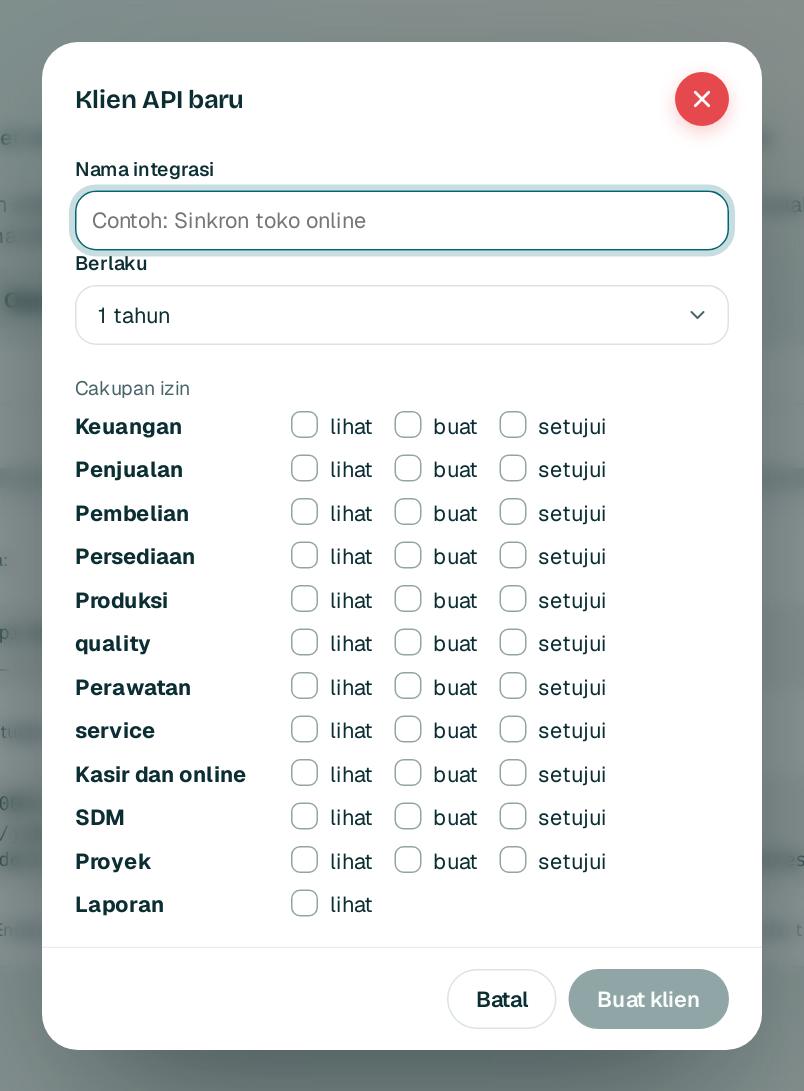
Beri akses mesin ke mesin dengan cakupan izin yang Anda pilih.
Give machine to machine access with the scopes you choose.
123
1
Buka Pengaturan, API lalu Klien API baru. Beri nama integrasi 1.
Open Settings, API and choose New API client. Name the integration 1.
2
Centang cakupan izin 2. Anda hanya bisa memberi izin yang Anda pegang sendiri.
Tick the scopes 2. You can only give permissions you hold yourself.
3
Klik Buat klien3 lalu salin rahasianya. Rahasia hanya tampil sekali.
Click Create client3 and copy the secret. It is shown only once.
4
Pakai kunci langsung atau OAuth2 client credentials. Spesifikasi lengkap ada di tautan OpenAPI di halaman yang sama.
Use the key directly or OAuth2 client credentials. The full specification is in the OpenAPI link on the same page.
1rupiah1rupiah · Panduan Pengguna | User Guide
1rupiah · 16
Audit dan pemisahan tugas
Audit and segregation of duties
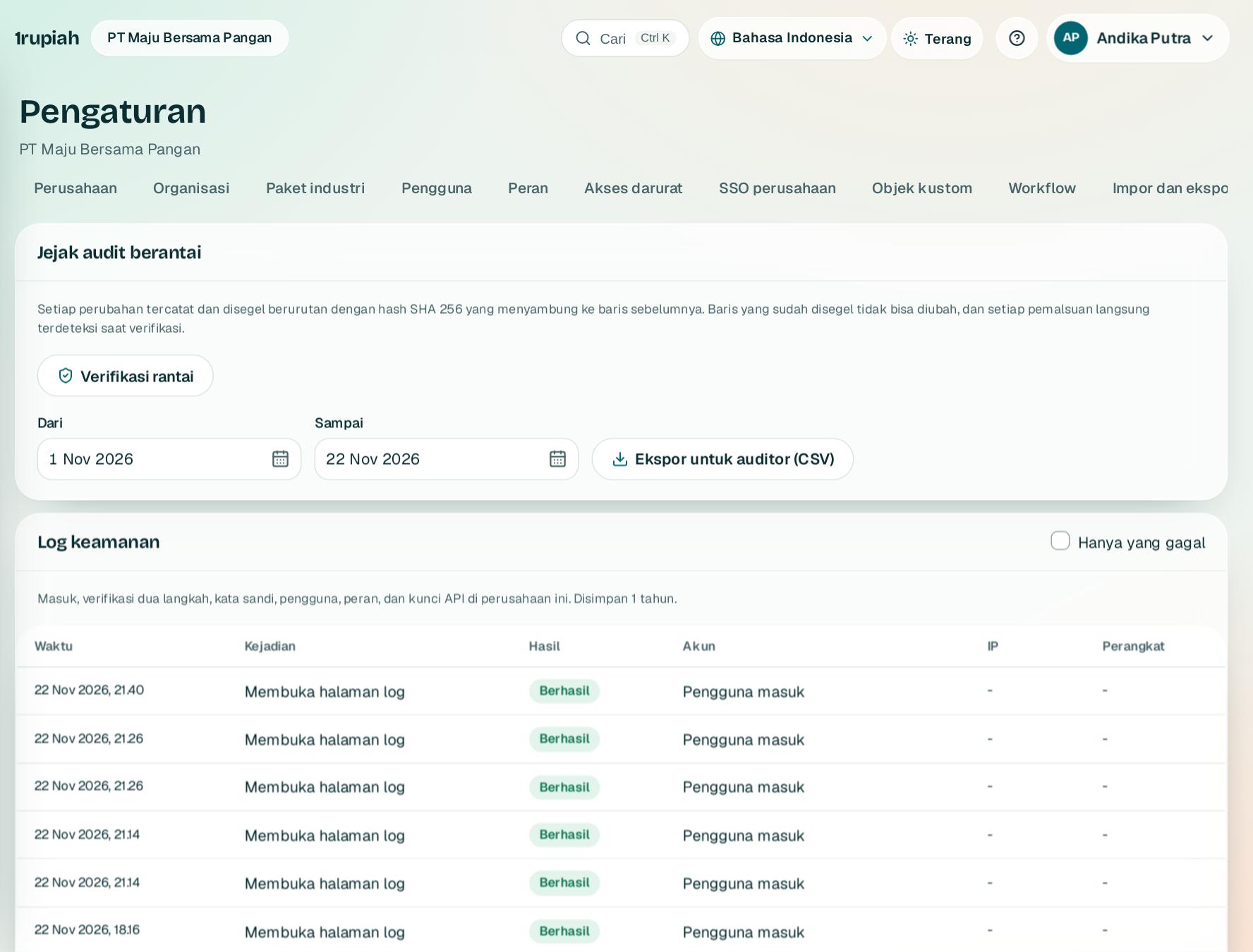
Buktikan jejak audit utuh dan kendalikan konflik akses.
Prove the audit trail is intact and control access conflicts.
123
1
Buka Pengaturan, Audit dan SoD. Klik Verifikasi rantai1 untuk memeriksa bahwa tidak ada catatan yang diubah.
Open Settings, Audit and SoD. Click Verify chain1 to check that no record was changed.
2
Unduh jejak audit untuk auditor 2 per rentang tanggal, lengkap dengan hash setiap baris.
Download the audit trail for auditors 2 by date range, with the hash of every row.
3
Log keamanan 3 mencatat masuk, verifikasi dua langkah, kata sandi, pengguna, peran, dan kunci API. Centang Hanya yang gagal untuk melihat percobaan yang ditolak.
The security log 3 records sign ins, two step verification, passwords, users, roles, and API keys. Tick Failures only to see refused attempts.
4
Gulir ke pemisahan tugas dan tinjau pelanggaran saat ini. Beri mitigasi dengan kontrol pengganti dan batas waktu bila konflik memang diterima.
Scroll to segregation of duties and review the current violations. Add a mitigation with a compensating control and an end date if the conflict is accepted.
5
Mulai ulasan akses setiap kuartal: putuskan tetap atau cabut untuk setiap orang, lalu tutup ulasannya.
Start an access review every quarter: decide keep or revoke for each person, then close the review.
1rupiah1rupiah · Panduan Pengguna | User Guide
1rupiah · 17
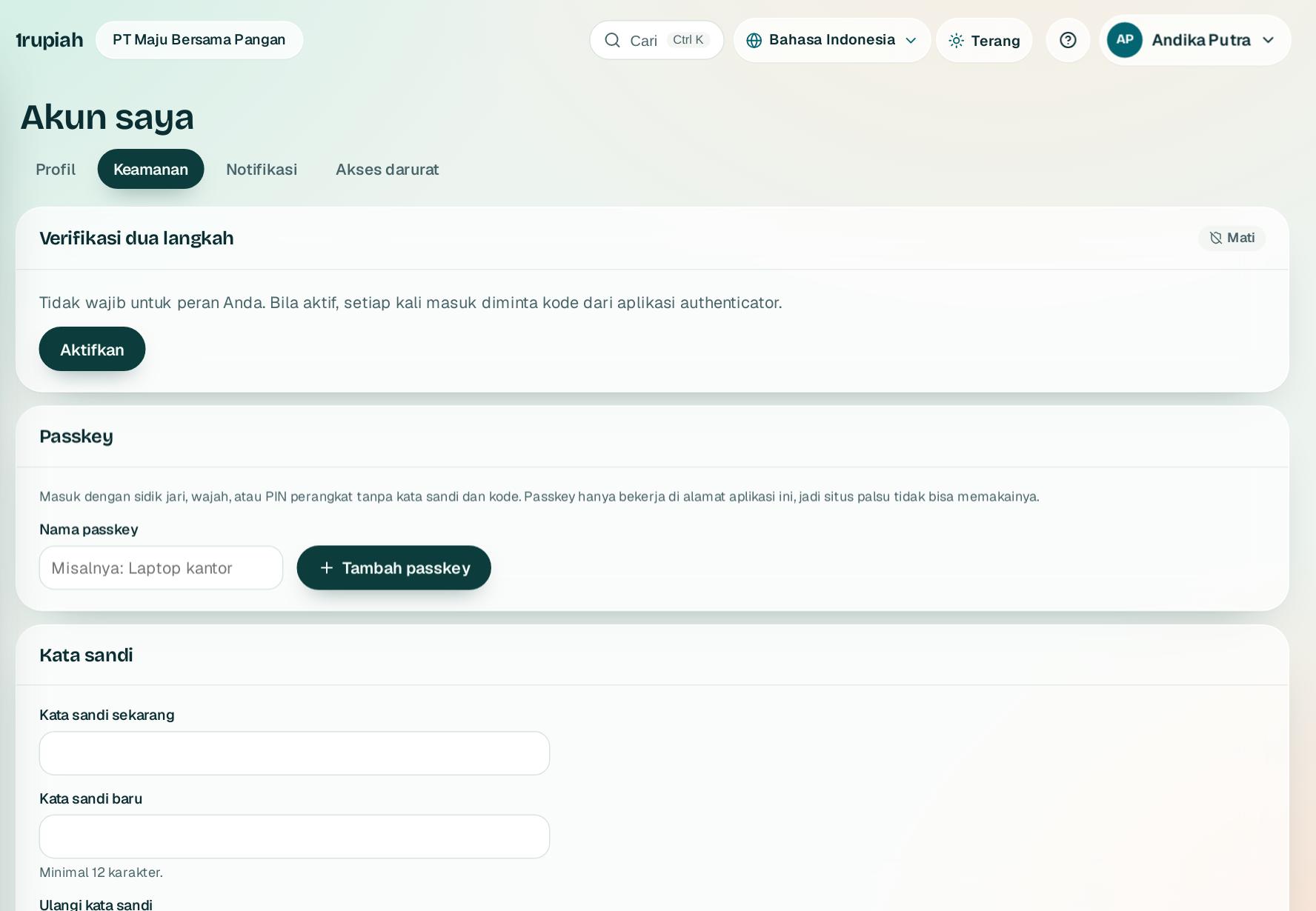
Akun saya dan keamanan
My account and security
Aktifkan passkey dan verifikasi dua langkah supaya akun tidak bisa dipakai orang lain.
Turn on passkeys and two step verification so nobody else can use your account.
12
1
Klik nama Anda di kanan atas, pilih Akun saya, lalu tab Keamanan.
Click your name at the top right, choose My account, then the Security tab.
2
Klik Aktifkan1 untuk verifikasi dua langkah dan pindai kode QR dengan aplikasi authenticator.
Click Turn on1 for two step verification and scan the QR code with an authenticator app.
3
Klik Tambah passkey2 agar bisa masuk dengan sidik jari, wajah, atau PIN perangkat tanpa kata sandi.
Click Add a passkey2 to sign in with your fingerprint, face, or device PIN without a password.
4
Ganti kata sandi di bagian Kata sandi di bawahnya. Perangkat lain otomatis dikeluarkan.
Change your password in the Password section below. Other devices are signed out automatically.
1rupiah1rupiah · Panduan Pengguna | User Guide
1rupiah · 18
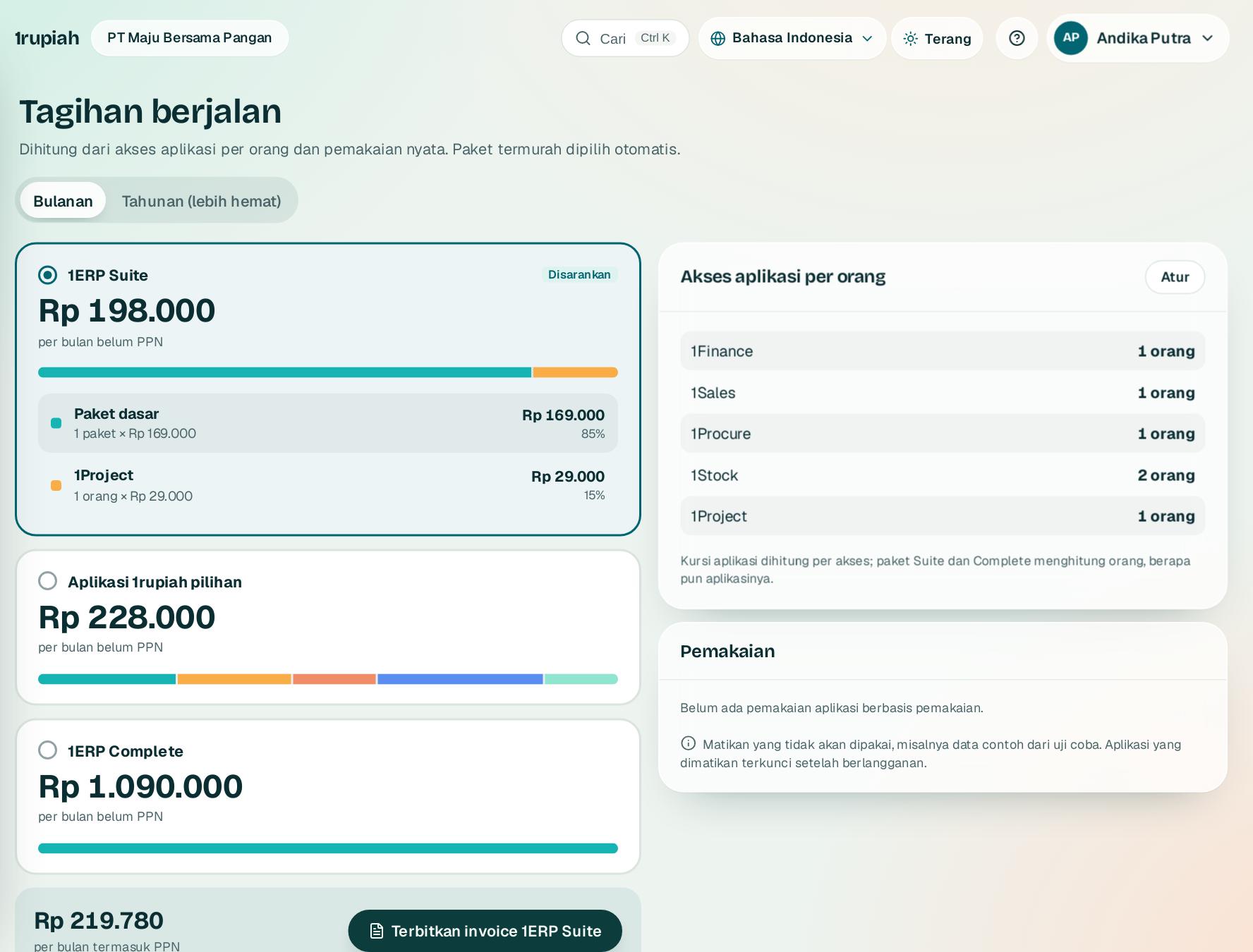
Paket, tagihan, dan pembayaran
Plans, billing, and payment
Lihat tagihan berjalan sesuai pemakaian dan bayar dengan transfer ke rekening resmi.
See the running bill based on usage and pay by transfer to the official account.
1
1
Buka menu akun lalu Tagihan. Pilihan termurah ditandai Disarankan.
Open the account menu and choose Billing. The cheapest option is marked Recommended.
2
Pilih siklus Bulanan atau Tahunan 1. Tahunan dibayar di muka dan lebih hemat.
Choose Monthly or Yearly 1. Yearly is paid upfront and costs less.
3
Klik Terbitkan invoice pada pilihan yang Anda inginkan. Invoice INV/1R dikirim ke email Anda.
Click Issue invoice on the option you want. An INV/1R invoice is emailed to you.
4
Transfer ke rekening PT Satu Rupiah Indonesia di halaman pesanan, lalu klik Saya sudah transfer dan lampirkan bukti. Kwitansi dikirim setelah dikonfirmasi.
Transfer to the PT Satu Rupiah Indonesia account on the order page, then click I have paid and attach the proof. The receipt follows once confirmed.
Tips Uji coba berakhir menjadi 1ERP Gratis. Data tetap aman dan aplikasi berbayar terbuka lagi setelah bayar.
Tip When the trial ends the account becomes 1ERP Free. Your data stays safe and paid apps open again once you pay.
1rupiah1rupiah · Panduan Pengguna | User Guide
1rupiah · 19
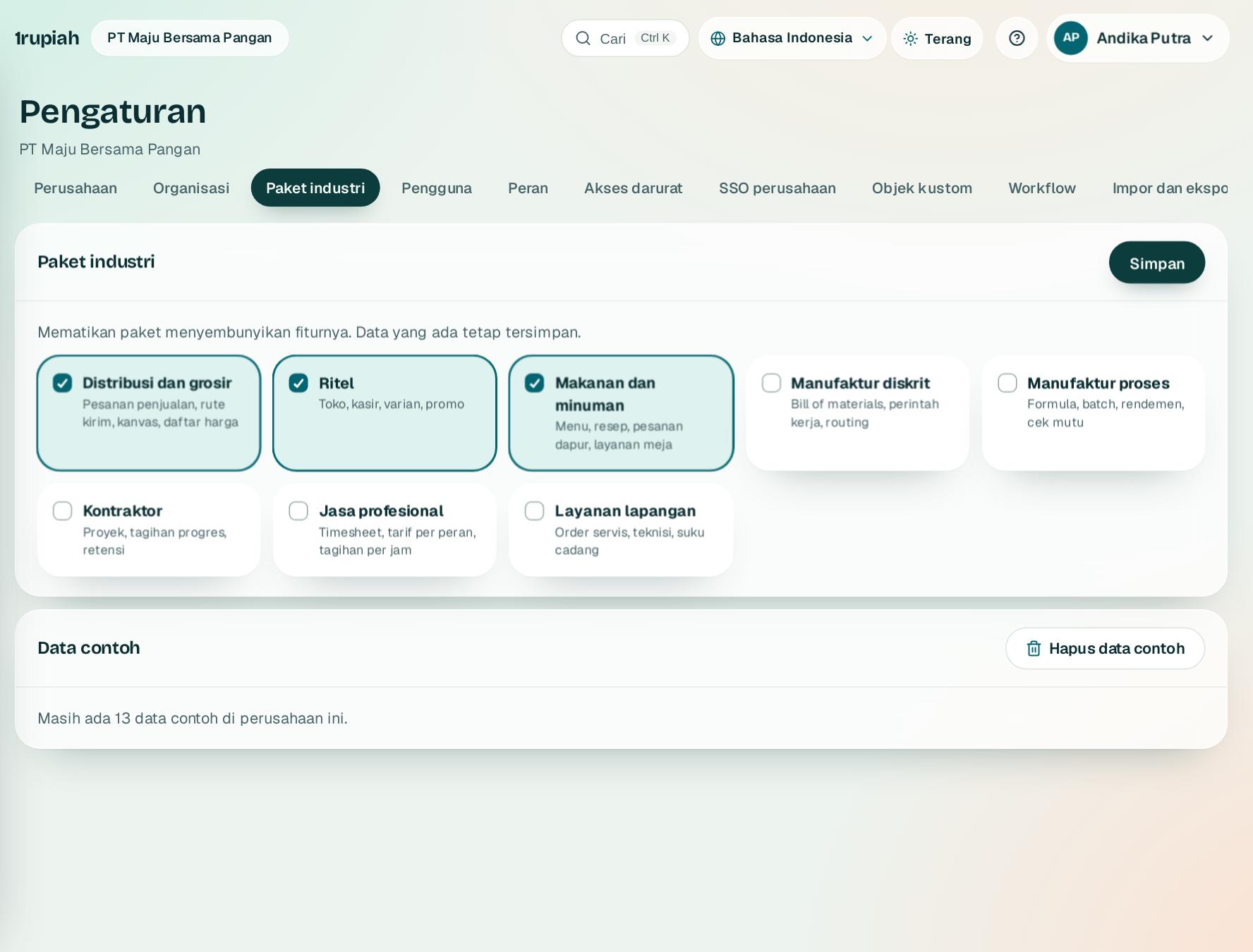
Paket industri dan data contoh
Industry packs and sample data
Aktifkan istilah, akun, dan menu yang cocok untuk jenis usaha Anda.
Turn on the terms, accounts, and menus that fit your type of business.
123
1
Buka Pengaturan, Paket industri1 dan centang paket yang sesuai, misalnya distribusi, ritel, atau makanan dan minuman. Tekan Simpan.
Open Settings, Industry packs1 and tick the packs that fit, for example distribution, retail, or food and beverage. Press Save.
2
Bagian Data contoh2 menunjukkan apakah data latihan masih ada di perusahaan Anda.
The Sample data section 2 shows whether practice data is still in your company.
3
Sebelum mulai transaksi sungguhan, tekan Hapus data contoh3. Data yang Anda buat sendiri tidak ikut terhapus.
Before real transactions begin, press Remove sample data3. Data you created yourself is kept.
1rupiah1rupiah · Panduan Pengguna | User Guide
1rupiah · 20
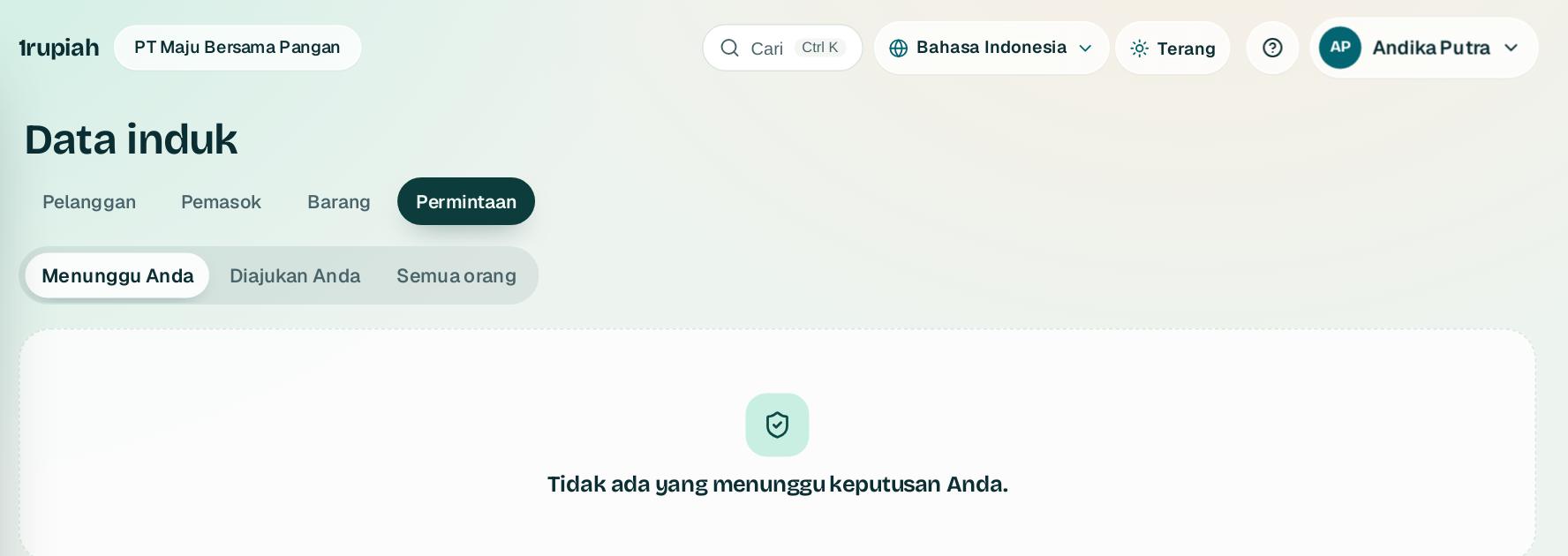
Persetujuan data induk
Master data approval
Pemasok dan barang baru bisa diwajibkan disetujui sebelum dipakai di transaksi.
New suppliers and items can require approval before they are used in transactions.
123
1
Pemasok dan barang yang diajukan berstatus Menunggu di daftar Data induk. Pemasok baru tampil sebagai belum terverifikasi.
Submitted suppliers and items show as Pending in Master data. New suppliers appear as not yet verified.
2
Buka Data induk, Permintaan. Tab Menunggu Anda1 berisi pengajuan yang perlu keputusan Anda; Diajukan Anda2 untuk memantau pengajuan sendiri.
Open Master data, Requests. The Waiting for you tab 1 lists submissions that need your decision; Submitted by you2 tracks your own.
3
Semua orang3 menampilkan seluruh pengajuan bagi admin. Setujui atau tolak dengan alasan; keputusan tercatat di jejak audit.
Everyone3 shows all submissions for admins. Approve or reject with a reason; the decision is recorded in the audit trail.
1rupiah1rupiah · Panduan Pengguna | User Guide
1rupiah · 21
Peran dan hak akses
Roles and permissions
Atur siapa boleh melihat, membuat, dan menyetujui apa.
Control who can view, create, and approve what.
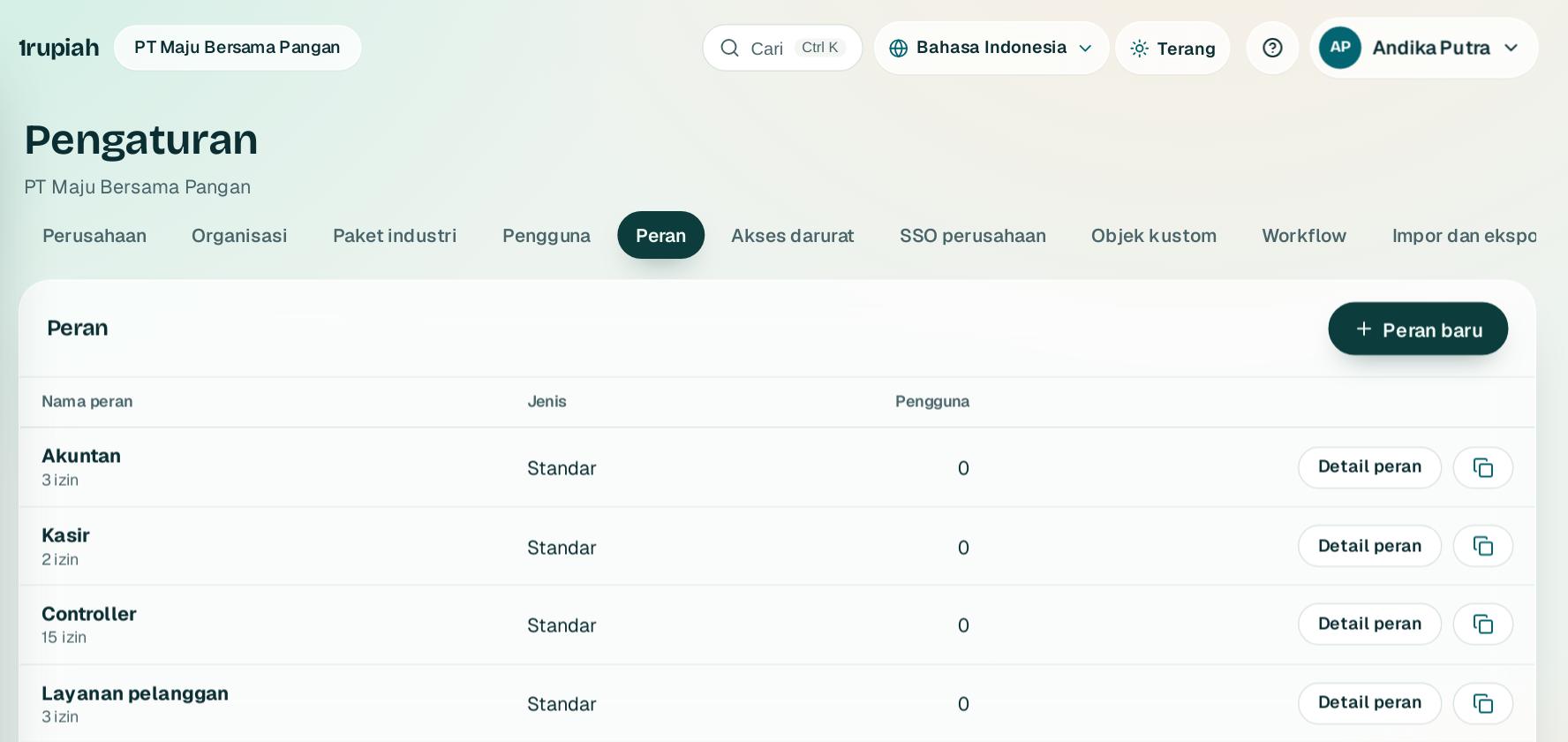
12
1
Buka Pengaturan, Peran. Peran bawaan sudah tersedia untuk pemilik, keuangan, penjualan, gudang, dan lainnya.
Open Settings, Roles. Built in roles cover owner, finance, sales, warehouse, and more.
2
Tekan Peran baru1 untuk membuat peran sendiri dari salinan peran yang ada, lalu centang izin per modul.
Press New role1 to create your own role from a copy of an existing one, then tick permissions per module.
3
Detail peran2 menampilkan semua izin dan pengguna yang memegangnya. Kombinasi yang melanggar pemisahan tugas ditandai.
Role details2 shows every permission and who holds it. Combinations that break segregation of duties are flagged.
1rupiah1rupiah · Panduan Pengguna | User Guide
1rupiah · 22
Akses darurat
Emergency access
Akses sementara dengan alasan saat orang yang berwenang tidak ada.
Temporary access with a reason when the authorised person is away.
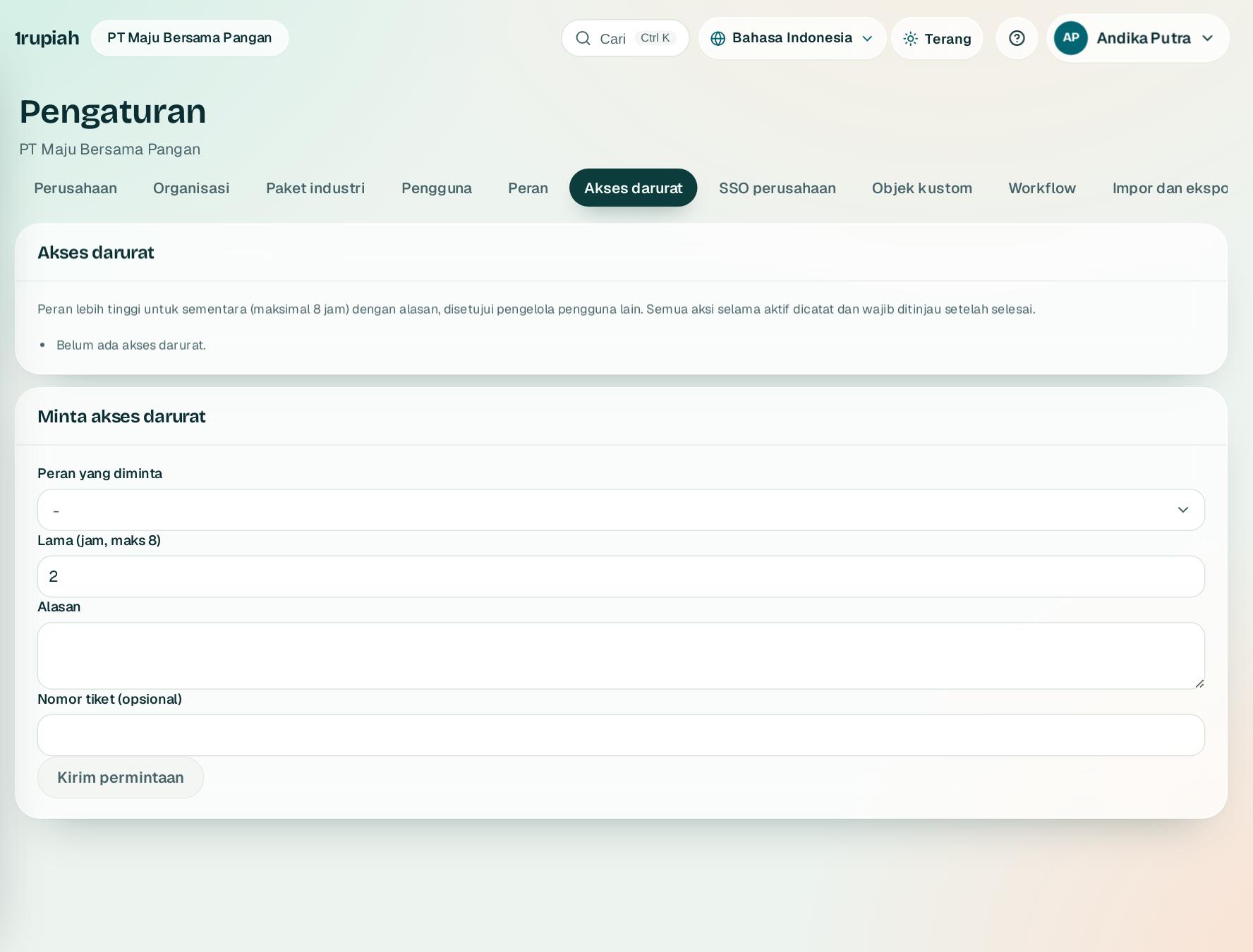
12
1
Buka Pengaturan, Akses darurat, lalu isi formulir Minta akses darurat1: izin yang dibutuhkan, lama akses, dan alasan.
Open Settings, Emergency access, then fill in Request emergency access1: the permission needed, the duration, and the reason.
2
Tekan Kirim permintaan2. Admin lain menyetujui, dan akses berakhir otomatis sesuai waktunya.
Press Send request2. Another admin approves, and the access ends automatically on time.
3
Semua tindakan selama akses darurat ditandai khusus di log untuk ditinjau.
Everything done during emergency access is marked in the log for review.
1rupiah1rupiah · Panduan Pengguna | User Guide
1rupiah · 23
Masuk tunggal (SSO) dan SCIM
Single sign on (SSO) and SCIM
Karyawan masuk dengan akun kantor dari Entra ID, Okta, atau Google Workspace.
Staff sign in with their work account from Entra ID, Okta, or Google Workspace.
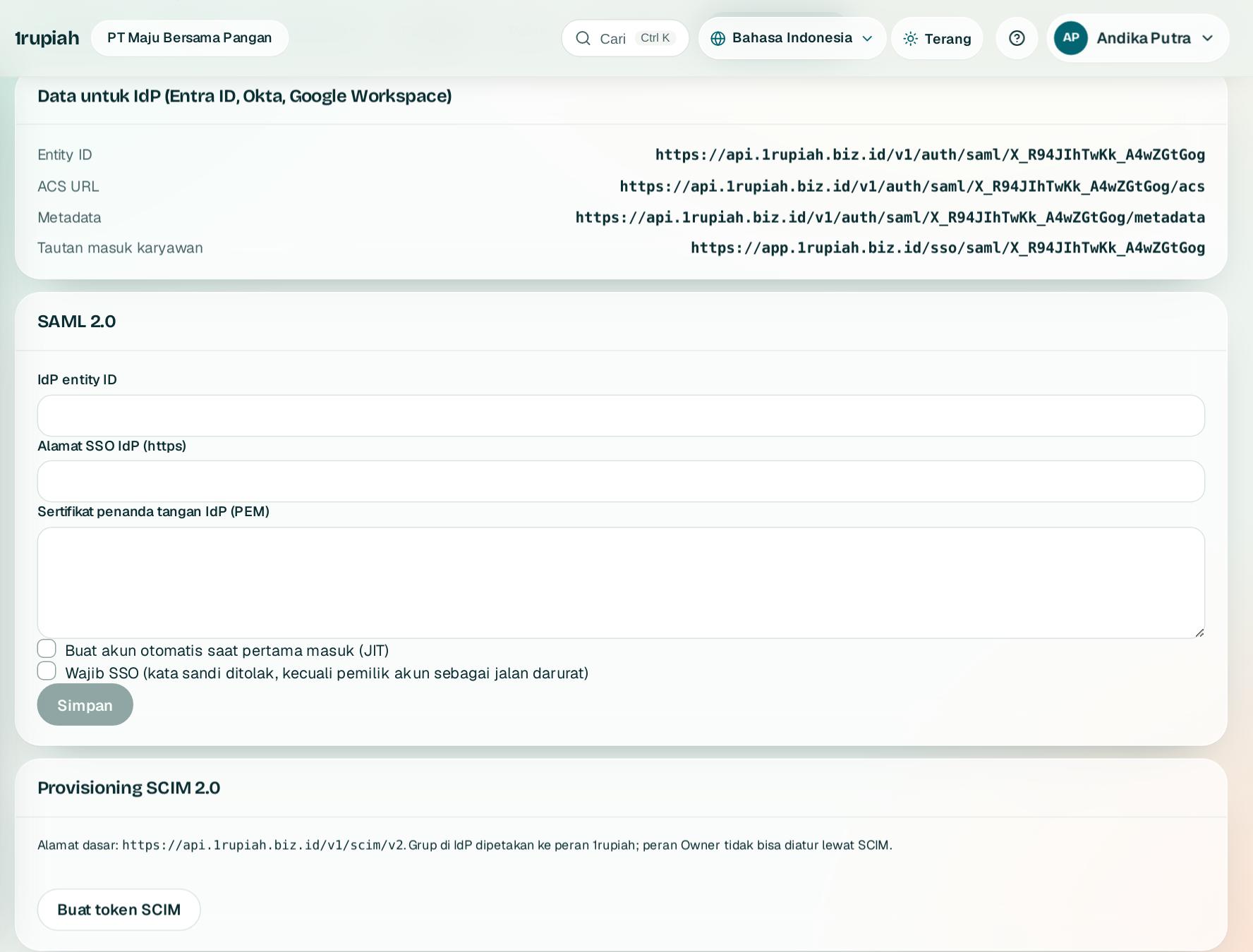
123
1
Buka Pengaturan, SSO perusahaan. Salin isian di Data untuk IdP1 ke penyedia identitas Anda.
Open Settings, Company SSO. Copy the values under Data for the IdP1 into your identity provider.
2
Di bagian SAML 2.02, tempel metadata dari penyedia identitas lalu tekan Simpan.
Under SAML 2.02, paste the metadata from your identity provider and press Save.
3
Untuk membuat dan menonaktifkan pengguna otomatis, tekan Buat token SCIM3 dan pasang token itu di penyedia identitas.
To create and deactivate users automatically, press Create SCIM token3 and add the token to your identity provider.
1rupiah1rupiah · Panduan Pengguna | User Guide
1rupiah · 24
Field custom
Custom fields
Tambah isian sendiri di pelanggan, barang, karyawan, dan dokumen.
Add your own fields to customers, items, employees, and documents.
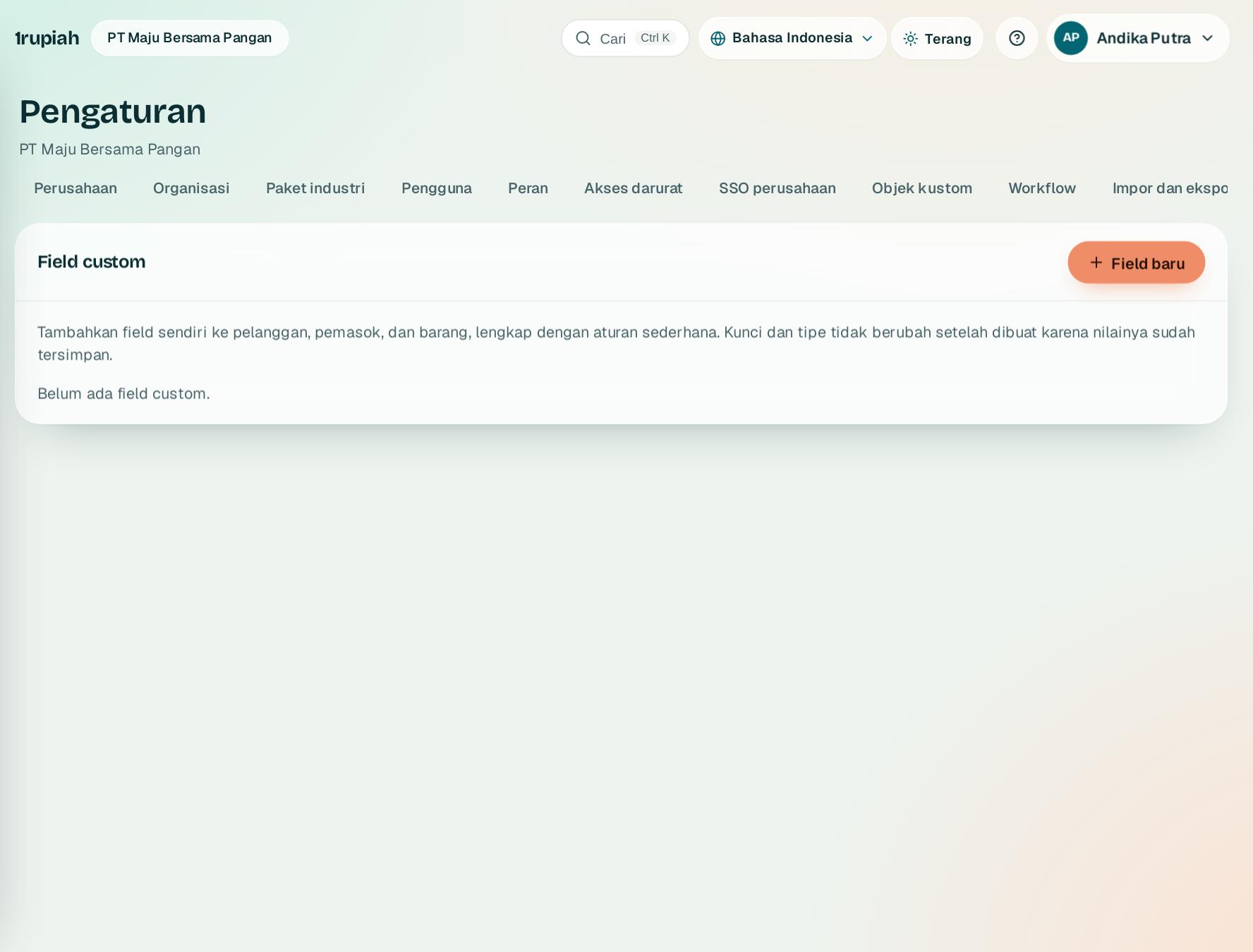
1
1
Buka Pengaturan, Field custom, lalu tekan Field baru1.
Open Settings, Custom fields, then press New field1.
2
Pilih objek, jenis isian (teks, angka, tanggal, pilihan), dan apakah wajib diisi.
Choose the object, the field type (text, number, date, choice), and whether it is required.
3
Field baru langsung tampil di formulir, bisa disaring di daftar, dan ikut di ekspor serta API.
The new field appears in forms right away, can be filtered in lists, and is included in exports and the API.
1rupiah1rupiah · Panduan Pengguna | User Guide
1rupiah · 25
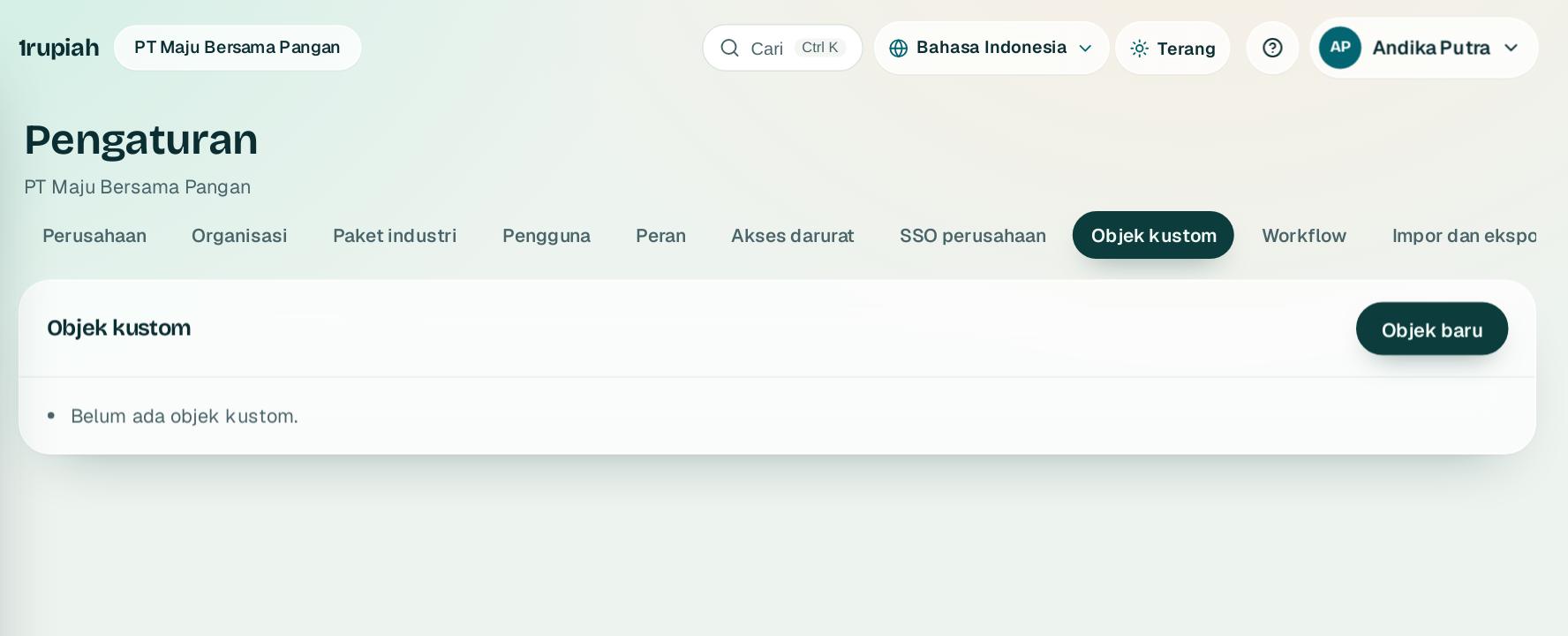
Objek kustom
Custom objects
Buat daftar data sendiri, misalnya armada, kontrak sewa, atau inventaris kantor.
Create your own records, for example vehicles, leases, or office equipment.
12
1
Buka Pengaturan, Objek kustom1 dan tekan Objek baru2.
Open Settings, Custom objects1 and press New object2.
2
Beri nama, tentukan field, lalu atur siapa yang boleh melihat dan mengubahnya.
Name it, define its fields, then set who may view and change it.
3
Data objek kustom bisa dipakai di workflow, laporan, dan API, serta memicu webhook custom_record.updated.
Custom object records can be used in workflows, reports, and the API, and trigger the custom_record.updated webhook.
1rupiah1rupiah · Panduan Pengguna | User Guide
1rupiah · 26
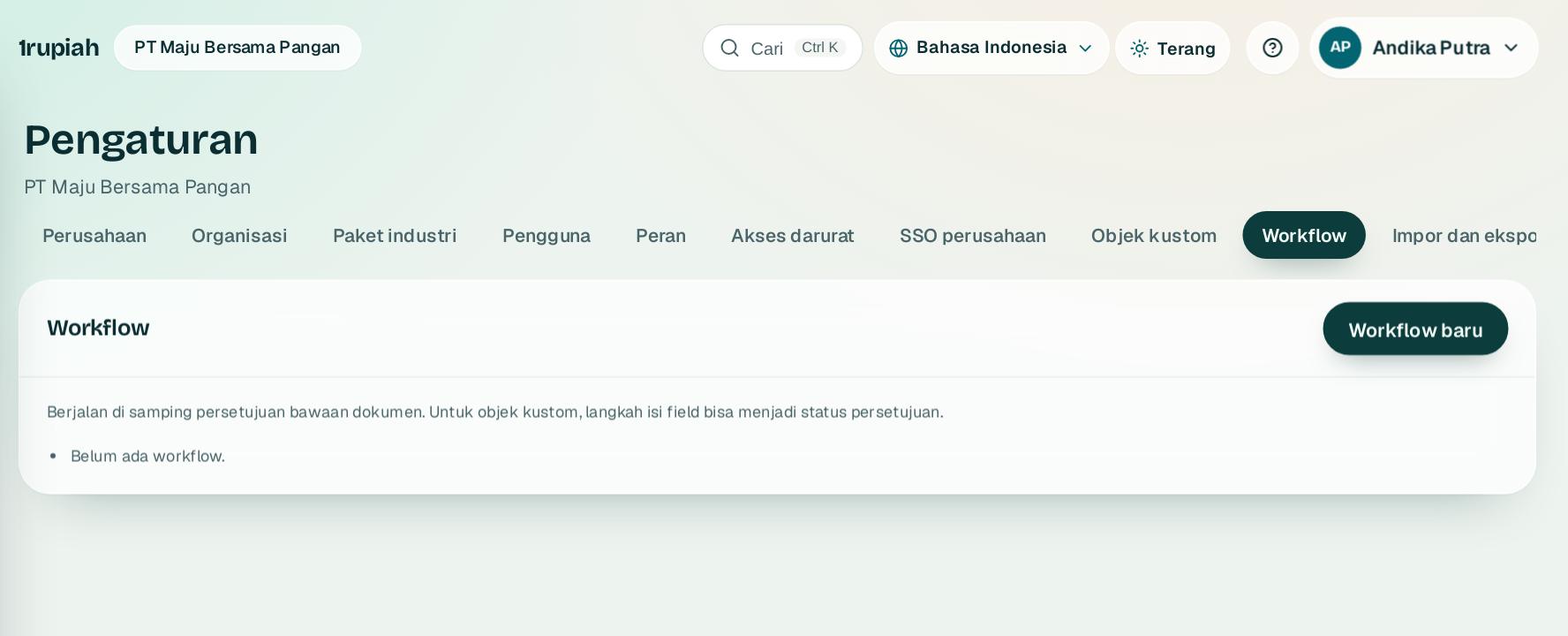
Workflow otomatis
Automated workflows
Jalankan tindakan otomatis saat sesuatu terjadi, tanpa menulis kode.
Run actions automatically when something happens, without writing code.
12
1
Buka Pengaturan, Workflow1 dan tekan Workflow baru2.
Open Settings, Workflows1 and press New workflow2.
2
Pilih pemicu (misalnya order dikonfirmasi), tambah syarat, lalu pilih tindakan seperti kirim email, buat tugas, atau ubah field.
Choose a trigger (for example an order is confirmed), add conditions, then pick actions such as send an email, create a task, or change a field.
3
Workflow hanya menawarkan tindakan yang cocok dengan pemicunya, dan setiap jalannya tercatat.
A workflow only offers actions that fit its trigger, and every run is recorded.
1rupiah1rupiah · Panduan Pengguna | User Guide
1rupiah · 27
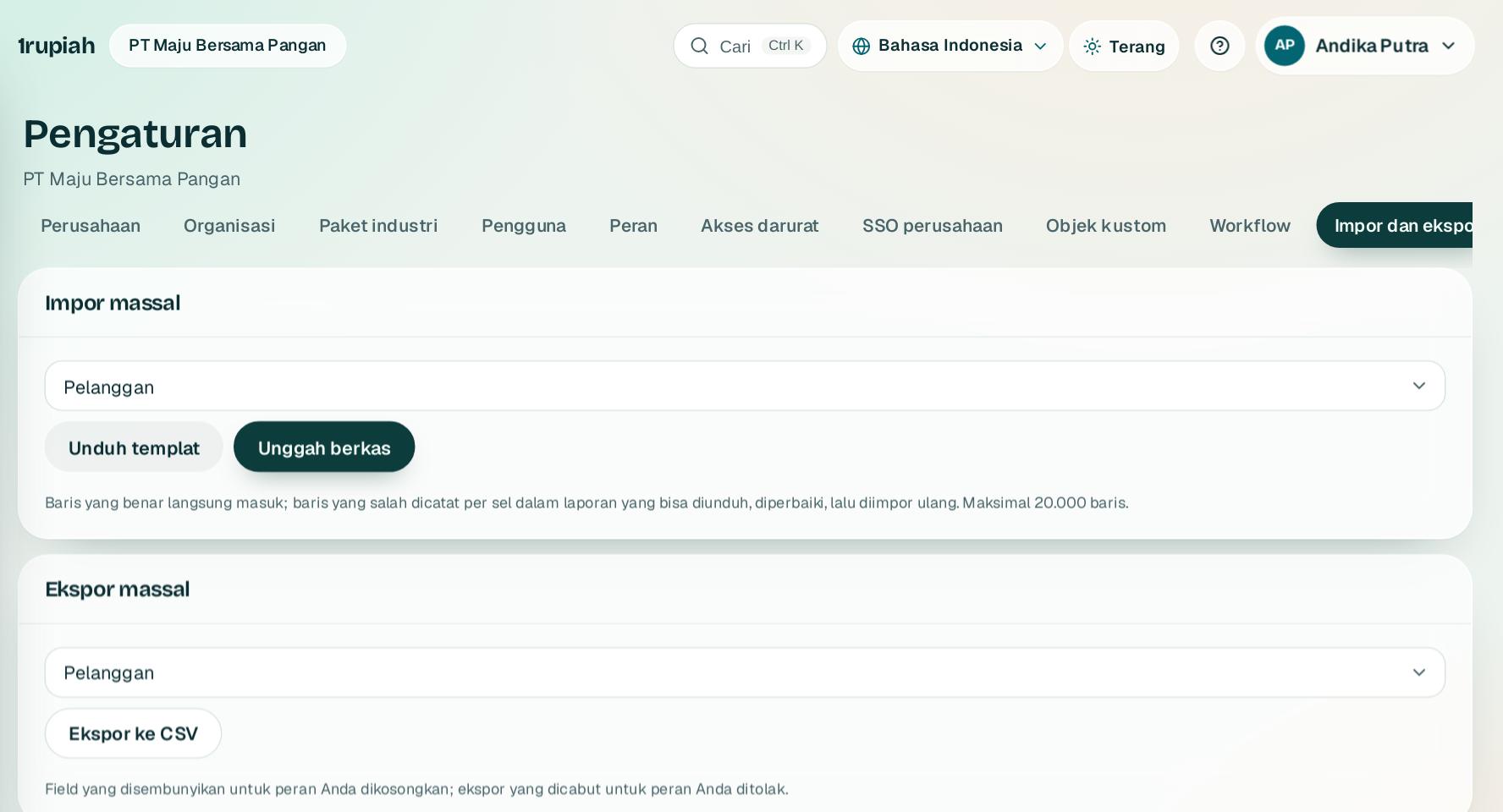
Impor dan ekspor massal
Bulk import and export
Pindahkan ribuan baris data sekaligus dengan berkas CSV.
Move thousands of rows at once with CSV files.
123
1
Buka Pengaturan, Impor dan ekspor. Di Impor massal1 pilih jenis data lalu Unduh templat2.
Open Settings, Import and export. Under Bulk import1 choose the data type, then Download template2.
2
Isi templat lalu Unggah berkas. Baris yang salah ditandai dengan alasannya sebelum apa pun disimpan.
Fill in the template and Upload file. Rows with errors are flagged with the reason before anything is saved.
3
Ekspor massal3 mengunduh data ke CSV. Pekerjaan besar berjalan di latar dan tampil di Pekerjaan saya.
Bulk export3 downloads data to CSV. Large jobs run in the background and appear under My jobs.
1rupiah1rupiah · Panduan Pengguna | User Guide
1rupiah · 28
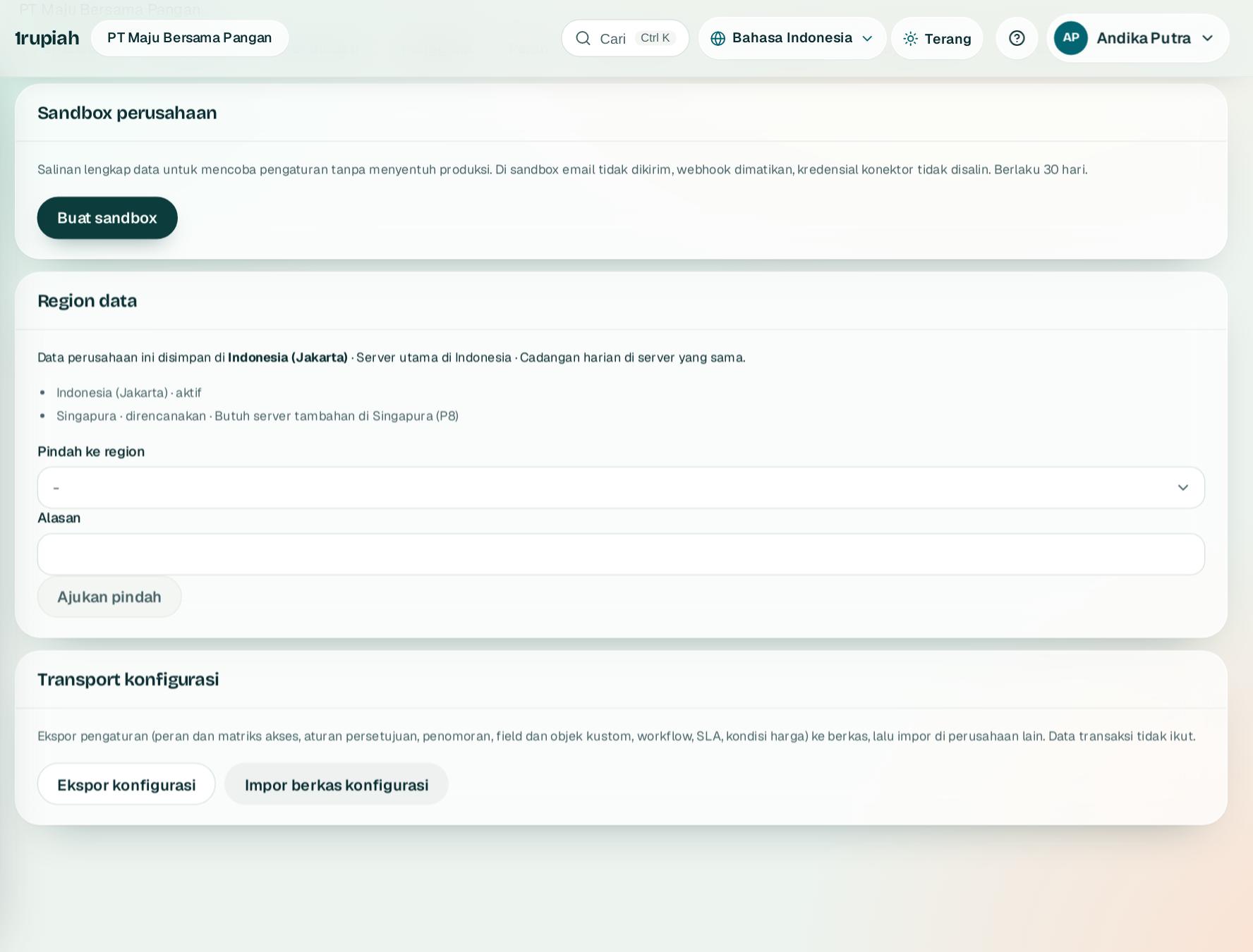
Sandbox dan transport konfigurasi
Sandbox and configuration transport
Uji pengaturan baru di salinan perusahaan sebelum dipakai sungguhan.
Try new settings in a copy of your company before using them for real.
123
1
Buka Pengaturan, Sandbox dan tekan Buat sandbox2 di bagian Sandbox perusahaan1.
Open Settings, Sandbox and press Create sandbox2 under Company sandbox1.
2
Coba peran, workflow, atau field baru di sandbox tanpa menyentuh data asli.
Try new roles, workflows, or fields in the sandbox without touching live data.
3
Setelah cocok, pakai Transport konfigurasi3: ekspor dari sandbox lalu impor berkasnya ke perusahaan asli.
When it works, use Configuration transport3: export from the sandbox, then import the file into the live company.
1rupiah1rupiah · Panduan Pengguna | User Guide
1rupiah · 29
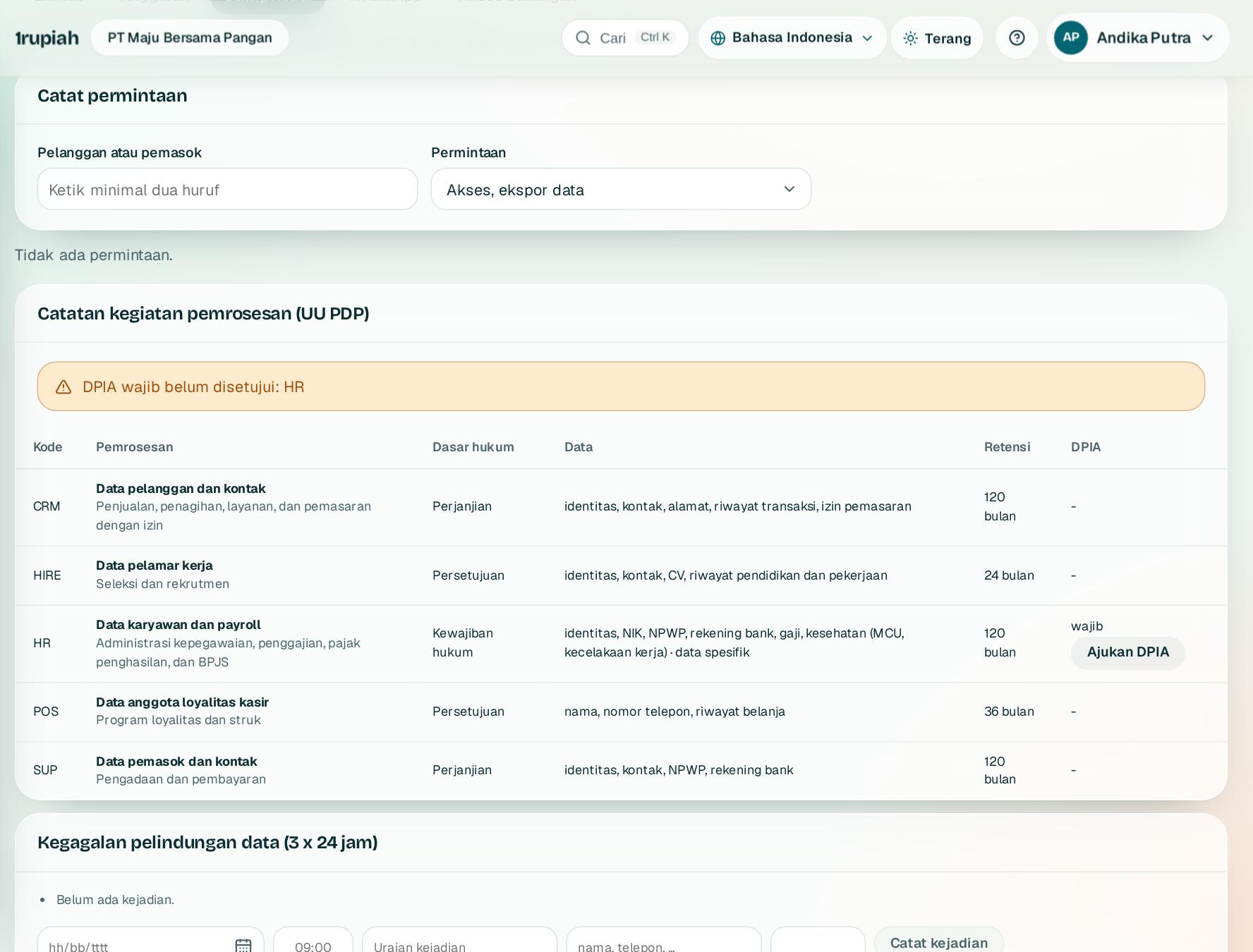
Privasi dan UU PDP
Privacy and the PDP law
Catat permintaan pemilik data, kegiatan pemrosesan, dan insiden sesuai UU PDP.
Record data subject requests, processing activities, and incidents under the PDP law.
123
1
Buka Grup dan kepatuhan, Privasi. Di Catat permintaan1 rekam permintaan akses, ekspor, atau penghapusan data beserta tenggatnya.
Open Group and compliance, Privacy. Under Log a request1 record access, export, or deletion requests with their deadline.
2
Lengkapi Catatan kegiatan pemrosesan2 dan ajukan DPIA untuk pemrosesan berisiko tinggi.
Complete the Record of processing activities2 and submit a DPIA for high risk processing.
3
Bila terjadi insiden, catat di Kegagalan pelindungan data3. Sistem menghitung batas pemberitahuan 3 x 24 jam.
If an incident happens, log it under Personal data breach3. The system counts down the 3 x 24 hour notification limit.
1rupiah1rupiah · Panduan Pengguna | User Guide
1rupiah · 30
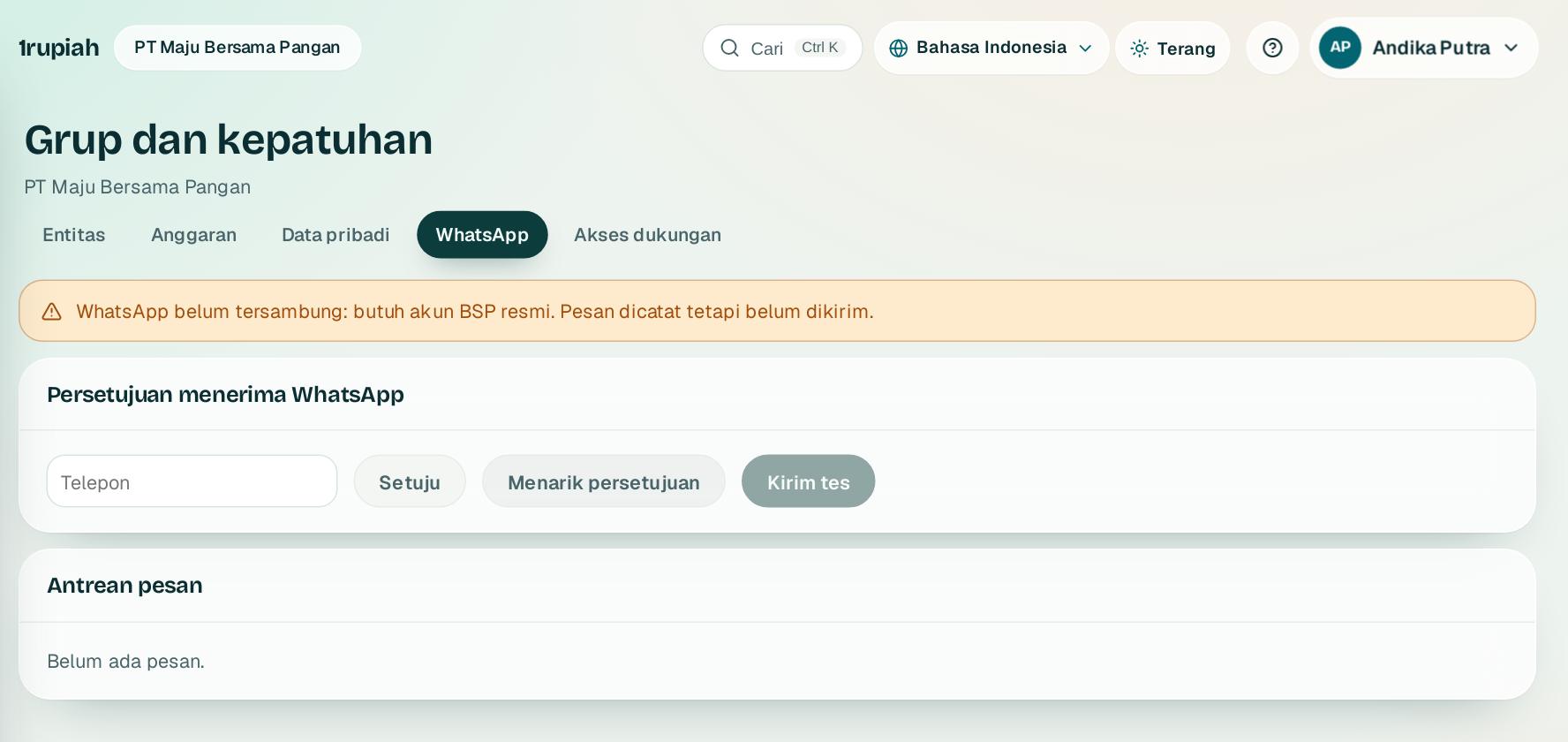
Persetujuan WhatsApp
WhatsApp consent
Kirim WhatsApp hanya ke kontak yang sudah setuju.
Send WhatsApp messages only to contacts who agreed.
12
1
Buka Grup dan kepatuhan, WhatsApp. Catat persetujuan atau penarikan persetujuan di Persetujuan menerima WhatsApp1.
Open Group and compliance, WhatsApp. Record consent or its withdrawal under Consent to receive WhatsApp1.
2
Antrean pesan2 menampilkan pesan yang menunggu, terkirim, atau gagal. Pesan ke kontak tanpa persetujuan ditahan.
Message queue2 shows messages waiting, sent, or failed. Messages to contacts without consent are held.
3
Pengiriman membutuhkan penyedia WhatsApp Business (BSP) yang tersambung di Integrasi.
Sending needs a WhatsApp Business provider (BSP) connected under Integrations.
1rupiah1rupiah · Panduan Pengguna | User Guide
1rupiah · 31
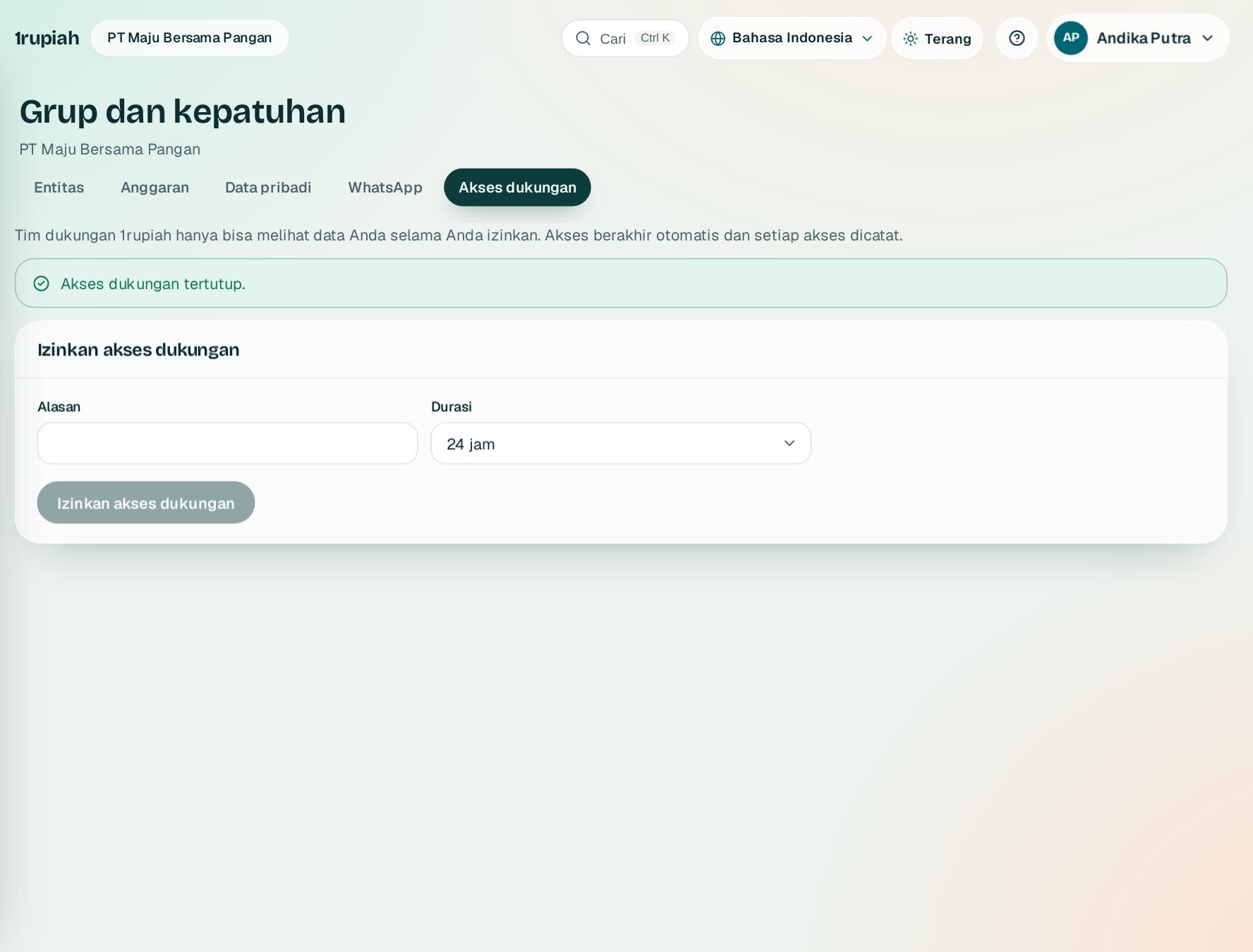
Izin akses tim dukungan
Support access
Tim 1rupiah hanya bisa melihat data Anda bila Anda izinkan, dengan batas waktu.
The 1rupiah team can only see your data when you allow it, for a limited time.
1
1
Buka Grup dan kepatuhan, Akses dukungan, pilih lama akses, tulis alasan, lalu tekan Izinkan akses dukungan1.
Open Group and compliance, Support access, choose the duration, write a reason, then press Allow support access1.
2
Akses berakhir otomatis, atau tutup lebih cepat kapan saja. Semua yang dibuka tim dukungan tercatat di log.
Access ends automatically, or close it early at any time. Everything the support team opens is logged.
1rupiah1rupiah · Panduan Pengguna | User Guide
1rupiah · 32
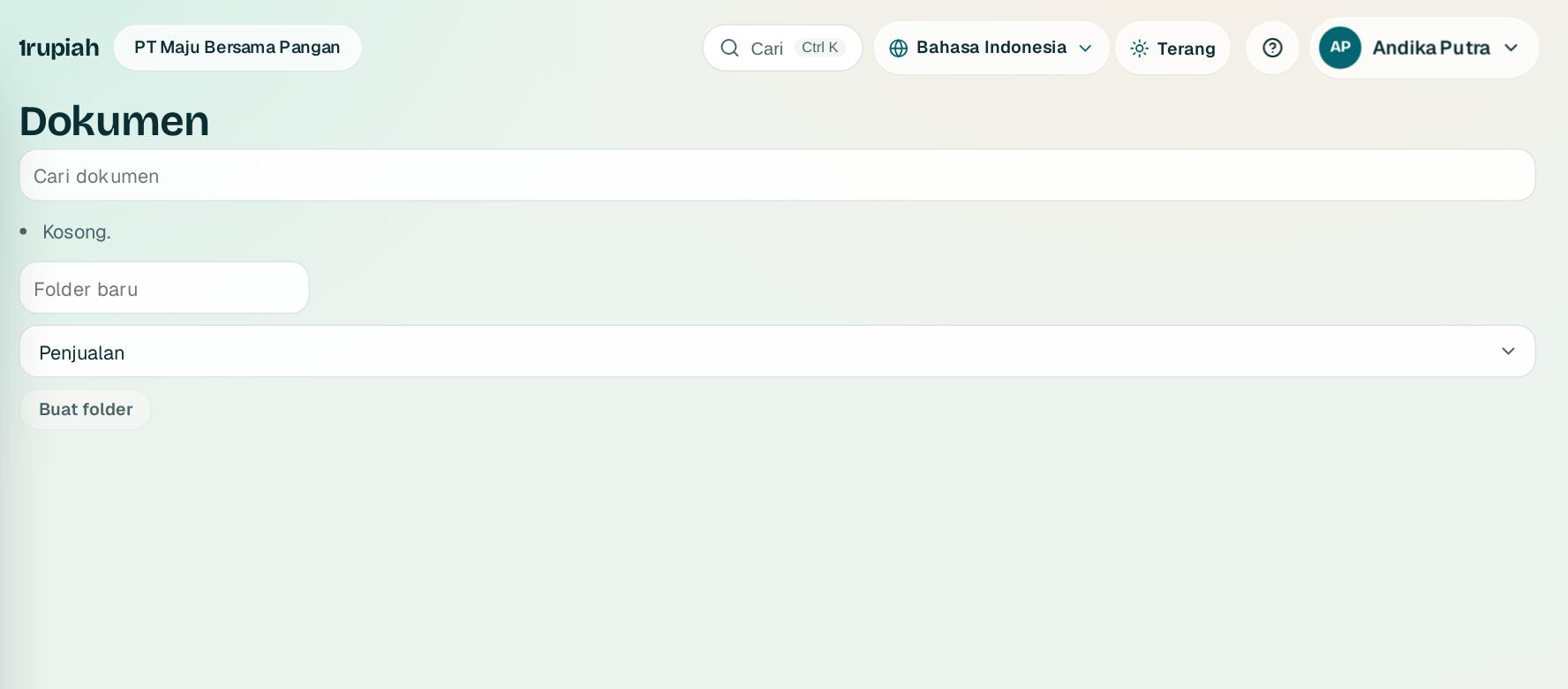
Dokumen
Documents
Simpan berkas perusahaan dalam folder, terhubung ke transaksinya.
Keep company files in folders, linked to their transactions.
1
1
Buka Dokumen. Folder dikelompokkan per area seperti penjualan, pembelian, dan SDM.
Open Documents. Folders are grouped by area such as sales, purchasing, and HR.
2
Tekan Buat folder1 lalu unggah berkas. Lampiran dari transaksi otomatis tampil di folder area yang sesuai.
Press Create folder1 and upload files. Attachments from transactions show up in the matching area folder automatically.
1rupiah
Butuh bantuan?
Tim kami siap 24 jam, Senin sampai Minggu. Buka chat di aplikasi atau situs, atau kirim email.
Need help?
Our team is available 24 hours, Monday to Sunday. Open the chat in the app or on the site, or send an email.