1rupiahDocs
EN
1rupiahv1.0

Panduan Pengguna | User Guide

1Project

Proyek

Projects

Anggaran berversi, jam kerja, tagihan milestone dengan retensi, biaya aktual, dan kapitalisasi proyek internal.

Versioned budgets, timesheets, milestone billing with retention, actual costs, and capitalisation of internal projects.

17 November 2026 · PT Satu Rupiah Indonesia

1rupiah1Project · Panduan Pengguna | User Guide

Mengapa 1rupiah

Why 1rupiah

Sistem bisnis lama dibangun untuk kantor yang selalu online, satu bahasa, dan pajak yang dihitung manual. 1rupiah dibangun untuk cara kerja Indonesia hari ini.

Older business systems were built for offices that are always online, in one language, with tax worked out by hand. 1rupiah is built for how Indonesian businesses work today.

AI yang bekerja, bukan sekadar menjawabTanya data dengan kalimat biasa, pembaca faktur pemasok dari foto atau PDF, agen yang menagih dan memesan ulang dalam batas nilai, dan situs 1CMS yang disusun AI. Setiap usulan AI bisa ditinjau dan dibatalkan.
AI that works, not just chatsAsk your data in plain words, read supplier invoices from a photo or PDF, let agents chase payments and reorder within value limits, and draft a 1CMS website with AI. Every AI suggestion can be reviewed and undone.
Pajak Indonesia sudah di dalamPPN 12 persen dengan DPP nilai lain 11/12, ekspor Faktur Pajak ke Coretax, PPh 21 tarif TER, PPh 23 dan 4(2) dengan bukti potong, BPJS, PBJT restoran, dan pesangon PP 35/2021.
Indonesian tax built inVAT at 12 percent on the 11/12 tax base, tax invoice export to Coretax, PPh 21 TER rates, PPh 23 and 4(2) with withholding slips, BPJS, restaurant PBJT, and severance under PP 35/2021.
Tetap jalan saat internet putusKasir dan aplikasi HP terus berjualan dan mencatat saat koneksi hilang, lalu menyinkronkan sekali saat online lagi tanpa transaksi ganda.
Keeps working offlineThe cashier and mobile apps keep selling and recording when the connection drops, then sync once when back online without duplicate transactions.
Keamanan kelas bankPasskey, verifikasi dua langkah, masuk dengan Google (Microsoft bila diaktifkan), persetujuan empat mata untuk uang keluar, rekening pemasok dicek orang kedua, data tiap perusahaan di skema terpisah, dan jejak audit lengkap.
Bank grade securityPasskeys, two step verification, Google sign in (Microsoft when enabled), four eyes approval for money going out, supplier bank accounts checked by a second person, a separate schema per company, and a full audit trail.
Angka yang selalu tepatHarga, PPN, dan pembulatan dihitung oleh Calc Core berbahasa Rust yang sama di server, web, dan desktop. Jurnal selalu seimbang dan periode terkunci tidak bisa diubah diam diam.
Figures that are always rightPrices, VAT, and rounding are computed by the same Rust Calc Core on the server, web, and desktop. Journals always balance and locked periods cannot be changed quietly.
Bayar hanya yang dipakaiMulai dari 1ERP Gratis, lalu tambah aplikasi satu per satu: 1Finance, 1Sales, 1HR, 1Cashier, dan lainnya. Semua terhubung dalam satu data, satu login, di web, desktop, dan HP.
Pay only for what you useStart on 1ERP Free, then add apps one at a time: 1Finance, 1Sales, 1HR, 1Cashier, and more. Everything shares one set of data and one login, on web, desktop, and mobile.
1rupiah.biz.id/guide2 / 7
1rupiah1Project · Panduan Pengguna | User Guide

Daftar isi

Contents

  1. 1Membuat proyekCreating a project4
  2. 2Jam kerja, tagihan, dan retensiTimesheets, billing, and retention5
  3. 3Prioritas portofolioPortfolio prioritisation6

Cara membaca panduan ini

How to read this guide

Satu halaman, satu tugasSetiap halaman menjelaskan satu pekerjaan dari awal sampai selesai.
One page, one taskEach page covers one job from start to finish.
Nomor di gambarKotak bernomor 1 menunjukkan tombol atau isian yang dimaksud langkah dengan nomor sama.
Numbers on screenshotsA numbered box 1 marks the button or field the matching step refers to.
Chip tombolSimpan adalah tombol utama, Batal tombol biasa, persis seperti di layar.
Button chipsSave is a main button and Cancel a regular one, exactly as on screen.
Gambar layarGambar diambil dari tampilan bahasa Indonesia. Ganti bahasa kapan saja lewat pilihan bahasa di kanan atas.
ScreenshotsScreenshots use the Indonesian interface. Switch language at any time with the language picker at the top right.
1rupiah.biz.id/guide3 / 7
1rupiah1Project · Panduan Pengguna | User Guide

1Project · 01

Membuat proyek

Creating a project

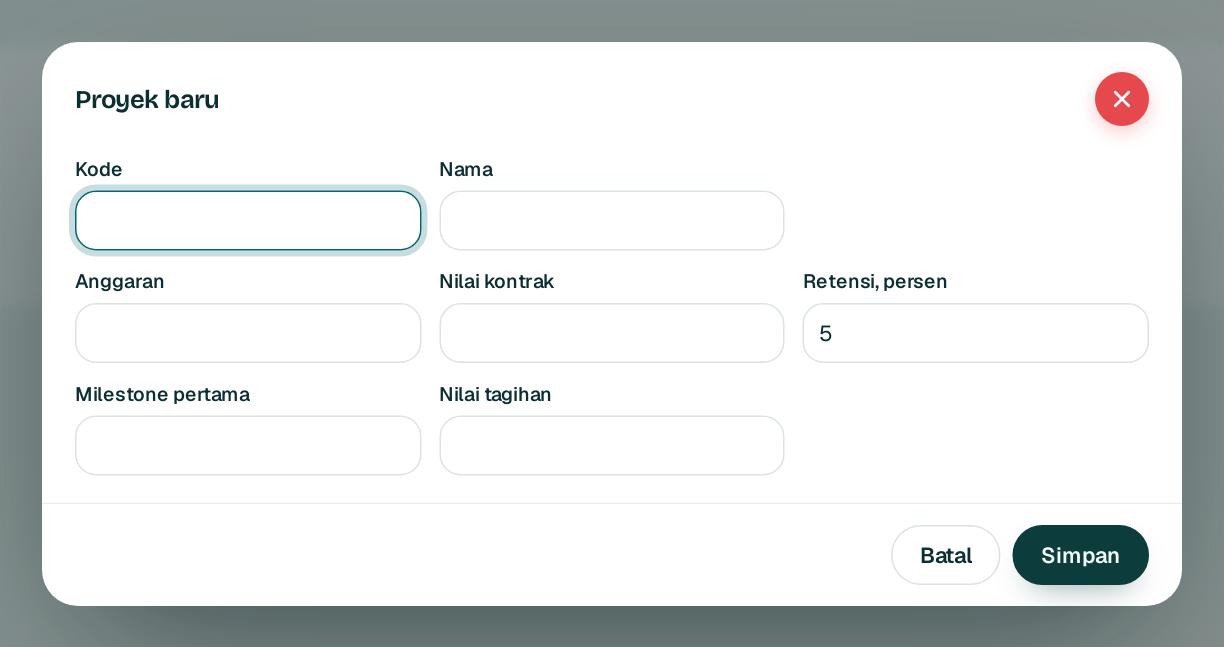
Proyek menyatukan anggaran, nilai kontrak, retensi, dan milestone.

A project brings together the budget, contract value, retention, and milestones.

1234
  1. 1

    Buka Proyek lalu Proyek baru. Isi kode 1 dan nama.

    Open Projects and choose New project. Fill in the code 1 and name.

  2. 2

    Isi anggaran 2 dan nilai kontrak.

    Enter the budget 2 and contract value.

  3. 3

    Isi persen retensi 3 dan milestone pertama dengan nilai tagihannya, lalu Simpan 4.

    Enter the retention percentage 3 and the first milestone with its billing value, then Save 4.

1rupiah.biz.id/guide4 / 7
1rupiah1Project · Panduan Pengguna | User Guide

1Project · 02

Jam kerja, tagihan, dan retensi

Timesheets, billing, and retention

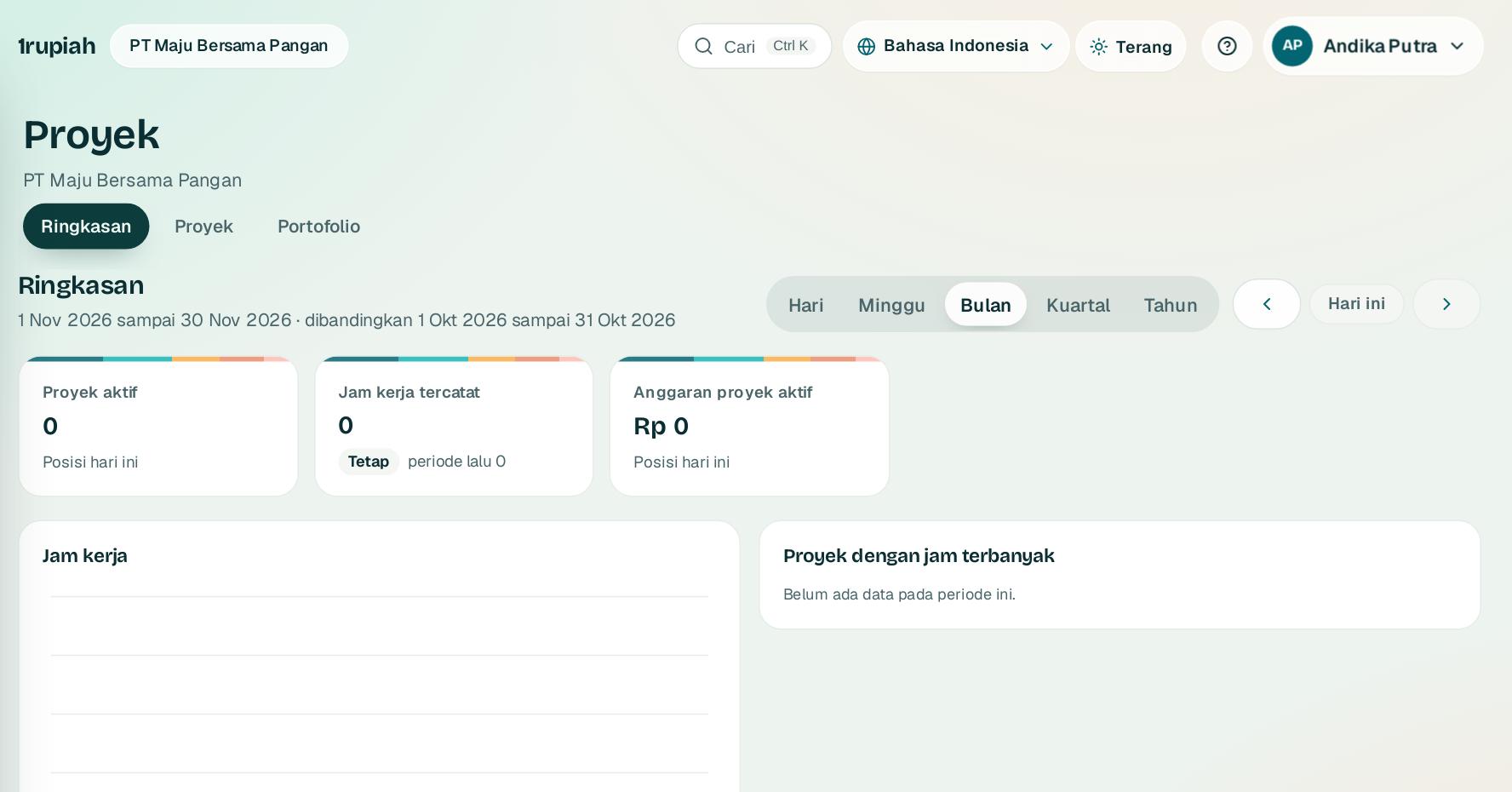
Pantau biaya aktual terhadap anggaran dan tagih saat milestone selesai.

Track actual cost against budget and bill when a milestone is done.

  1. 1

    Catat jam kerja per proyek. Proyek yang ditutup menolak jam baru.

    Log hours per project. Closed projects refuse new hours.

  2. 2

    Tandai biaya di baris jurnal dengan kolom Proyek supaya biaya langsung muncul di proyek.

    Tag costs on journal lines with the Project column so direct costs show on the project.

  3. 3

    Tagih milestone setelah selesai dengan bukti. Retensi masuk Piutang retensi sampai dilepas dengan Lepas retensi.

    Bill a milestone once it is done with evidence. Retention sits in retention receivable until released with Release retention.

  4. 4

    Proyek internal tanpa pelanggan bisa dikapitalisasi menjadi aset tetap.

    Internal projects without a customer can be capitalised into a fixed asset.

1rupiah.biz.id/guide5 / 7
1rupiah1Project · Panduan Pengguna | User Guide

1Project · 03

Prioritas portofolio

Portfolio prioritisation

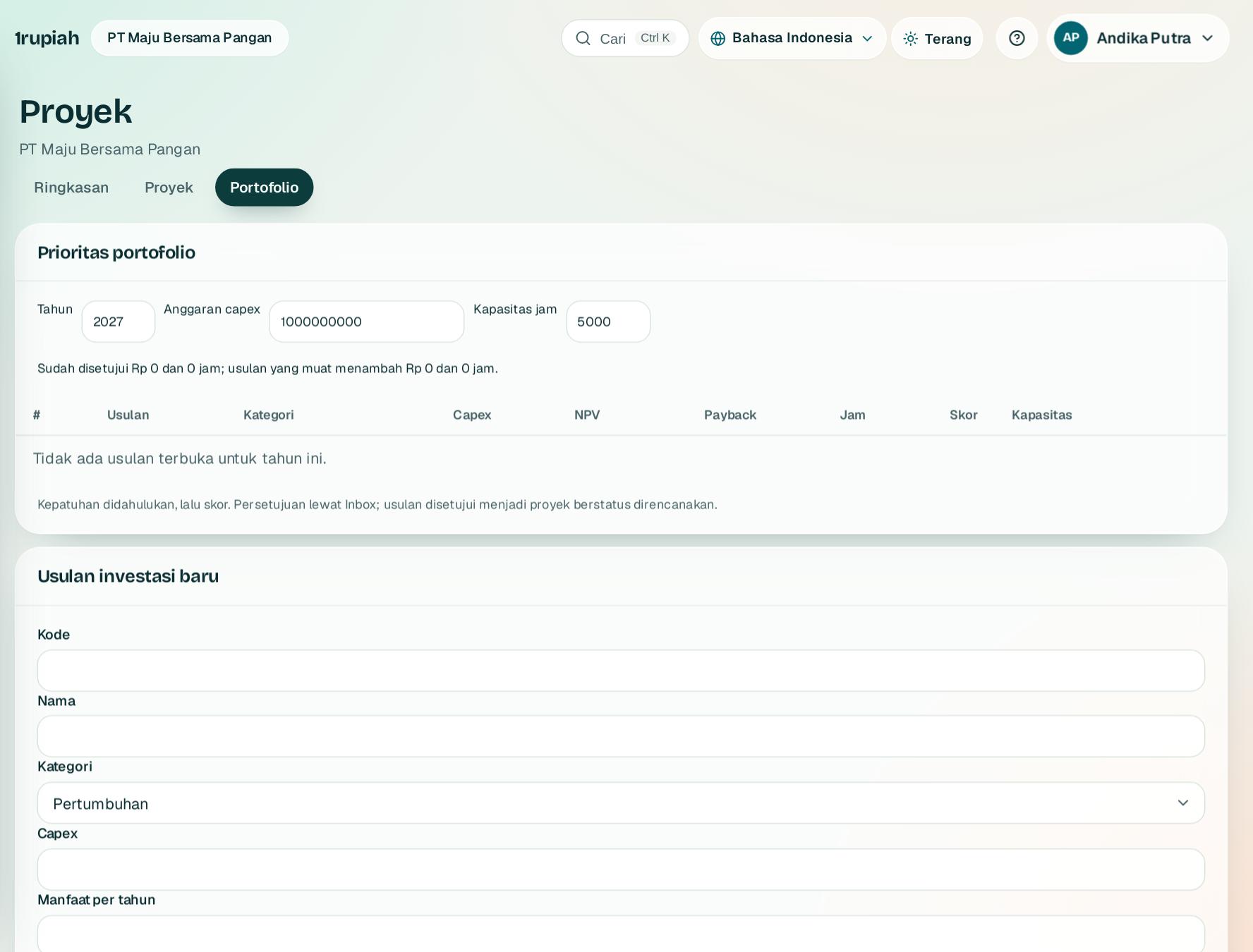
Nilai usulan proyek dengan skor yang sama sebelum dananya disetujui.

Score project proposals the same way before funding is approved.

12
  1. 1

    Buka Proyek, Portofolio. Daftar Prioritas portofolio 1 mengurutkan usulan menurut skor.

    Open Projects, Portfolio. The Portfolio priorities 1 list ranks proposals by score.

  2. 2

    Isi Usulan investasi baru 2: kategori, nilai strategi, risiko, urgensi, dan anggaran, lalu Ajukan.

    Fill in New investment proposal 2: category, strategy, risk, urgency, and budget, then Submit.

1rupiah.biz.id/guide6 / 7
1rupiah

Butuh bantuan?

Tim kami siap 24 jam, Senin sampai Minggu. Buka chat di aplikasi atau situs, atau kirim email.

Need help?

Our team is available 24 hours, Monday to Sunday. Open the chat in the app or on the site, or send an email.

  • 1rupiah.biz.id
  • app.1rupiah.biz.id
  • halo@1rupiah.biz.id

© 2026 PT Satu Rupiah Indonesia · 1Project · v1.0