Data karyawan, posisi, shift dan absensi, payroll dengan PPh 21 TER dan BPJS, hubungan industrial, K3, OKR, penilaian kinerja, pelatihan, dan analitik SDM.
Employee records, positions, shifts and attendance, payroll with PPh 21 TER and BPJS, employee relations, safety, OKRs, reviews, learning, and HR analytics.
17 November 2026 · PT Satu Rupiah Indonesia
1rupiah1HR · Panduan Pengguna | User Guide
Mengapa 1rupiah
Why 1rupiah
Sistem bisnis lama dibangun untuk kantor yang selalu online, satu bahasa, dan pajak yang dihitung manual. 1rupiah dibangun untuk cara kerja Indonesia hari ini.
Older business systems were built for offices that are always online, in one language, with tax worked out by hand. 1rupiah is built for how Indonesian businesses work today.
AI yang bekerja, bukan sekadar menjawabTanya data dengan kalimat biasa, pembaca faktur pemasok dari foto atau PDF, agen yang menagih dan memesan ulang dalam batas nilai, dan situs 1CMS yang disusun AI. Setiap usulan AI bisa ditinjau dan dibatalkan.
AI that works, not just chatsAsk your data in plain words, read supplier invoices from a photo or PDF, let agents chase payments and reorder within value limits, and draft a 1CMS website with AI. Every AI suggestion can be reviewed and undone.
Pajak Indonesia sudah di dalamPPN 12 persen dengan DPP nilai lain 11/12, ekspor Faktur Pajak ke Coretax, PPh 21 tarif TER, PPh 23 dan 4(2) dengan bukti potong, BPJS, PBJT restoran, dan pesangon PP 35/2021.
Indonesian tax built inVAT at 12 percent on the 11/12 tax base, tax invoice export to Coretax, PPh 21 TER rates, PPh 23 and 4(2) with withholding slips, BPJS, restaurant PBJT, and severance under PP 35/2021.
Tetap jalan saat internet putusKasir dan aplikasi HP terus berjualan dan mencatat saat koneksi hilang, lalu menyinkronkan sekali saat online lagi tanpa transaksi ganda.
Keeps working offlineThe cashier and mobile apps keep selling and recording when the connection drops, then sync once when back online without duplicate transactions.
Keamanan kelas bankPasskey, verifikasi dua langkah, masuk dengan Google (Microsoft bila diaktifkan), persetujuan empat mata untuk uang keluar, rekening pemasok dicek orang kedua, data tiap perusahaan di skema terpisah, dan jejak audit lengkap.
Bank grade securityPasskeys, two step verification, Google sign in (Microsoft when enabled), four eyes approval for money going out, supplier bank accounts checked by a second person, a separate schema per company, and a full audit trail.
Angka yang selalu tepatHarga, PPN, dan pembulatan dihitung oleh Calc Core berbahasa Rust yang sama di server, web, dan desktop. Jurnal selalu seimbang dan periode terkunci tidak bisa diubah diam diam.
Figures that are always rightPrices, VAT, and rounding are computed by the same Rust Calc Core on the server, web, and desktop. Journals always balance and locked periods cannot be changed quietly.
Bayar hanya yang dipakaiMulai dari 1ERP Gratis, lalu tambah aplikasi satu per satu: 1Finance, 1Sales, 1HR, 1Cashier, dan lainnya. Semua terhubung dalam satu data, satu login, di web, desktop, dan HP.
Pay only for what you useStart on 1ERP Free, then add apps one at a time: 1Finance, 1Sales, 1HR, 1Cashier, and more. Everything shares one set of data and one login, on web, desktop, and mobile.
Satu halaman, satu tugasSetiap halaman menjelaskan satu pekerjaan dari awal sampai selesai.
One page, one taskEach page covers one job from start to finish.
Nomor di gambarKotak bernomor 1 menunjukkan tombol atau isian yang dimaksud langkah dengan nomor sama.
Numbers on screenshotsA numbered box 1 marks the button or field the matching step refers to.
Chip tombolSimpan adalah tombol utama, Batal tombol biasa, persis seperti di layar.
Button chipsSave is a main button and Cancel a regular one, exactly as on screen.
Gambar layarGambar diambil dari tampilan bahasa Indonesia. Ganti bahasa kapan saja lewat pilihan bahasa di kanan atas.
ScreenshotsScreenshots use the Indonesian interface. Switch language at any time with the language picker at the top right.
1rupiah1HR · Panduan Pengguna | User Guide
1HR · 01
Menambah karyawan
Adding an employee
Status PTKP dan kota kerja menentukan PPh 21, BPJS, dan cek UMK.
PTKP status and work city decide PPh 21, BPJS, and the minimum wage check.
12345
1
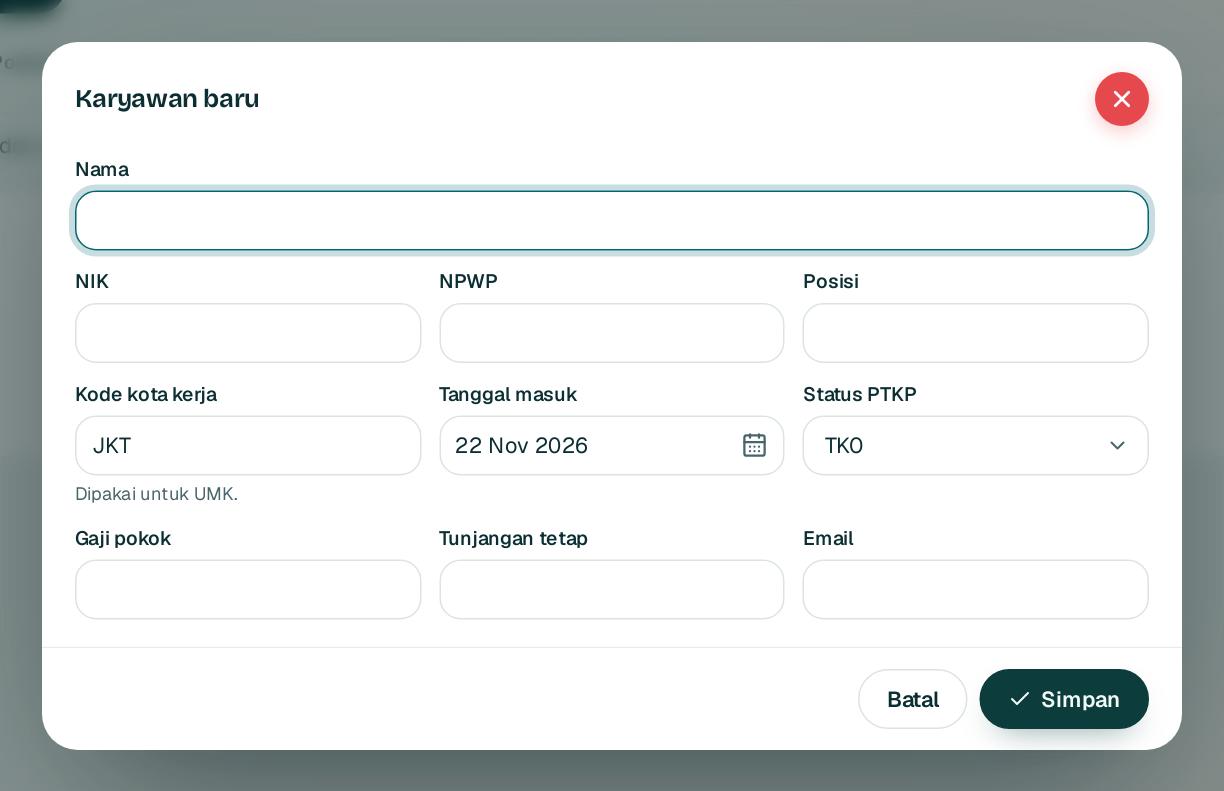
Buka SDM dan payroll, Karyawan lalu Karyawan baru.
Open People and payroll, Employees and choose New employee.
2
Isi nama, NIK 1, NPWP, posisi, dan kode kota kerja 2 untuk UMK.
Fill in the name, NIK 1, NPWP, position, and work city code 2 for the minimum wage.
3
Pilih status PTKP 3, tanggal masuk, lalu gaji pokok 4 dan tunjangan tetap.
Choose the PTKP status 3 and start date, then base salary 4 and fixed allowance.
4
Isi email supaya karyawan bisa absen dan mengajukan cuti, lalu Simpan5.
Add the email so the employee can clock in and request leave, then Save5.
Tips NIK atau NPWP yang sudah dipakai karyawan aktif lain ditolak.
Tip An NIK or NPWP already used by another active employee is refused.
1rupiah1HR · Panduan Pengguna | User Guide
1HR · 02
Cuti dan absensi
Leave and attendance
Kalender tim, persetujuan cuti, dan absensi dengan lokasi.
Team calendar, leave approval, and attendance with location.
1
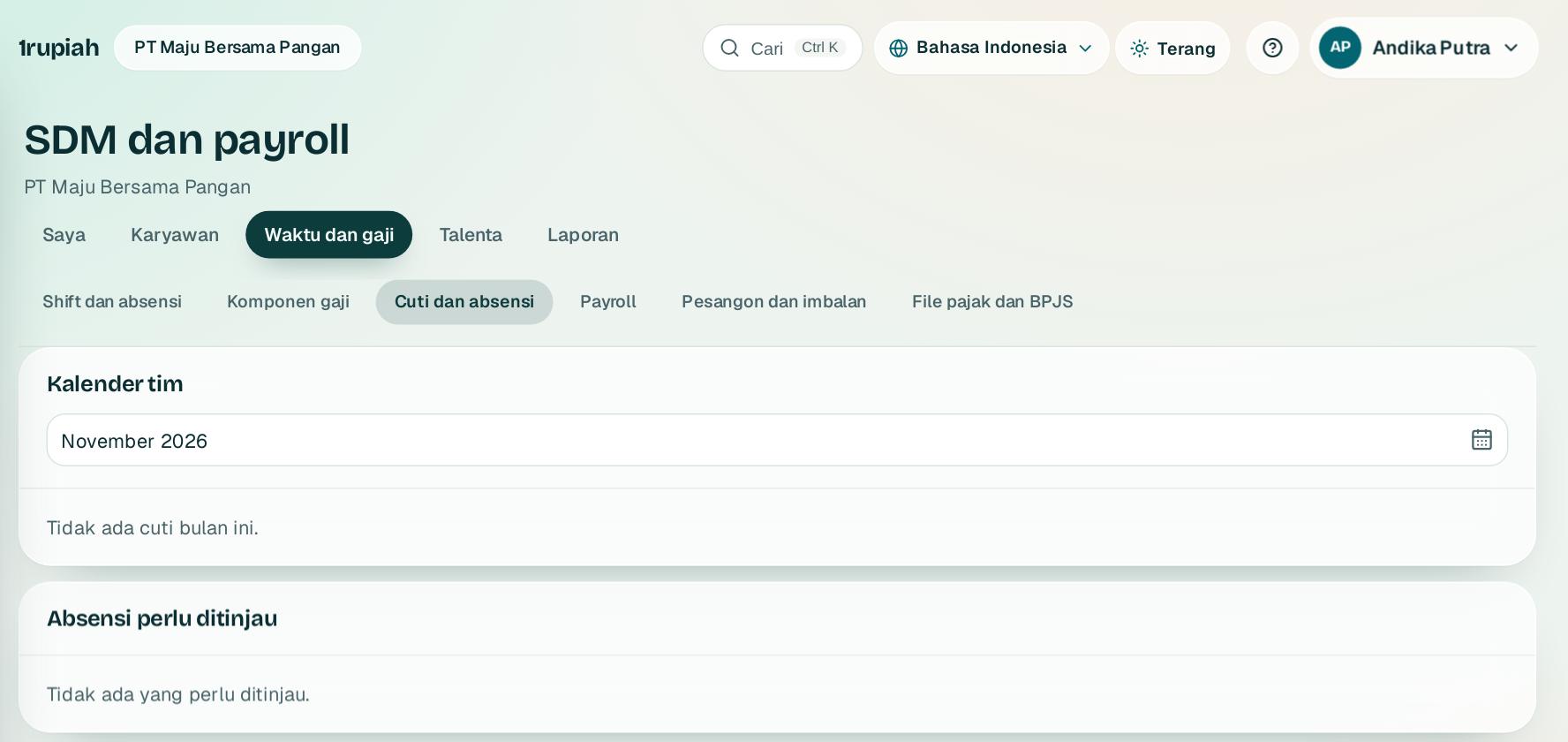
Karyawan mengajukan cuti dari tab Saya atau aplikasi HP. Cuti melewati akhir pekan dan libur nasional.
Employees request leave from the Me tab or the mobile app. Leave skips weekends and public holidays.
2
Atasan menyetujui dari Inbox. Melebihi sisa cuti diblokir dengan pilihan cuti tanpa upah.
Managers approve from the Inbox. Going over the balance is blocked with an unpaid leave option.
3
Absensi memeriksa radius kantor. Di luar radius menunggu tinjauan di bagian Absensi perlu ditinjau.
Attendance checks the office radius. Outside it, the record waits under Attendance to review.
4
Isi kalender libur nasional dan lokasi kantor di tab Pengaturan sebelum dipakai.
Fill in the public holiday calendar and office location in the Settings tab before you start.
1rupiah1HR · Panduan Pengguna | User Guide
1HR · 03
Menghitung payroll
Running payroll
PPh 21 TER, BPJS, lembur yang disetujui, dan cek UMK dalam satu hitungan.
PPh 21 TER, BPJS, approved overtime, and the minimum wage check in one run.
12
1
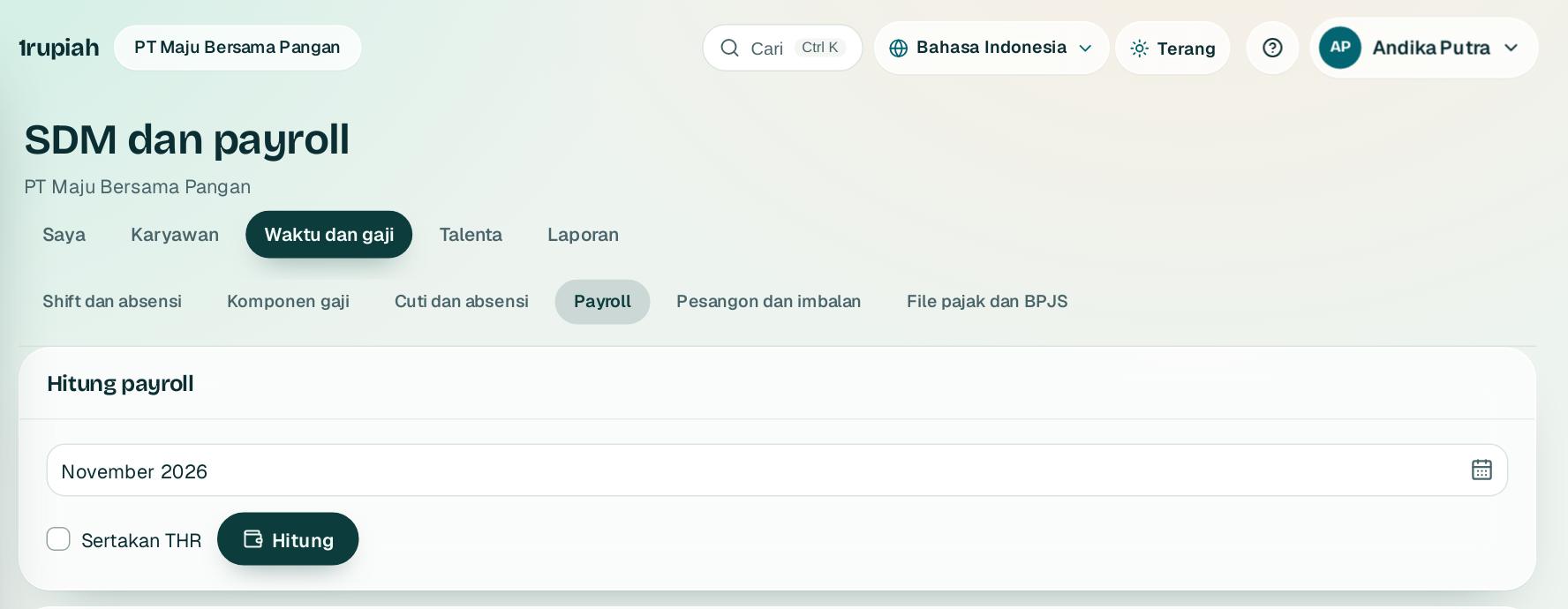
Buka SDM dan payroll, Payroll dan pilih periode 1.
Open People and payroll, Payroll and choose the period 1.
2
Klik Hitung2. Desember atau bulan berhenti memakai tarif Pasal 17 setahun.
Click Calculate2. December or the leaving month uses the annual Article 17 rates.
3
Upah di bawah UMK memblokir sampai dikoreksi atau diberi alasan. Ajukan untuk disetujui pemegang wewenang lain.
Pay below the minimum wage blocks until it is corrected or explained. Submit it for approval by another approver.
4
Setelah disetujui, slip gaji PDF tersedia dan karyawan bisa mengunduh slipnya sendiri.
Once approved, PDF payslips are ready and employees can download their own.
Tips Parameter pajak dan BPJS berversi per tanggal. Cek dengan konsultan pajak sebelum payroll sungguhan pertama.
Tip Tax and BPJS parameters are dated versions. Check them with a tax adviser before your first real payroll.
1rupiah1HR · Panduan Pengguna | User Guide
1HR · 04
Pesangon dan imbalan kerja
Severance and employee benefits
Hitung pesangon sesuai PP 35/2021 dan PPh final PP 68/2009.
Calculate severance under PP 35/2021 with final tax under PP 68/2009.
123
1
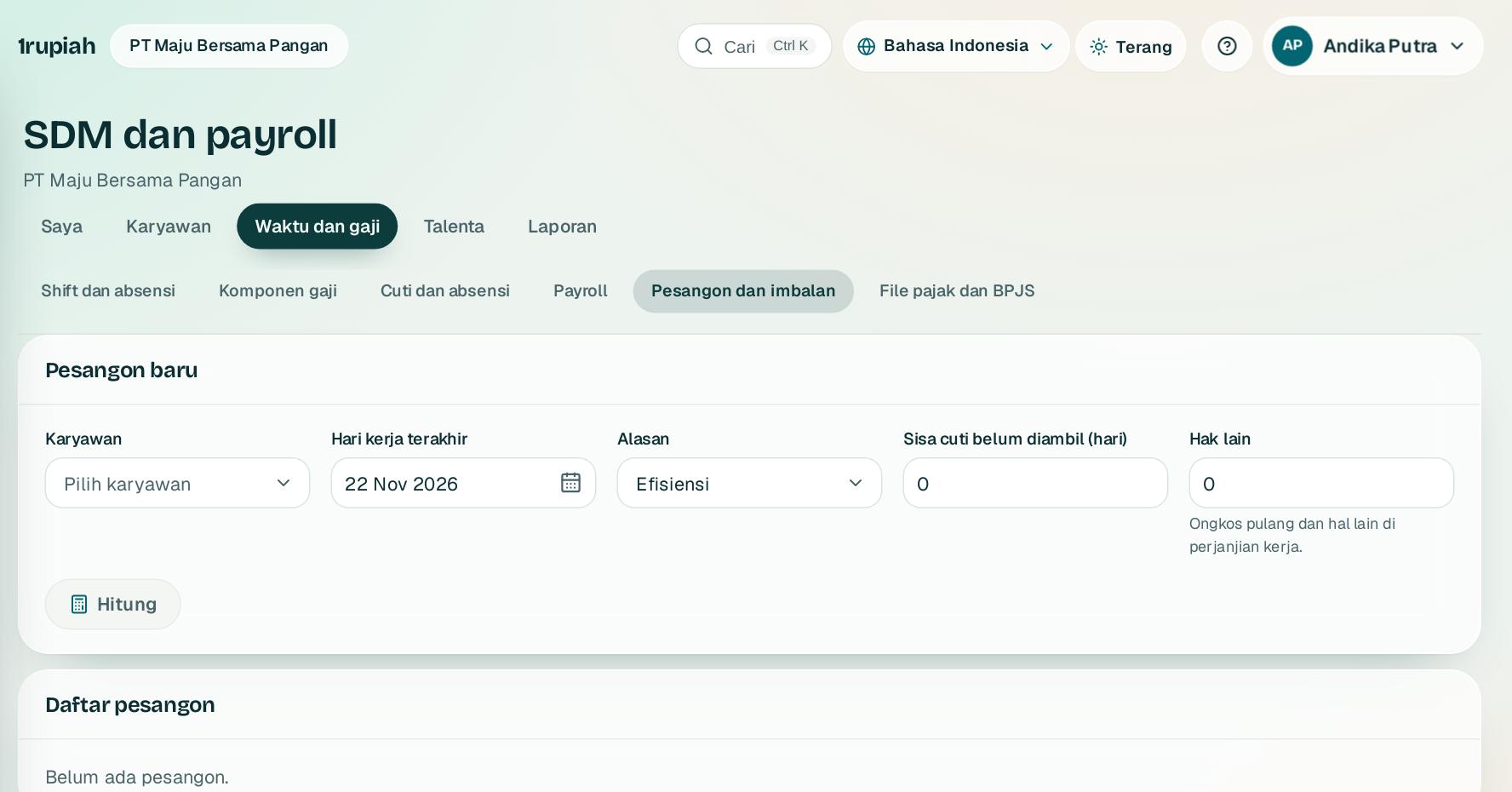
Buka SDM dan payroll, Pesangon dan imbalan. Pilih karyawan 1 dan hari kerja terakhir.
Open People and payroll, Severance and benefits. Pick the employee 1 and the last working day.
2
Pilih alasan berhenti 2, lalu Hitung3. Rinciannya: pesangon, UPMK, UPH, dan PPh final.
Choose the reason 2, then Calculate3. The breakdown shows severance, service pay, compensation, and final tax.
3
Ajukan persetujuan. Setelah disetujui, liabilitas imbalan kerja dipakai lebih dulu dan bukti potong final disiapkan.
Submit for approval. Once approved, the benefit liability is used first and the final withholding slip is prepared.
4
Catat valuasi PSAK 219 dari laporan aktuaris di bagian Imbalan kerja.
Record the PSAK 219 valuation from the actuarial report under Employee benefits.
1rupiah1HR · Panduan Pengguna | User Guide
1HR · 05
File pajak dan BPJS
Tax and BPJS files
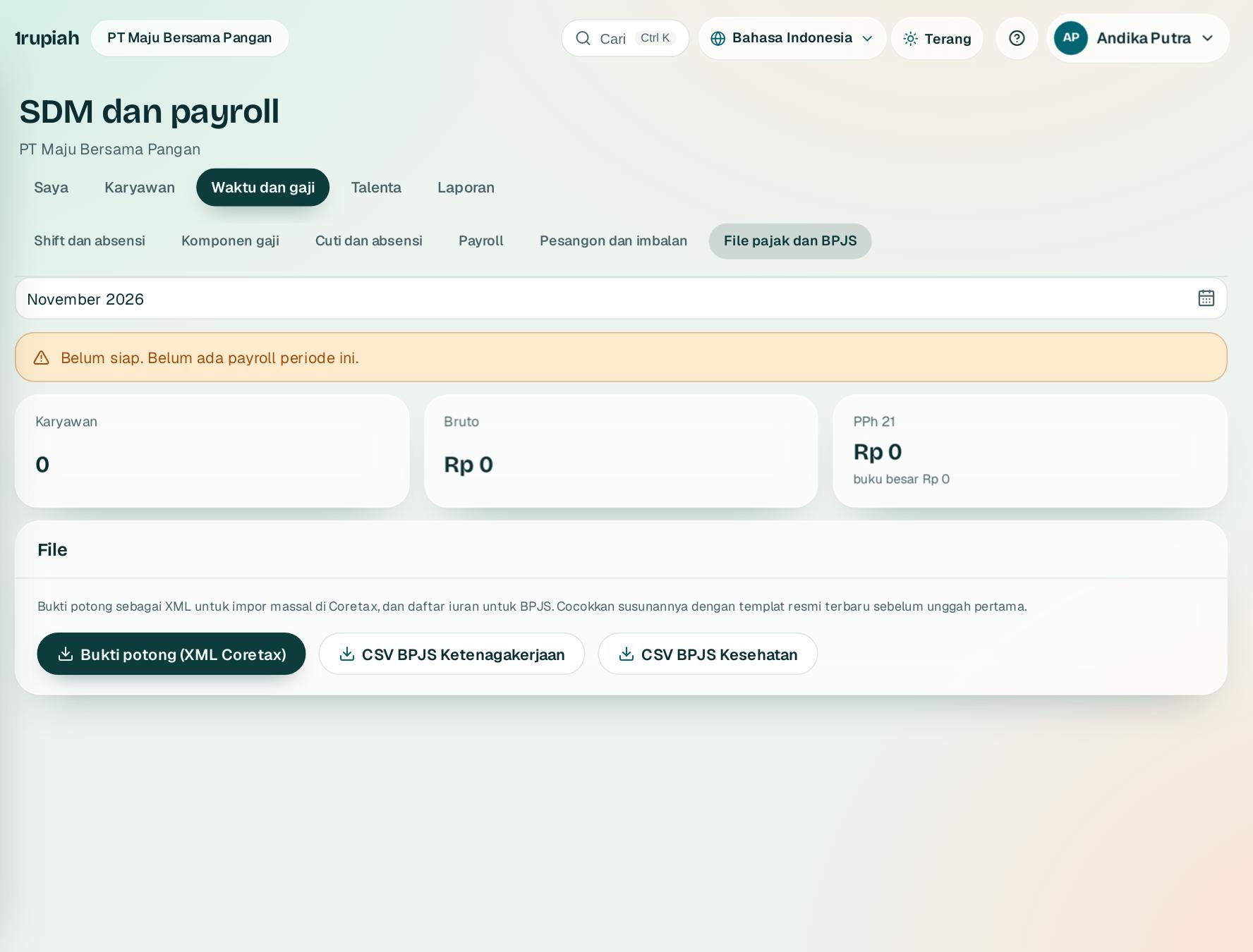
Unduh bukti potong untuk Coretax dan daftar BPJS setiap bulan.
Download withholding slips for Coretax and the BPJS lists every month.
123
1
Buka SDM dan payroll, File pajak dan BPJS lalu pilih periode.
Open People and payroll, Tax and BPJS files and choose the period.
2
Laporan PPh 21 bulanan dicocokkan dengan buku besar. Selisih atau payroll belum disetujui ditampilkan sebagai penghalang.
The monthly PPh 21 report is reconciled with the ledger. Differences or unapproved payroll show as blockers.
3
Unduh Bukti potong (XML Coretax)1 untuk Coretax.
Download Withholding slips (Coretax XML)1 for Coretax.
4
Unduh CSV BPJS Ketenagakerjaan 2 dan Kesehatan 3. Karyawan tanpa NIK atau nomor peserta disebut.
Download the BPJS Employment 2 and Health 3 CSVs. Employees without an NIK or member number are listed.
1rupiah1HR · Panduan Pengguna | User Guide
1HR · 06
Posisi dan riwayat kepegawaian
Positions and employment history
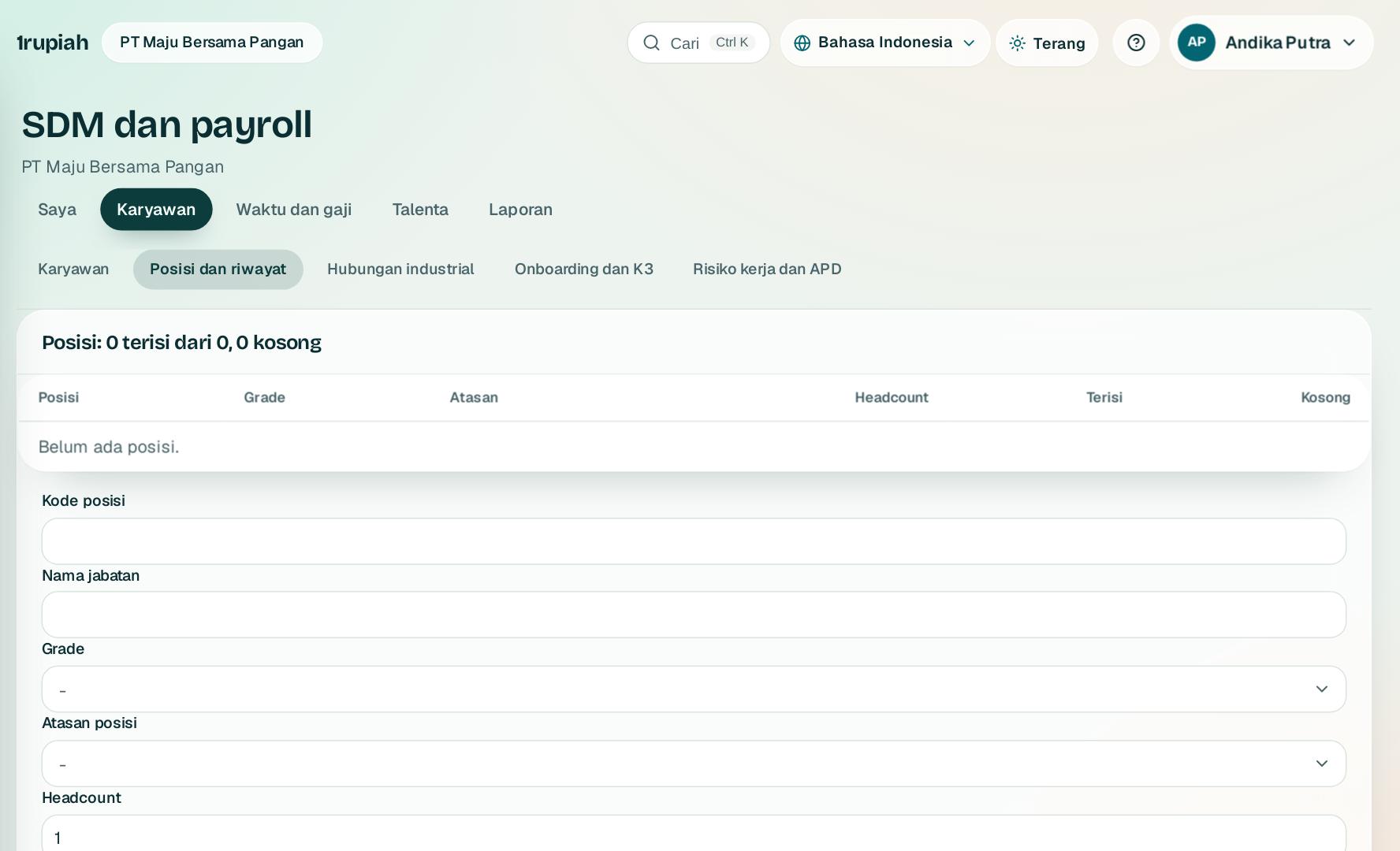
Struktur posisi dengan grade dan rentang gaji, lalu promosi, mutasi, dan kenaikan gaji bertanggal.
A position structure with grades and pay ranges, then dated promotions, transfers, and raises.
1
Buat keluarga jabatan dan grade dengan gaji minimum dan maksimum, lalu posisi dengan kuota dan atasannya.
Create job families and grades with minimum and maximum pay, then positions with headcount and who they report to.
2
Ajukan perubahan karyawan dengan tanggal berlaku: promosi, mutasi, atau kenaikan gaji.
Request an employee change with an effective date: promotion, transfer, or raise.
3
Orang lain menyetujui. Perubahan berlaku sendiri di tanggalnya dan gaji baru masuk payroll.
Someone else approves. The change applies on its date and the new pay goes into payroll.
4
Gaji di luar rentang grade atau posisi yang sudah penuh minta konfirmasi.
Pay outside the grade range or a full position asks for confirmation.
1rupiah1HR · Panduan Pengguna | User Guide
1HR · 07
Shift, roster, dan mesin absensi
Shifts, rosters, and time clocks
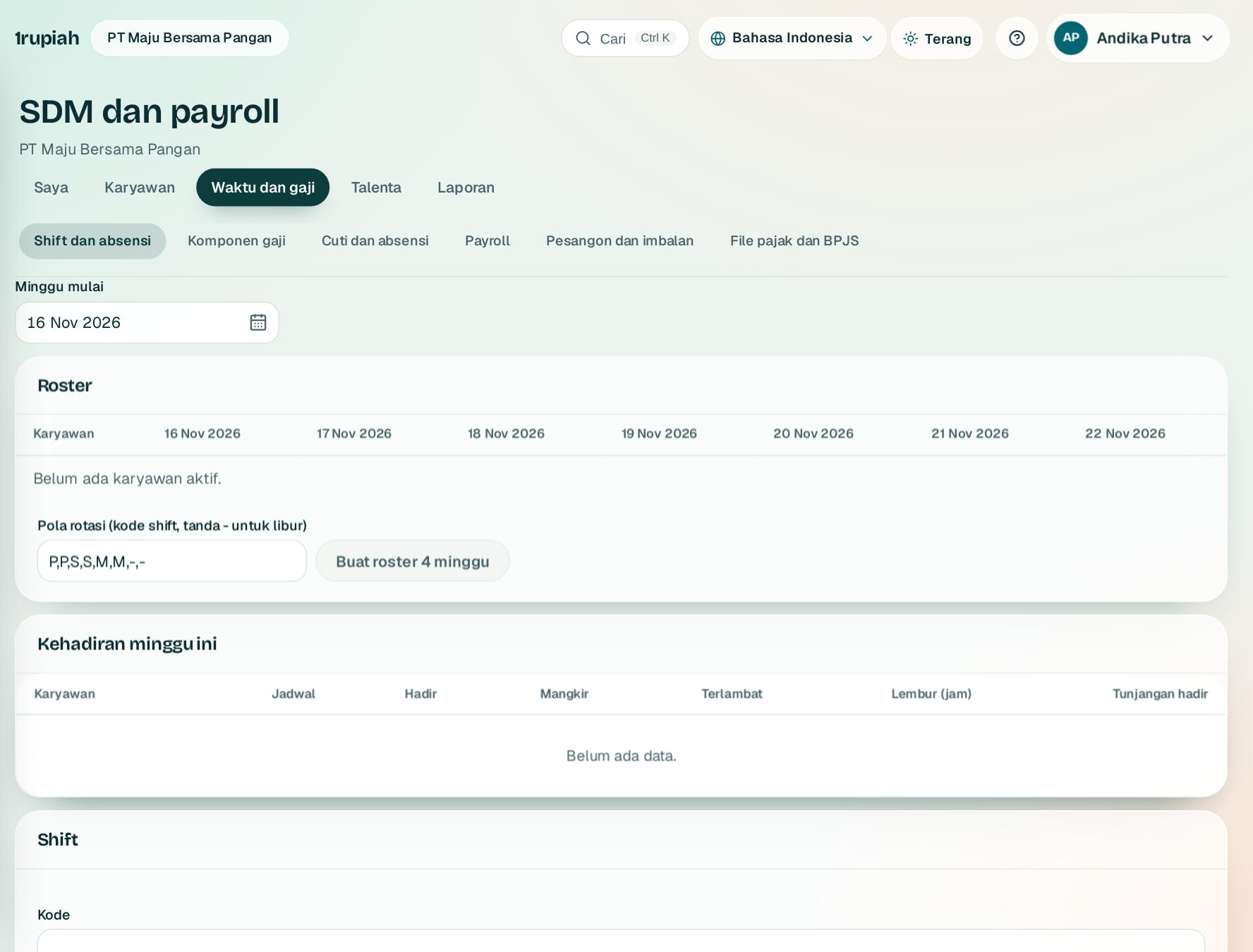
Roster dari pola rotasi, tap dari mesin wajah atau sidik jari, terlambat dan lembur dihitung otomatis.
Rosters from rotation patterns, taps from face or fingerprint clocks, lateness and overtime calculated for you.
1
Buat shift dengan jam mulai, selesai, istirahat, dan toleransi terlambat. Shift malam boleh melewati tengah malam.
Create shifts with start, end, break, and grace minutes. Night shifts may cross midnight.
2
Isi roster per hari, atau tulis pola rotasi seperti P,P,S,S,M,M,-,- lalu Buat roster 4 minggu.
Fill the roster per day, or type a rotation such as P,P,S,S,M,M,-,- and choose Create a 4 week roster.
3
Daftarkan mesin absensi. Kuncinya tampil sekali untuk dipasang di mesin; log mesin juga bisa diimpor.
Register the time clock. Its key shows once for the device; machine logs can also be imported.
4
Atur ambang lembur dan tunjangan kehadiran. Lembur otomatis masuk alur persetujuan, tunjangan masuk payroll.
Set the overtime threshold and attendance allowance. Overtime goes to approval automatically, the allowance goes to payroll.
1rupiah1HR · Panduan Pengguna | User Guide
1HR · 08
Komponen gaji dan payroll mingguan
Pay components and weekly payroll
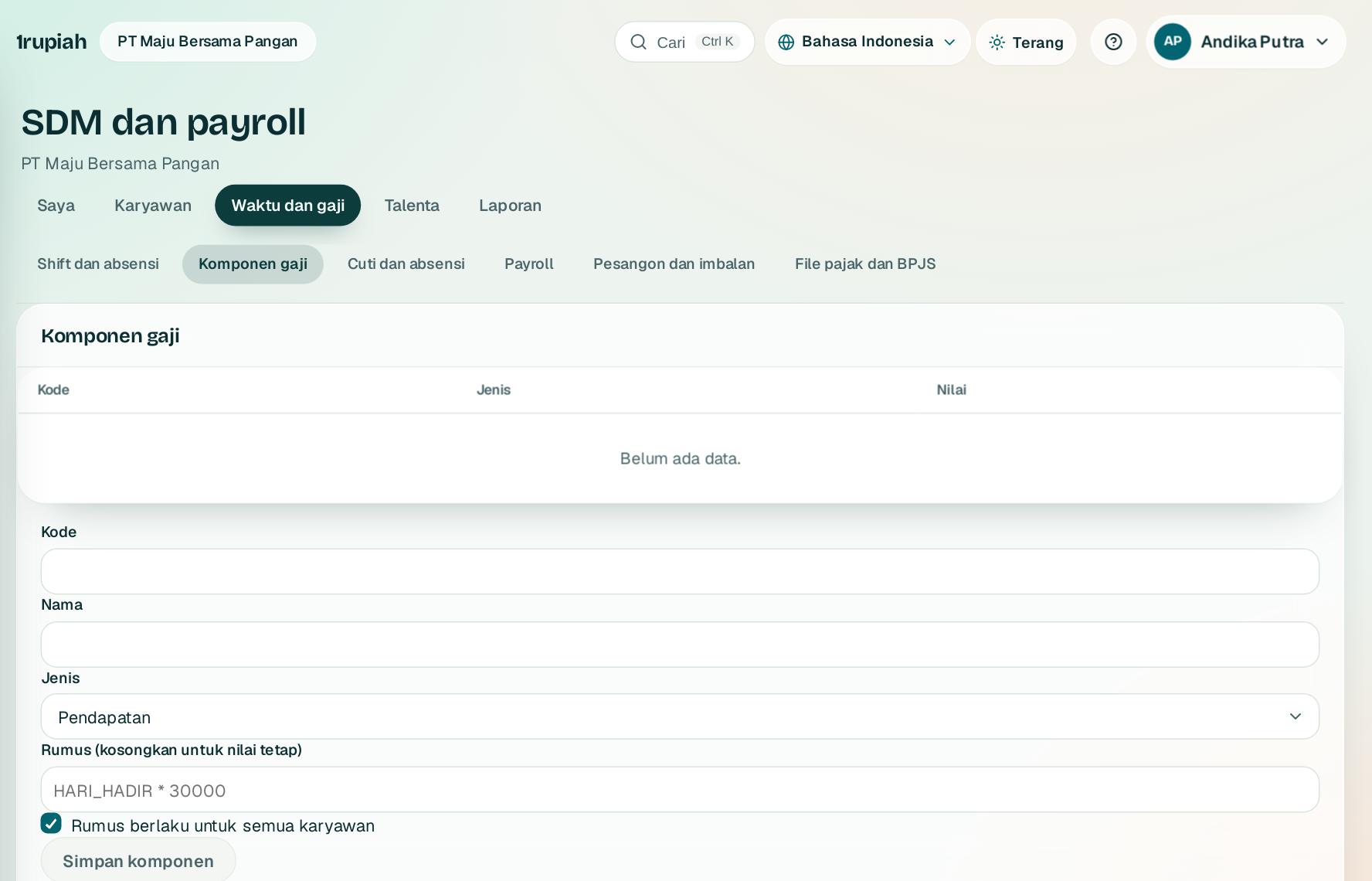
Tunjangan dan potongan dengan rumus, potongan koperasi, dan upah mingguan untuk karyawan harian.
Allowances and deductions with formulas, cooperative deductions, and weekly pay for daily workers.
1
Buat komponen pendapatan atau potongan. Kosongkan rumus untuk nilai tetap per karyawan.
Create an earning or deduction. Leave the formula empty for a fixed amount per employee.
2
Rumus memakai variabel seperti HARI_HADIR, JAM_LEMBUR, atau MASA_KERJA_BULAN dan diperiksa dengan contoh saat disimpan.
Formulas use variables such as HARI_HADIR, JAM_LEMBUR, or MASA_KERJA_BULAN and are checked with a sample when saved.
3
Tugaskan potongan koperasi ke karyawan; potongan mengurangi gaji bersih dan dijurnal sebagai utang.
Assign the cooperative deduction to employees; it lowers net pay and is posted as a payable.
4
Untuk karyawan bayar mingguan, pilih Senin awal minggu lalu Buat payroll mingguan.
For weekly paid employees, pick the Monday that starts the week and choose Create weekly payroll.
1rupiah1HR · Panduan Pengguna | User Guide
1HR · 09
Hubungan industrial
Employee relations
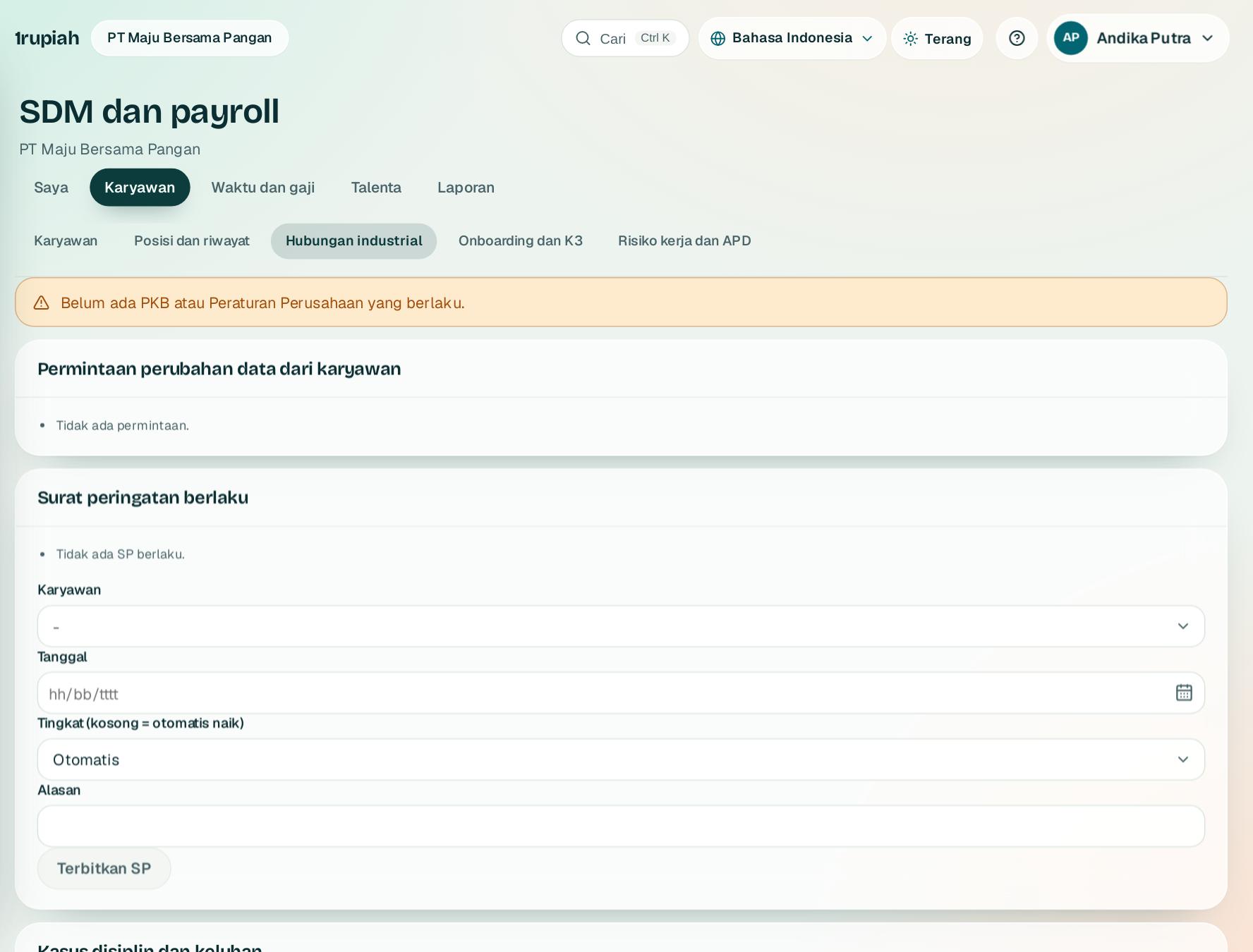
Surat peringatan berjenjang, PKB atau Peraturan Perusahaan, kasus disiplin, dan permintaan data dari karyawan.
Graded warning letters, the company regulation, disciplinary cases, and data requests from employees.
1
Simpan PKB atau Peraturan Perusahaan dengan masa berlakunya. Pengingat muncul 90 hari sebelum berakhir.
Save the collective agreement or company regulation with its validity. A reminder shows 90 days before it ends.
2
Terbitkan SP. Tingkatnya naik sendiri dari SP yang masih berlaku dan karyawan mengakuinya dari aplikasinya.
Issue a warning. Its level rises from any active warning and the employee acknowledges it in the app.
3
Buka kasus disiplin atau keluhan. Kasus pelecehan selalu rahasia dan hanya terlihat oleh penyetuju SDM.
Open a disciplinary case or grievance. Harassment cases are always confidential and visible to HR approvers only.
4
Setujui atau tolak perubahan data yang diajukan karyawan dari HP; rekening bank selalu diperiksa orang lain.
Approve or reject data changes employees request from their phone; bank details are always checked by someone else.
1rupiah1HR · Panduan Pengguna | User Guide
1HR · 10
Onboarding dan K3
Onboarding and safety
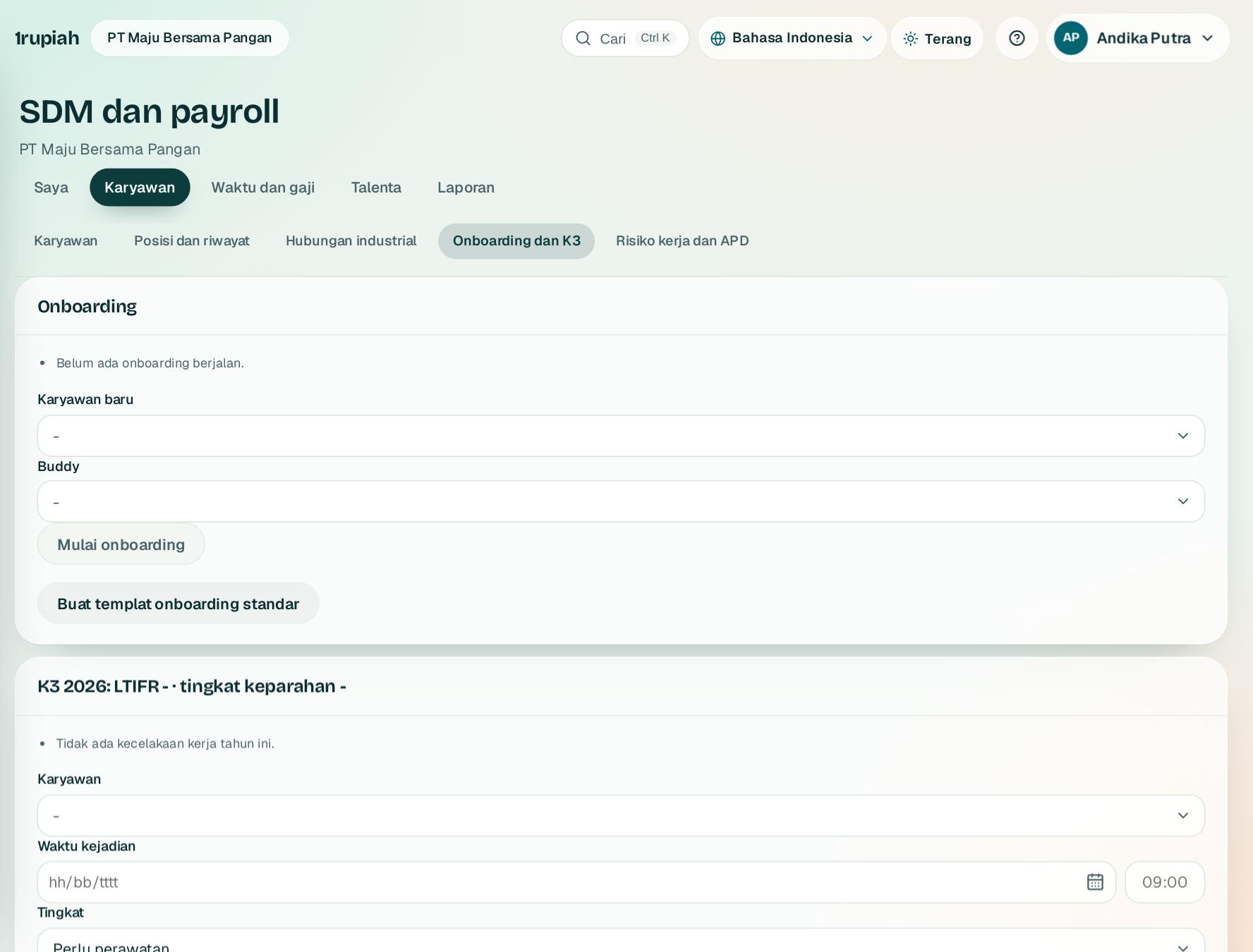
Tugas onboarding ke pemiliknya, kecelakaan kerja dengan batas lapor BPJS, MCU, serta bonus referral.
Onboarding tasks to their owners, work accidents with the BPJS reporting limit, check ups, and referral bonuses.
1
Buat templat onboarding standar, lalu Mulai onboarding untuk karyawan baru dan pilih buddy-nya.
Create the standard onboarding template, then Start onboarding for a new hire and pick a buddy.
2
Catat kecelakaan kerja. Selain P3K wajib dilaporkan ke BPJS Ketenagakerjaan dalam 2 x 24 jam.
Record work accidents. Anything beyond first aid must be reported to BPJS Ketenagakerjaan within 2 x 24 hours.
3
Simpan hasil MCU; jadwal berikutnya otomatis setahun lagi dan yang jatuh tempo ditandai.
Save check up results; the next one is set a year later and due ones are flagged.
4
Klik Hitung dan bayar yang jatuh tempo untuk bonus referral dan fee agensi rekrutmen.
Choose Calculate and pay what is due for referral bonuses and agency fees.
1rupiah1HR · Panduan Pengguna | User Guide
1HR · 11
OKR
OKRs
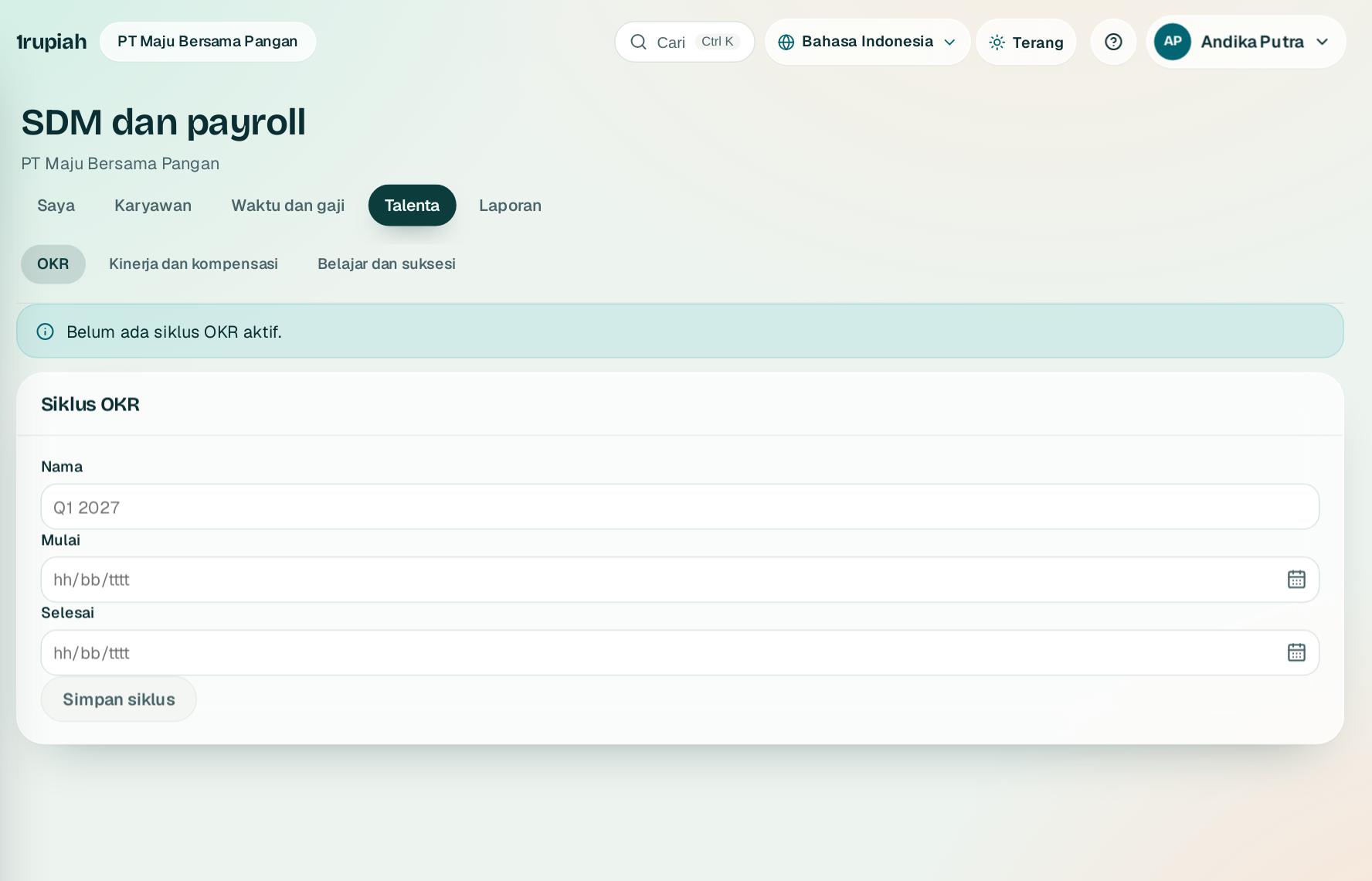
Sasaran perusahaan menurun ke departemen dan individu, dengan check in dan kemajuan yang digulung ke atas.
Company goals cascade to departments and people, with check ins and progress that rolls up.
1
SDM membuat siklus OKR, misalnya satu kuartal.
HR creates an OKR cycle, for example one quarter.
2
Buat objective perusahaan, lalu objective departemen dan individu yang mendukungnya, masing masing dengan key result.
Create company objectives, then the department and individual objectives that support them, each with key results.
3
Isi check in nilai dan keyakinan. Key result tanpa check in 14 hari atau keyakinan rendah ditandai.
Check in the value and confidence. Key results without a check in for 14 days or with low confidence are flagged.
4
Objective yang kemajuannya tertinggal dari waktu berjalan ditandai merah.
Objectives falling behind the time elapsed show in red.
1rupiah1HR · Panduan Pengguna | User Guide
1HR · 12
Penilaian kinerja dan kompensasi
Performance reviews and pay
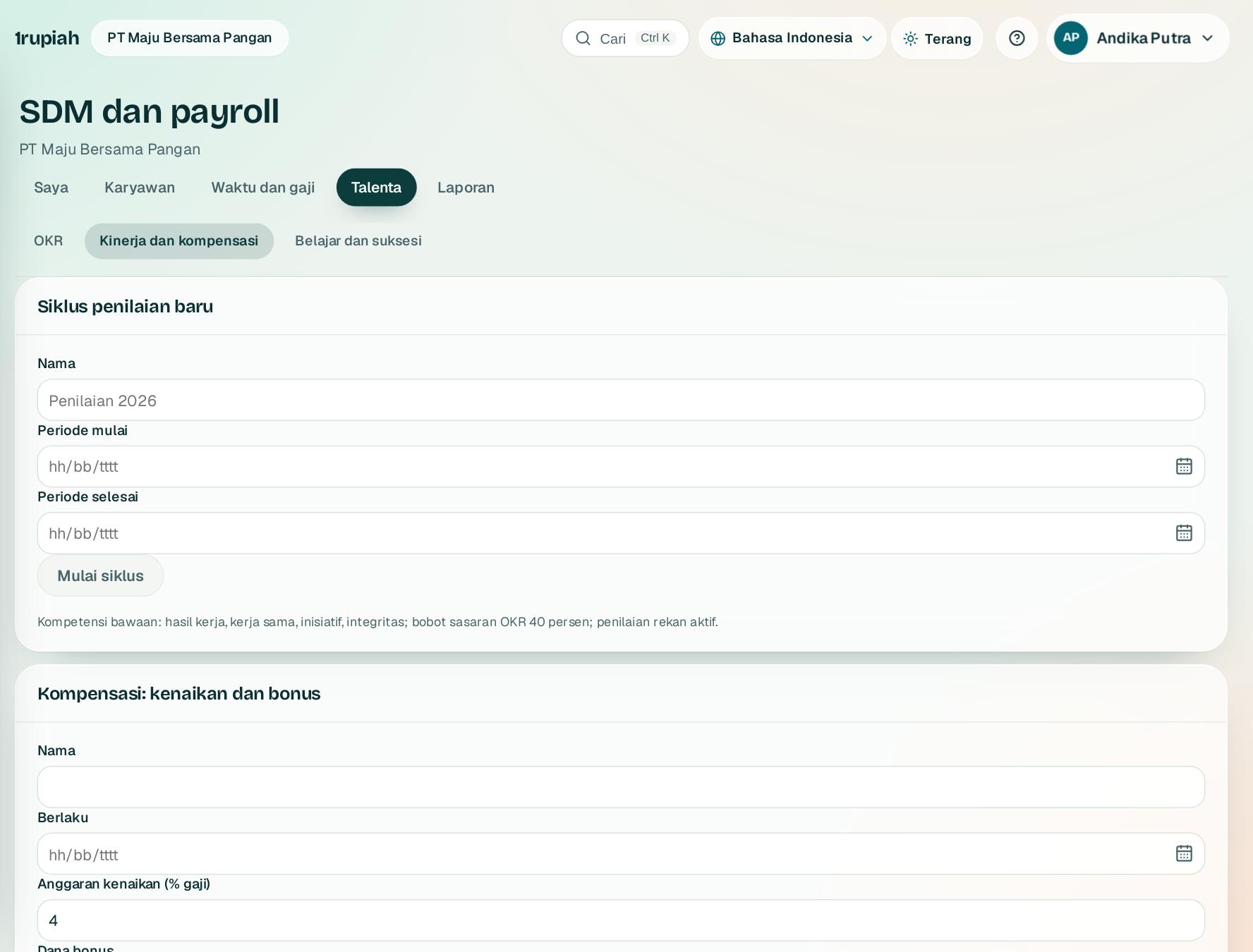
Penilaian diri, rekan, dan atasan, kalibrasi 9 kotak, lalu kenaikan gaji dan bonus dari matriks.
Self, peer, and manager reviews, 9 box calibration, then raises and bonuses from a matrix.
1
SDM memulai siklus penilaian. Setiap karyawan mendapat tugas penilaian diri di Inbox.
HR starts a review cycle. Every employee gets a self review task in the Inbox.
2
Atasan menilai setelah penilaian diri dan bisa meminta masukan rekan. Skor menggabungkan OKR dan kompetensi.
Managers review after the self review and can ask peers for feedback. The score combines OKRs and competencies.
3
Di Kalibrasi, geser rating akhir dengan alasan, lalu tutup siklus.
Under Calibration, move final ratings with a reason, then close the cycle.
4
Buat usulan kompensasi dari matriks. Penyimpangan butuh alasan dan persetujuan dilakukan orang lain dari pembuat.
Create compensation proposals from the matrix. Deviations need a reason and someone other than the author approves.
1rupiah1HR · Panduan Pengguna | User Guide
1HR · 13
Belajar, kompetensi, dan suksesi
Learning, competencies, and succession
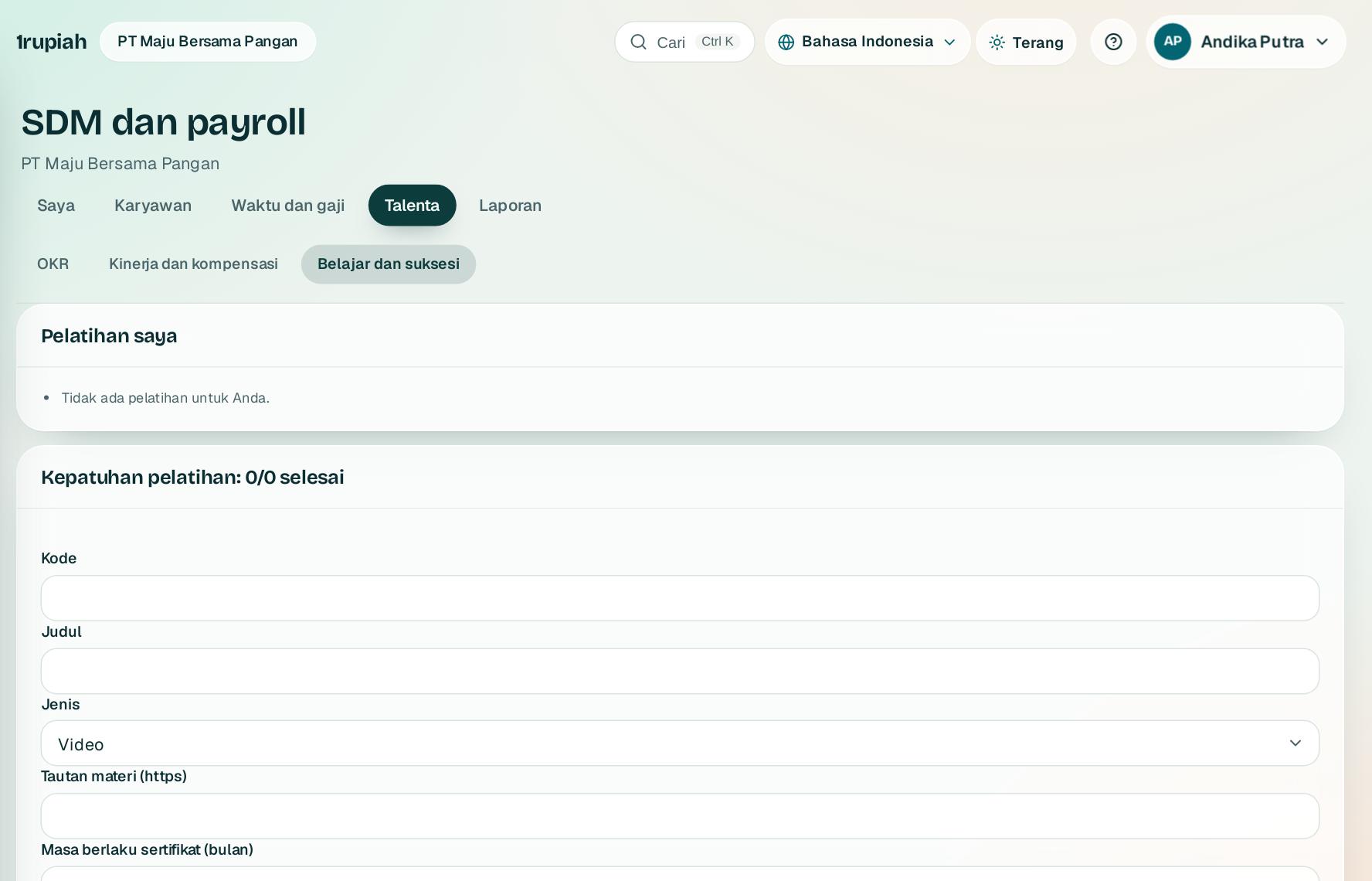
Kursus dengan kuis dan sertifikat, kursus wajib otomatis, gap kompetensi, dan pengganti posisi kunci.
Courses with quizzes and certificates, automatic required training, competency gaps, and successors for key positions.
1
Buat kursus dan centang wajib untuk semua karyawan; karyawan baru ikut ditugaskan.
Create a course and tick required for everyone; new hires are assigned too.
2
Karyawan mengerjakan kuis dari tab ini. Lulus menerbitkan sertifikat dengan masa berlaku.
Employees take the quiz from this tab. Passing issues a certificate with an expiry date.
3
Kecocokan kompetensi ke posisi tampil dengan saran kursus untuk menutup gap.
The competency fit to the position shows with suggested courses to close the gap.
4
Posisi kunci tanpa pengganti yang siap sekarang ditandai.
Key positions without a ready now successor are flagged.
1rupiah1HR · Panduan Pengguna | User Guide
1HR · 14
Survei dan analitik
Surveys and analytics
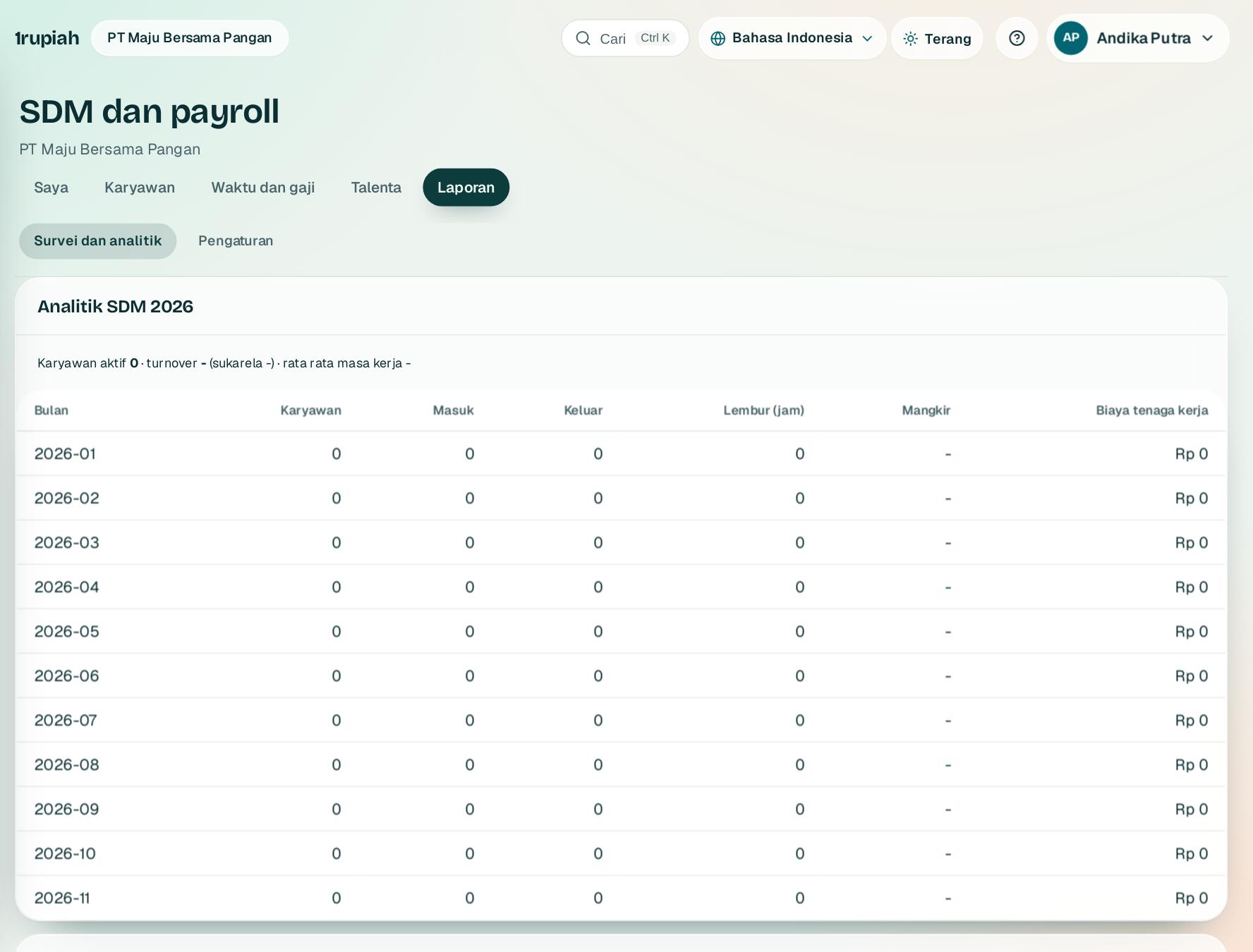
Survei anonim dengan eNPS, analitik SDM, rencana tenaga kerja, dan risiko keluar yang dijelaskan.
Anonymous surveys with eNPS, HR analytics, workforce plans, and explained flight risk.
1
Buka survei engagement standar. Jawaban disimpan tanpa nama dan hasil baru tampil setelah minimal 5 jawaban.
Open the standard engagement survey. Answers are stored without names and results show after at least 5 answers.
2
Analitik menampilkan headcount, turnover, mangkir, lembur, dan biaya tenaga kerja per bulan.
Analytics show headcount, turnover, absence, overtime, and labour cost per month.
3
Rencana tenaga kerja membandingkan rencana dengan posisi terisi dan jumlah yang perlu direkrut.
The workforce plan compares the plan with filled positions and how many to hire.
4
Risiko keluar menyebut faktornya satu per satu. Pakai untuk percakapan, bukan keputusan otomatis.
Flight risk names each factor. Use it for a conversation, not an automatic decision.
1rupiah1HR · Panduan Pengguna | User Guide
1HR · 15
Ringkasan modul
Module overview
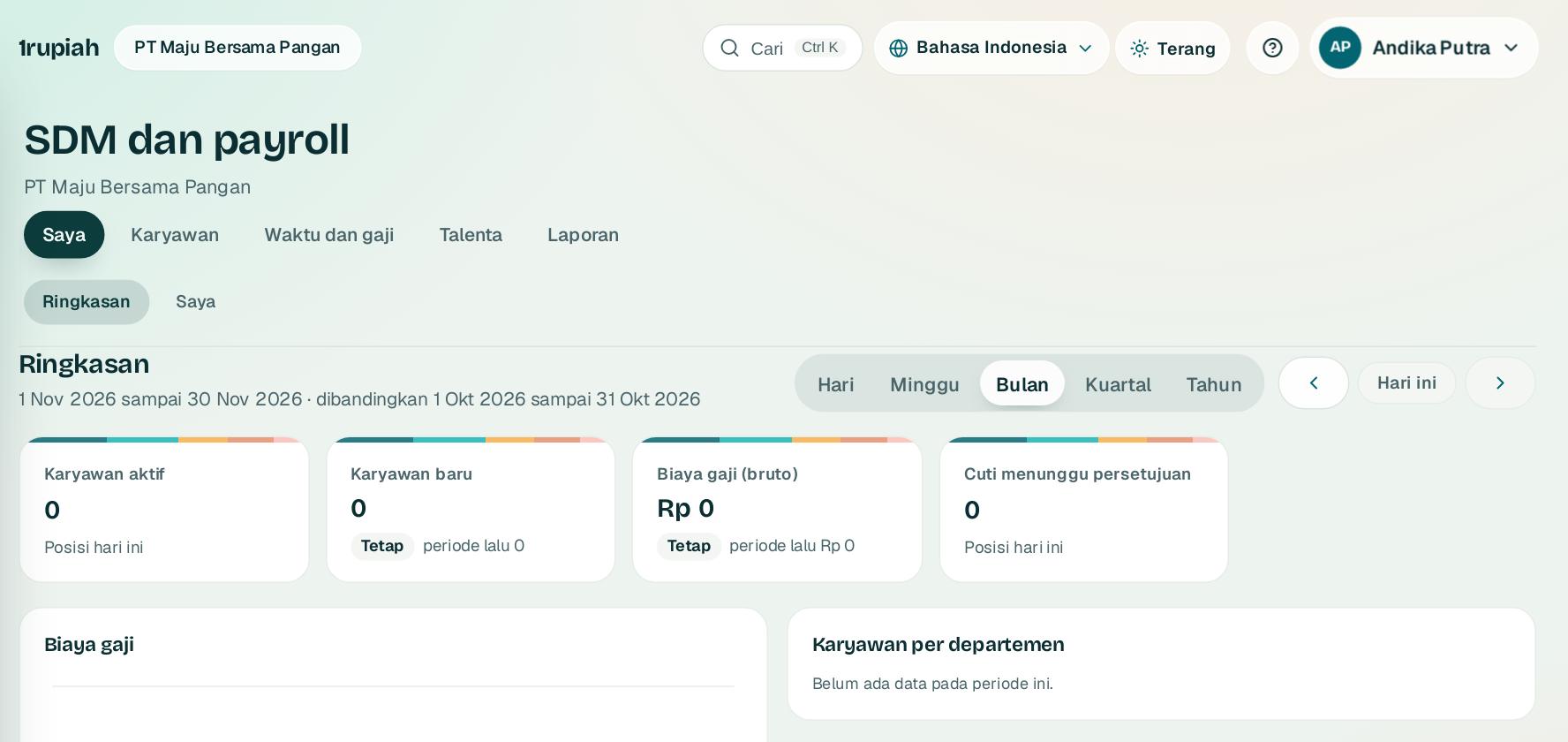
Angka utama SDM dan payroll dalam satu layar, dengan perbandingan periode sebelumnya.
The key HR and payroll figures on one screen, compared with the previous period.
12
1
Buka SDM dan payroll, lalu Ringkasan1.
Open HR and payroll, then Overview1.
2
Pilih rentang Hari, Minggu, Bulan2, Kuartal, atau Tahun. Kartu karyawan aktif, karyawan baru, biaya gaji, dan cuti menunggu ikut berubah dan menampilkan selisih dengan periode sebelumnya.
Pick Day, Week, Month2, Quarter, or Year. The active employees, new hires, payroll cost, and pending leave cards update and show the change against the previous period.
3
Klik kartu untuk membuka daftar di belakang angkanya. Angka di luar izin Anda tidak ditampilkan.
Click a card to open the list behind the figure. Figures outside your permissions are not shown.
1rupiah
Butuh bantuan?
Tim kami siap 24 jam, Senin sampai Minggu. Buka chat di aplikasi atau situs, atau kirim email.
Need help?
Our team is available 24 hours, Monday to Sunday. Open the chat in the app or on the site, or send an email.