1rupiahDocs
ID
1rupiahv1.0

Panduan Pengguna | User Guide

1Sales

Penjualan dan Piutang

Sales and Receivables

Penawaran, order, pengiriman, faktur ber PPN, penerimaan, penagihan, retur, kontrak, langganan, pipeline, dan portal pelanggan.

Quotes, orders, deliveries, VAT invoices, receipts, collections, returns, contracts, subscriptions, pipeline, and the customer portal.

17 November 2026 · PT Satu Rupiah Indonesia

1rupiah1Sales · Panduan Pengguna | User Guide

Mengapa 1rupiah

Why 1rupiah

Sistem bisnis lama dibangun untuk kantor yang selalu online, satu bahasa, dan pajak yang dihitung manual. 1rupiah dibangun untuk cara kerja Indonesia hari ini.

Older business systems were built for offices that are always online, in one language, with tax worked out by hand. 1rupiah is built for how Indonesian businesses work today.

AI yang bekerja, bukan sekadar menjawabTanya data dengan kalimat biasa, pembaca faktur pemasok dari foto atau PDF, agen yang menagih dan memesan ulang dalam batas nilai, dan situs 1CMS yang disusun AI. Setiap usulan AI bisa ditinjau dan dibatalkan.
AI that works, not just chatsAsk your data in plain words, read supplier invoices from a photo or PDF, let agents chase payments and reorder within value limits, and draft a 1CMS website with AI. Every AI suggestion can be reviewed and undone.
Pajak Indonesia sudah di dalamPPN 12 persen dengan DPP nilai lain 11/12, ekspor Faktur Pajak ke Coretax, PPh 21 tarif TER, PPh 23 dan 4(2) dengan bukti potong, BPJS, PBJT restoran, dan pesangon PP 35/2021.
Indonesian tax built inVAT at 12 percent on the 11/12 tax base, tax invoice export to Coretax, PPh 21 TER rates, PPh 23 and 4(2) with withholding slips, BPJS, restaurant PBJT, and severance under PP 35/2021.
Tetap jalan saat internet putusKasir dan aplikasi HP terus berjualan dan mencatat saat koneksi hilang, lalu menyinkronkan sekali saat online lagi tanpa transaksi ganda.
Keeps working offlineThe cashier and mobile apps keep selling and recording when the connection drops, then sync once when back online without duplicate transactions.
Keamanan kelas bankPasskey, verifikasi dua langkah, masuk dengan Google (Microsoft bila diaktifkan), persetujuan empat mata untuk uang keluar, rekening pemasok dicek orang kedua, data tiap perusahaan di skema terpisah, dan jejak audit lengkap.
Bank grade securityPasskeys, two step verification, Google sign in (Microsoft when enabled), four eyes approval for money going out, supplier bank accounts checked by a second person, a separate schema per company, and a full audit trail.
Angka yang selalu tepatHarga, PPN, dan pembulatan dihitung oleh Calc Core berbahasa Rust yang sama di server, web, dan desktop. Jurnal selalu seimbang dan periode terkunci tidak bisa diubah diam diam.
Figures that are always rightPrices, VAT, and rounding are computed by the same Rust Calc Core on the server, web, and desktop. Journals always balance and locked periods cannot be changed quietly.
Bayar hanya yang dipakaiMulai dari 1ERP Gratis, lalu tambah aplikasi satu per satu: 1Finance, 1Sales, 1HR, 1Cashier, dan lainnya. Semua terhubung dalam satu data, satu login, di web, desktop, dan HP.
Pay only for what you useStart on 1ERP Free, then add apps one at a time: 1Finance, 1Sales, 1HR, 1Cashier, and more. Everything shares one set of data and one login, on web, desktop, and mobile.
1rupiah.biz.id/guide2 / 21
1rupiah1Sales · Panduan Pengguna | User Guide

Daftar isi

Contents

  1. 1Ringkasan penjualanSales overview4
  2. 2Membuat penawaranCreating a quote5
  3. 3Order sampai pengirimanFrom order to delivery6
  4. 4Faktur penjualan dan PPNSales invoices and VAT7
  5. 5Mencatat pembayaran pelangganRecording customer payments8
  6. 6Umur piutang dan penagihanReceivables aging and collections9
  7. 7Daftar harga dan promoPrice lists and promotions10
  8. 8Kontrak dan langgananContracts and subscriptions11
  9. 9Pipeline penjualanSales pipeline12
  10. 10Portal pelangganCustomer portal13
  11. 11Ketersediaan dan janji kirimAvailability and promise dates14
  12. 12Tiket layanan pelangganCustomer service tickets15
  13. 13Kampanye, segmen, dan journeyCampaigns, segments, and journeys16
  14. 14Kondisi harga dan rebatePricing conditions and rebates17
  15. 15Konfigurator produk dan konsinyasiProduct configurator and consignment18
  16. 16Retur penjualanSales returns19
  17. 17Portal B2B dan 1Supplier NetworkB2B portal and 1Supplier Network20

Cara membaca panduan ini

How to read this guide

Satu halaman, satu tugasSetiap halaman menjelaskan satu pekerjaan dari awal sampai selesai.
One page, one taskEach page covers one job from start to finish.
Nomor di gambarKotak bernomor 1 menunjukkan tombol atau isian yang dimaksud langkah dengan nomor sama.
Numbers on screenshotsA numbered box 1 marks the button or field the matching step refers to.
Chip tombolSimpan adalah tombol utama, Batal tombol biasa, persis seperti di layar.
Button chipsSave is a main button and Cancel a regular one, exactly as on screen.
Gambar layarGambar diambil dari tampilan bahasa Indonesia. Ganti bahasa kapan saja lewat pilihan bahasa di kanan atas.
ScreenshotsScreenshots use the Indonesian interface. Switch language at any time with the language picker at the top right.
1rupiah.biz.id/guide3 / 21
1rupiah1Sales · Panduan Pengguna | User Guide

1Sales · 01

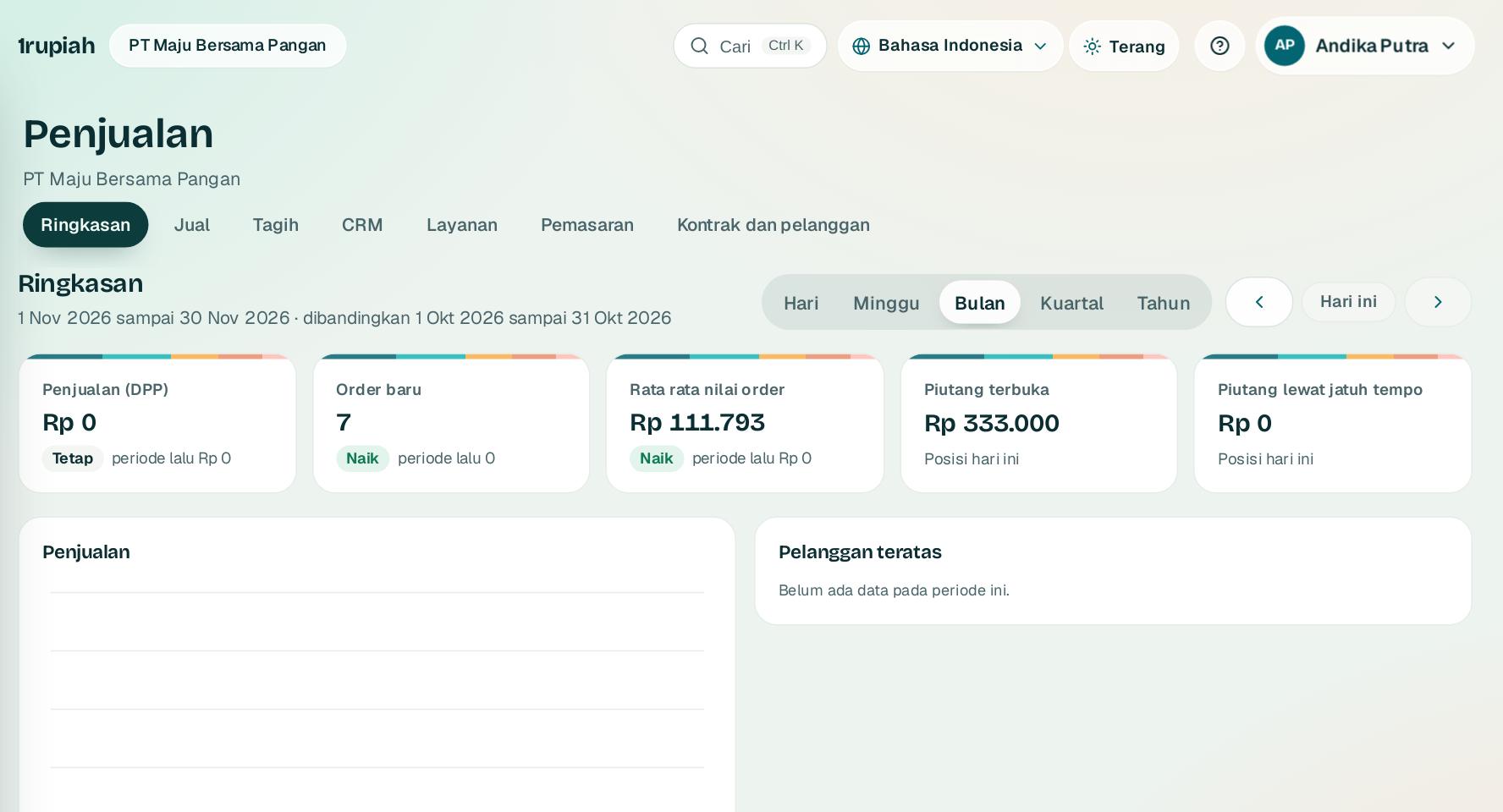
Ringkasan penjualan

Sales overview

Penjualan, order, piutang, dan pelanggan teratas dalam satu layar.

Sales, orders, receivables, and top customers on one screen.

1
  1. 1

    Buka Penjualan dari rel kiri, tab Ringkasan.

    Open Sales from the left rail, Summary tab.

  2. 2

    Pilih periode di 1. Kartu menampilkan penjualan DPP, order baru, rata rata order, dan piutang.

    Choose the period at 1. Cards show net sales, new orders, average order value, and receivables.

  3. 3

    Kartu piutang lewat jatuh tempo membuka daftar faktur yang perlu ditagih.

    The overdue receivables card opens the list of invoices to chase.

1rupiah.biz.id/guide4 / 21
1rupiah1Sales · Panduan Pengguna | User Guide

1Sales · 02

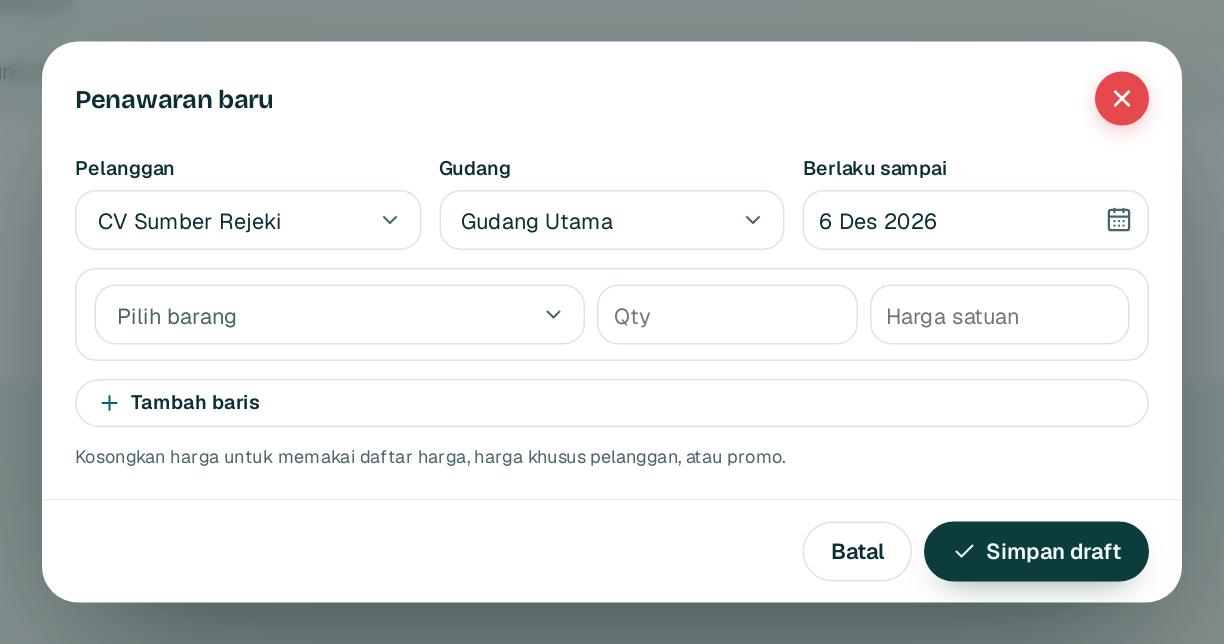
Membuat penawaran

Creating a quote

Harga diambil otomatis dari daftar harga pelanggan, tingkat qty, dan promo aktif.

Prices come automatically from the customer price list, quantity tiers, and active promotions.

1234
  1. 1

    Buka Penjualan, Penawaran lalu Penawaran baru.

    Open Sales, Quotes and choose New quote.

  2. 2

    Pilih pelanggan 1 dan tanggal berlaku 2.

    Pick the customer 1 and the valid until date 2.

  3. 3

    Pilih barang 3, isi qty, dan biarkan harga kosong untuk memakai harga daftar.

    Choose the item 3, enter the quantity, and leave the price empty to use the list price.

  4. 4

    Klik Simpan draft 4, lalu kirim PDF ke pelanggan. Penawaran yang diterima dijadikan order dengan satu klik.

    Click Save draft 4, then send the PDF to the customer. An accepted quote becomes an order in one click.

Tips Harga di bawah margin minimum ditandai per baris dan butuh persetujuan.

Tip Prices below the minimum margin are flagged per line and need approval.

1rupiah.biz.id/guide5 / 21
1rupiah1Sales · Panduan Pengguna | User Guide

1Sales · 03

Order sampai pengiriman

From order to delivery

Konfirmasi order, kirim barang, lalu stok dan HPP terposting otomatis.

Confirm the order and ship the goods; stock and cost of sales post automatically.

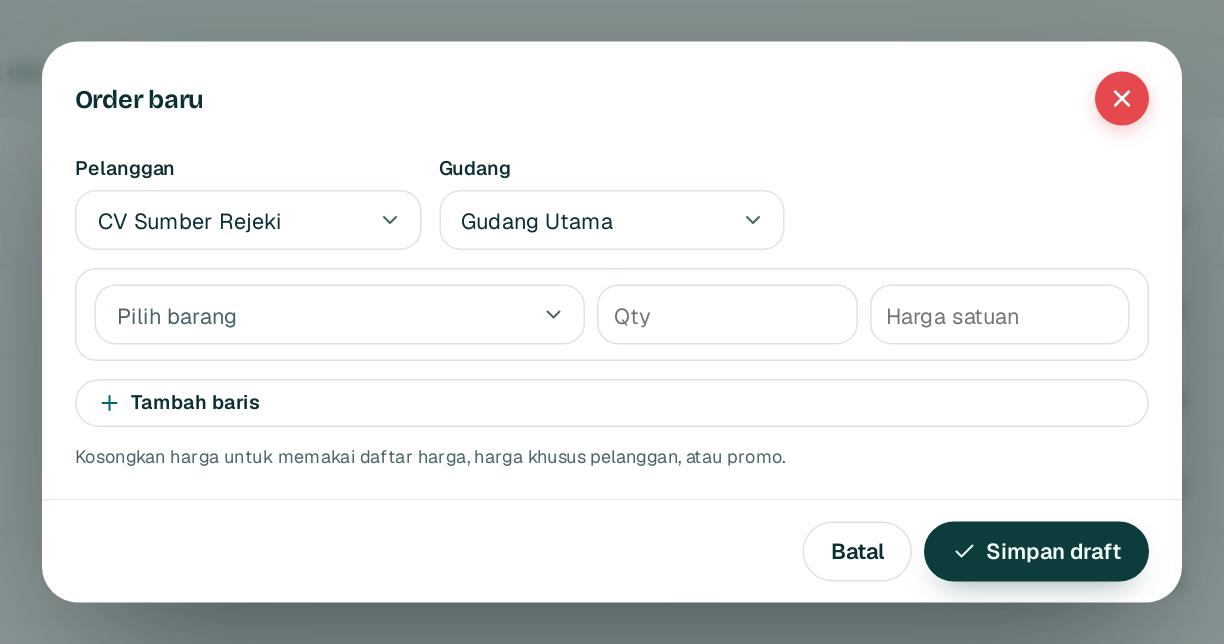
1234
  1. 1

    Buka Penjualan, Order lalu Order baru. Pilih pelanggan 1 dan gudang 2.

    Open Sales, Orders and choose New order. Pick the customer 1 and warehouse 2.

  2. 2

    Isi barang dan qty, tambah dengan Tambah baris 3, lalu Simpan draft 4.

    Add items and quantities, more with Add line 3, then Save draft 4.

  3. 3

    Di halaman order klik Konfirmasi order. Order di atas limit kredit ditahan untuk keuangan.

    On the order page click Confirm order. Orders above the credit limit are held for finance.

  4. 4

    Isi qty di kolom Kirim sekarang lalu Catat pengiriman. Batch dipilih dari kedaluwarsa terdekat.

    Enter quantities under Ship now and click Record delivery. Batches are picked by nearest expiry.

1rupiah.biz.id/guide6 / 21
1rupiah1Sales · Panduan Pengguna | User Guide

1Sales · 04

Faktur penjualan dan PPN

Sales invoices and VAT

Faktur dibuat dari pengiriman dengan PPN 12 persen dari DPP nilai lain 11/12 dan jurnal otomatis.

Invoices are created from deliveries with 12 percent VAT on the 11/12 base and an automatic journal.

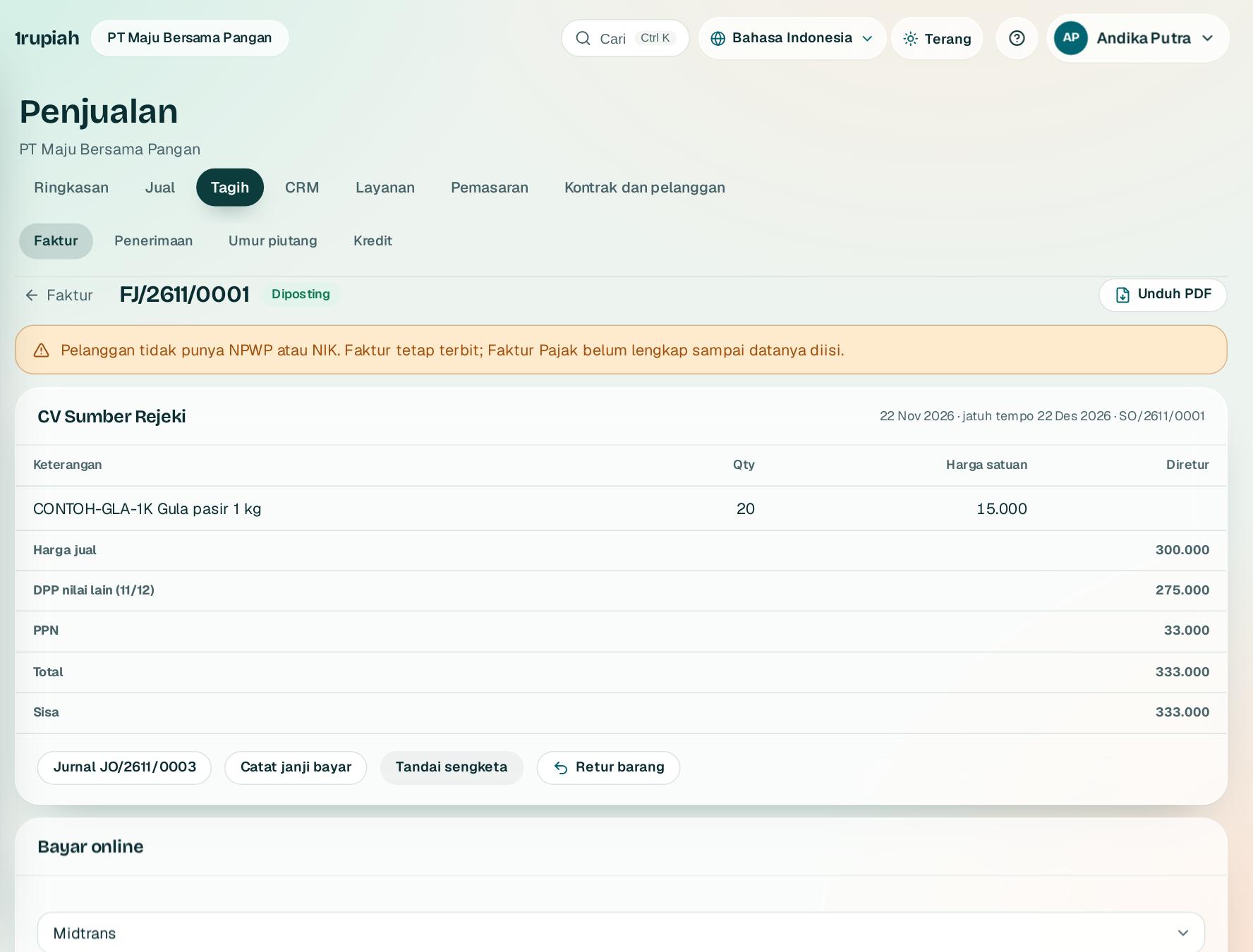
123
  1. 1

    Buka order yang sudah dikirim, lalu klik Buat faktur. Faktur langsung diposting dengan nomor FJ.

    Open a shipped order and click Create invoice. The invoice posts at once with an FJ number.

  2. 2

    Bagian total menampilkan harga jual, DPP nilai lain 11/12 1, PPN, dan sisa tagihan.

    The totals show the selling price, the 11/12 tax base 1, VAT, and the balance due.

  3. 3

    Klik Unduh PDF 2 untuk mengirim faktur berkop perusahaan Anda.

    Click Download PDF 2 to send the invoice on your letterhead.

  4. 4

    Catat janji bayar atau tandai sengketa supaya pengingat otomatis menyesuaikan. Retur dibuat lewat Retur barang 3.

    Record a payment promise or mark a dispute so reminders adjust. Returns start from Return goods 3.

1rupiah.biz.id/guide7 / 21
1rupiah1Sales · Panduan Pengguna | User Guide

1Sales · 05

Mencatat pembayaran pelanggan

Recording customer payments

Catat transfer masuk dan biarkan sistem mengusulkan faktur yang dilunasi.

Record incoming transfers and let the system suggest which invoices they settle.

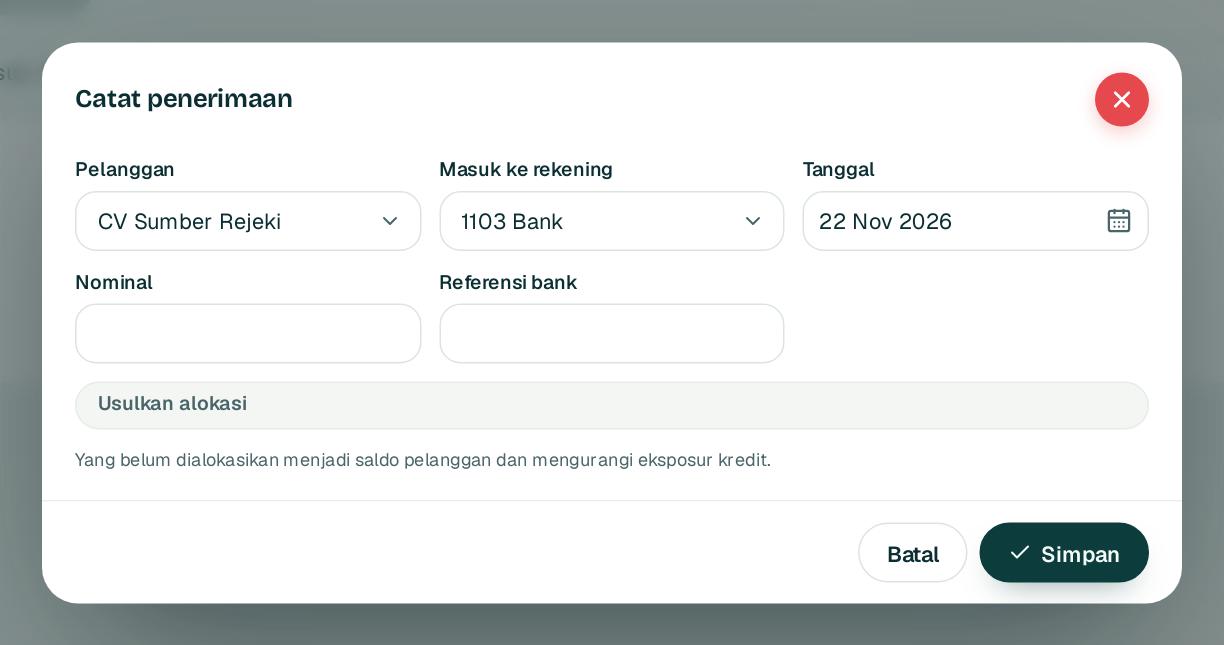
1234
  1. 1

    Buka Penjualan, Penerimaan lalu Catat penerimaan.

    Open Sales, Receipts and choose Record receipt.

  2. 2

    Pilih pelanggan 1, rekening, tanggal, dan isi nominal 2 serta referensi bank.

    Pick the customer 1, the account, the date, and enter the amount 2 and bank reference.

  3. 3

    Klik Usulkan alokasi 3: nominal persis ke faktur itu, selain itu ke faktur paling lama. Sisanya jadi saldo pelanggan.

    Click Suggest allocation 3: an exact amount goes to that invoice, otherwise to the oldest. Any rest becomes customer credit.

  4. 4

    Klik Simpan 4. Jurnal dan sisa faktur langsung diperbarui.

    Click Save 4. The journal and invoice balances update at once.

1rupiah.biz.id/guide8 / 21
1rupiah1Sales · Panduan Pengguna | User Guide

1Sales · 06

Umur piutang dan penagihan

Receivables aging and collections

Lihat piutang per umur dan kirim pengingat sopan secara otomatis.

See receivables by age and send polite reminders automatically.

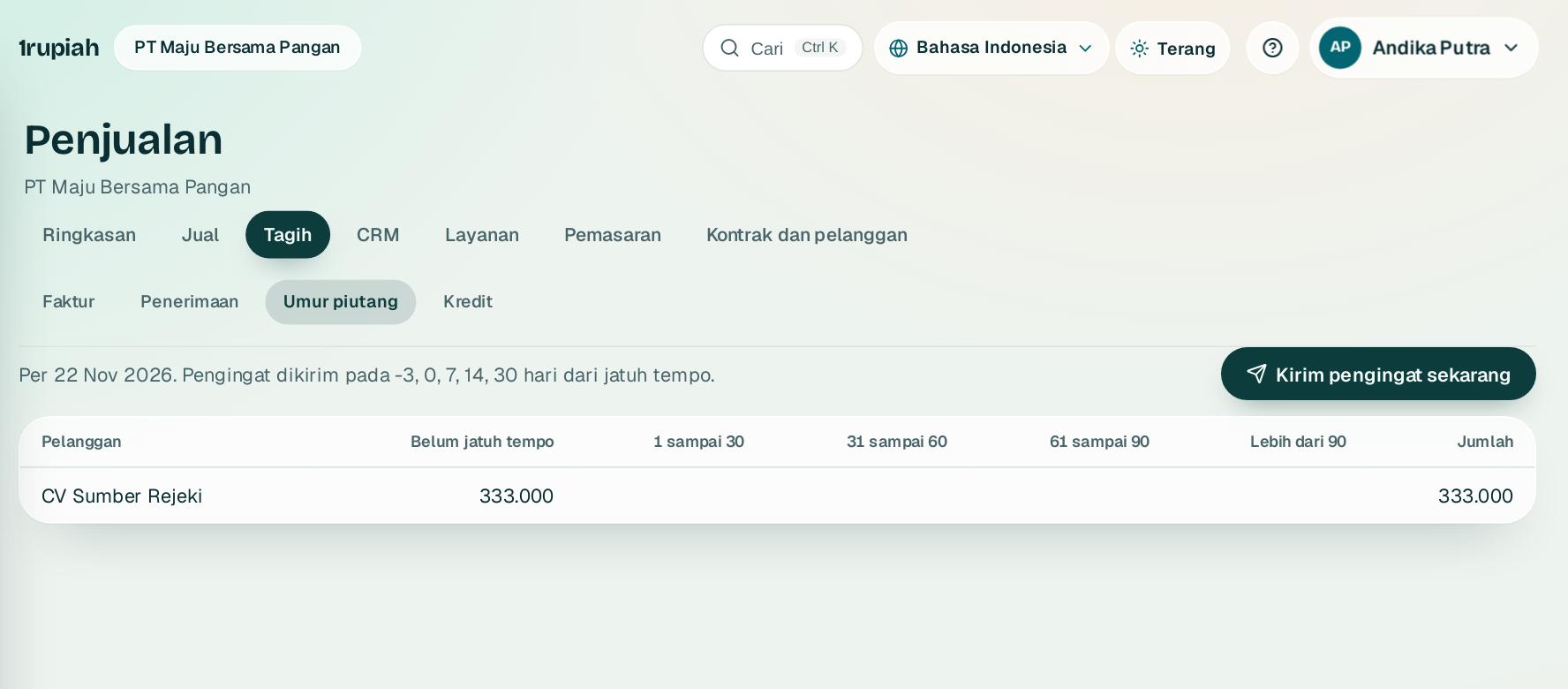
1
  1. 1

    Buka Penjualan, Umur piutang untuk melihat piutang per kelompok hari.

    Open Sales, Aging to see receivables by age bucket.

  2. 2

    Pengingat dikirim lewat email sebelum dan sesudah jatuh tempo, sekali per tingkat. Klik Kirim pengingat sekarang 1 untuk menjalankannya saat itu juga.

    Reminders are emailed before and after the due date, once per level. Click Send reminders now 1 to run them straight away.

  3. 3

    Pelanggan tanpa email menjadi tugas telepon di Inbox.

    Customers without an email become a phone call task in the Inbox.

  4. 4

    Atur limit kredit per pelanggan di tab Kredit.

    Set credit limits per customer in the Credit tab.

1rupiah.biz.id/guide9 / 21
1rupiah1Sales · Panduan Pengguna | User Guide

1Sales · 07

Daftar harga dan promo

Price lists and promotions

Atur harga per pelanggan atau kelompok, tingkat qty, dan promo berjangka.

Set prices per customer or group, quantity tiers, and time limited promotions.

12
  1. 1

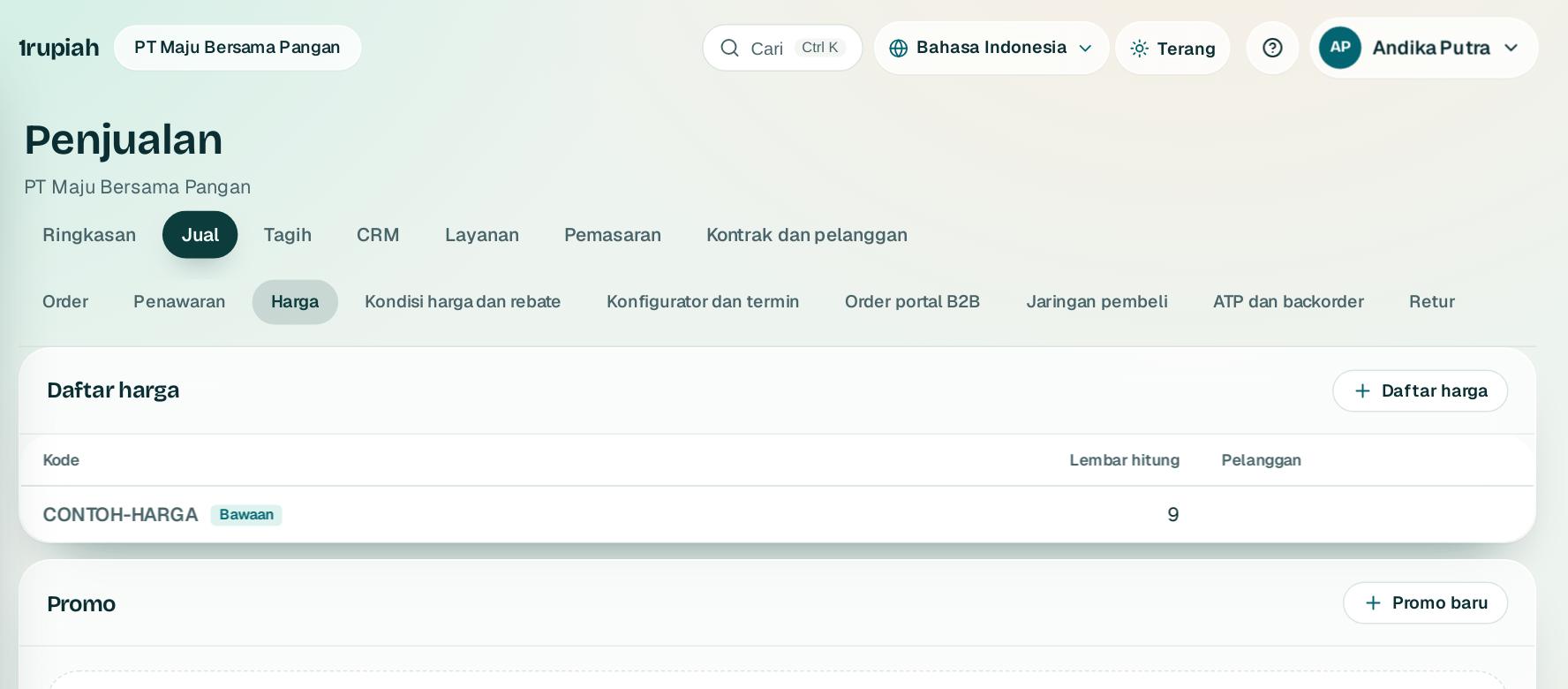
    Buka Penjualan, Harga. Daftar harga 1 berisi harga per barang dengan qty minimum.

    Open Sales, Pricing. Price lists 1 hold prices per item with minimum quantities.

  2. 2

    Tautkan daftar harga ke pelanggan di data induk supaya order memakainya otomatis.

    Link a price list to a customer in master data so orders use it automatically.

  3. 3

    Klik Promo baru 2 untuk diskon persen atau beli X gratis Y dengan masa berlaku.

    Click New promotion 2 for a percentage discount or buy X get Y with a validity period.

1rupiah.biz.id/guide10 / 21
1rupiah1Sales · Panduan Pengguna | User Guide

1Sales · 08

Kontrak dan langganan

Contracts and subscriptions

Kunci harga dengan kontrak dan tagih jasa berulang secara otomatis.

Lock prices with contracts and bill recurring services automatically.

1234
  1. 1

    Kontrak: di tab Kontrak isi pelanggan, periode, barang, qty komitmen, harga kontrak, dan jadwal kirim, lalu aktifkan.

    Contracts: in the Contracts tab fill in the customer, period, item, committed quantity, contract price, and delivery schedule, then activate it.

  2. 2

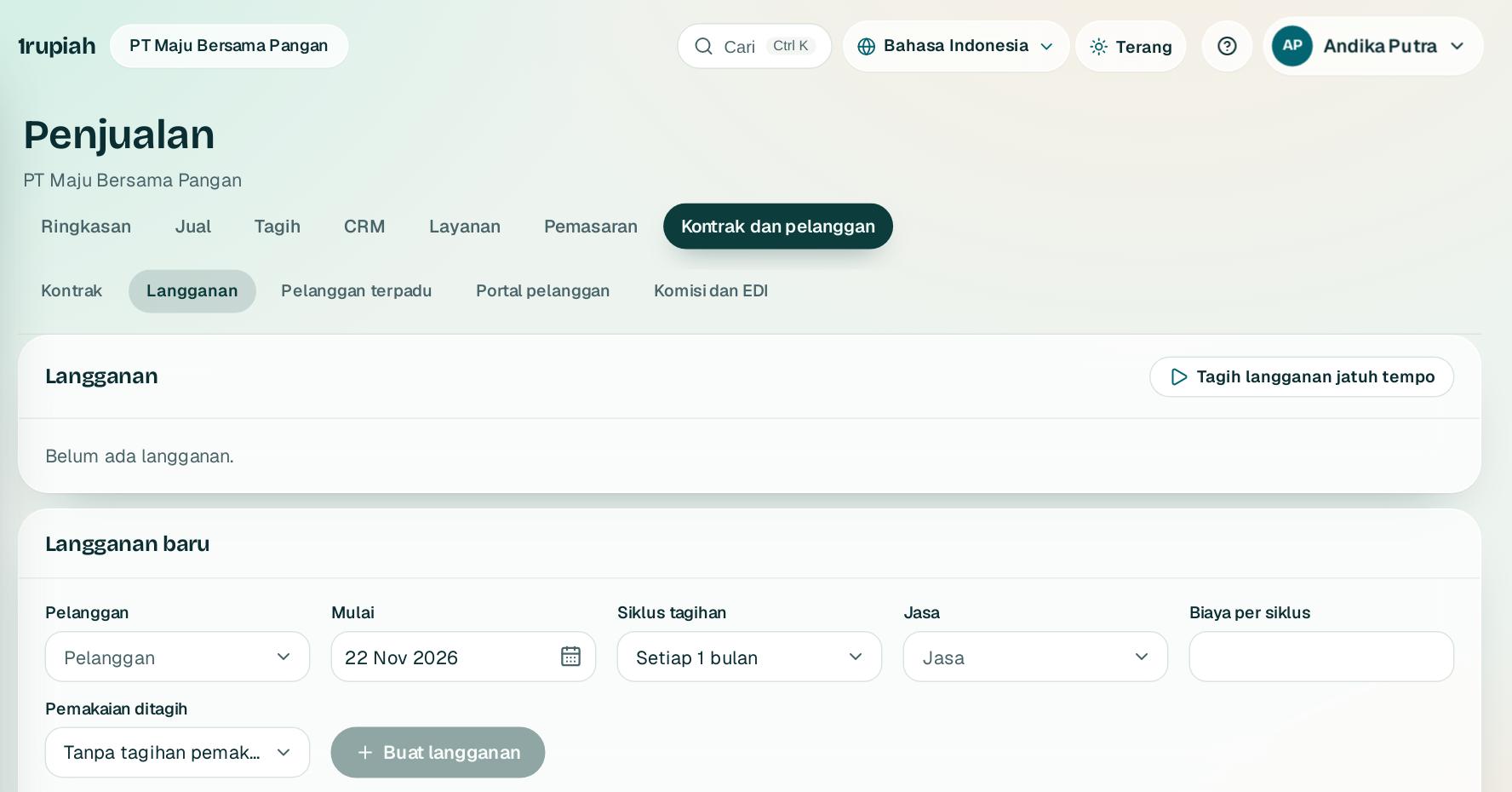
    Langganan: di tab Langganan pilih pelanggan 1, jasa, biaya, dan siklus tagihan 2.

    Subscriptions: in the Subscriptions tab pick the customer 1, service, fee, and billing cycle 2.

  3. 3

    Klik Buat langganan 3. Pemakaian di atas kuota bisa ikut ditagih.

    Click Create subscription 3. Usage above the quota can be billed too.

  4. 4

    Klik Tagih langganan jatuh tempo 4 untuk membuat satu faktur per periode. Mulai di tengah bulan diprorata.

    Click Bill due subscriptions 4 to create one invoice per period. Mid month starts are prorated.

1rupiah.biz.id/guide11 / 21
1rupiah1Sales · Panduan Pengguna | User Guide

1Sales · 09

Pipeline penjualan

Sales pipeline

Kelola lead dan peluang sampai menang atau kalah.

Manage leads and opportunities until they are won or lost.

12
  1. 1

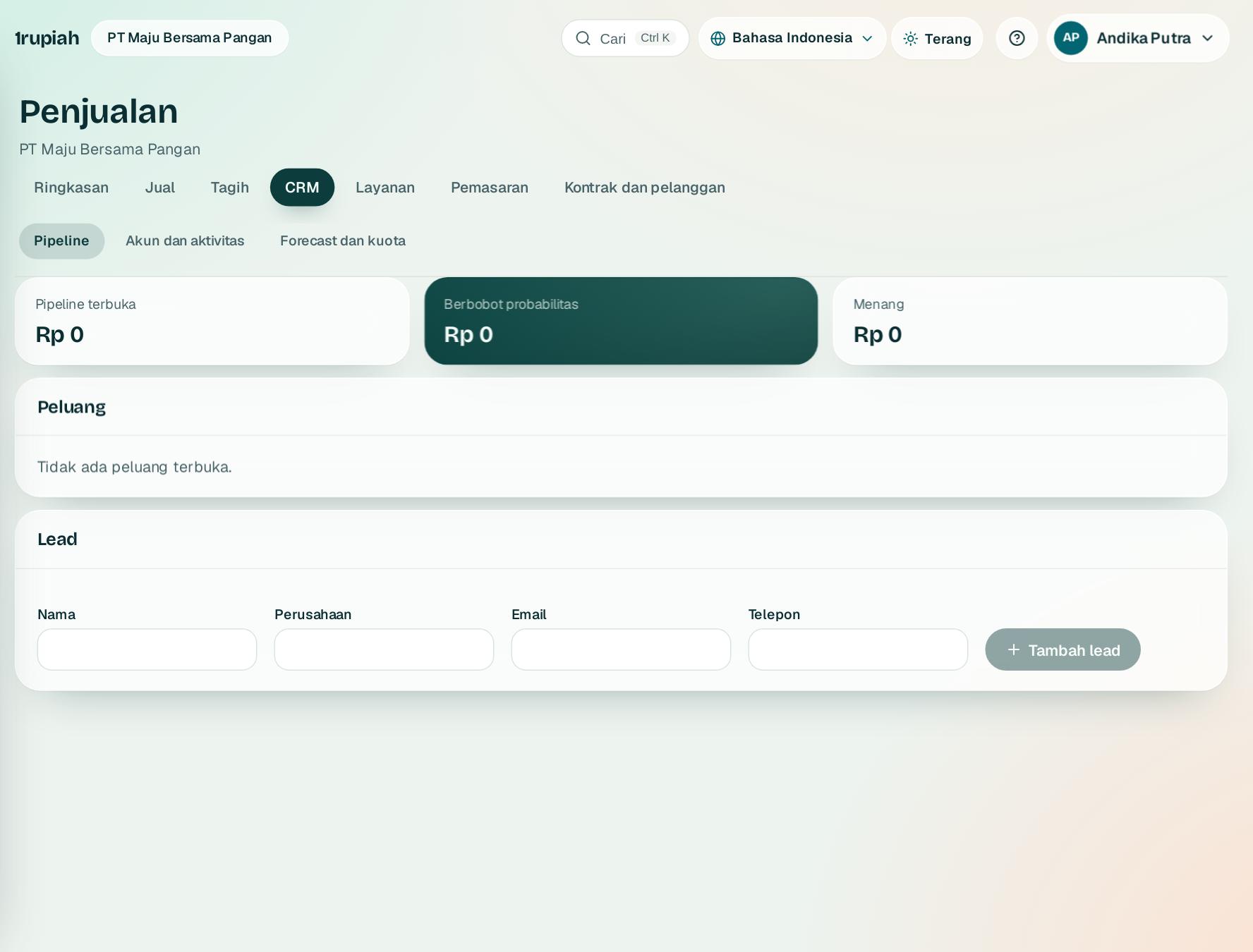
    Buka Penjualan, Pipeline. Isi nama 1, perusahaan, email, atau telepon lalu Tambah lead 2.

    Open Sales, Pipeline. Fill in the name 1, company, email, or phone, then Add lead 2.

  2. 2

    Kontak yang sudah ada disebut supaya pelanggan tidak dihubungi dua kali.

    Existing contacts are flagged so a customer is not contacted twice.

  3. 3

    Jadikan lead sebagai peluang, lalu geser tahapnya. Nilai berbobot dihitung dari probabilitas tiap tahap.

    Turn a lead into an opportunity and move it through the stages. The weighted value uses each stage probability.

  4. 4

    Menang butuh pelanggan terverifikasi dan penawaran atau ordernya; kalah butuh alasan.

    Won needs a verified customer and their quote or order; lost needs a reason.

1rupiah.biz.id/guide12 / 21
1rupiah1Sales · Panduan Pengguna | User Guide

1Sales · 10

Portal pelanggan

Customer portal

Pelanggan melihat order dan fakturnya sendiri serta mengonfirmasi transfer.

Customers see their own orders and invoices and confirm their transfers.

12
  1. 1

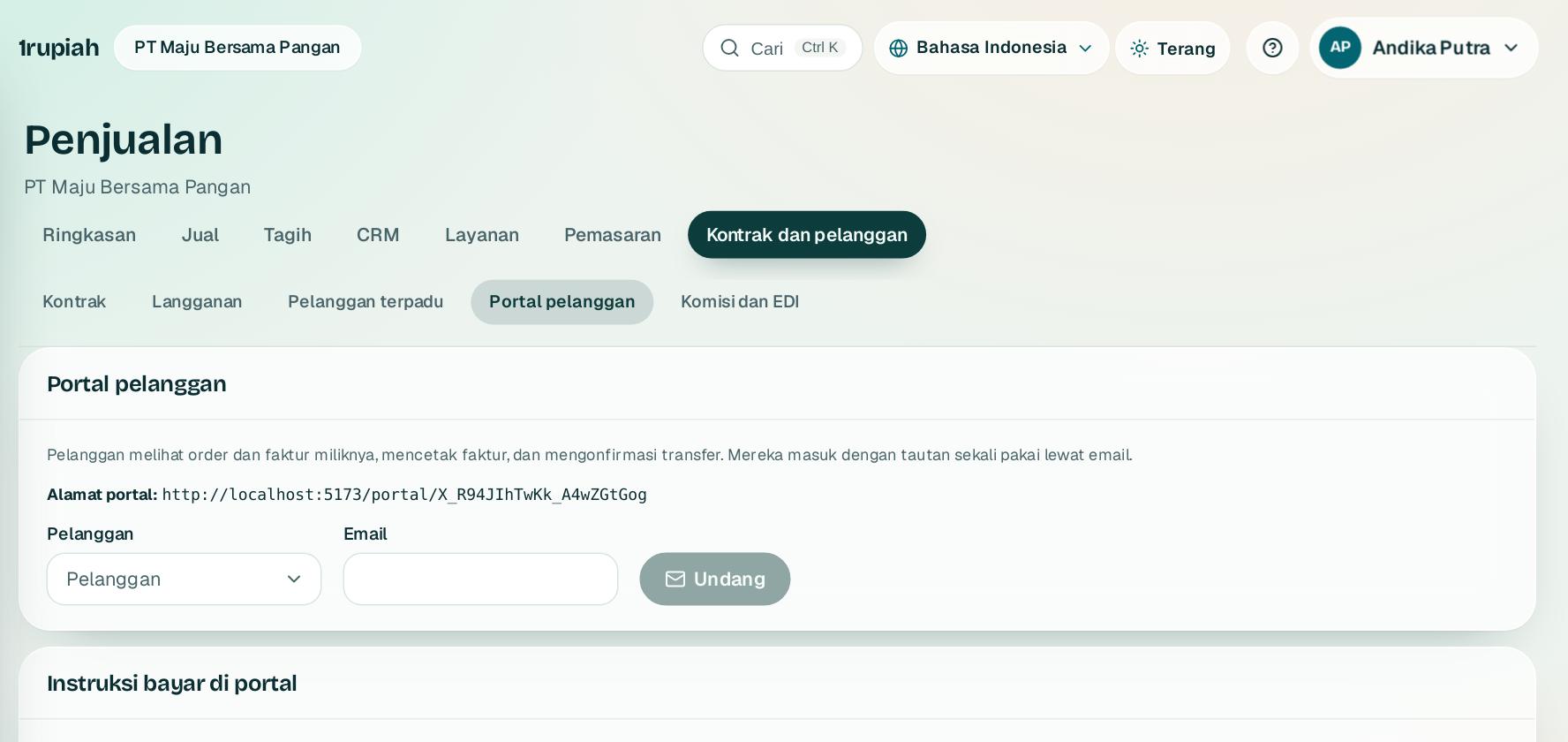
    Buka Penjualan, Portal pelanggan. Pilih pelanggan 1 dan isi email kontaknya.

    Open Sales, Customer portal. Pick the customer 1 and enter the contact email.

  2. 2

    Klik Undang 2. Kontak menerima tautan sekali pakai; berikutnya masuk dengan email dan tautan baru.

    Click Invite 2. The contact receives a one time link; later they sign in with their email and a fresh link.

  3. 3

    Isi instruksi bayar yang tampil di portal, lalu Simpan.

    Fill in the payment instructions shown in the portal, then Save.

  4. 4

    Konfirmasi transfer dari pelanggan masuk ke Inbox keuangan dan tidak mengubah sisa sampai penerimaan dicatat.

    Transfer confirmations from customers arrive in the finance Inbox and change nothing until the receipt is recorded.

1rupiah.biz.id/guide13 / 21
1rupiah1Sales · Panduan Pengguna | User Guide

1Sales · 11

Ketersediaan dan janji kirim

Availability and promise dates

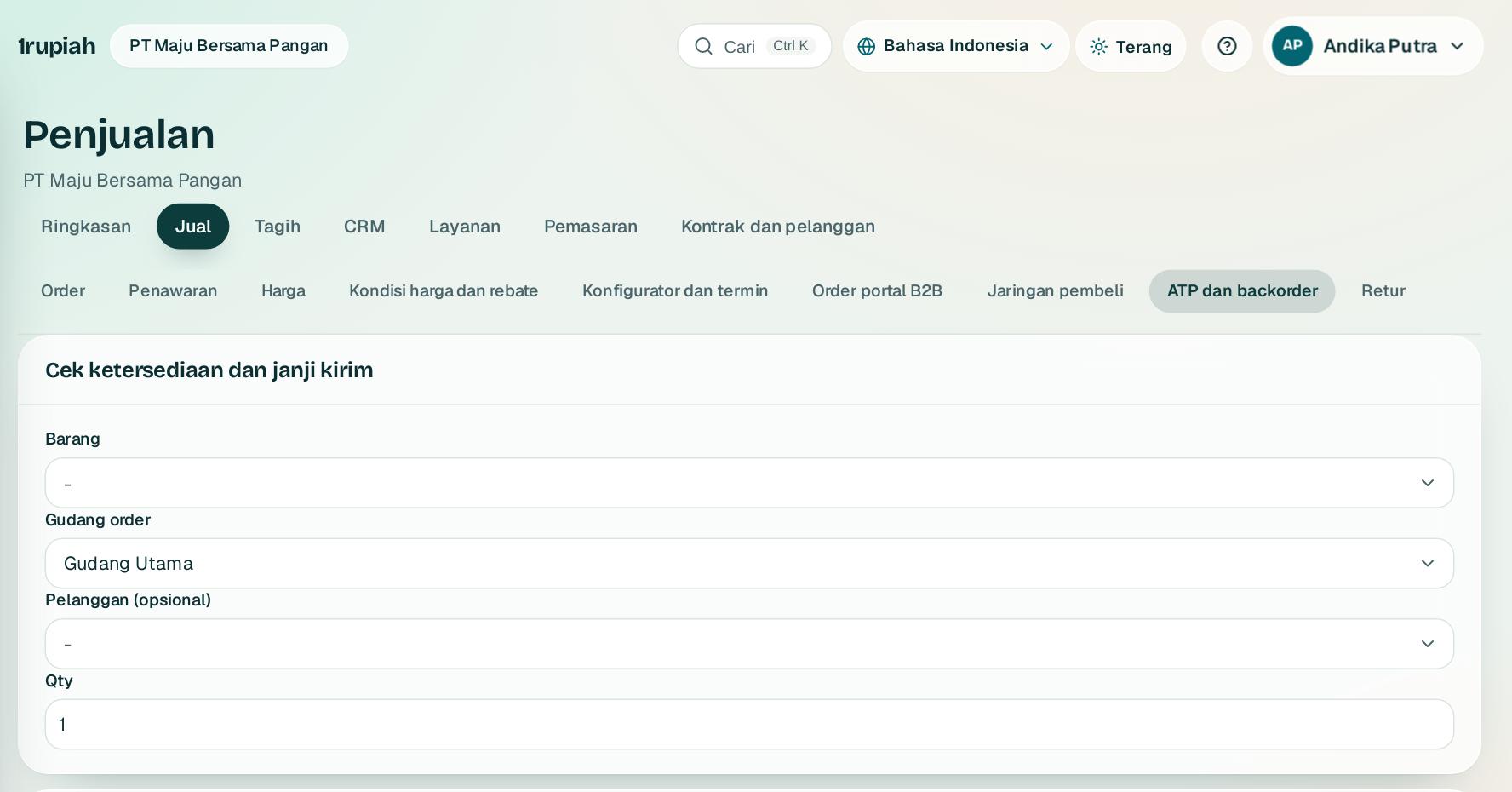
Cek stok yang bisa dijanjikan di semua gudang, sisihkan untuk pelanggan penting, dan pantau backorder.

Check stock you can promise across warehouses, hold some for key customers, and watch backorders.

123
  1. 1

    Buka Penjualan, Jual lalu ATP dan backorder. Pilih barang 1, gudang order 2, dan jumlah.

    Open Sales, Selling then ATP and backorders. Pick the item 1, the order warehouse 2, and the quantity.

  2. 2

    Rencana pemenuhan dimulai dari gudang order, lalu gudang lain dengan waktu transfer, lalu PO yang akan masuk. Tanggal janji kirim tampil di atas.

    Fulfilment starts at the order warehouse, then other warehouses with transfer time, then incoming POs. The promise date shows on top.

  3. 3

    Pilih pelanggan 3 untuk melihat stok yang boleh dipakai pelanggan itu, atau jatahkan stok untuk pelanggan penting dengan alasan.

    Pick a customer 3 to see the stock that customer can use, or allocate stock to a key customer with a reason.

  4. 4

    Periksa backorder di bagian bawah membagi stok ke order tertua; kekurangan dicatat dengan tanggal janji dan tertutup otomatis saat stok datang.

    Check backorders at the bottom gives stock to the oldest orders first; shortages are recorded with a promise date and close by themselves when stock arrives.

1rupiah.biz.id/guide14 / 21
1rupiah1Sales · Panduan Pengguna | User Guide

1Sales · 12

Tiket layanan pelanggan

Customer service tickets

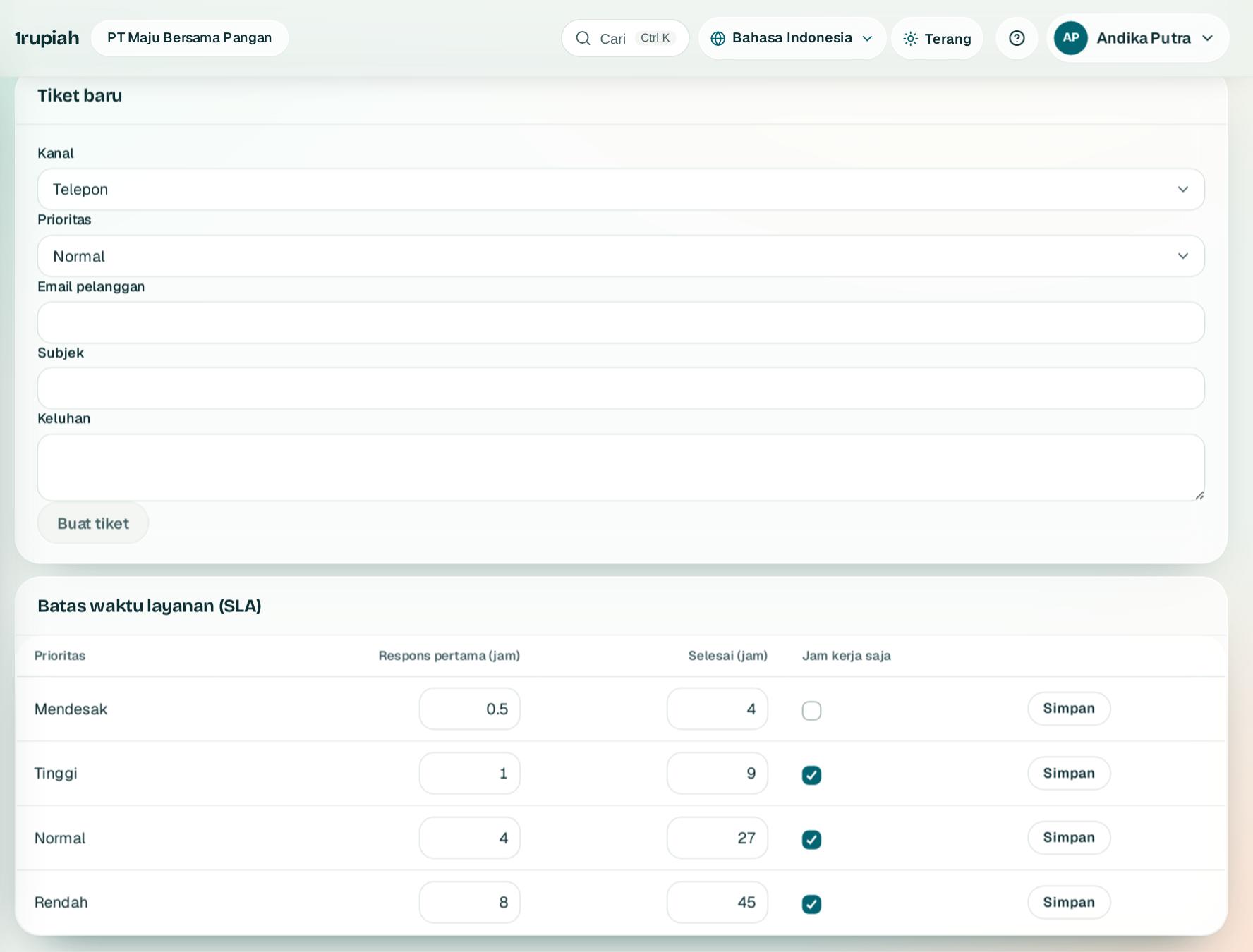
Catat keluhan dan permintaan pelanggan dengan batas waktu layanan.

Track customer issues and requests with service deadlines.

123
  1. 1

    Buka Penjualan, Layanan, Tiket. Isi formulir Tiket baru 1: pelanggan, saluran, prioritas, dan ringkasan, lalu Buat tiket 2.

    Open Sales, Service, Tickets. Fill in New ticket 1: customer, channel, priority, and summary, then Create ticket 2.

  2. 2

    Atur Batas waktu layanan (SLA) 3 per prioritas. Tiket yang mendekati batas otomatis dieskalasi.

    Set the Service level (SLA) 3 per priority. Tickets close to the limit are escalated automatically.

1rupiah.biz.id/guide15 / 21
1rupiah1Sales · Panduan Pengguna | User Guide

1Sales · 13

Kampanye, segmen, dan journey

Campaigns, segments, and journeys

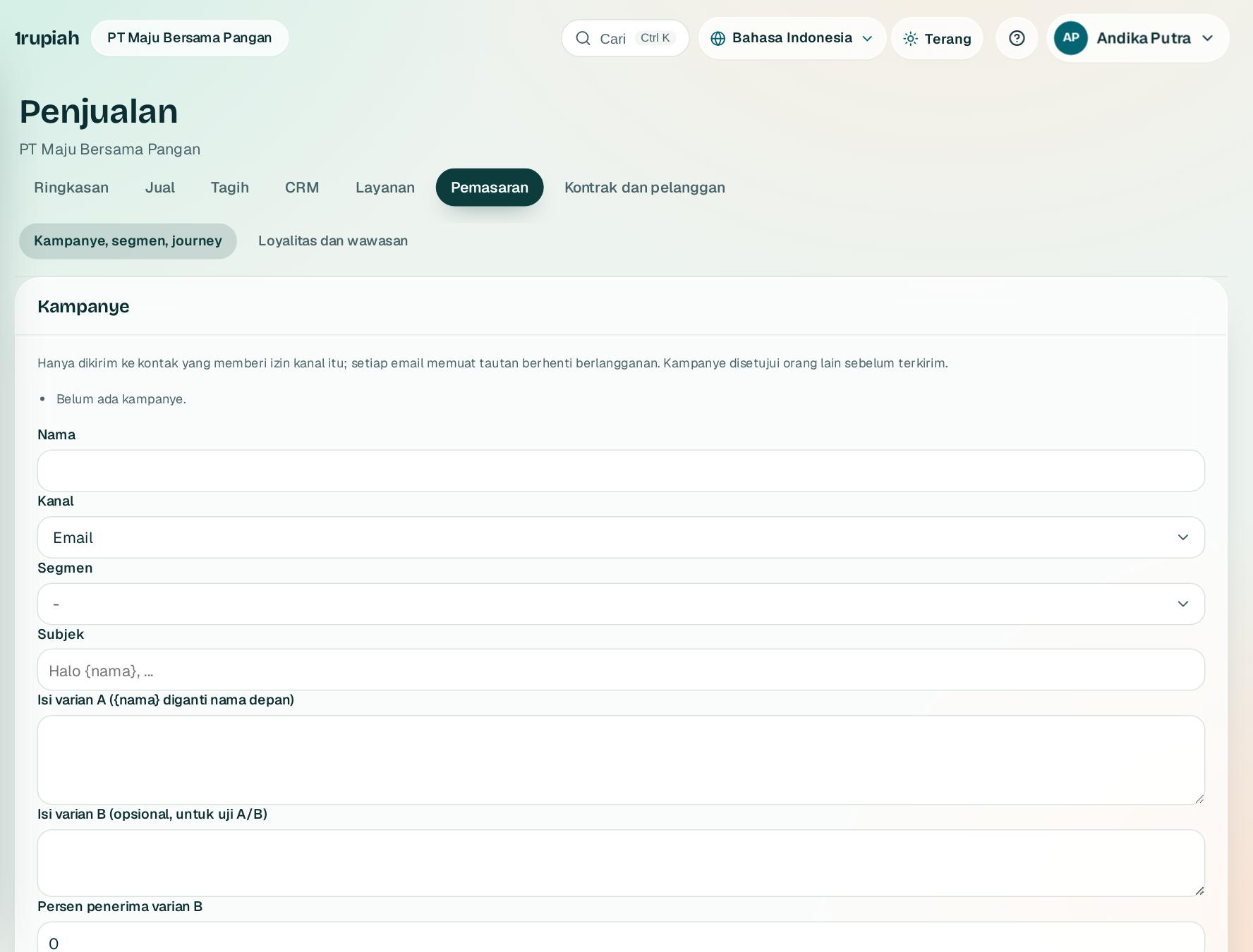
Kirim email ke kelompok pelanggan yang tepat, sekali atau otomatis.

Email the right group of customers, once or automatically.

12
  1. 1

    Buka Penjualan, Pemasaran. Buat Kampanye 1 lalu Simpan draf; kampanye dikirim setelah disetujui.

    Open Sales, Marketing. Create a Campaign 1 and Save draft; it is sent after approval.

  2. 2

    Di Segmen 2 pilih kriteria, misalnya jumlah order 12 bulan, lalu Simpan segmen.

    Under Segments 2 pick criteria, for example orders in 12 months, then Save segment.

  3. 3

    Journey otomatis menyediakan alur siap pakai: selamat datang, beli ulang 30 hari, ulang tahun, dan keranjang tertinggal.

    Automated journeys offers ready made flows: welcome, buy again after 30 days, birthday, and abandoned cart.

1rupiah.biz.id/guide16 / 21
1rupiah1Sales · Panduan Pengguna | User Guide

1Sales · 14

Kondisi harga dan rebate

Pricing conditions and rebates

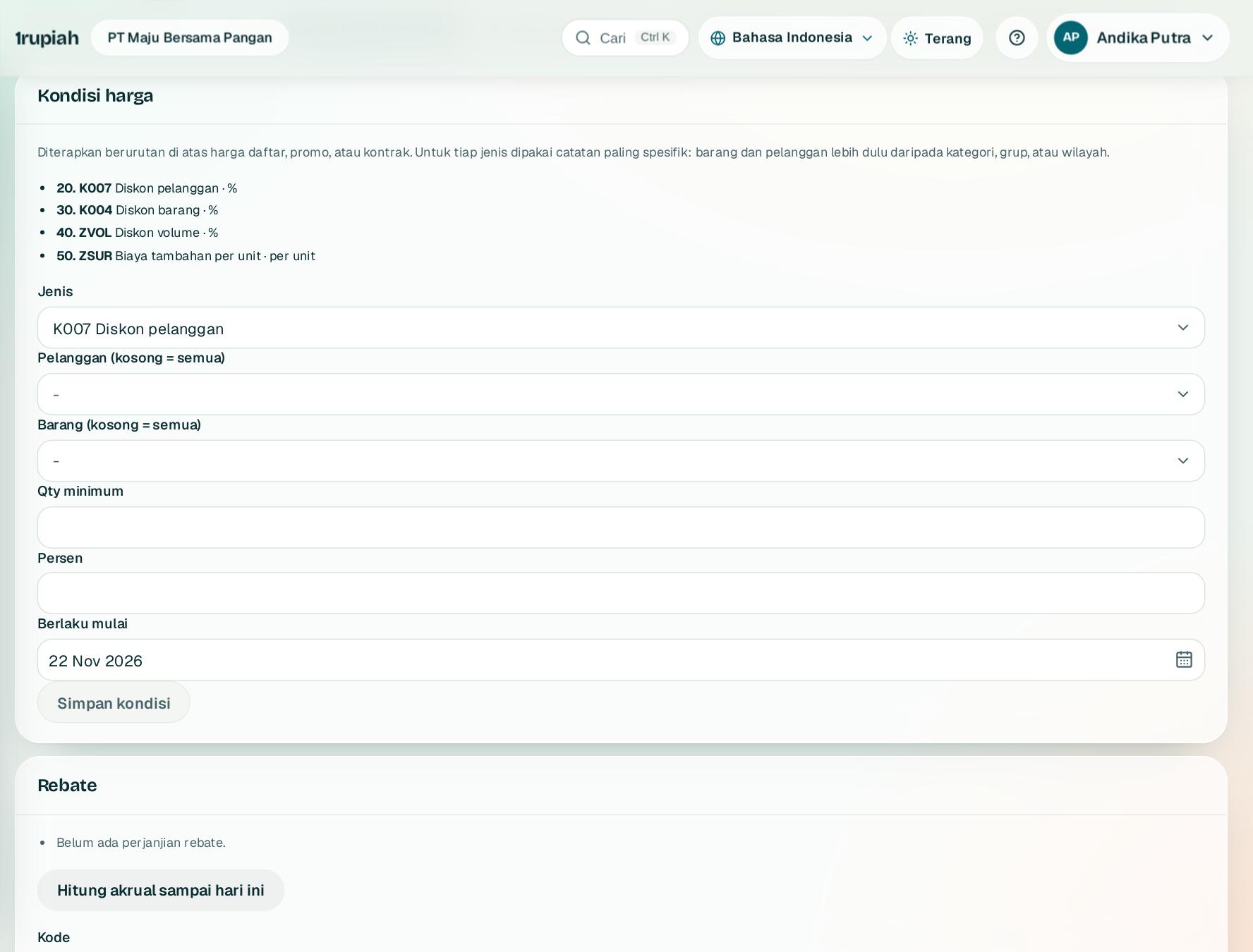
Diskon bertingkat per pelanggan, barang, dan periode, serta rebate akhir periode.

Layered discounts per customer, item, and period, plus period end rebates.

12
  1. 1

    Buka Penjualan, Kondisi harga 1. Pilih tipe, misalnya diskon pelanggan, isi nilai dan masa berlaku, lalu Simpan kondisi.

    Open Sales, Pricing conditions 1. Pick a type, for example customer discount, enter the value and validity, then Save condition.

  2. 2

    Di Rebate 2 buat perjanjian dengan pelanggan; Hitung akrual sampai hari ini membukukan rebate yang sudah terbentuk.

    Under Rebates 2 create an agreement with a customer; Calculate accrual to date books the rebate earned so far.

  3. 3

    Tipe kondisi harga mengatur urutan perhitungan. Tipe yang sudah dipakai dikunci agar harga lama tidak berubah.

    Pricing condition types set the calculation order. Types already in use are locked so past prices do not change.

1rupiah.biz.id/guide17 / 21
1rupiah1Sales · Panduan Pengguna | User Guide

1Sales · 15

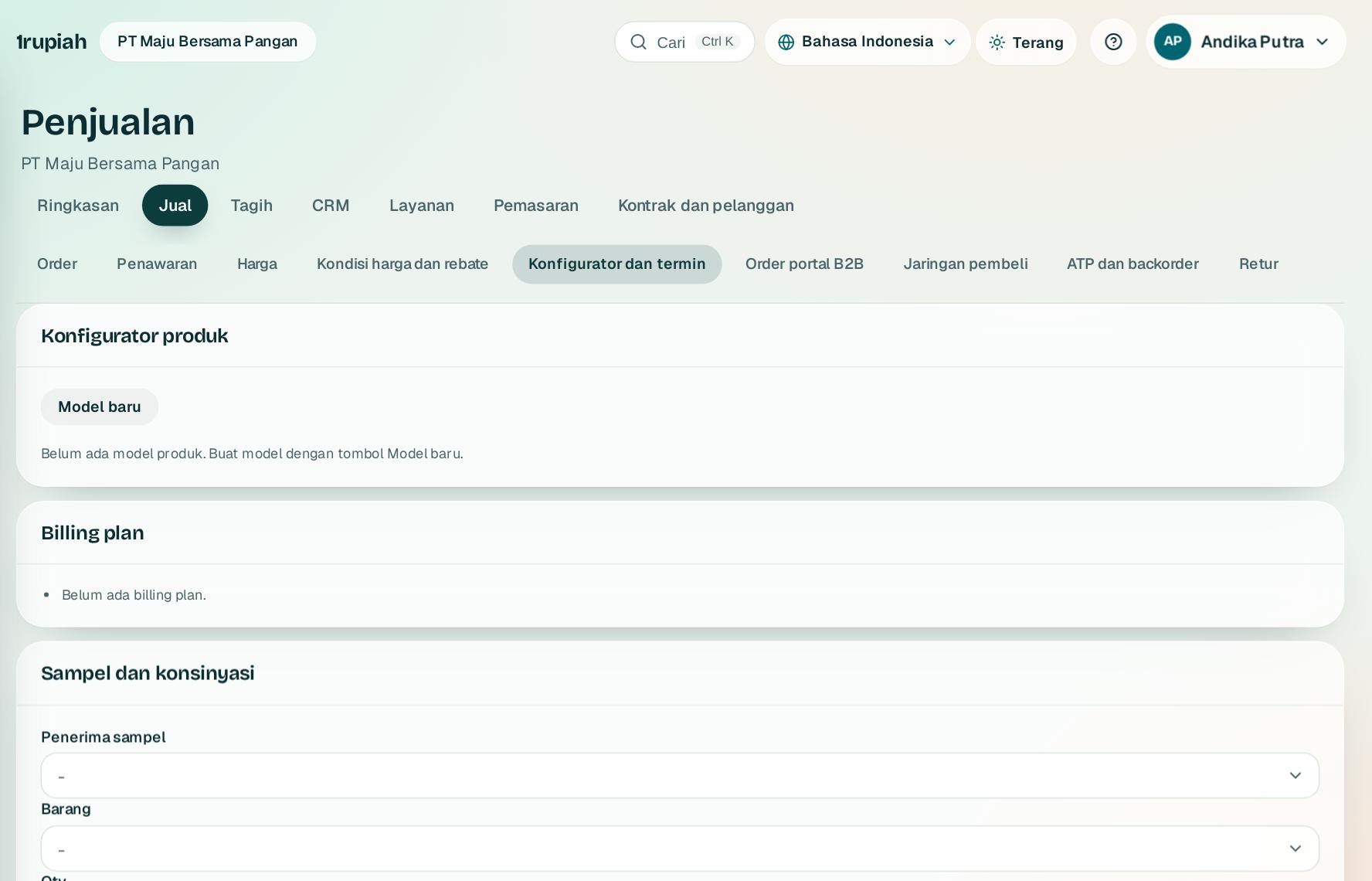
Konfigurator produk dan konsinyasi

Product configurator and consignment

Jual produk dengan pilihan, tagih bertahap, dan kelola barang titipan.

Sell configurable products, bill in stages, and manage consigned stock.

123
  1. 1

    Buka Penjualan, CPQ. Di Konfigurator produk 1 tekan Model baru dan tentukan pilihan serta aturan harganya.

    Open Sales, CPQ. Under Product configurator 1 press New model and define its options and price rules.

  2. 2

    Billing plan 2 membagi tagihan order besar per termin atau tonggak.

    Billing plan 2 splits a large order into instalments or milestones.

  3. 3

    Sampel dan konsinyasi 3: keluarkan sampel, tagih pemakaian konsinyasi, dan catat retur.

    Samples and consignment 3: issue samples, bill consignment usage, and record returns.

1rupiah.biz.id/guide18 / 21
1rupiah1Sales · Panduan Pengguna | User Guide

1Sales · 16

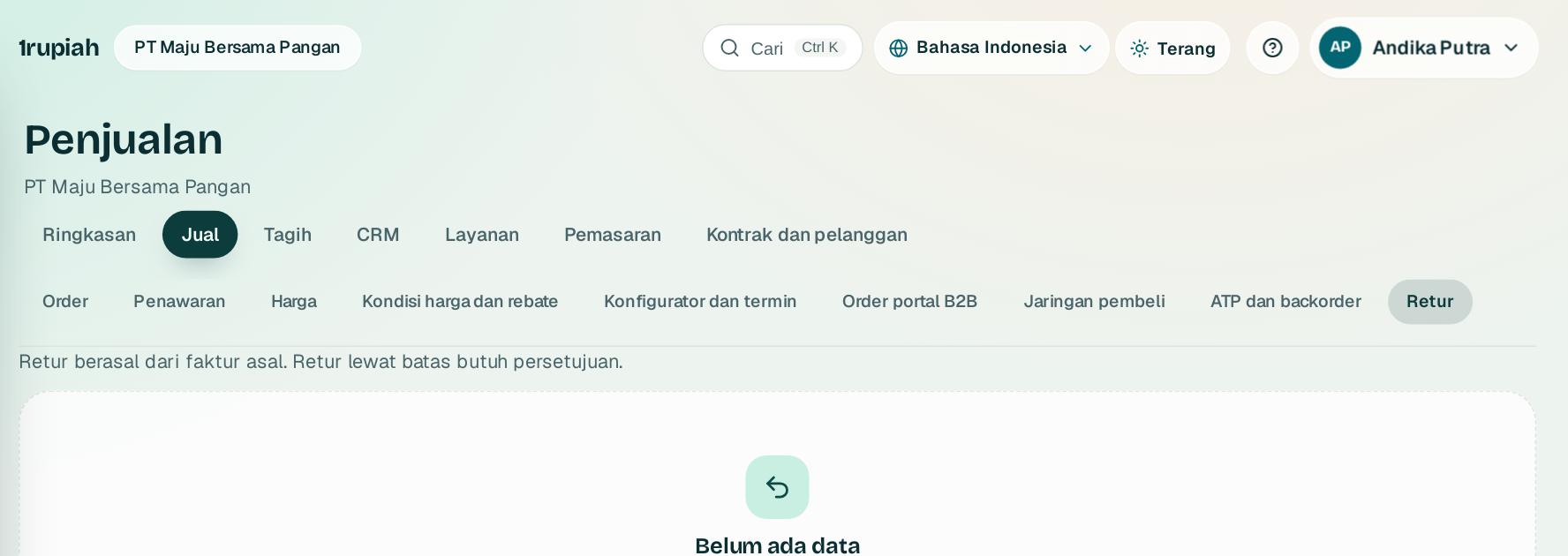
Retur penjualan

Sales returns

Barang kembali dari pelanggan, stok dan piutang ikut disesuaikan.

Goods come back from the customer, and stock and receivables adjust.

  1. 1

    Buat retur dari faktur yang bersangkutan dengan Retur barang. Daftar semua retur ada di Penjualan, Retur.

    Create a return from the related invoice with Return goods. All returns are listed under Sales, Returns.

  2. 2

    Saat retur diposting, stok masuk kembali, nota kredit terbit, dan jurnal retur dibuat otomatis.

    When posted, stock comes back, a credit note is issued, and the return journal is created automatically.

1rupiah.biz.id/guide19 / 21
1rupiah1Sales · Panduan Pengguna | User Guide

1Sales · 17

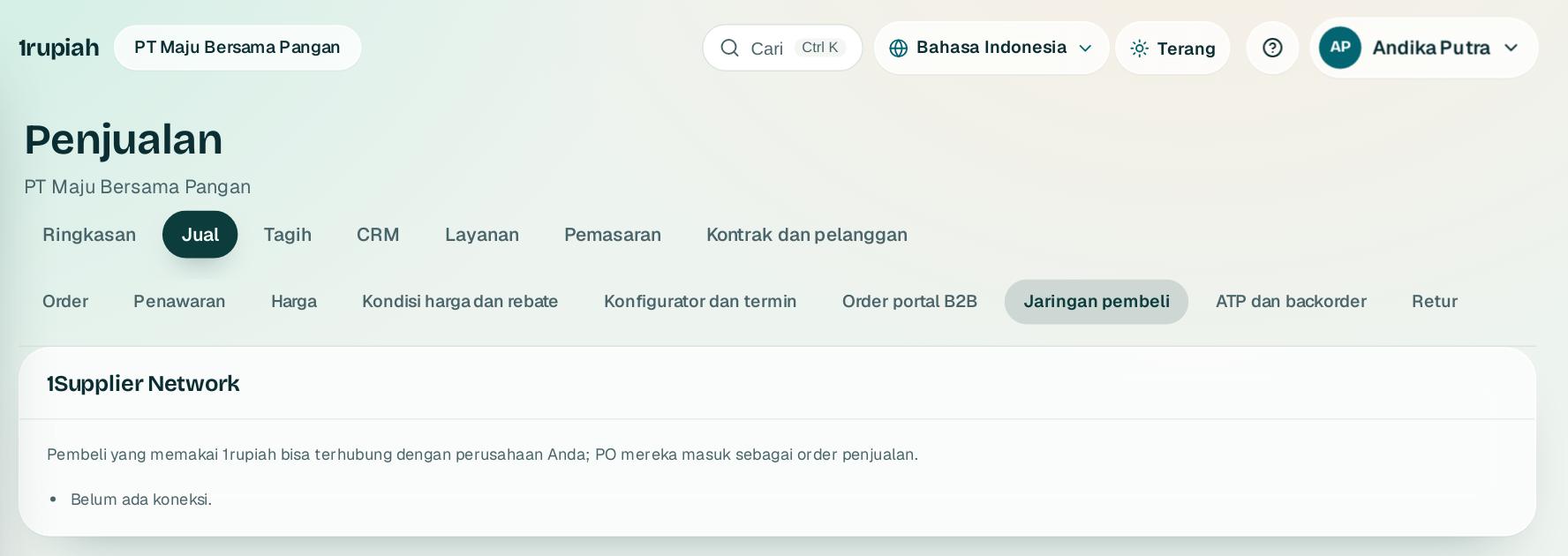
Portal B2B dan 1Supplier Network

B2B portal and 1Supplier Network

Pelanggan bisnis memesan sendiri, dan pemasok terhubung lewat jaringan.

Business customers order on their own, and suppliers connect through the network.

1
  1. 1

    Di Penjualan, B2B atur katalog dan harga yang terlihat di portal pelanggan bisnis.

    In Sales, B2B set the catalogue and prices shown on the business customer portal.

  2. 2

    1Supplier Network 1 menghubungkan perusahaan Anda dengan pengguna 1rupiah lain, sehingga PO dan konfirmasi order bertukar otomatis.

    1Supplier Network 1 links your company with other 1rupiah users, so purchase orders and order confirmations are exchanged automatically.

1rupiah.biz.id/guide20 / 21
1rupiah

Butuh bantuan?

Tim kami siap 24 jam, Senin sampai Minggu. Buka chat di aplikasi atau situs, atau kirim email.

Need help?

Our team is available 24 hours, Monday to Sunday. Open the chat in the app or on the site, or send an email.
  • 1rupiah.biz.id
  • app.1rupiah.biz.id
  • halo@1rupiah.biz.id

© 2026 PT Satu Rupiah Indonesia · 1Sales · v1.0