Permintaan, penawaran pemasok, PO, penerimaan barang, faktur pemasok dengan pencocokan tiga arah, pembaca faktur AI, pembayaran, dan klaim biaya.
Requests, supplier quotes, purchase orders, goods receipt, three way matched supplier invoices, the AI invoice reader, payments, and expense claims.
17 November 2026 · PT Satu Rupiah Indonesia
1rupiah1Procure · Panduan Pengguna | User Guide
Mengapa 1rupiah
Why 1rupiah
Sistem bisnis lama dibangun untuk kantor yang selalu online, satu bahasa, dan pajak yang dihitung manual. 1rupiah dibangun untuk cara kerja Indonesia hari ini.
Older business systems were built for offices that are always online, in one language, with tax worked out by hand. 1rupiah is built for how Indonesian businesses work today.
AI yang bekerja, bukan sekadar menjawabTanya data dengan kalimat biasa, pembaca faktur pemasok dari foto atau PDF, agen yang menagih dan memesan ulang dalam batas nilai, dan situs 1CMS yang disusun AI. Setiap usulan AI bisa ditinjau dan dibatalkan.
AI that works, not just chatsAsk your data in plain words, read supplier invoices from a photo or PDF, let agents chase payments and reorder within value limits, and draft a 1CMS website with AI. Every AI suggestion can be reviewed and undone.
Pajak Indonesia sudah di dalamPPN 12 persen dengan DPP nilai lain 11/12, ekspor Faktur Pajak ke Coretax, PPh 21 tarif TER, PPh 23 dan 4(2) dengan bukti potong, BPJS, PBJT restoran, dan pesangon PP 35/2021.
Indonesian tax built inVAT at 12 percent on the 11/12 tax base, tax invoice export to Coretax, PPh 21 TER rates, PPh 23 and 4(2) with withholding slips, BPJS, restaurant PBJT, and severance under PP 35/2021.
Tetap jalan saat internet putusKasir dan aplikasi HP terus berjualan dan mencatat saat koneksi hilang, lalu menyinkronkan sekali saat online lagi tanpa transaksi ganda.
Keeps working offlineThe cashier and mobile apps keep selling and recording when the connection drops, then sync once when back online without duplicate transactions.
Keamanan kelas bankPasskey, verifikasi dua langkah, masuk dengan Google (Microsoft bila diaktifkan), persetujuan empat mata untuk uang keluar, rekening pemasok dicek orang kedua, data tiap perusahaan di skema terpisah, dan jejak audit lengkap.
Bank grade securityPasskeys, two step verification, Google sign in (Microsoft when enabled), four eyes approval for money going out, supplier bank accounts checked by a second person, a separate schema per company, and a full audit trail.
Angka yang selalu tepatHarga, PPN, dan pembulatan dihitung oleh Calc Core berbahasa Rust yang sama di server, web, dan desktop. Jurnal selalu seimbang dan periode terkunci tidak bisa diubah diam diam.
Figures that are always rightPrices, VAT, and rounding are computed by the same Rust Calc Core on the server, web, and desktop. Journals always balance and locked periods cannot be changed quietly.
Bayar hanya yang dipakaiMulai dari 1ERP Gratis, lalu tambah aplikasi satu per satu: 1Finance, 1Sales, 1HR, 1Cashier, dan lainnya. Semua terhubung dalam satu data, satu login, di web, desktop, dan HP.
Pay only for what you useStart on 1ERP Free, then add apps one at a time: 1Finance, 1Sales, 1HR, 1Cashier, and more. Everything shares one set of data and one login, on web, desktop, and mobile.
Satu halaman, satu tugasSetiap halaman menjelaskan satu pekerjaan dari awal sampai selesai.
One page, one taskEach page covers one job from start to finish.
Nomor di gambarKotak bernomor 1 menunjukkan tombol atau isian yang dimaksud langkah dengan nomor sama.
Numbers on screenshotsA numbered box 1 marks the button or field the matching step refers to.
Chip tombolSimpan adalah tombol utama, Batal tombol biasa, persis seperti di layar.
Button chipsSave is a main button and Cancel a regular one, exactly as on screen.
Gambar layarGambar diambil dari tampilan bahasa Indonesia. Ganti bahasa kapan saja lewat pilihan bahasa di kanan atas.
ScreenshotsScreenshots use the Indonesian interface. Switch language at any time with the language picker at the top right.
1rupiah1Procure · Panduan Pengguna | User Guide
1Procure · 01
Permintaan pembelian
Purchase requests
Siapa pun bisa mengajukan kebutuhan barang atau jasa; yang disetujui menjadi PO.
Anyone can request goods or services; approved requests become purchase orders.
123
1
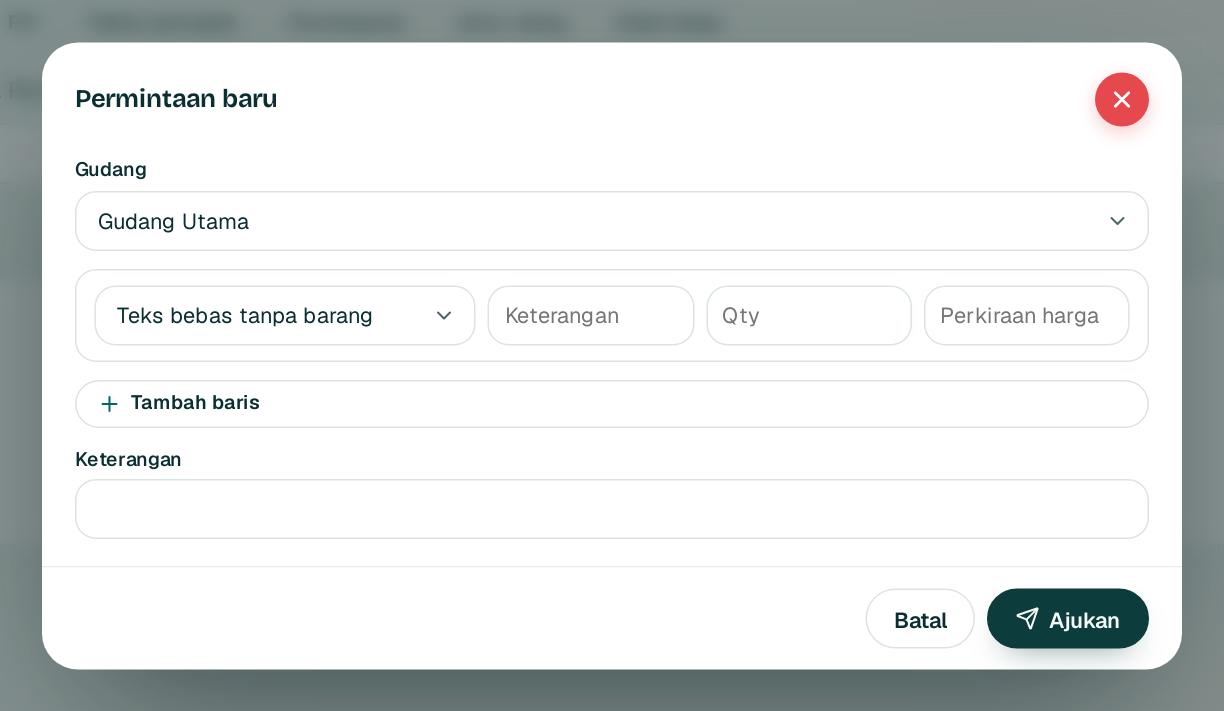
Buka Pembelian, Permintaan lalu Permintaan baru.
Open Purchasing, Requests and choose New request.
2
Pilih barang 1 atau tulis teks bebas untuk jasa, lalu isi qty dan perkiraan harga 2.
Choose an item 1 or type free text for a service, then enter the quantity and estimated price 2.
3
Klik Ajukan3. Penyetuju mendapat item di Inbox.
Click Submit3. The approver gets an Inbox item.
4
Stok menipis? Klik Permintaan dari reorder untuk membuat permintaan dari saran reorder.
Running low? Click Request from reorder to create a request from the reorder suggestions.
1rupiah1Procure · Panduan Pengguna | User Guide
1Procure · 02
Purchase order
Purchase orders
PO memakai harga kontrak bila harga dikosongkan, dan menandai harga yang naik tidak wajar.
POs use the contract price when the price is left empty and flag unusual price increases.
1234
1
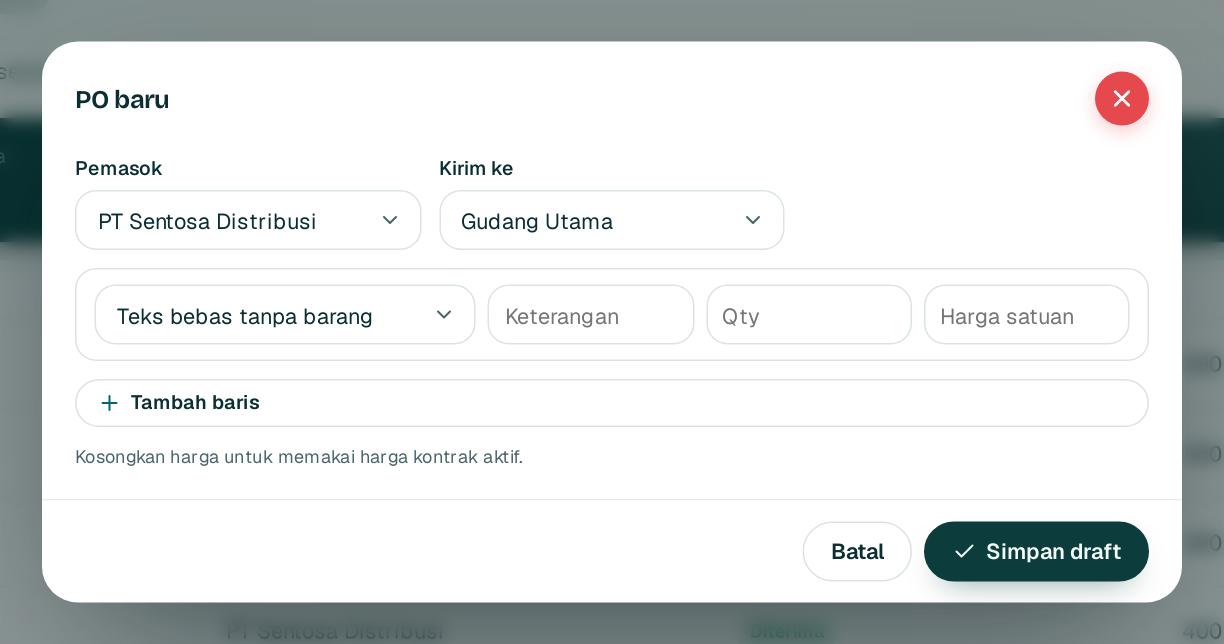
Buka Pembelian, PO lalu PO baru.
Open Purchasing, PO and choose New PO.
2
Pilih pemasok 1 dan gudang tujuan 2.
Pick the supplier 1 and the receiving warehouse 2.
3
Isi barang 3, qty, dan harga satuan. Kosongkan harga untuk memakai harga kontrak aktif.
Enter the item 3, quantity, and unit price. Leave the price empty to use the active contract price.
4
Klik Simpan draft4, lalu Ajukan persetujuan di halaman PO. Unduh PDF untuk dikirim ke pemasok.
Click Save draft4, then Submit for approval on the PO page. Download the PDF to send to the supplier.
Tips Harga di atas kontrak atau lebih dari 10 persen di atas harga terakhir ditandai untuk penyetuju.
Tip Prices above the contract, or more than 10 percent above the last price, are flagged for the approver.
1rupiah1Procure · Panduan Pengguna | User Guide
1Procure · 03
Menerima barang
Receiving goods
Catat barang yang datang langsung di PO. Stok dan jurnal diperbarui otomatis.
Record arriving goods right on the PO. Stock and journals update automatically.
1
1
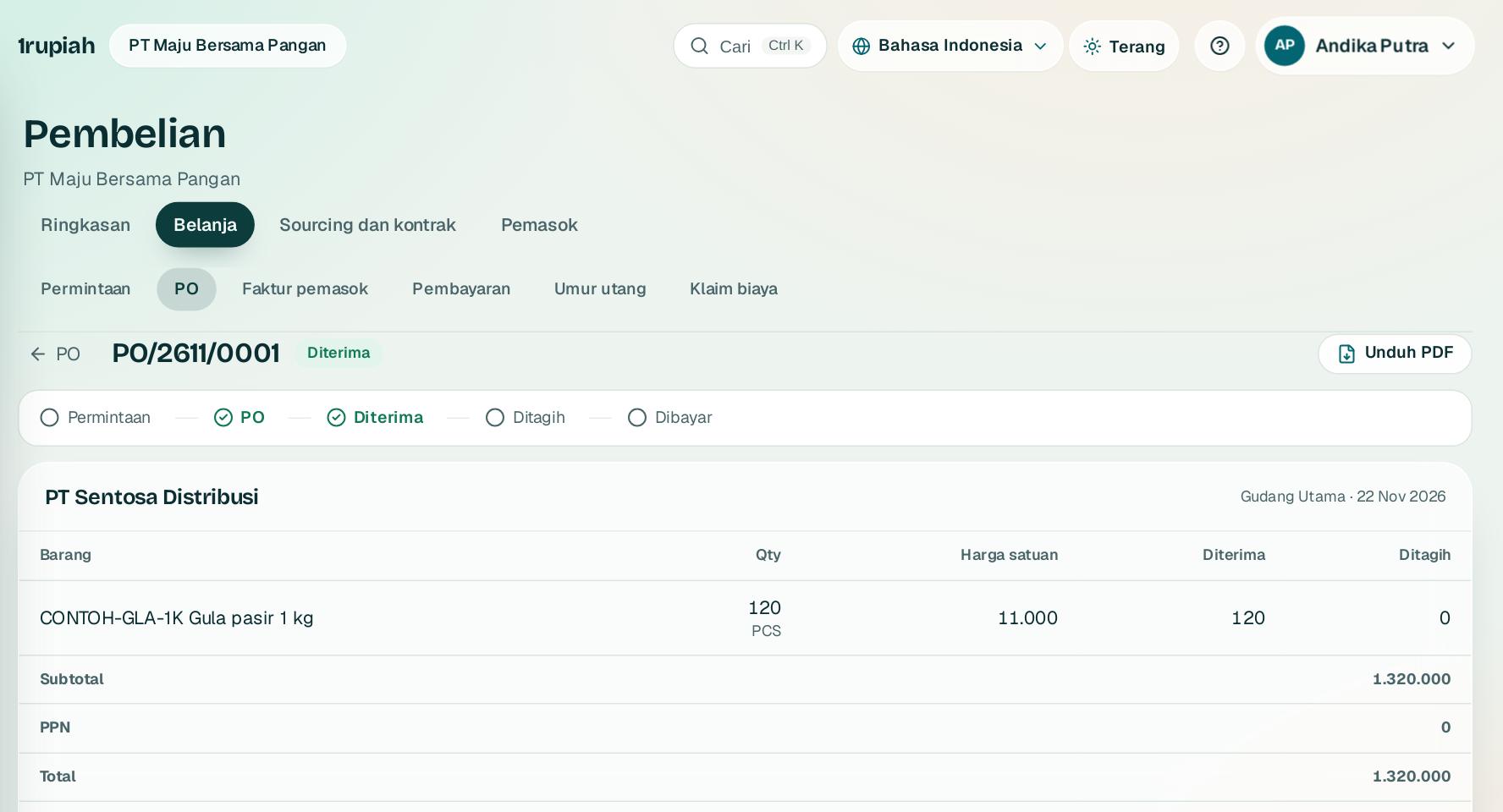
Buka PO yang sudah disetujui dari tab PO.
Open an approved PO from the PO tab.
2
Bagian atas 1 menampilkan alur dokumen: permintaan, PO, diterima, ditagih, dibayar.
The top 1 shows the document flow: request, PO, received, billed, paid.
3
Isi qty di kolom Terima sekarang, nomor surat jalan, batch dan kedaluwarsa bila ada, lalu Catat penerimaan.
Enter quantities under Receive now, the delivery note number, and batch and expiry if any, then Record receipt.
4
Penerimaan sebagian membuat PO tetap terbuka. Melebihi PO plus toleransi ditolak.
A partial receipt keeps the PO open. Receiving more than the PO plus tolerance is refused.
1rupiah1Procure · Panduan Pengguna | User Guide
1Procure · 04
Faktur pemasok dan pencocokan
Supplier invoices and matching
Faktur dicocokkan dengan PO dan penerimaan. Yang cocok langsung diposting.
Invoices are matched with the PO and receipt. Matching ones post immediately.
1234
1
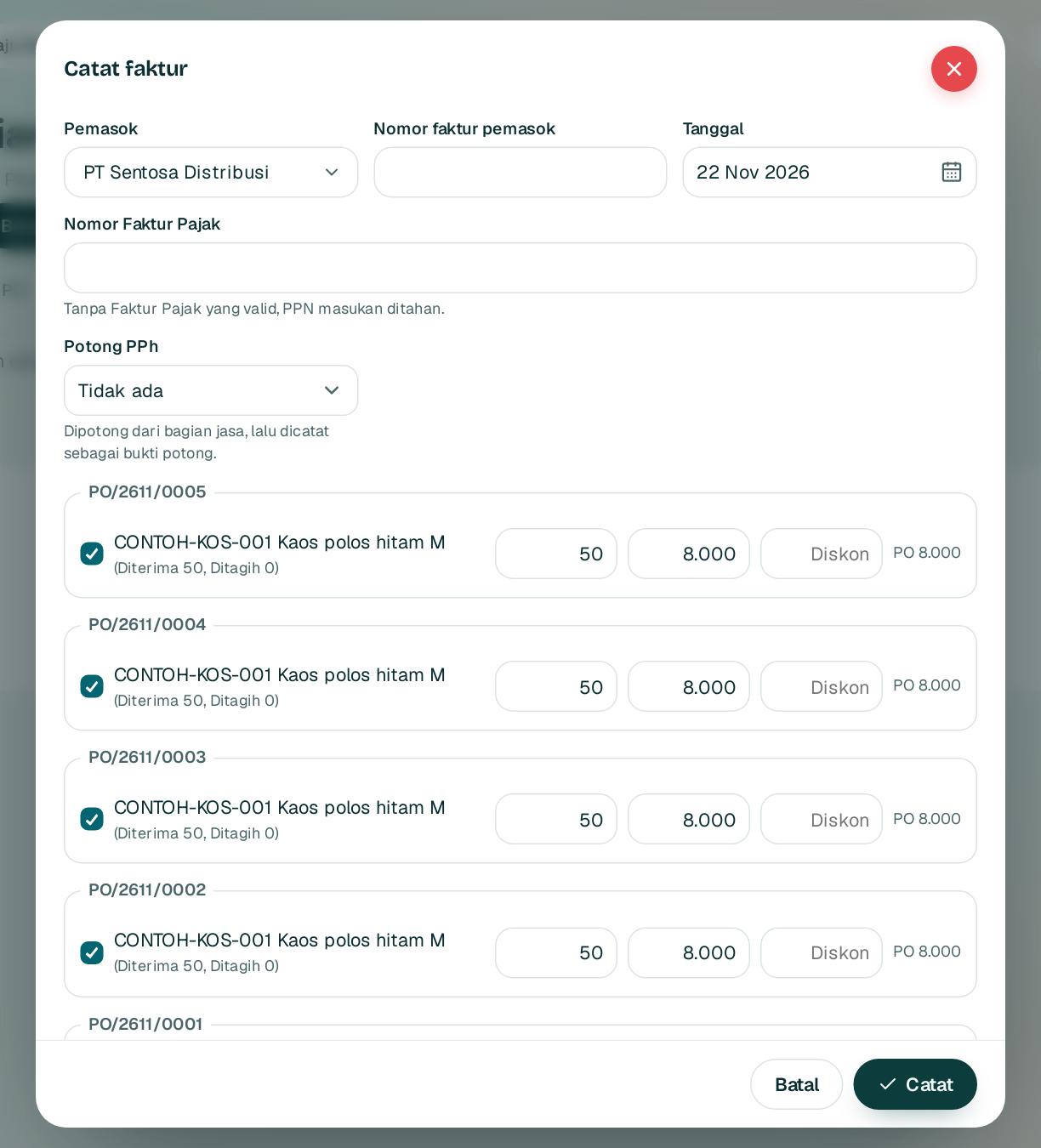
Buka Pembelian, Faktur pemasok lalu Catat faktur. Pilih pemasok; baris PO yang sudah diterima muncul.
Open Purchasing, Supplier invoices and choose Record invoice. Pick the supplier; received PO lines appear.
2
Isi nomor faktur pemasok 1 dan Nomor Faktur Pajak 2. Tanpa Faktur Pajak valid, PPN masukan ditahan.
Enter the supplier invoice number 1 and the tax invoice number 2. Without a valid tax invoice, input VAT is held.
3
Pilih potong PPh 23 atau 4(2) di 3 bila ada bagian jasa. Bukti potong dibuat otomatis.
Choose PPh 23 or 4(2) withholding at 3 if part of it is a service. The withholding slip is created automatically.
4
Sesuaikan qty, harga, dan diskon dengan faktur, lalu Catat4. Selisih lebih dari 2 persen menunggu persetujuan.
Match quantities, prices, and discounts to the invoice, then Record4. Differences above 2 percent wait for approval.
Tips Nomor faktur yang sama dari pemasok yang sama ditolak walau ditulis berbeda.
Tip The same invoice number from the same supplier is refused even when written differently.
1rupiah1Procure · Panduan Pengguna | User Guide
1Procure · 05
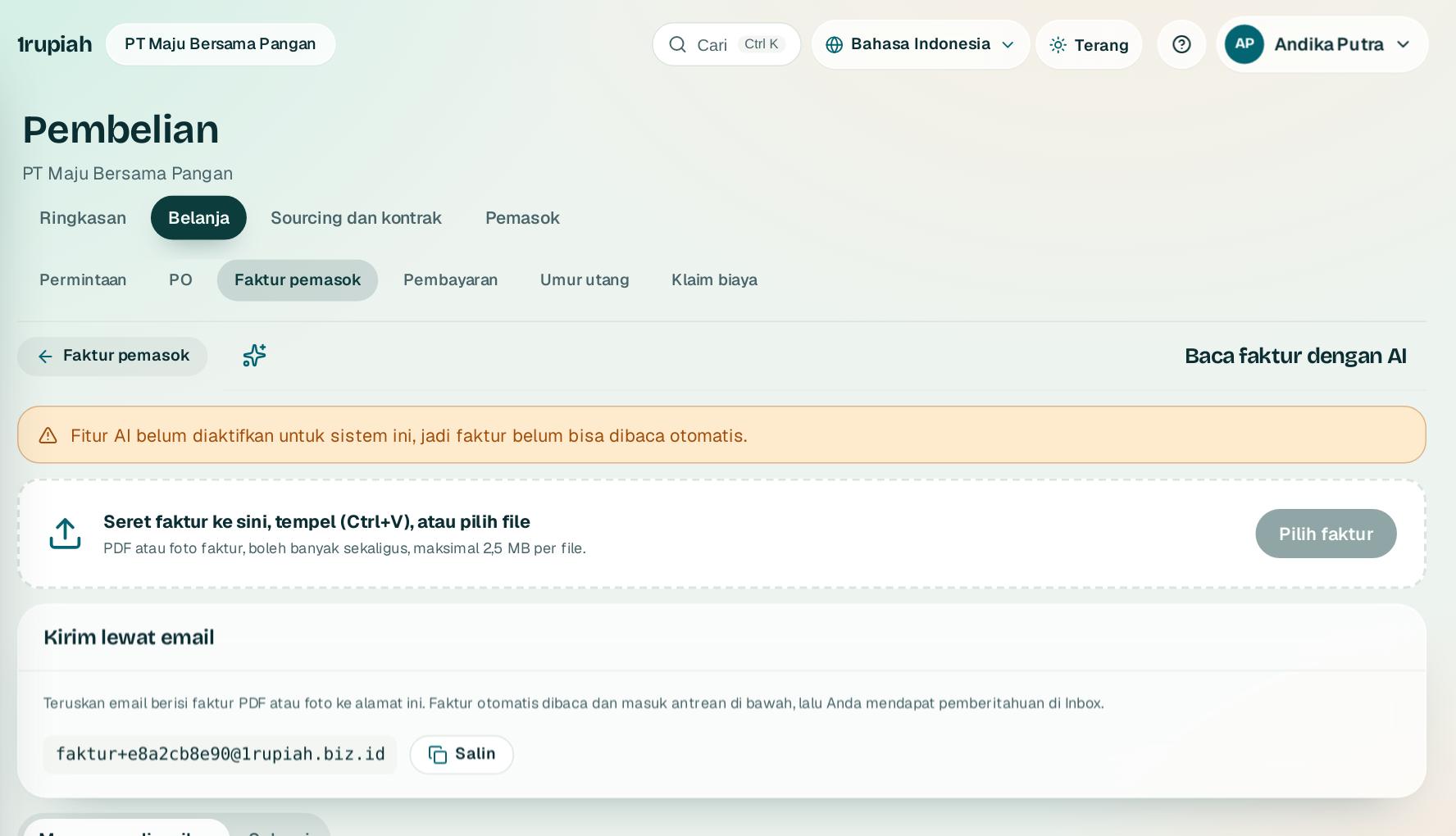
Baca faktur dengan AI
Read invoices with AI
Unggah foto atau PDF faktur, AI membaca isinya, Anda tinggal memeriksa.
Upload a photo or PDF of the invoice, the AI reads it, and you just check it.
12
1
Buka Pembelian, Faktur pemasok lalu Baca faktur dengan AI.
Open Purchasing, Supplier invoices and choose Read invoices with AI.
2
Klik Pilih faktur1 dan pilih foto atau PDF, boleh beberapa sekaligus.
Click Choose invoices1 and pick photos or PDFs, several at once if you like.
3
AI mengisi pemasok dari NPWP atau nama, nomor, tanggal, dan baris. File yang sama ditandai dobel.
The AI fills in the supplier from the NPWP or name, the number, date, and lines. The same file twice is flagged as a duplicate.
4
Periksa di tab Menunggu diperiksa lalu simpan sebagai faktur pemasok. Pemasok juga bisa mengirim faktur ke alamat email khusus 2.
Check it under Waiting for review and save it as a supplier invoice. Suppliers can also email invoices to your dedicated address 2.
1rupiah1Procure · Panduan Pengguna | User Guide
1Procure · 06
Membayar pemasok
Paying suppliers
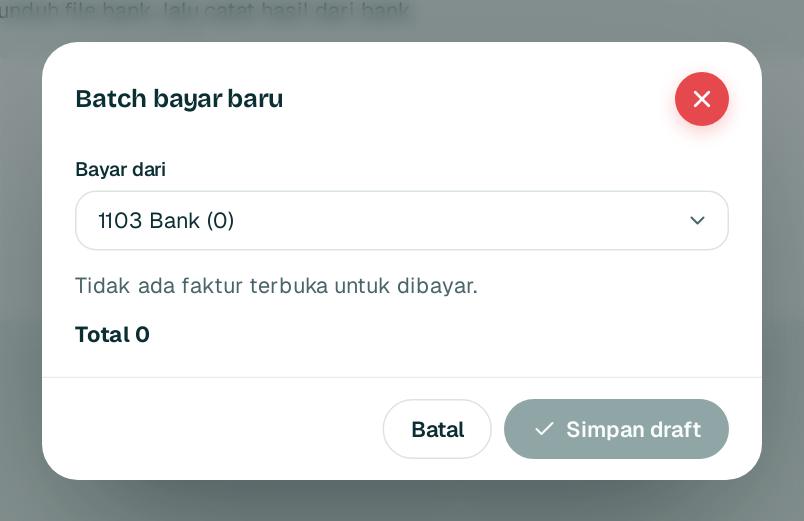
Kelompokkan faktur dalam batch, setujui, lalu unggah file bank.
Group invoices into a batch, approve it, then upload the bank file.
12
1
Buka Pembelian, Pembayaran lalu Batch bayar baru.
Open Purchasing, Payments and choose New payment batch.
2
Pilih rekening 1 dan centang faktur yang dibayar; faktur boleh dibayar sebagian. Saldo kurang diperingatkan.
Choose the account 1 and tick the invoices to pay; partial payment is allowed. A low balance is flagged.
3
Klik Simpan draft2 lalu ajukan. Penyetuju lain menyetujui batch.
Click Save draft2 and submit. Another approver approves the batch.
4
Unduh file bank sekali, unggah ke internet banking, lalu catat hasil per pemasok. Yang gagal kembali belum dibayar.
Download the bank file once, upload it to internet banking, then record the result per supplier. Failed lines return to unpaid.
Tips Hanya rekening pemasok yang sudah dicek orang kedua yang bisa dibayar.
Tip Only supplier bank accounts checked by a second person can be paid.
1rupiah1Procure · Panduan Pengguna | User Guide
1Procure · 07
Klaim biaya karyawan
Employee expense claims
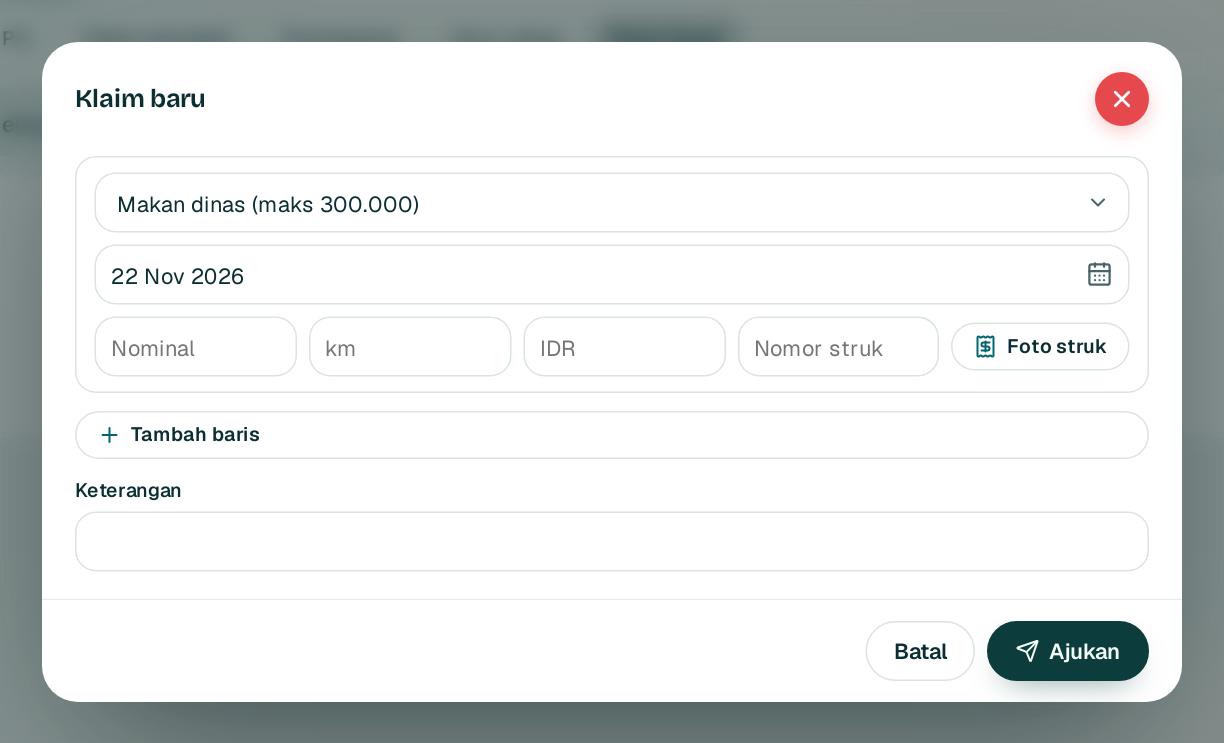
Karyawan mengajukan penggantian biaya dengan foto struk.
Employees claim expenses back with a photo of the receipt.
1234
1
Buka Pembelian, Klaim biaya lalu Klaim baru. Pilih kategori dan tanggal.
Open Purchasing, Expense claims and choose New claim. Pick the category and date.
2
Isi nominal 1 dan nomor struk 2, lalu lampirkan foto struk 3.
Enter the amount 1 and receipt number 2, then attach the receipt photo 3.
3
Klik Ajukan4. Di atas batas kategori tetap bisa dikirim dengan alasan.
Click Submit4. Claims above the category limit can still be sent with a reason.
4
Struk yang sama tidak bisa diklaim dua kali dalam 12 bulan.
The same receipt cannot be claimed twice within 12 months.
1rupiah1Procure · Panduan Pengguna | User Guide
1Procure · 08
Sourcing dan e-auction
Sourcing and e-auctions
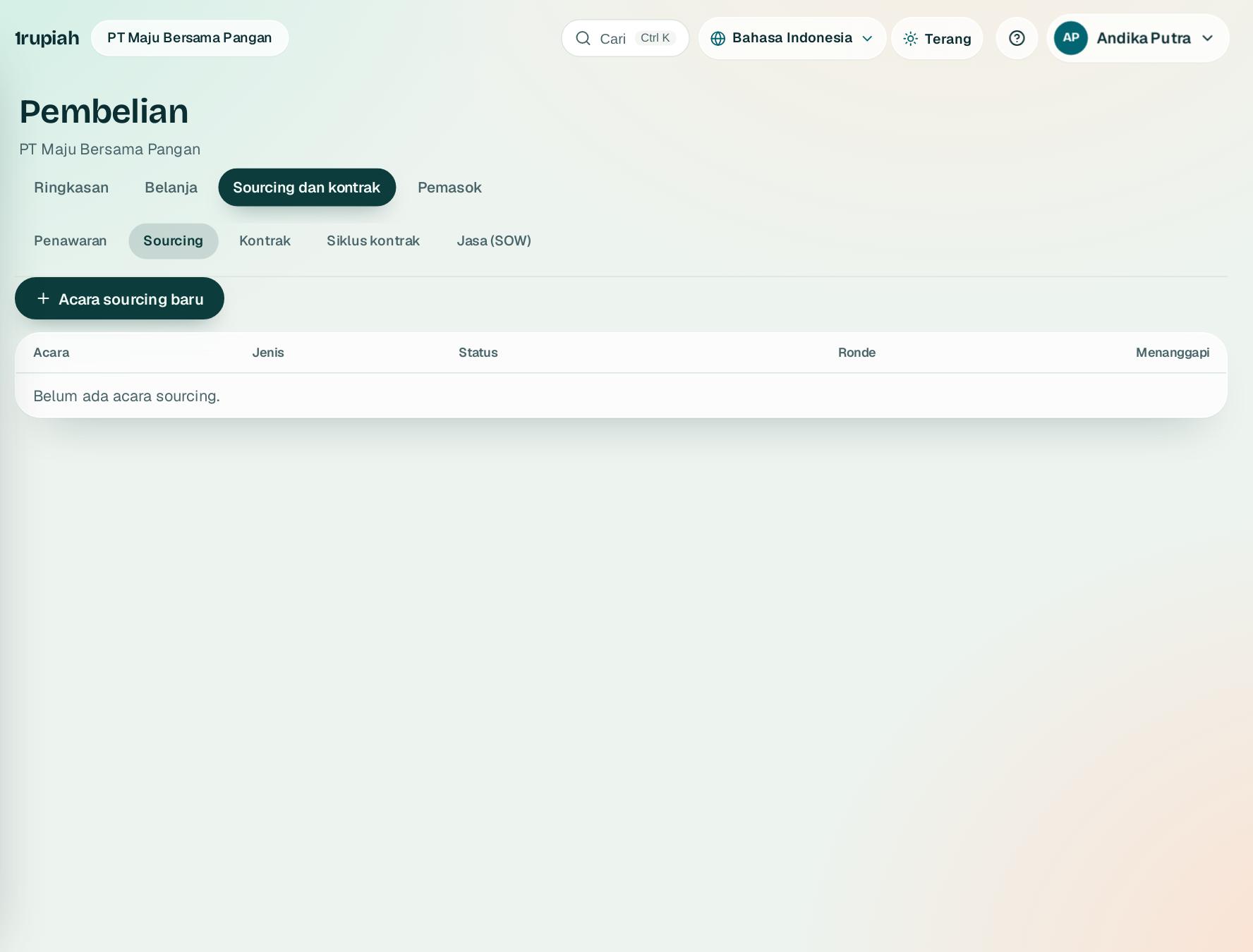
RFQ, RFP, dan lelang terbalik dengan pemasok yang menanggapi lewat tautan.
RFQs, RFPs, and reverse auctions with suppliers answering through a link.
123
1
Buka Pembelian, Sourcing dan kontrak lalu Sourcing. Buat acara 1 dengan baris barang dan pertanyaan berbobot.
Open Purchasing, Sourcing and contracts, then Sourcing. Create an event 1 with lines and weighted questions.
2
Undang pemasok; masing masing mendapat tautan tanpa perlu akun. Ronde 2 bisa diulang untuk peserta terpilih.
Invite suppliers; each gets a link without an account. Rounds 2 can repeat for a shortlist.
3
Skor teknis dan harga dihitung otomatis 3; rekomendasi menjelaskan alasannya, lalu tetapkan pemenang menjadi draf kontrak.
Technical and price scores are automatic 3; the recommendation explains why, then award to create a draft contract.
1rupiah1Procure · Panduan Pengguna | User Guide
1Procure · 09
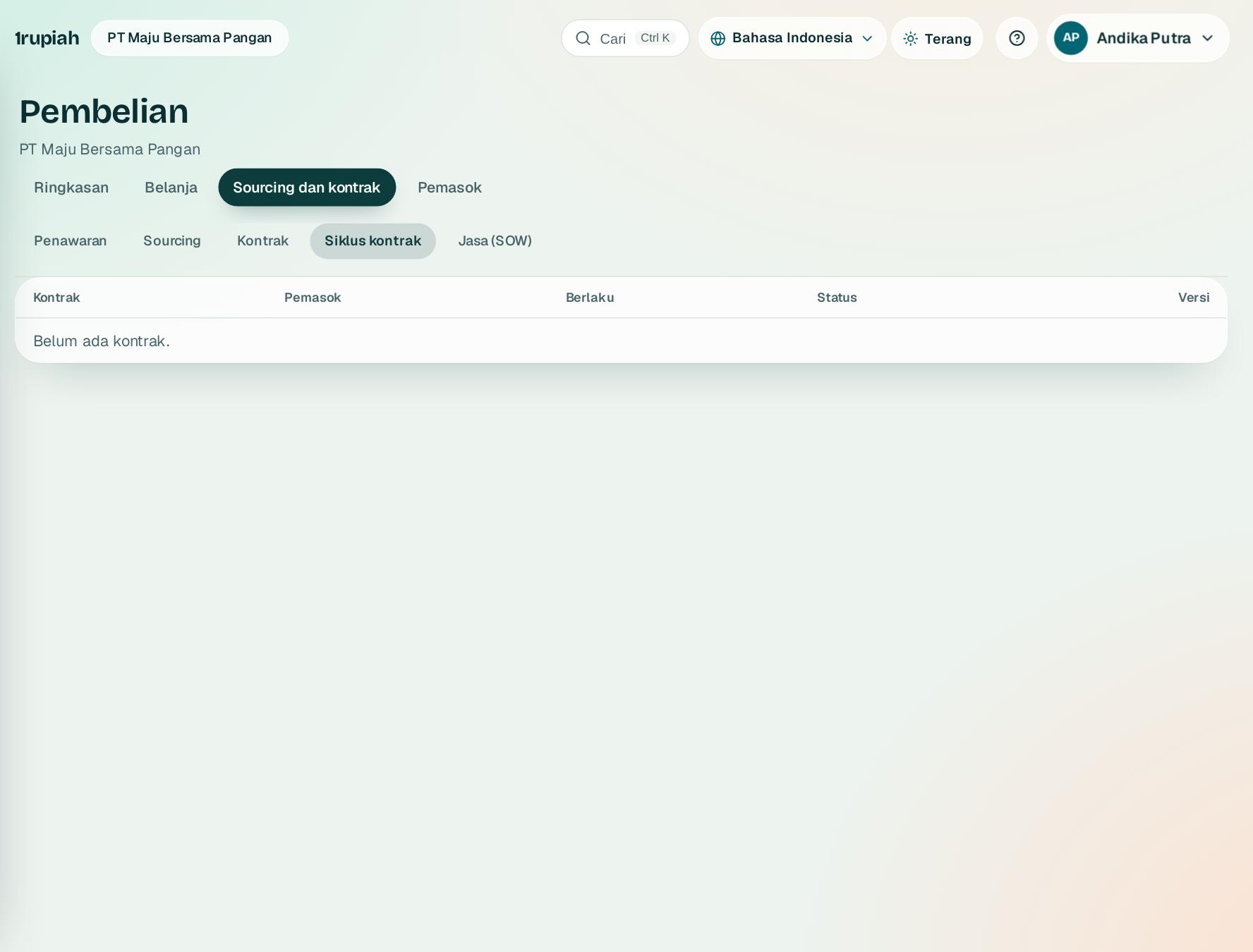
Siklus kontrak
Contract lifecycle
Negosiasi berversi, persetujuan, tanda tangan, kewajiban, dan perpanjangan.
Versioned negotiation, approval, signing, obligations, and renewal.
123
1
Setiap kontrak 1 bergerak dari draf, negosiasi, persetujuan, tanda tangan, sampai aktif 2.
Every contract 1 moves from draft, negotiation, approval, signing, to active 2.
2
Perubahan harga atau klausul membuat versi baru 3 dengan ringkasan perbedaannya.
Price or clause changes create a new version 3 with a summary of differences.
3
Tanggal penting dan pengingat perpanjangan tampil di kalender 90 hari.
Key dates and renewal reminders appear in the 90 day calendar.
1rupiah1Procure · Panduan Pengguna | User Guide
1Procure · 10
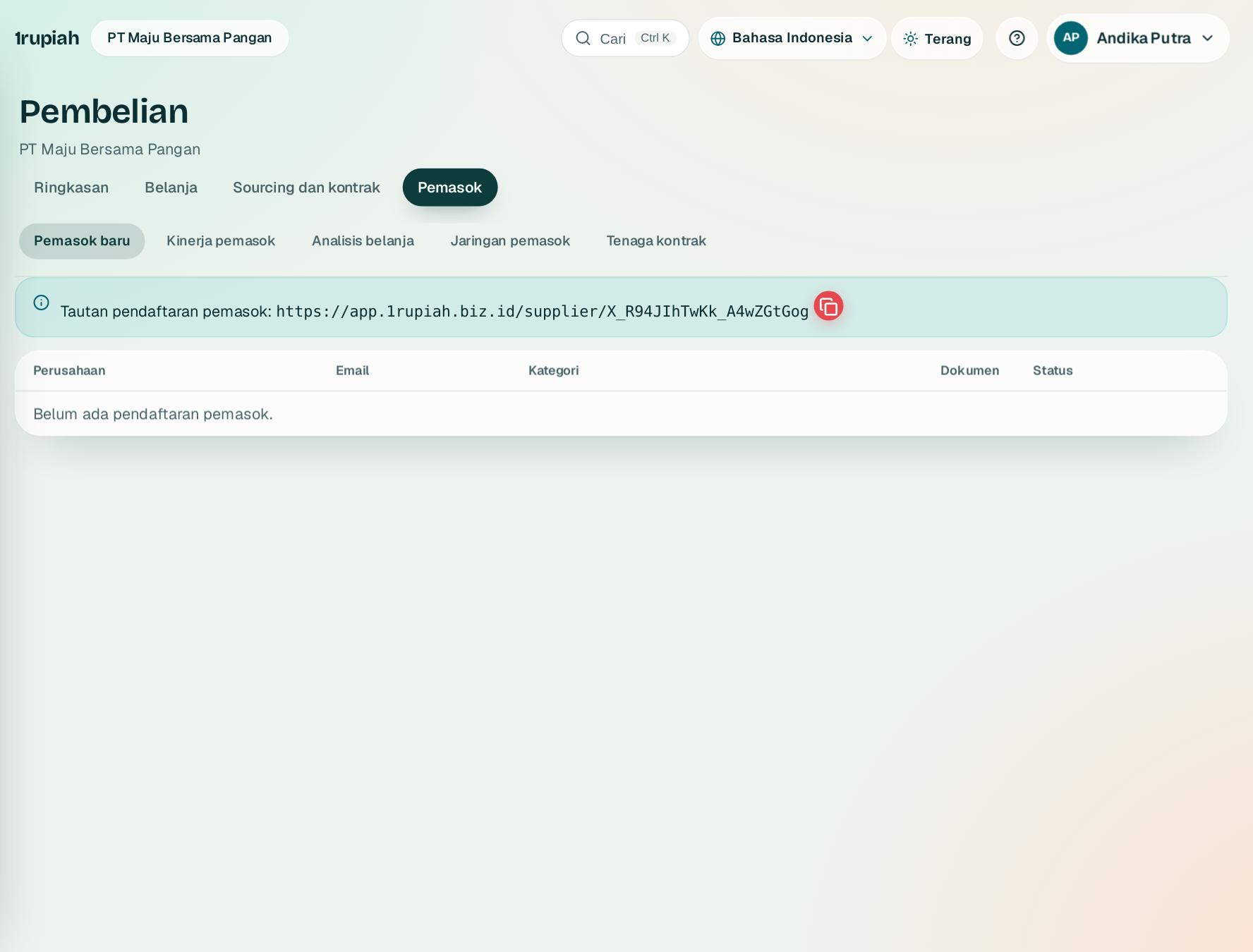
Portal dan onboarding pemasok
Supplier portal and onboarding
Pemasok mendaftar sendiri dengan dokumen legal; Anda memverifikasi dan menyetujui.
Suppliers register themselves with legal documents; you verify and approve.
123
1
Bagikan tautan pendaftaran 1 ke calon pemasok.
Share the registration link 1 with prospective suppliers.
2
Pemasok mengisi profil, kuesioner kategori, dan dokumen 2 dengan masa berlaku.
Suppliers fill in the profile, category questionnaire, and documents 2 with expiry dates.
3
Verifikasi dokumen lalu setujui 3; pemasok menjadi pihak terverifikasi dan bisa melihat PO, kirim ASN, serta faktur lewat portal.
Verify documents and approve 3; the supplier becomes a verified party and can see POs, send ASNs, and invoice through the portal.
1rupiah1Procure · Panduan Pengguna | User Guide
1Procure · 11
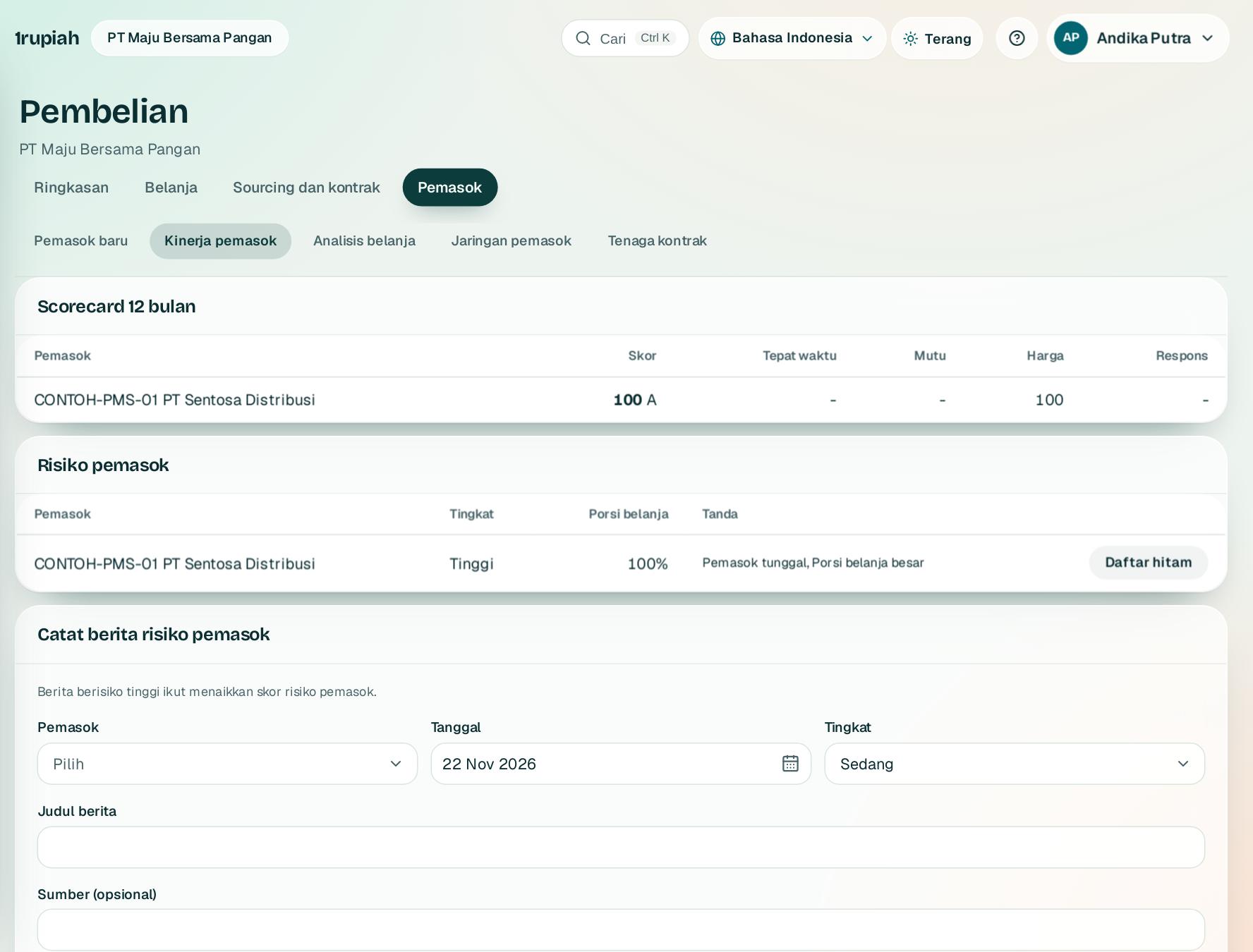
Kinerja dan risiko pemasok
Supplier performance and risk
Scorecard otomatis dan tanda risiko dari data transaksi.
Automatic scorecards and risk flags from transactions.
123
1
Scorecard 1 menilai tepat waktu, mutu, harga, dan respons 12 bulan terakhir.
The scorecard 1 rates on time delivery, quality, price, and response over 12 months.
2
Risiko 2 menandai pemasok tunggal, porsi belanja besar, dokumen kedaluwarsa, dan berita buruk.
Risk 2 flags sole sources, spend concentration, expired documents, and adverse news.
3
Daftar hitam3 dengan alasan memblokir PO, kontrak, dan undangan sourcing baru.
Blacklist3 with a reason blocks new POs, contracts, and sourcing invitations.
1rupiah1Procure · Panduan Pengguna | User Guide
1Procure · 12
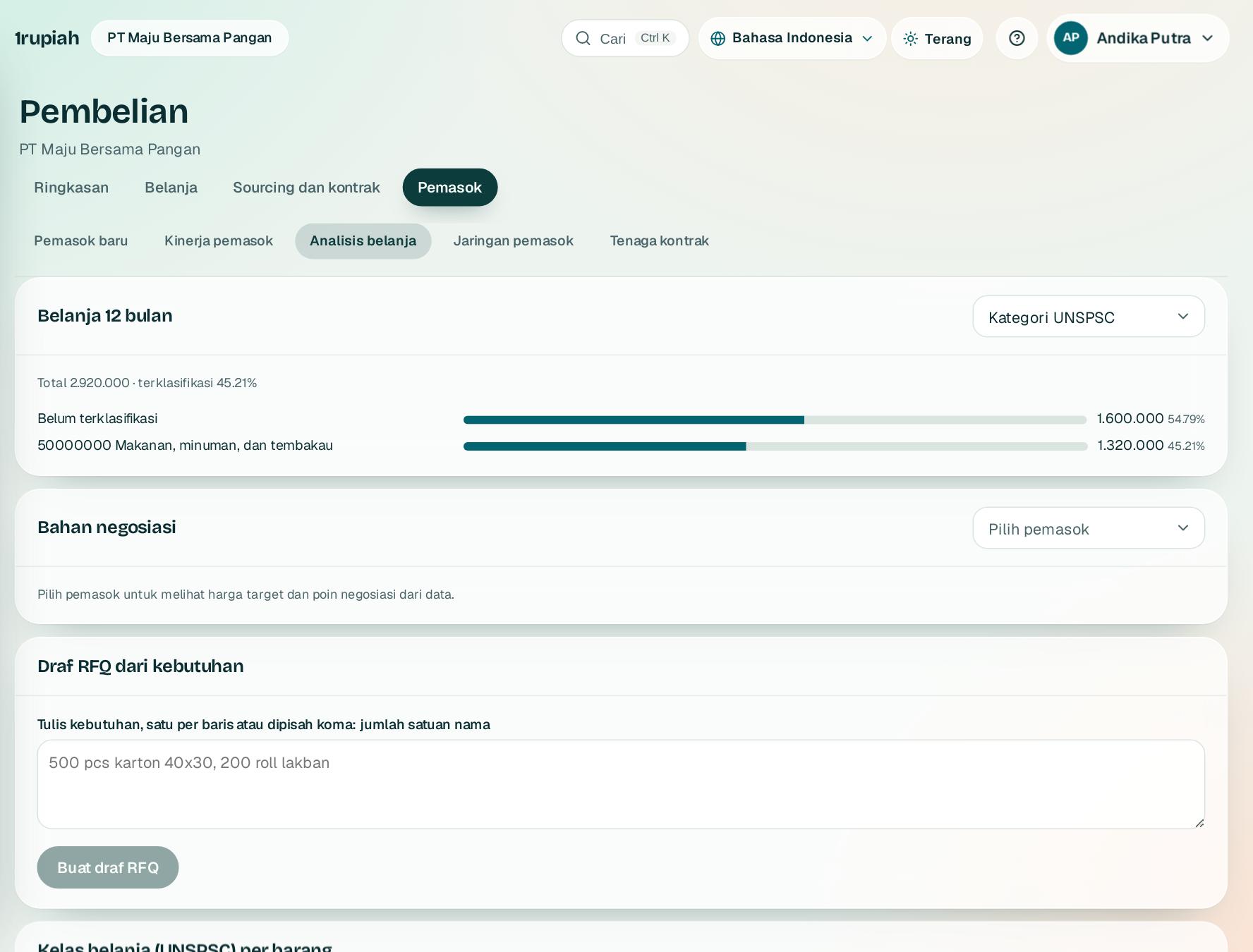
Analisis belanja dan AI pengadaan
Spend analysis and procurement AI
Ke mana uang pembelian pergi dan di mana bisa hemat.
Where purchasing money goes and where to save.
123
1
Pilih pengelompokan 1: kategori UNSPSC, pemasok, barang, atau cost center. Batang 2 menunjukkan porsinya.
Pick the grouping 1: UNSPSC category, supplier, item, or cost center. Bars 2 show the share.
2
Peluang penghematan, harga tidak wajar, dan bahan negosiasi dihitung dari data, bukan tebakan.
Savings opportunities, unusual prices, and negotiation briefs come from data, not guesses.
3
Tulis kebutuhan lalu Buat draf RFQ3; hasilnya langsung menjadi acara sourcing.
Write the need and click Create RFQ draft3; it becomes a sourcing event right away.
1rupiah1Procure · Panduan Pengguna | User Guide
1Procure · 13
Ringkasan modul
Module overview
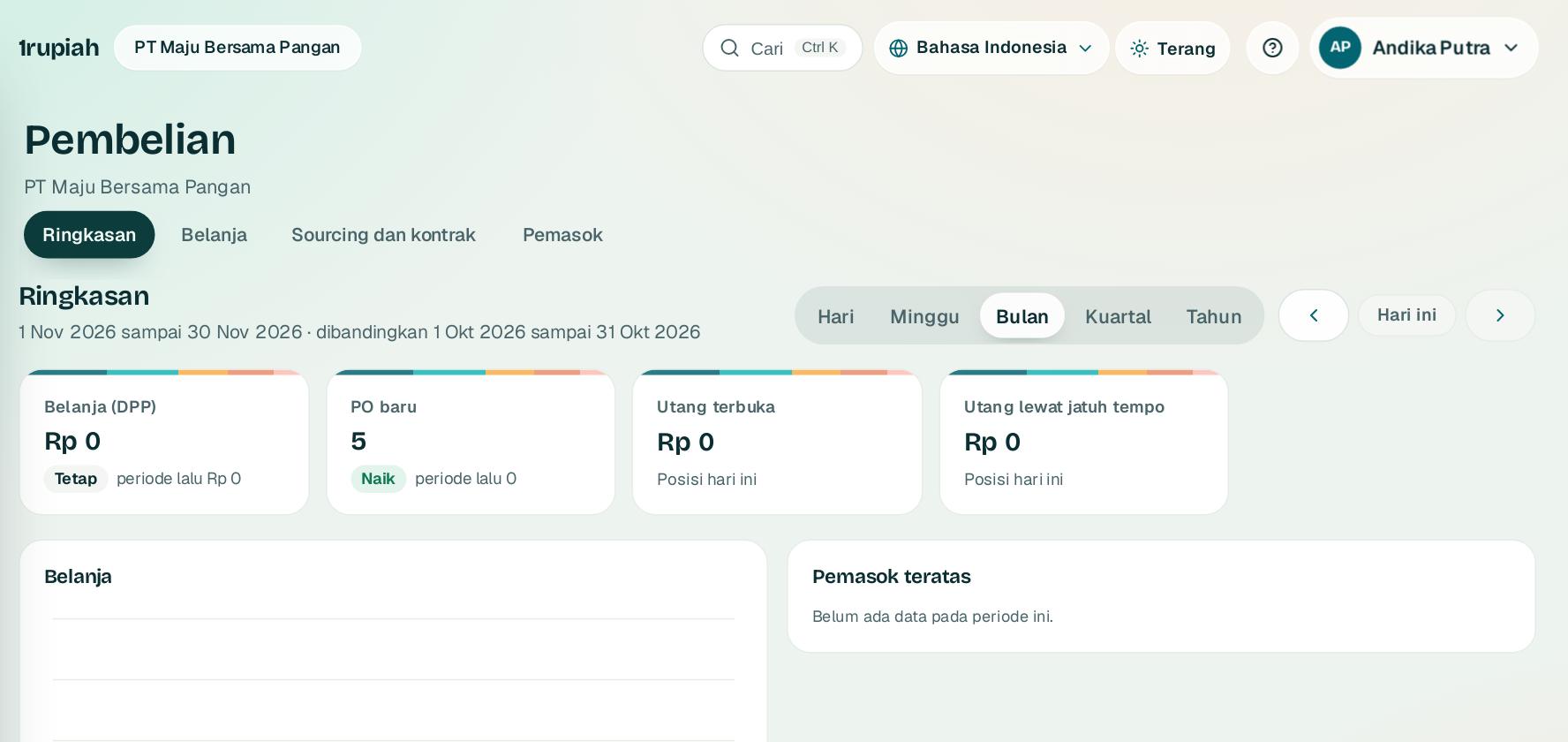
Angka utama Pembelian dalam satu layar, dengan perbandingan periode sebelumnya.
The key Purchasing figures on one screen, compared with the previous period.
12
1
Buka Pembelian, lalu Ringkasan1.
Open Purchasing, then Overview1.
2
Pilih rentang Hari, Minggu, Bulan2, Kuartal, atau Tahun. Kartu belanja, PO baru, dan utang ikut berubah dan menampilkan selisih dengan periode sebelumnya.
Pick Day, Week, Month2, Quarter, or Year. The spend, new purchase orders, and payables cards update and show the change against the previous period.
3
Klik kartu untuk membuka daftar di belakang angkanya. Angka di luar izin Anda tidak ditampilkan.
Click a card to open the list behind the figure. Figures outside your permissions are not shown.
1rupiah1Procure · Panduan Pengguna | User Guide
1Procure · 14
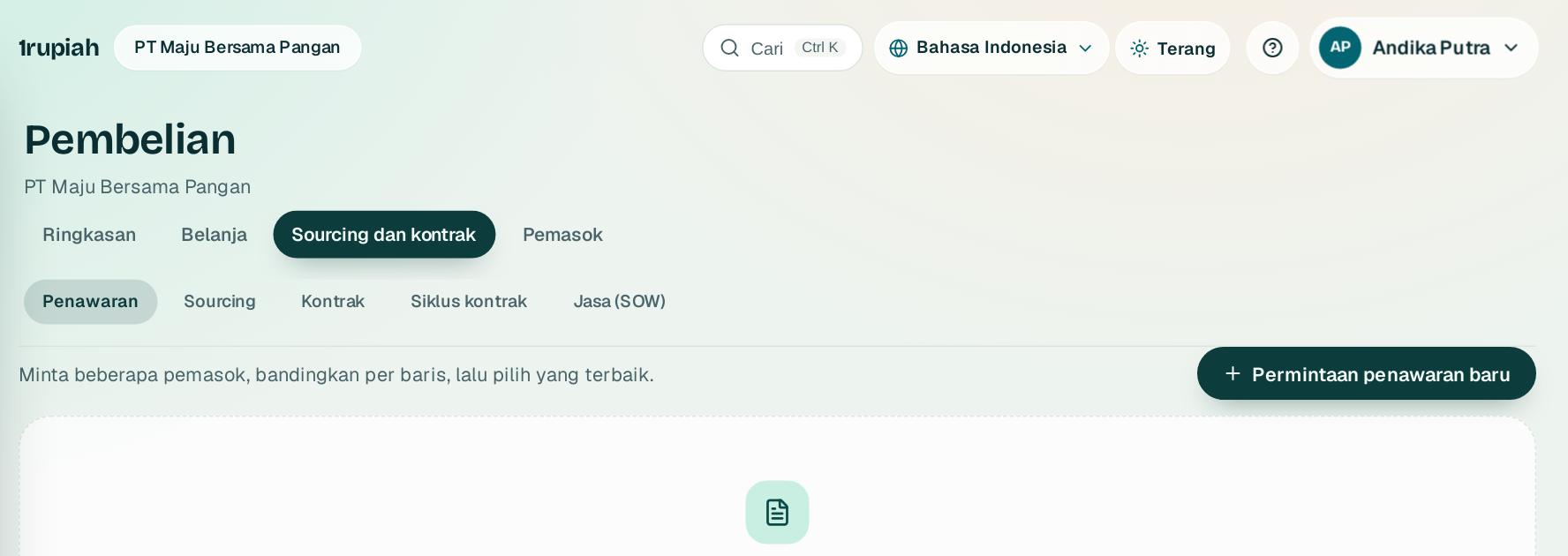
Permintaan penawaran (RFQ)
Requests for quotation (RFQ)
Minta harga ke beberapa pemasok sekaligus, lalu bandingkan.
Ask several suppliers for prices at once, then compare.
1
1
Buka Pembelian, RFQ dan tekan Permintaan penawaran baru1. Pilih barang, jumlah, dan pemasok yang diundang.
Open Purchasing, RFQ and press New request for quotation1. Choose the items, quantities, and invited suppliers.
2
Pemasok mengisi penawaran lewat portal. Bandingkan harga, waktu kirim, dan syarat, lalu jadikan PO.
Suppliers quote through the portal. Compare price, lead time, and terms, then turn the winner into a purchase order.
1rupiah1Procure · Panduan Pengguna | User Guide
1Procure · 15
Umur utang
Payables aging
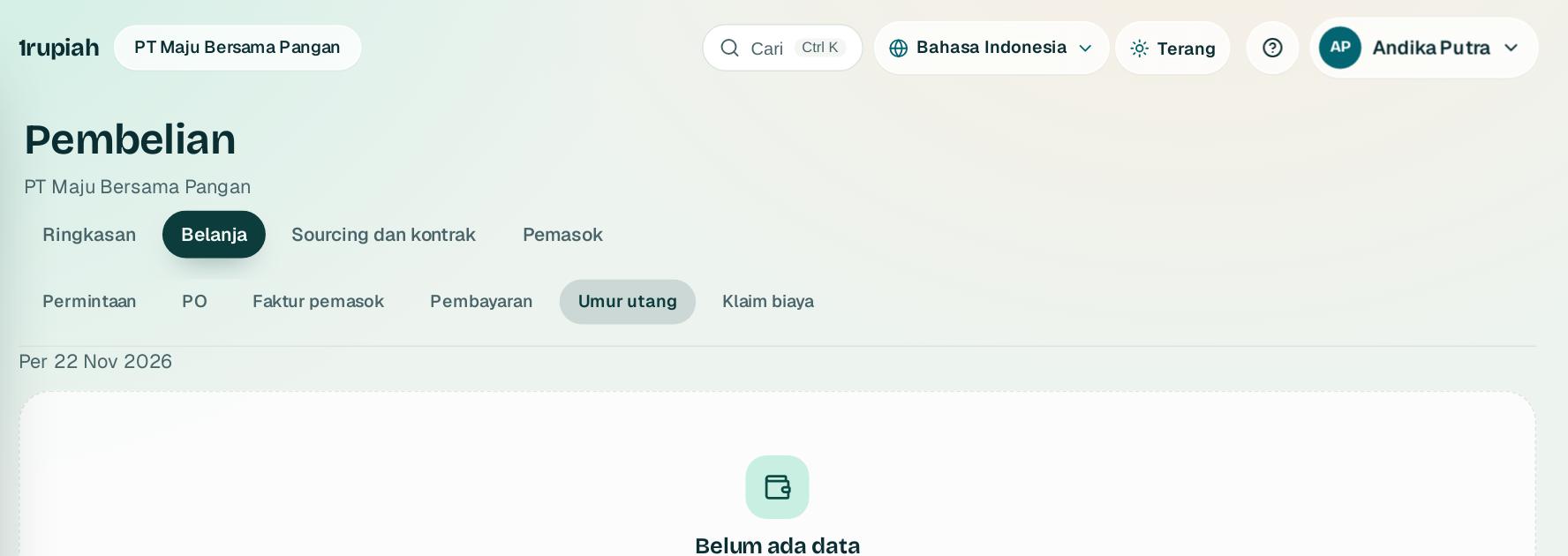
Utang ke pemasok dikelompokkan menurut umur jatuh tempo.
Amounts owed to suppliers grouped by how overdue they are.
1
Buka Pembelian, Umur utang. Utang dikelompokkan belum jatuh tempo, 1 sampai 30, 31 sampai 60, 61 sampai 90, dan lebih dari 90 hari.
Open Purchasing, Payables aging. Amounts are grouped as not yet due, 1 to 30, 31 to 60, 61 to 90, and over 90 days.
2
Klik pemasok untuk melihat faktur di baliknya dan jadwalkan pembayaran dari sana.
Click a supplier to see the invoices behind it and schedule payment from there.
1rupiah
Butuh bantuan?
Tim kami siap 24 jam, Senin sampai Minggu. Buka chat di aplikasi atau situs, atau kirim email.
Need help?
Our team is available 24 hours, Monday to Sunday. Open the chat in the app or on the site, or send an email.