BOM dan resep berversi, MRP, routing dan kapasitas, papan jadwal, MES dan OEE, make to order dan subkontrak, modul mutu dengan CAPA dan SPC, rekayasa produk, serta biaya produk.
Versioned BOMs and recipes, MRP, routing and capacity, the scheduling board, MES and OEE, make to order and subcontracting, the quality module with CAPA and SPC, product engineering, and product costing.
17 November 2026 · PT Satu Rupiah Indonesia
1rupiah1Make · Panduan Pengguna | User Guide
Mengapa 1rupiah
Why 1rupiah
Sistem bisnis lama dibangun untuk kantor yang selalu online, satu bahasa, dan pajak yang dihitung manual. 1rupiah dibangun untuk cara kerja Indonesia hari ini.
Older business systems were built for offices that are always online, in one language, with tax worked out by hand. 1rupiah is built for how Indonesian businesses work today.
AI yang bekerja, bukan sekadar menjawabTanya data dengan kalimat biasa, pembaca faktur pemasok dari foto atau PDF, agen yang menagih dan memesan ulang dalam batas nilai, dan situs 1CMS yang disusun AI. Setiap usulan AI bisa ditinjau dan dibatalkan.
AI that works, not just chatsAsk your data in plain words, read supplier invoices from a photo or PDF, let agents chase payments and reorder within value limits, and draft a 1CMS website with AI. Every AI suggestion can be reviewed and undone.
Pajak Indonesia sudah di dalamPPN 12 persen dengan DPP nilai lain 11/12, ekspor Faktur Pajak ke Coretax, PPh 21 tarif TER, PPh 23 dan 4(2) dengan bukti potong, BPJS, PBJT restoran, dan pesangon PP 35/2021.
Indonesian tax built inVAT at 12 percent on the 11/12 tax base, tax invoice export to Coretax, PPh 21 TER rates, PPh 23 and 4(2) with withholding slips, BPJS, restaurant PBJT, and severance under PP 35/2021.
Tetap jalan saat internet putusKasir dan aplikasi HP terus berjualan dan mencatat saat koneksi hilang, lalu menyinkronkan sekali saat online lagi tanpa transaksi ganda.
Keeps working offlineThe cashier and mobile apps keep selling and recording when the connection drops, then sync once when back online without duplicate transactions.
Keamanan kelas bankPasskey, verifikasi dua langkah, masuk dengan Google (Microsoft bila diaktifkan), persetujuan empat mata untuk uang keluar, rekening pemasok dicek orang kedua, data tiap perusahaan di skema terpisah, dan jejak audit lengkap.
Bank grade securityPasskeys, two step verification, Google sign in (Microsoft when enabled), four eyes approval for money going out, supplier bank accounts checked by a second person, a separate schema per company, and a full audit trail.
Angka yang selalu tepatHarga, PPN, dan pembulatan dihitung oleh Calc Core berbahasa Rust yang sama di server, web, dan desktop. Jurnal selalu seimbang dan periode terkunci tidak bisa diubah diam diam.
Figures that are always rightPrices, VAT, and rounding are computed by the same Rust Calc Core on the server, web, and desktop. Journals always balance and locked periods cannot be changed quietly.
Bayar hanya yang dipakaiMulai dari 1ERP Gratis, lalu tambah aplikasi satu per satu: 1Finance, 1Sales, 1HR, 1Cashier, dan lainnya. Semua terhubung dalam satu data, satu login, di web, desktop, dan HP.
Pay only for what you useStart on 1ERP Free, then add apps one at a time: 1Finance, 1Sales, 1HR, 1Cashier, and more. Everything shares one set of data and one login, on web, desktop, and mobile.
Satu halaman, satu tugasSetiap halaman menjelaskan satu pekerjaan dari awal sampai selesai.
One page, one taskEach page covers one job from start to finish.
Nomor di gambarKotak bernomor 1 menunjukkan tombol atau isian yang dimaksud langkah dengan nomor sama.
Numbers on screenshotsA numbered box 1 marks the button or field the matching step refers to.
Chip tombolSimpan adalah tombol utama, Batal tombol biasa, persis seperti di layar.
Button chipsSave is a main button and Cancel a regular one, exactly as on screen.
Gambar layarGambar diambil dari tampilan bahasa Indonesia. Ganti bahasa kapan saja lewat pilihan bahasa di kanan atas.
ScreenshotsScreenshots use the Indonesian interface. Switch language at any time with the language picker at the top right.
1rupiah1Make · Panduan Pengguna | User Guide
1Make · 01
Membuat BOM
Creating a bill of materials
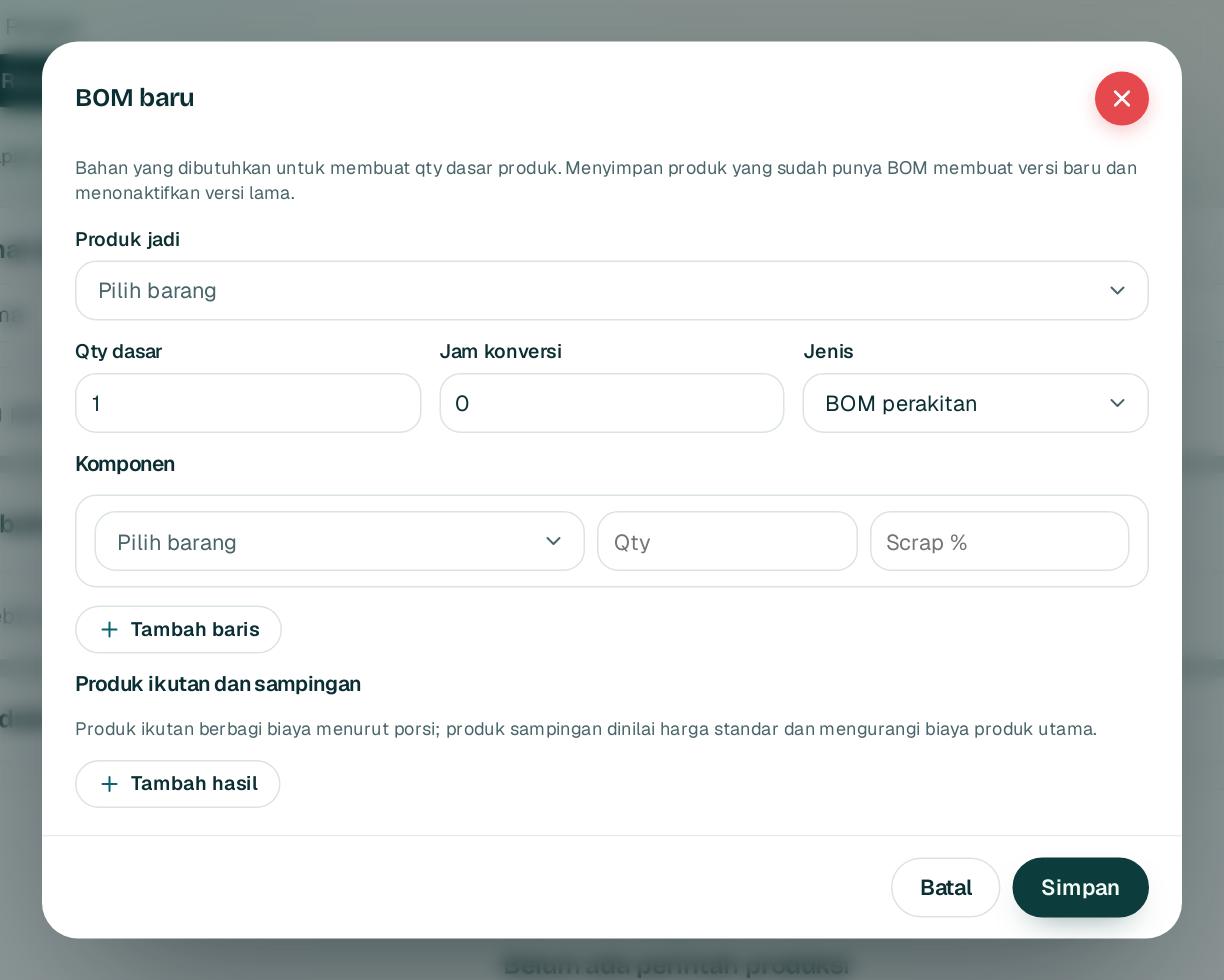
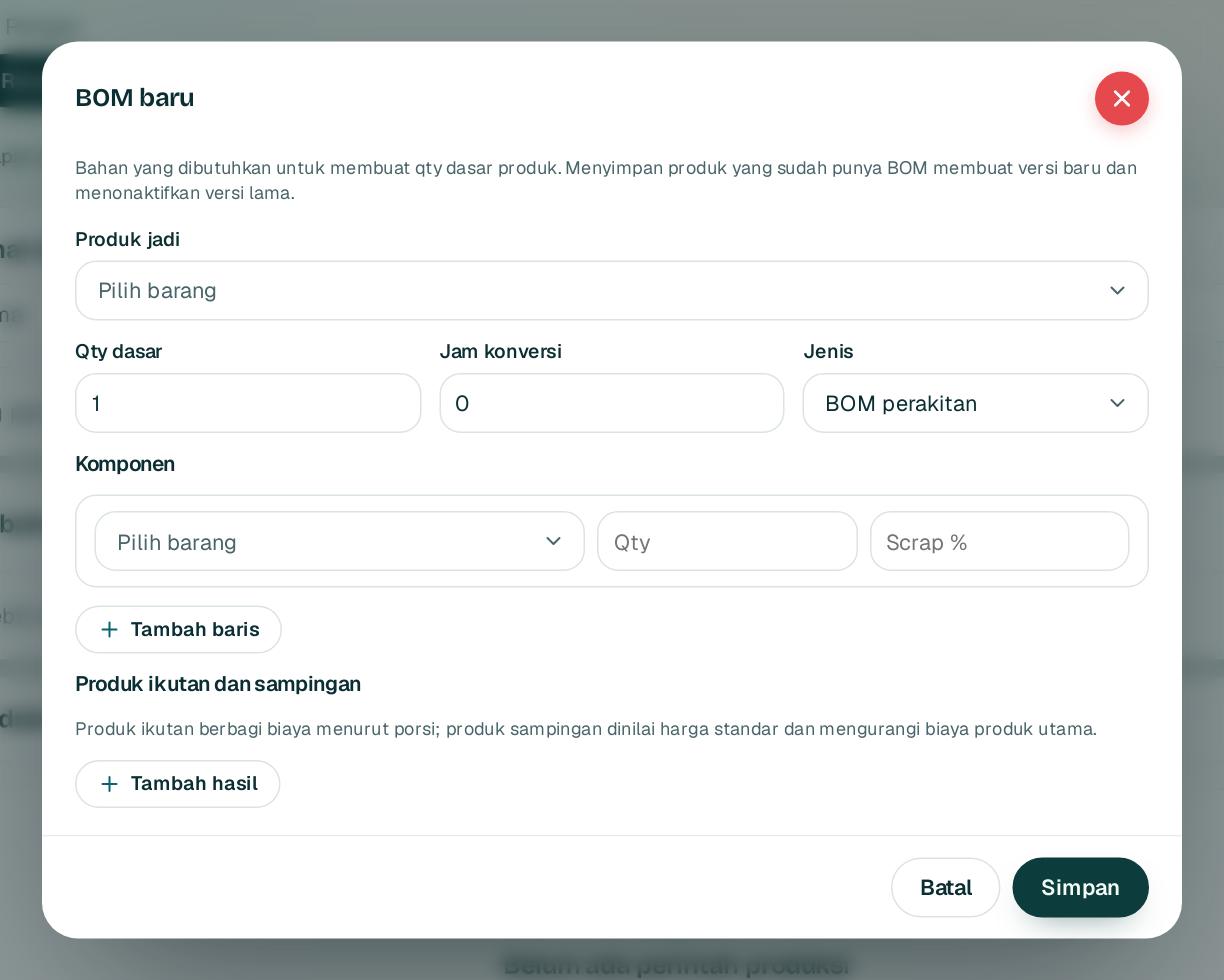
BOM menentukan bahan dan qty untuk setiap barang jadi.
A BOM sets the materials and quantities for each finished good.
1234
1
Buka Produksi lalu BOM baru.
Open Production and choose New BOM.
2
Pilih produk jadi 1 dan qty dasar 2, misalnya 100 pcs, serta jam konversi.
Choose the finished product 1 and base quantity 2, for example 100 pieces, plus conversion hours.
3
Tambah komponen 3 dengan qty dan persen scrap.
Add components 3 with quantity and scrap percentage.
4
Klik Simpan4. Menyimpan ulang membuat versi baru; perintah yang sudah dirilis tetap memakai versi lamanya.
Click Save4. Saving again creates a new version; released orders keep their version.
1rupiah1Make · Panduan Pengguna | User Guide
1Make · 02
Rencana bahan dan perintah produksi
Material planning and production orders
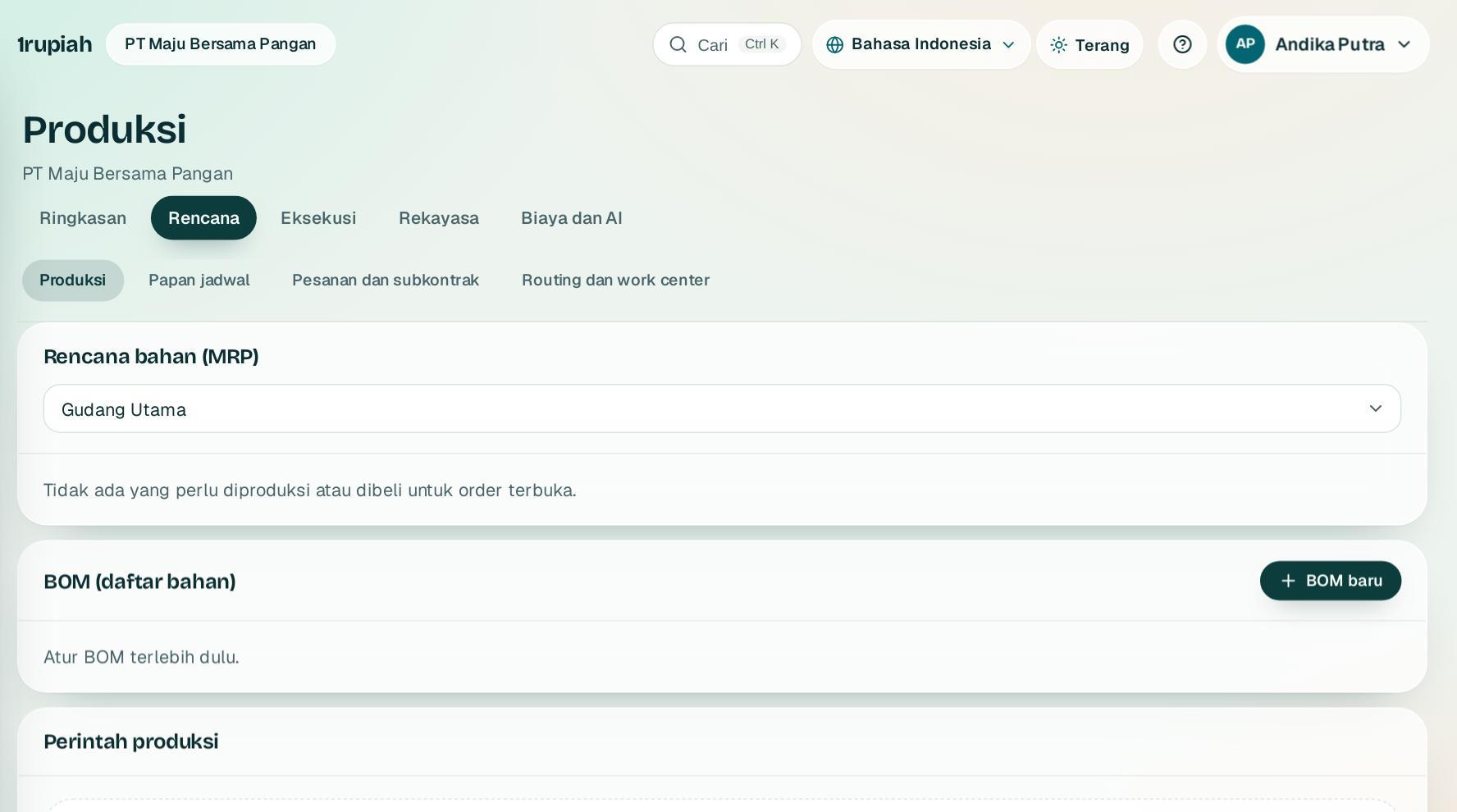
MRP membaca order terbuka, stok, PO, dan produksi berjalan untuk mengusulkan apa yang dibuat atau dibeli.
MRP reads open orders, stock, POs, and running production to suggest what to make or buy.
1
Buka Produksi. Kartu Rencana bahan (MRP) menghitung kebutuhan per gudang.
Open Production. The Material plan (MRP) card works out needs per warehouse.
2
Buat perintah produksi dari barang dan qty. Rilis membekukan versi BOM; bila bahan kurang, rilis sebagian atau tunggu.
Create a production order from the item and quantity. Releasing freezes the BOM version; if materials are short, release part of it or wait.
3
Laporkan hasil baik dan scrap terpisah. Bahan diambil dan barang jadi mendapat biaya aktual.
Report good output and scrap separately. Materials are issued and finished goods get their actual cost.
4
Scrap tinggi membuka Case mutu. Recall menelusuri lot sampai ke pelanggan.
High scrap opens a quality case. Recall traces lots all the way to customers.
1rupiah1Make · Panduan Pengguna | User Guide
1Make · 03
Routing, work center, dan kalender kerja
Routing, work centers, and work calendars
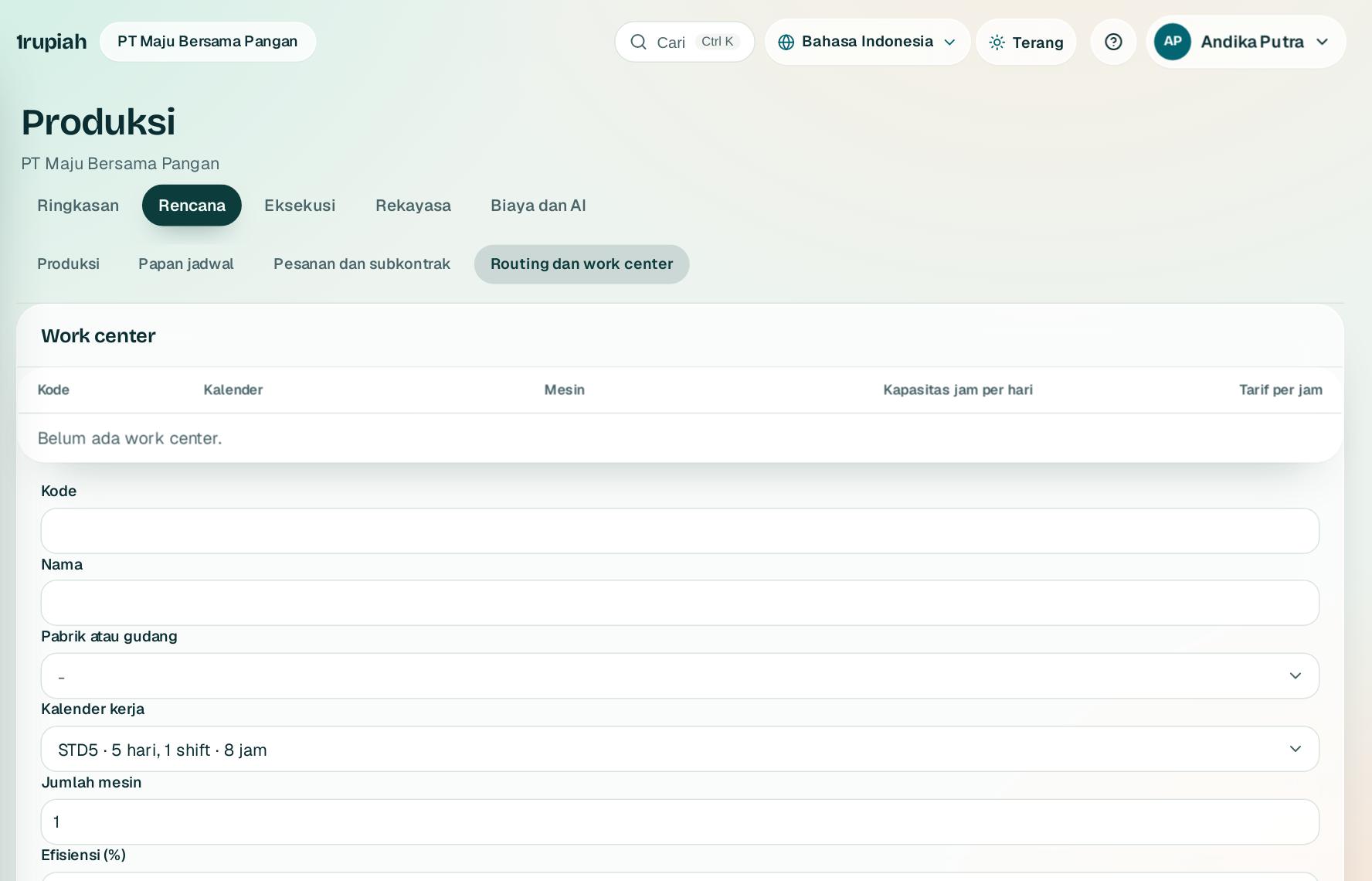
Routing menentukan urutan operasi dan work center; perintah produksi dijadwalkan maju menurut kalender kerja.
Routing sets the sequence of operations and work centers; production orders are scheduled forward on the work calendar.
1
Buka Produksi, kelompok Rencana, lalu Routing dan work center.
Open Production, the Plan group, then Routing and work centers.
2
Isi work center dengan kalender (1, 2, atau 3 shift), jumlah mesin, efisiensi, dan tarif. Kapasitas per hari dihitung otomatis.
Set up work centers with a calendar (1, 2, or 3 shifts), number of machines, efficiency, and rates. Daily capacity is worked out for you.
3
Buat routing per barang: operasi berurutan dengan menit setup dan menit proses per qty dasar.
Create a routing per item: operations in sequence with setup minutes and run minutes per base quantity.
4
Perintah produksi baru menyalin routing aktif dan menjadwalkan operasinya, melewati akhir pekan dan libur nasional.
New production orders copy the active routing and schedule its operations, skipping weekends and national holidays.
1rupiah1Make · Panduan Pengguna | User Guide
1Make · 04
Kapasitas dan papan jadwal
Capacity and the scheduling board
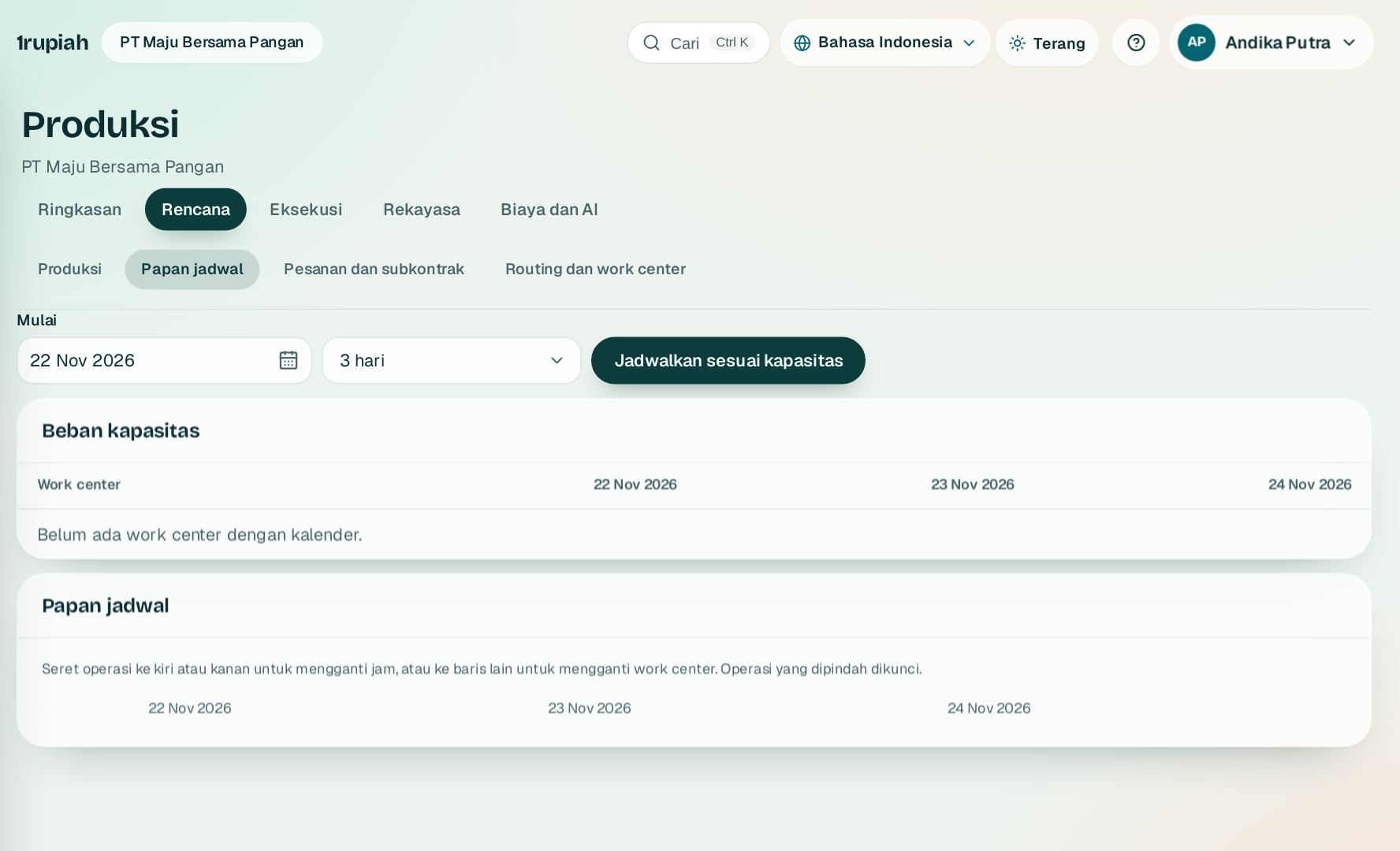
Lihat beban tiap work center per hari lalu atur jadwal dengan seret dan lepas.
See each work center load per day and arrange the schedule by drag and drop.
1
Tabel beban menunjukkan persen kapasitas terpakai; di atas 100 persen ditandai merah.
The load table shows the percentage of capacity used; above 100 percent is marked red.
2
Klik Jadwalkan sesuai kapasitas untuk menyusun ulang operasi menurut prioritas dan tanggal butuh. Perintah yang lewat tanggal butuh ditandai terlambat.
Click Schedule to capacity to reorder operations by priority and due date. Orders past their due date are marked late.
3
Seret operasi di papan untuk mengganti jam atau ke baris lain untuk mengganti work center. Operasi yang dipindah dikunci.
Drag an operation on the board to change its time, or onto another row to change the work center. Moved operations are locked.
1rupiah1Make · Panduan Pengguna | User Guide
1Make · 05
Resep, potensi, produksi berulang, dan produk ikutan
Recipes, potency, repetitive production, and co products
Untuk pabrik proses: jumlah bahan menyesuaikan kadar aktif lot, dan biaya dibagi ke produk ikutan.
For process plants: material quantities follow the active content of each lot, and cost is shared with co products.
1
Di dialog BOM pilih jenis Resep proses dan isi target potensi bahan. Saat rilis, lot dipilih kedaluwarsa terdekat dan jumlahnya disesuaikan kadar aktif.
In the BOM dialog choose Process recipe and set the material potency target. On release, lots are picked by nearest expiry and quantities follow the active content.
2
Tambah produk ikutan dengan porsi biaya, atau produk sampingan yang dinilai harga standar dan mengurangi biaya.
Add co products with a cost share, or by products valued at standard cost that reduce the main cost.
3
Untuk lini yang berjalan terus, laporkan hasil per shift di bagian Produksi berulang; bahan diambil otomatis dari BOM.
For lines that run continuously, report output per shift under Repetitive production; materials are taken from the BOM automatically.
1rupiah1Make · Panduan Pengguna | User Guide
1Make · 06
Make to order dan subkontrak
Make to order and subcontracting
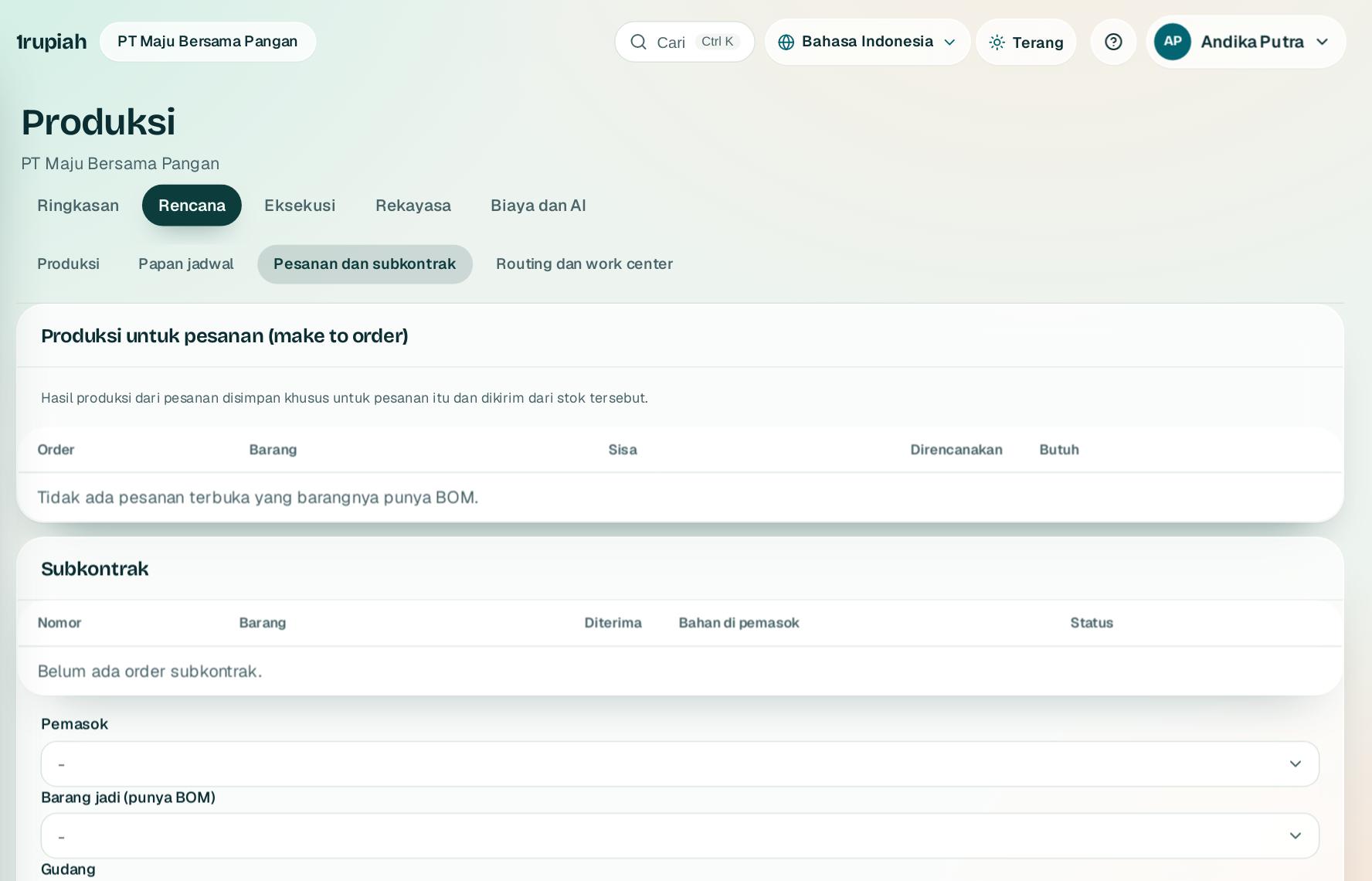
Produksi khusus untuk pesanan pelanggan, dan bahan yang diolah pemasok.
Production made for a customer order, and materials processed by a supplier.
1
Klik Buat perintah pada baris pesanan. Hasilnya disimpan khusus untuk pesanan itu dan dikirim dari stok tersebut.
Click Create order on an order line. The output is held for that order and shipped from that stock.
2
Buat order subkontrak dengan barang jadi ber BOM dan ongkos olah per unit, lalu Kirim bahan ke pemasok.
Create a subcontract order with a finished item that has a BOM and a processing fee per unit, then Send materials to the supplier.
3
Saat barang jadi datang klik Terima hasil. Biayanya bahan ditambah ongkos olah. Sisa bahan bisa ditarik kembali.
When the finished goods arrive click Receive. The cost is materials plus the processing fee. Leftover materials can be returned.
1rupiah1Make · Panduan Pengguna | User Guide
1Make · 07
MES di tablet operator
MES on the operator tablet
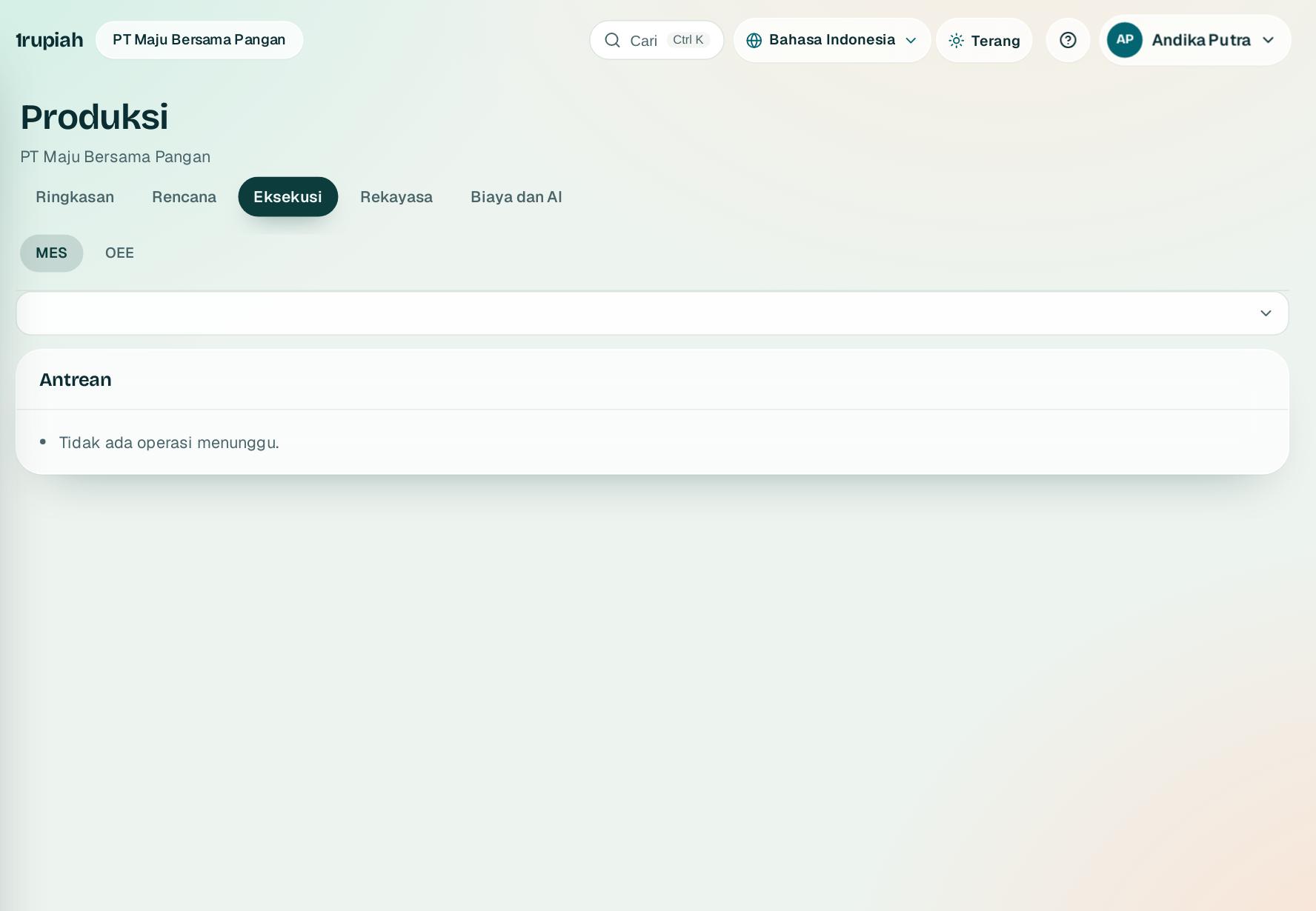
Operator memulai operasi, memindai bahan, mencatat mesin berhenti, dan melapor hasil.
Operators start operations, scan materials, record stops, and report output.
1
Buka Eksekusi lalu MES dan pilih work center. Klik Mulai pada operasi di antrean.
Open Execution then MES and choose a work center. Click Start on an operation in the queue.
2
Pindai bahan dengan barcode atau kode. Bahan di luar BOM ditolak dan pemakaian berlebih minta konfirmasi.
Scan materials by barcode or code. Materials outside the BOM are refused and overuse asks for confirmation.
3
Mesin berhenti dicatat dengan alasan. Klik Selesai dengan hasil baik dan scrap; menit kerja dikurangi waktu berhenti.
Record stops with a reason. Click Finish with good and scrap quantities; working minutes exclude stop time.
1rupiah1Make · Panduan Pengguna | User Guide
1Make · 08
OEE per mesin dan shift
OEE per machine and shift
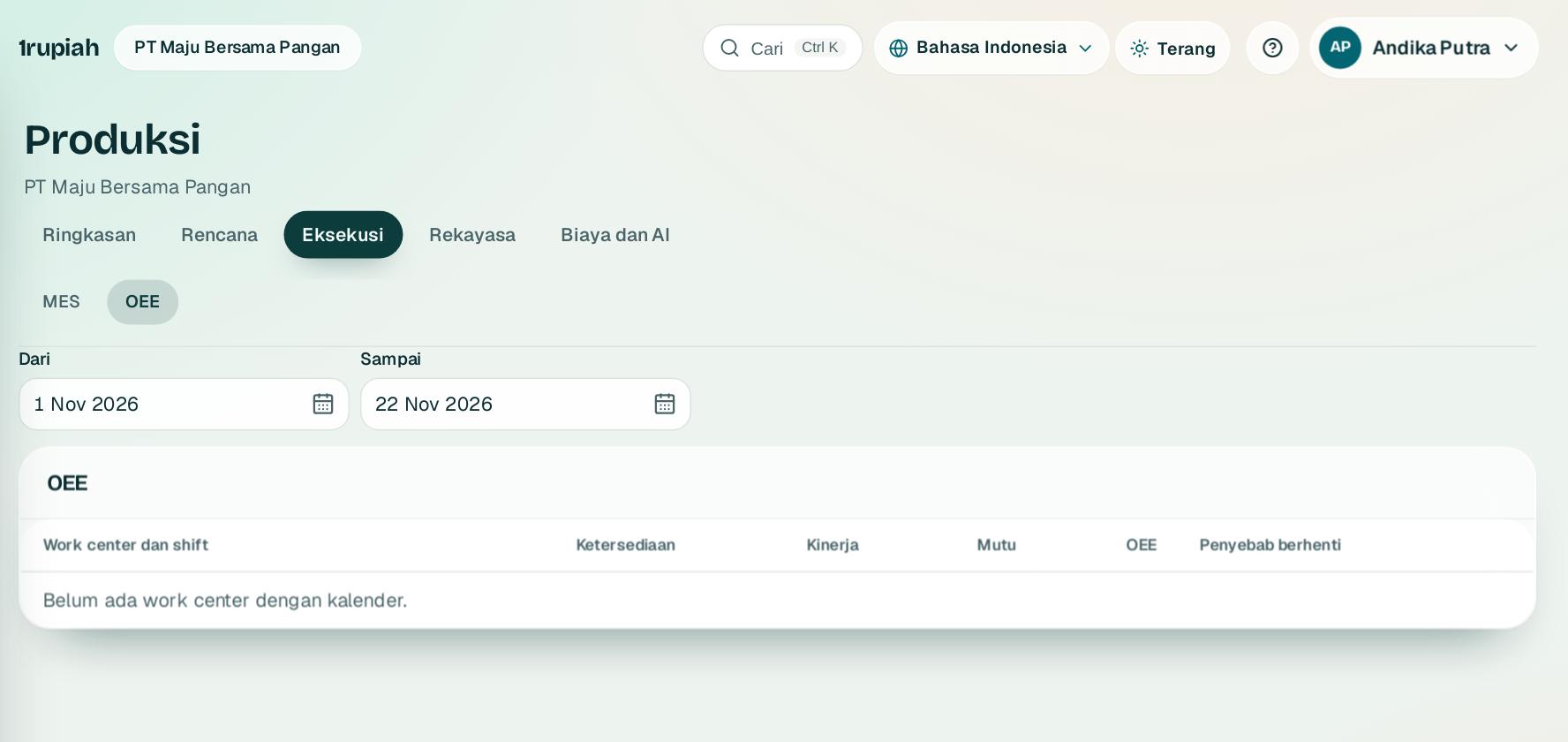
Ketersediaan, kinerja, dan mutu dikalikan menjadi OEE.
Availability, performance, and quality multiply into OEE.
1
Pilih rentang tanggal. Waktu terencana diambil dari kalender dikurangi berhenti terencana.
Choose a date range. Planned time comes from the calendar minus planned stops.
2
Kinerja membandingkan waktu siklus ideal routing dengan waktu berjalan; mutu membandingkan hasil baik dengan jumlah dibuat.
Performance compares the ideal routing cycle time with run time; quality compares good output with the quantity made.
3
Tiga penyebab berhenti terbesar tampil per work center.
The top three stop reasons are shown per work center.
1rupiah1Make · Panduan Pengguna | User Guide
1Make · 09
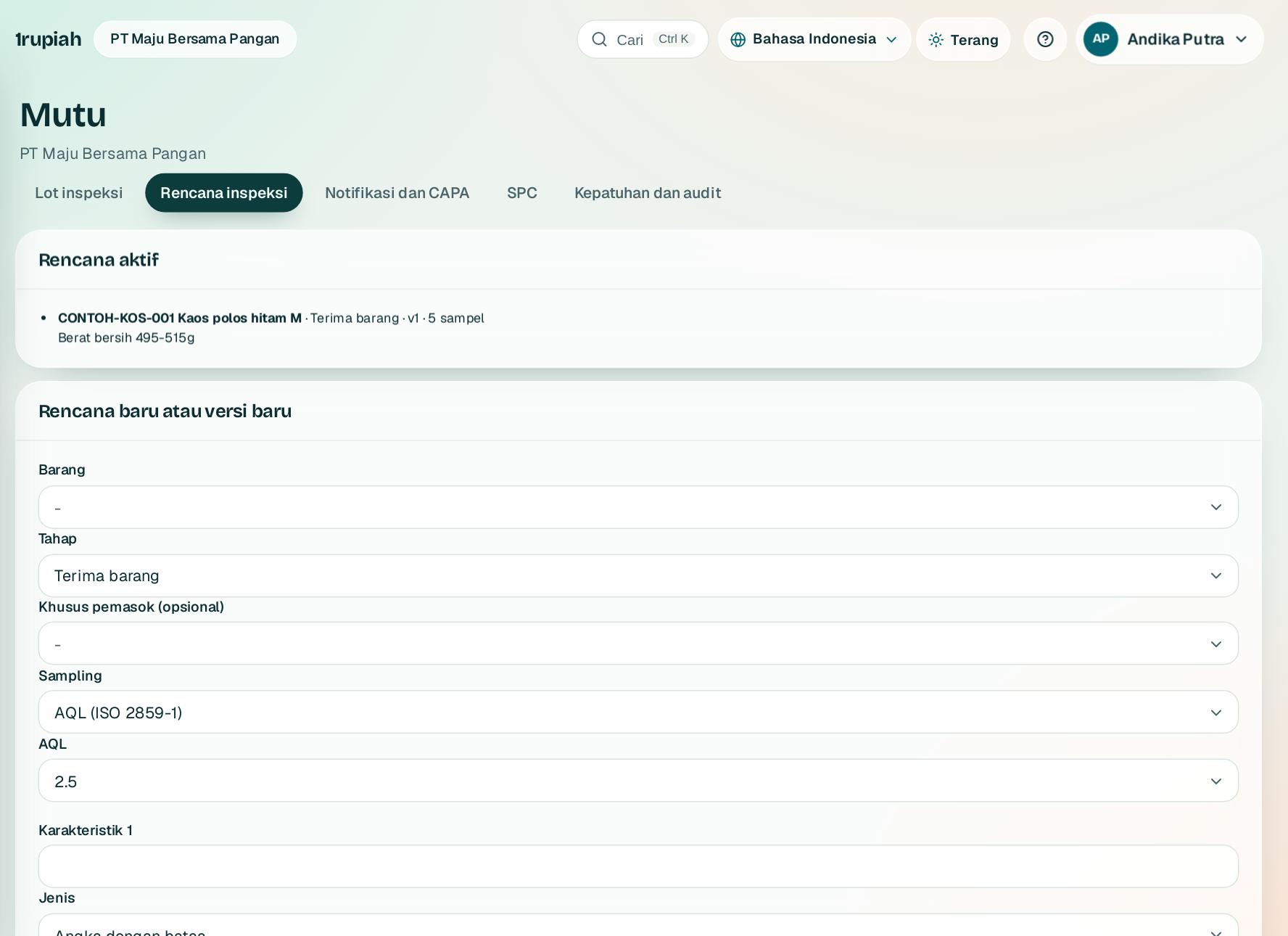
Rencana inspeksi dan AQL
Inspection plans and AQL
Menu Mutu menentukan apa yang diperiksa saat barang diterima, diproduksi, dan dikirim.
The Quality menu sets what is checked when goods are received, produced, and shipped.
1
Buka Mutu lalu Rencana inspeksi. Pilih barang, tahap, dan bila perlu pemasok tertentu.
Open Quality then Inspection plans. Choose the item, stage, and optionally a specific supplier.
2
Tambah karakteristik: angka dengan batas bawah dan atas, atau lulus dan tidak. Tandai yang kritis.
Add characteristics: numbers with lower and upper limits, or pass and fail. Mark the critical ones.
3
Pilih sampling AQL (ISO 2859 1), jumlah tetap, atau seluruh lot. Simpan ulang membuat versi baru.
Choose AQL sampling (ISO 2859 1), a fixed count, or the whole lot. Saving again creates a new version.
1rupiah1Make · Panduan Pengguna | User Guide
1Make · 10
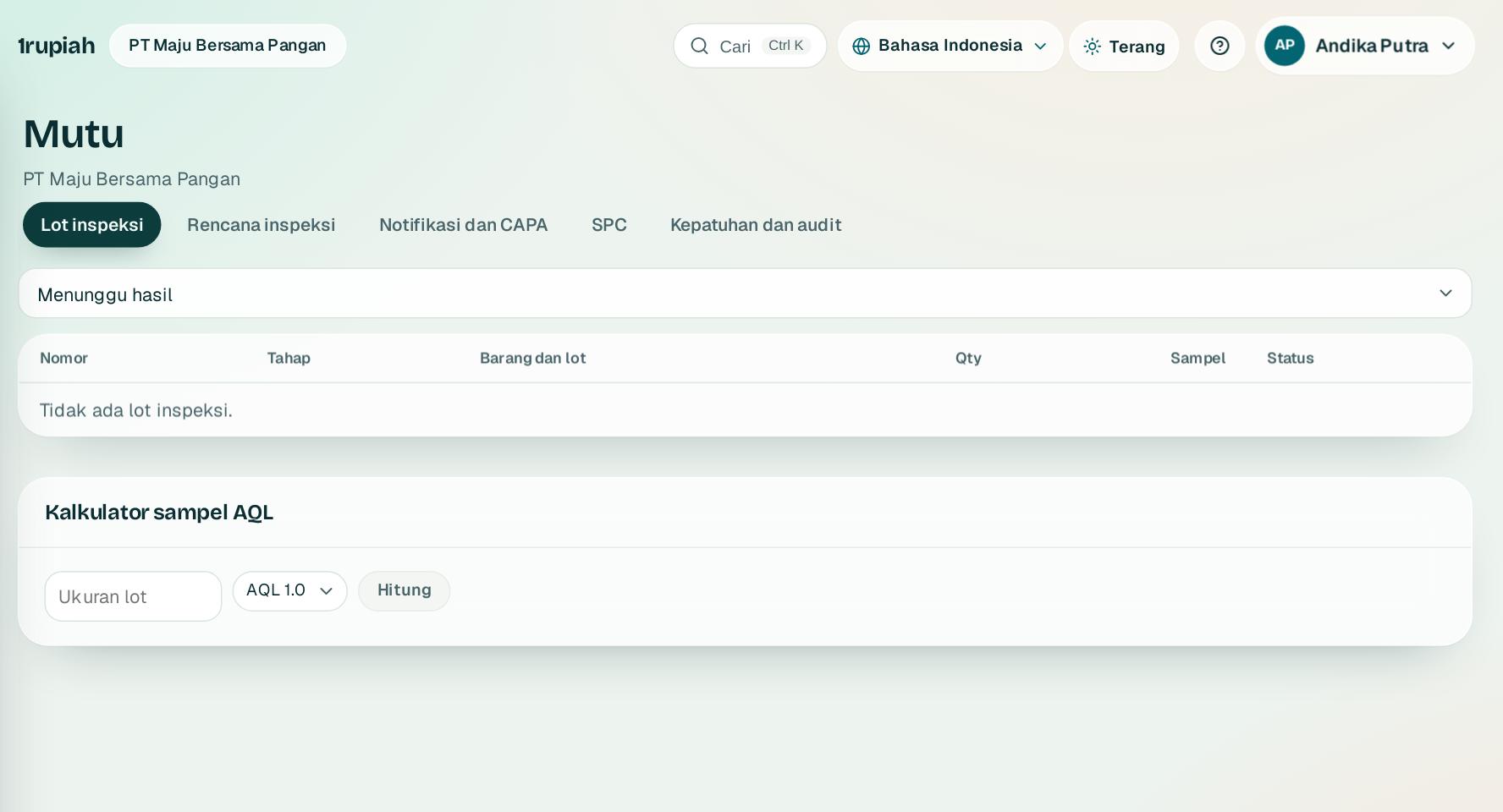
Lot inspeksi dan keputusan penggunaan
Inspection lots and usage decisions
Lot inspeksi dibuat otomatis dan stok ditahan sampai diputuskan.
Inspection lots are created automatically and stock is held until decided.
1
Penerimaan barang dan hasil produksi yang punya rencana langsung membuat lot inspeksi dengan ukuran sampel.
Goods receipts and production output with a plan create an inspection lot with its sample size.
2
Buka lot, isi hasil per sampel, lalu Simpan hasil. Sistem memberi usulan dari angka terima.
Open the lot, enter results per sample, then Save results. The system suggests a decision from the acceptance number.
3
Putuskan Diterima, Ditolak, atau Bersyarat. Menyimpang dari usulan wajib alasan. COA bisa diunduh untuk lot yang diterima.
Decide Accepted, Rejected, or Conditional. Going against the suggestion needs a reason. A COA can be downloaded for accepted lots.
1rupiah1Make · Panduan Pengguna | User Guide
1Make · 11
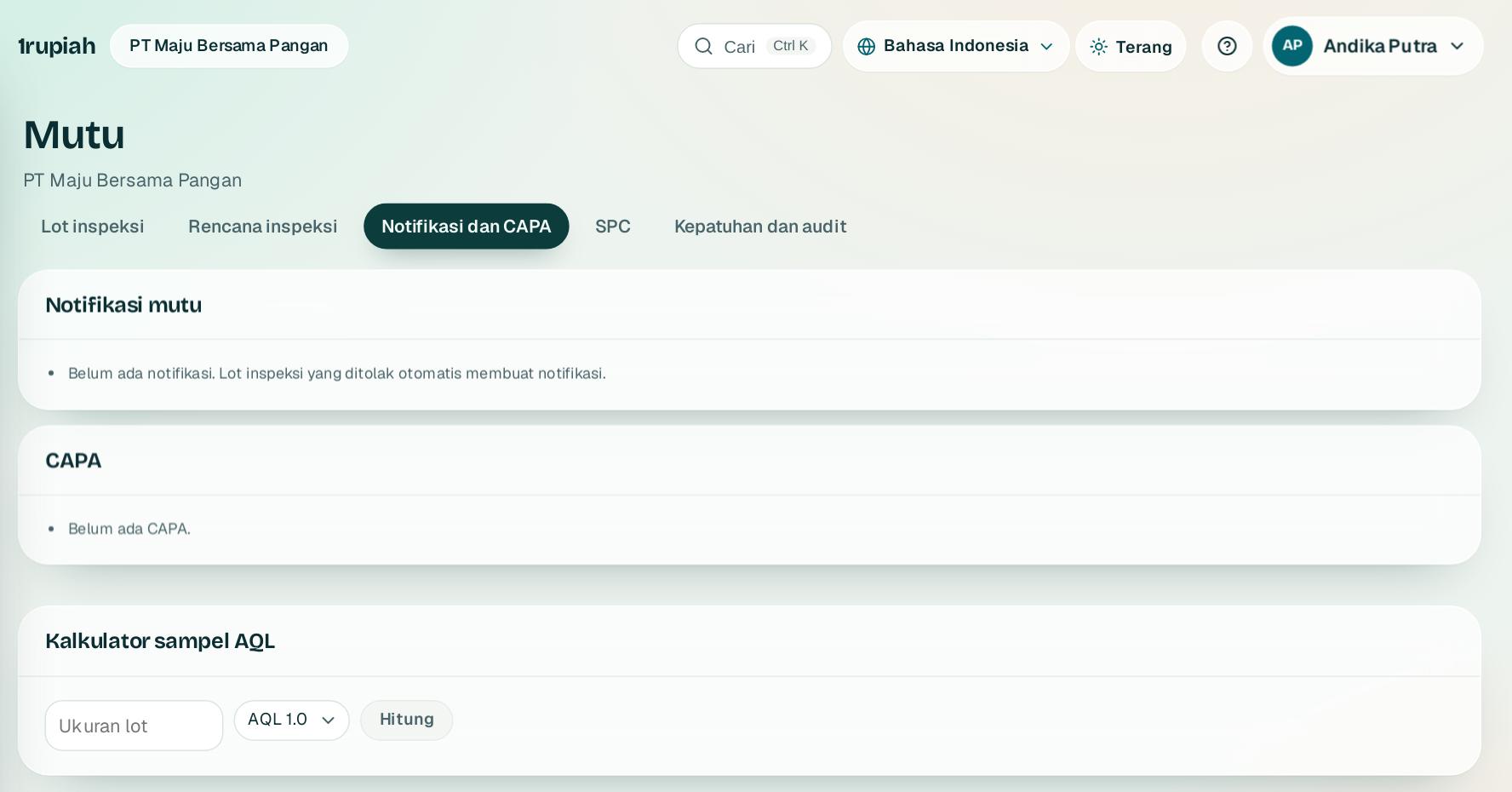
Notifikasi mutu dan CAPA 8D
Quality notifications and 8D CAPA
Masalah mutu ditangani berurutan dari tim sampai penutupan.
Quality problems are handled in order from the team to closure.
1
Lot yang ditolak otomatis membuat notifikasi. Klik Buka CAPA untuk menanganinya.
Rejected lots create a notification automatically. Click Open CAPA to handle it.
2
Isi D1 sampai D8 berurutan. D4 butuh metode dan D6 butuh verifikasi bahwa tindakan efektif.
Fill in D1 to D8 in order. D4 needs a method and D6 needs verification that the action is effective.
3
D8 ditutup oleh penyetuju yang bukan pemilik CAPA.
D8 is closed by an approver who is not the CAPA owner.
1rupiah1Make · Panduan Pengguna | User Guide
1Make · 12
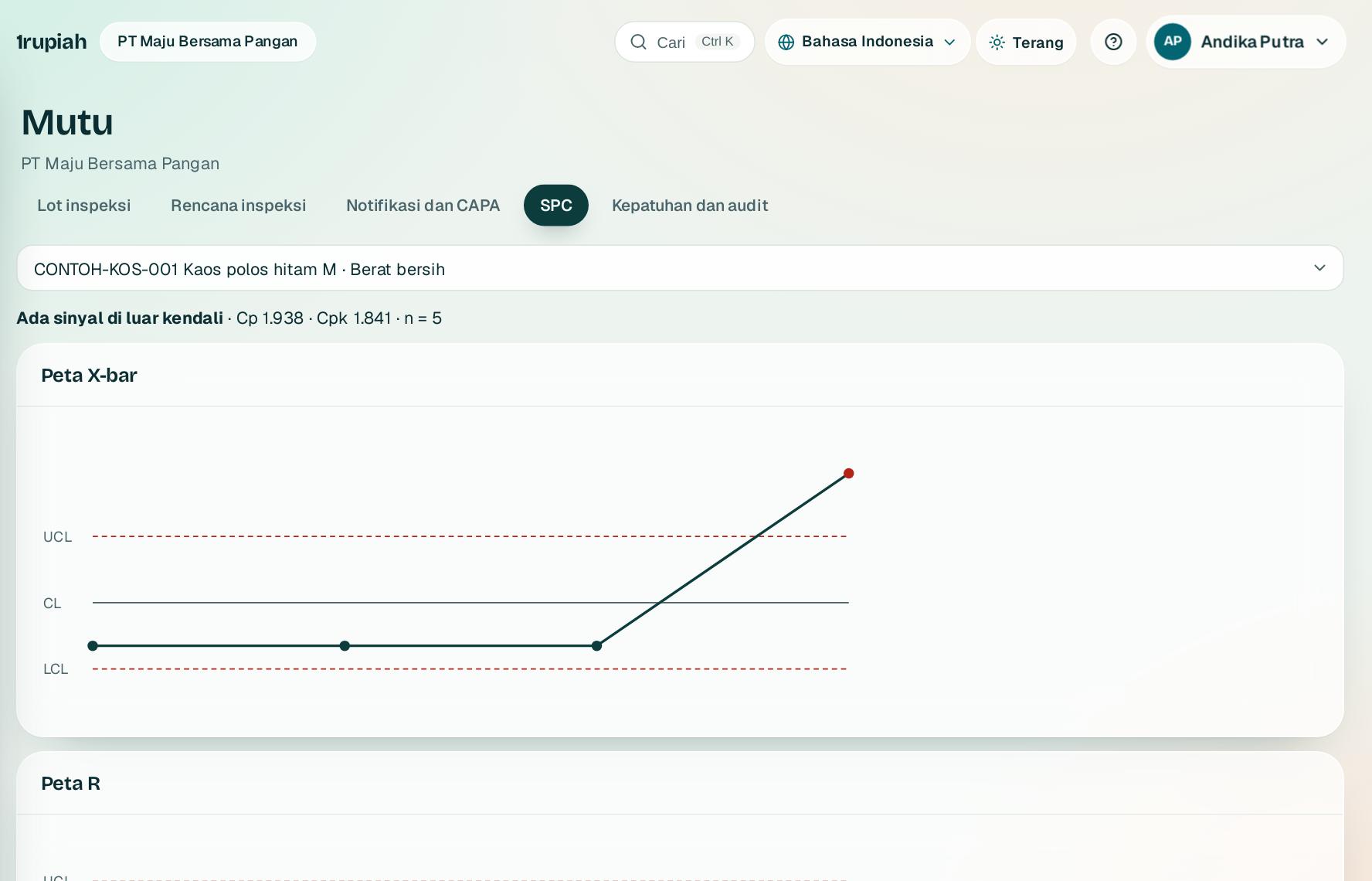
SPC: peta kendali dan kapabilitas
SPC: control charts and capability
Peta X bar dan R dari hasil lot inspeksi, dengan Cp dan Cpk.
X bar and R charts from inspection lot results, with Cp and Cpk.
1
Buka Mutu lalu SPC dan pilih barang serta karakteristik angka.
Open Quality then SPC and choose the item and a numeric characteristic.
2
Titik merah melanggar aturan sinyal (di luar batas, delapan titik di satu sisi, tren enam titik, dua dari tiga di atas dua sigma).
Red points break a signal rule (outside the limits, eight points on one side, a six point trend, two of three beyond two sigma).
3
Cp dan Cpk di atas 1,33 menandakan proses mampu memenuhi spesifikasi.
Cp and Cpk above 1.33 mean the process can meet the specification.
1rupiah1Make · Panduan Pengguna | User Guide
1Make · 13
Kepatuhan: halal, BPOM, ISO, HACCP
Compliance: halal, BPOM, ISO, HACCP
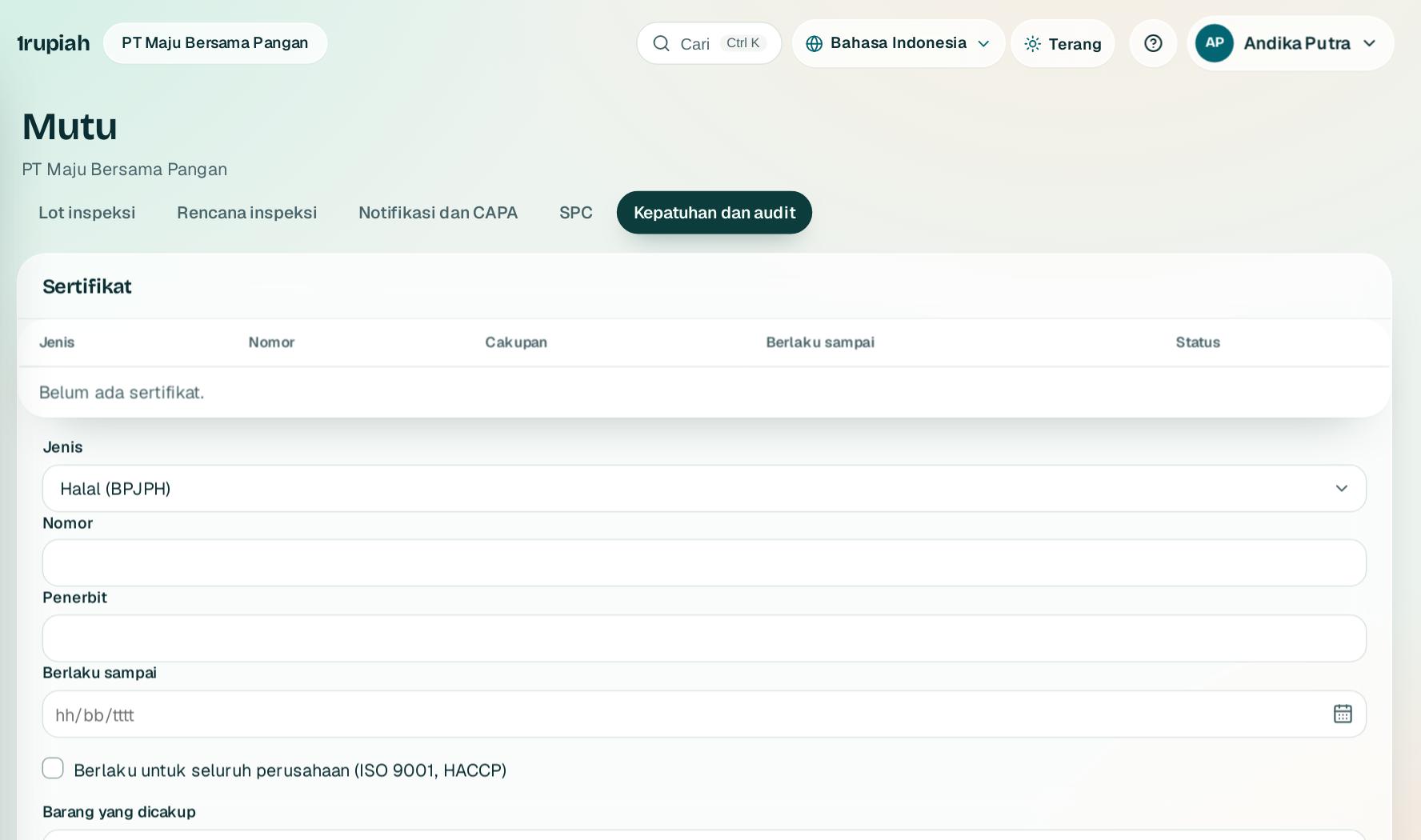
Sertifikat dengan masa berlaku, barang yang wajib sertifikat, dan audit dengan temuan.
Certificates with validity, items that require a certificate, and audits with findings.
1
Simpan sertifikat dengan nomor, penerbit, dan tanggal berlaku. Status berubah menjadi segera berakhir 60 hari sebelumnya.
Save certificates with number, issuer, and validity. The status turns to expiring 60 days before.
2
Barang yang wajib sertifikat tetapi belum punya sertifikat berlaku tampil sebagai peringatan.
Items that require a certificate but have no valid one show as a warning.
3
Catat audit dan temuannya. Temuan mayor otomatis membuat CAPA.
Record audits and their findings. Major findings create a CAPA automatically.
1rupiah1Make · Panduan Pengguna | User Guide
1Make · 14
Rekayasa produk: dokumen, ECR, ECO, produk baru
Product engineering: documents, ECR, ECO, new products
Perubahan produk tercatat dari permintaan sampai rilis, dengan dampaknya.
Product changes are recorded from request to release, with their impact.
1
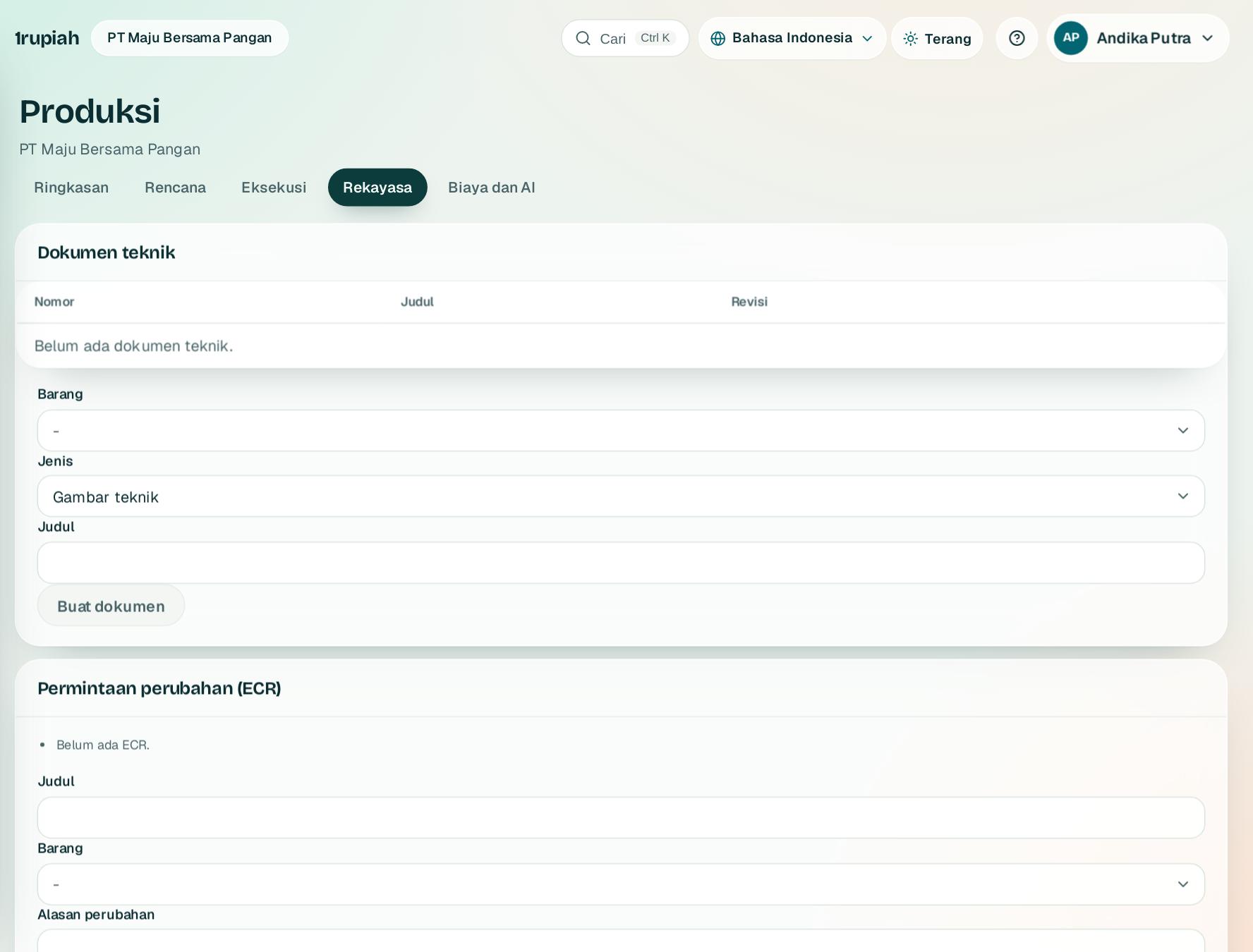
Dokumen teknik punya revisi A, B, C. Revisi baru dirilis oleh orang lain.
Engineering documents have revisions A, B, C. A new revision is released by someone else.
2
ECR mencatat alasan dan menampilkan dampak: BOM yang memakai, stok, PO, order jual, dan perintah produksi terbuka.
An ECR records the reason and shows the impact: BOMs using the item, stock, POs, sales orders, and open production orders.
3
ECO dari ECR yang disetujui dirilis empat mata dan membuat BOM serta routing versi baru.
An ECO from an approved ECR is released by a second person and creates new BOM and routing versions.
4
Proyek produk baru melewati tahap ide sampai peluncuran dengan keputusan gerbang dan biaya dibanding anggaran.
New product projects move from idea to launch with gate decisions and cost against budget.
1rupiah1Make · Panduan Pengguna | User Guide
1Make · 15
Biaya produk, varians, dan harga pokok aktual
Product costing, variances, and actual cost
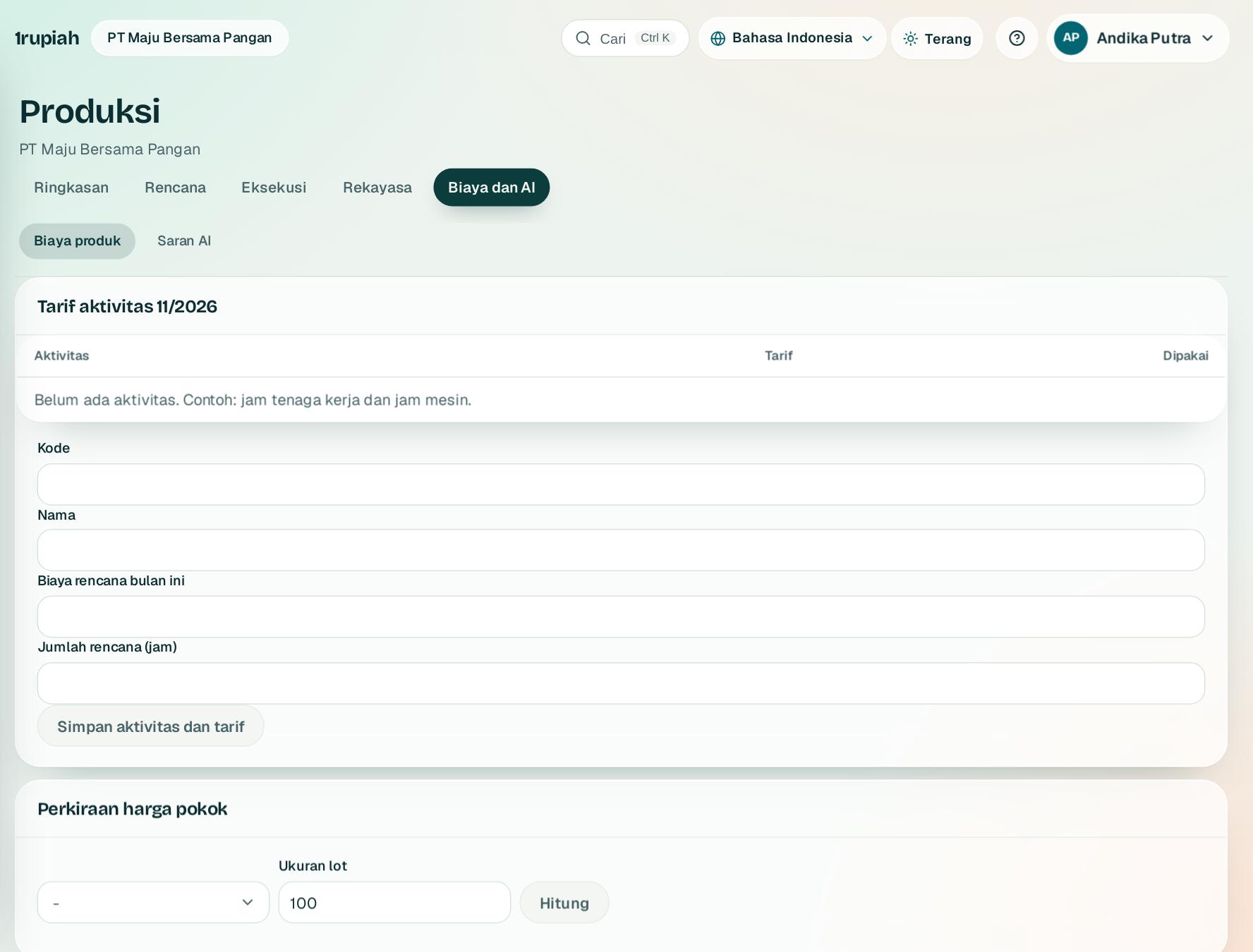
Harga pokok standar dari BOM dan routing dengan tarif aktivitas, lalu varians dan harga pokok aktual.
Standard cost from the BOM and routing with activity rates, then variances and actual cost.
1
Isi tarif aktivitas seperti jam tenaga kerja dan jam mesin; work center yang ditautkan memakai tarif ini.
Enter activity rates such as labour and machine hours; linked work centers use these rates.
2
Pilih barang dan ukuran lot lalu Hitung. Rincian bertingkat tampil; Rilis jadi harga standar merevaluasi stok bernilai standar.
Choose an item and lot size then Calculate. A multi level breakdown appears; Release as standard price revalues standard valued stock.
3
Tabel varians memecah selisih perintah selesai menjadi harga, kuantitas, efisiensi, dan ukuran lot. WIP menunjukkan nilai perintah yang belum dilaporkan.
The variance table splits finished order differences into price, quantity, efficiency, and lot size. WIP shows the value of orders not yet reported.
4
Harga pokok aktual bulanan membagi selisih ke stok akhir, produk, dan HPP; bagian HPP bisa dijurnal sekali per bulan.
Monthly actual costing splits differences across ending stock, products, and COGS; the COGS share can be posted once a month.
1rupiah1Make · Panduan Pengguna | User Guide
1Make · 16
Saran AI produksi dan mutu
AI suggestions for production and quality
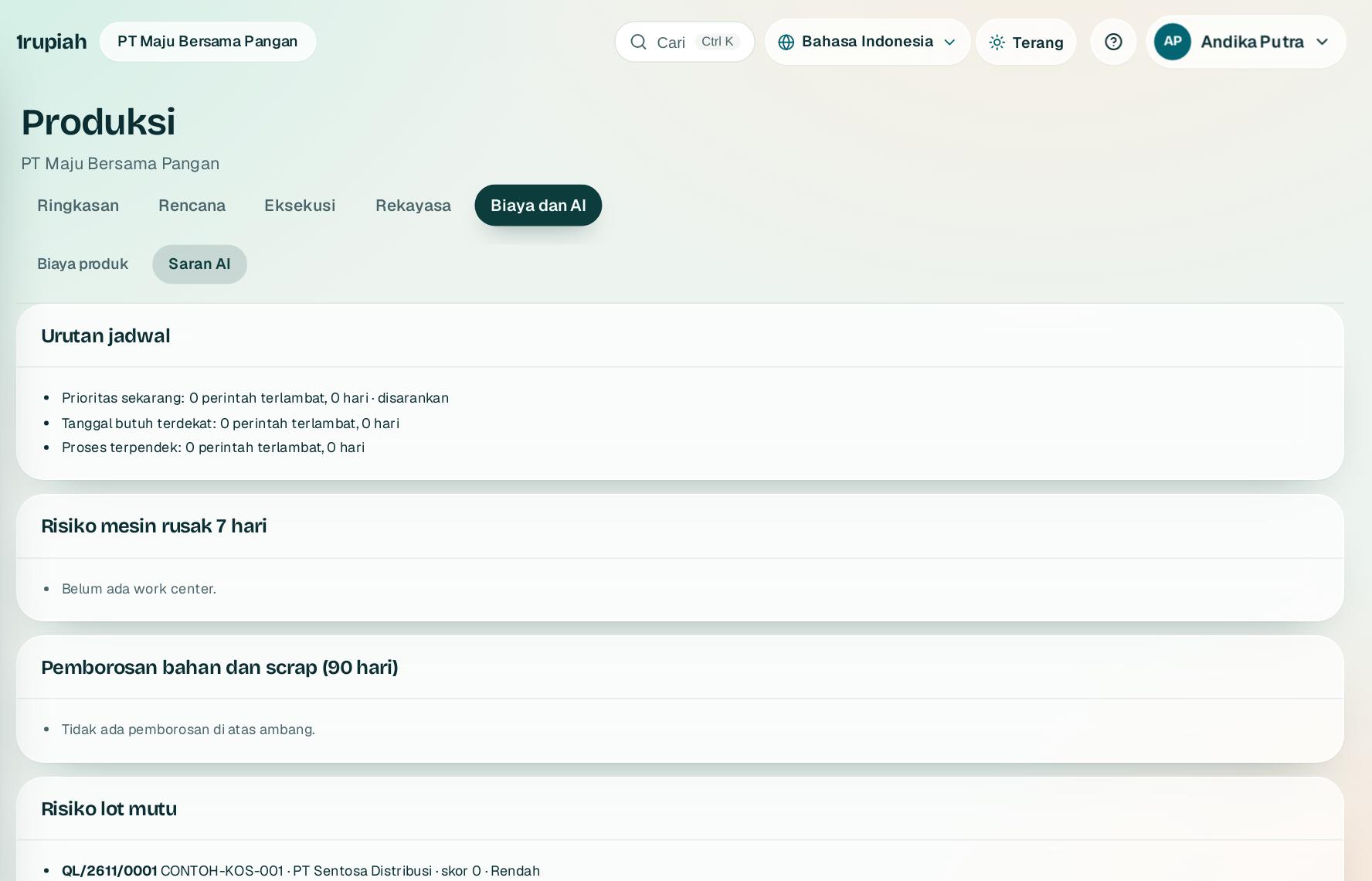
Usulan dihitung dari data Anda sendiri dan bisa diperiksa.
Suggestions are computed from your own data and can be checked.
1
Urutan jadwal membandingkan tiga aturan dan menyarankan yang paling sedikit terlambat; klik Terapkan urutan ini.
The schedule order compares three rules and suggests the one with the fewest late orders; click Apply this order.
2
Risiko mesin rusak 7 hari dihitung dari jarak antar kerusakan; pemborosan menandai bahan berlebih dan scrap tinggi.
Seven day failure risk comes from the time between breakdowns; waste flags material overuse and high scrap.
3
Risiko lot mutu dan akar masalah dari CAPA membantu menentukan pemeriksaan dan tindakan berikutnya.
Quality lot risk and CAPA root causes help decide the next checks and actions.
1rupiah1Make · Panduan Pengguna | User Guide
1Make · 17
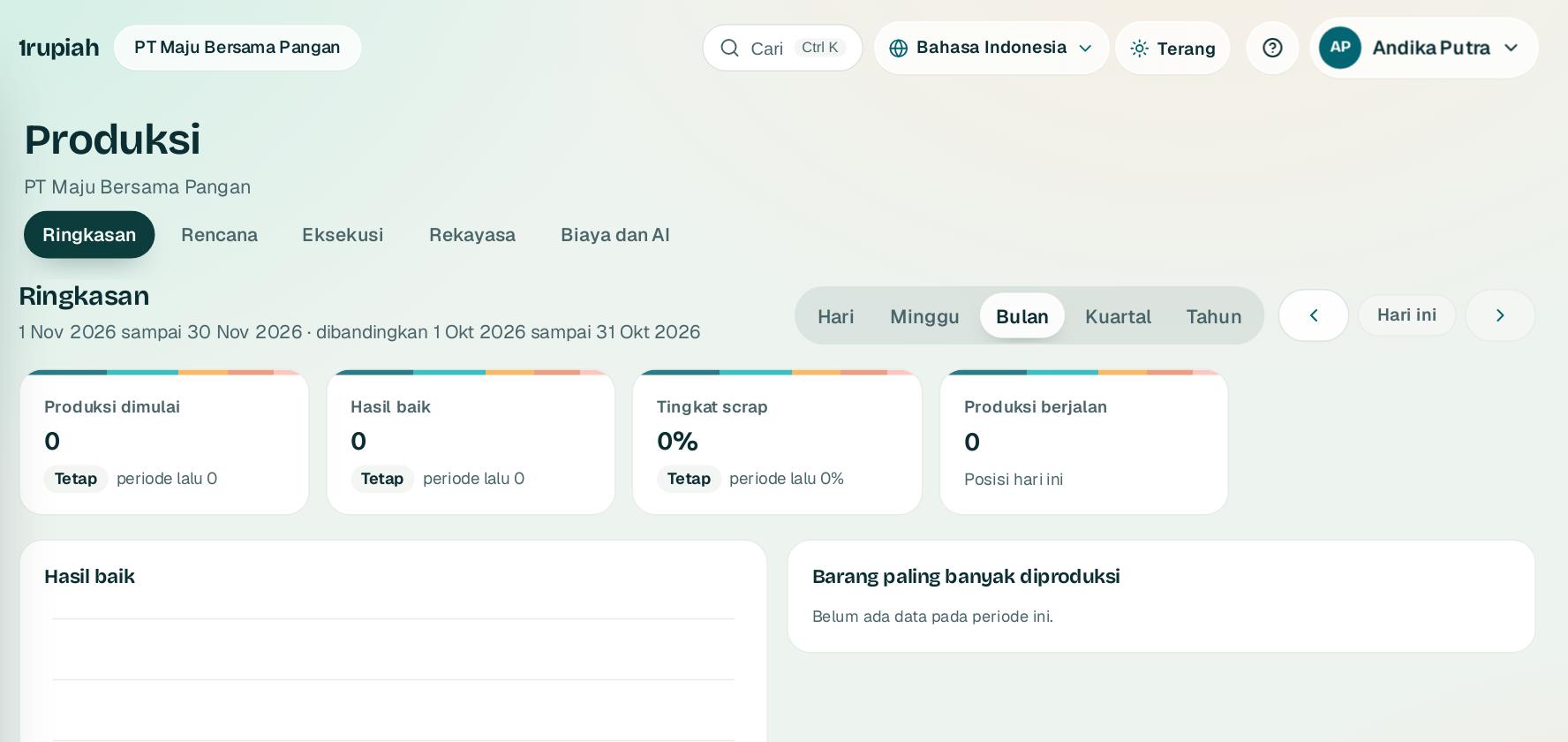
Ringkasan modul
Module overview
Angka utama Produksi dalam satu layar, dengan perbandingan periode sebelumnya.
The key Production figures on one screen, compared with the previous period.
12
1
Buka Produksi, lalu Ringkasan1.
Open Production, then Overview1.
2
Pilih rentang Hari, Minggu, Bulan2, Kuartal, atau Tahun. Kartu produksi dimulai, hasil baik, dan tingkat scrap ikut berubah dan menampilkan selisih dengan periode sebelumnya.
Pick Day, Week, Month2, Quarter, or Year. The production started, good output, and scrap rate cards update and show the change against the previous period.
3
Klik kartu untuk membuka daftar di belakang angkanya. Angka di luar izin Anda tidak ditampilkan.
Click a card to open the list behind the figure. Figures outside your permissions are not shown.
1rupiah
Butuh bantuan?
Tim kami siap 24 jam, Senin sampai Minggu. Buka chat di aplikasi atau situs, atau kirim email.
Need help?
Our team is available 24 hours, Monday to Sunday. Open the chat in the app or on the site, or send an email.